Introduzione
This manual provides comprehensive instructions for the Mitel Wireless DECT Headset, designed for use with Mitel MiVoice 6930 and 6940 phones. It covers product components, setup procedures, operational guidelines, maintenance tips, and technical specifications to ensure optimal performance and user experience. This headset offers wireless connectivity, allowing users freedom of movement during calls.
Chì ci hè in u Box
Carefully unpack your Mitel Wireless DECT Headset and verify that all components are present. The package typically includes the following items:
- Mitel Wireless DECT Headset
- Integrated Headset Charging Cradle
- Fascia per a testa
- Guida d'installazione
- Necessary connection cables/adapters
- Small tools (e.g., screwdriver) for installation
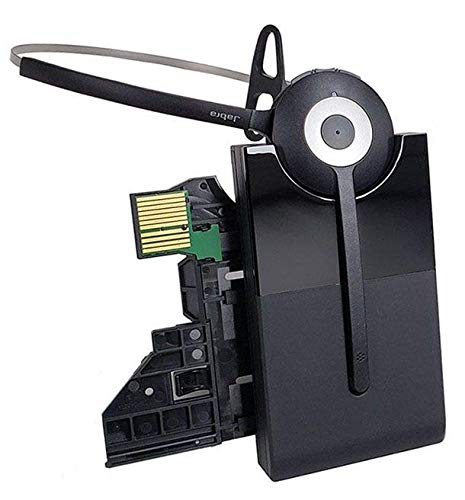
Image: All components included in the Mitel Wireless DECT Headset package. This includes the headset, charging cradle, headband, installation guide, and various small accessories for setup.
Istruzzioni di stallazione
Follow these steps to set up your Mitel Wireless DECT Headset with your compatible Mitel MiVoice phone.
- Verificazione di cumpatibilità: Ensure your Mitel MiVoice phone is a 6930 or 6940 model. The system requires MiVoice Business Release 8.0 SP1 or higher.
- Connect Charging Cradle: The integrated headset charging cradle connects directly to your MiVoice 6930 or 6940 phone via its expansion port or a PKM expansion port. Refer to the included installation guide for specific connection diagrams.
- Charge Headset: Place the wireless DECT headset into the charging cradle. The headset battery requires initial charging. A full charge provides up to 8 hours of talk time.
- Accoppiamentu: The headset is designed for simplified deployment. Once connected and charged, the headset should automatically pair with the compatible Mitel phone. Consult the phone's user manual or the headset's installation guide for specific pairing instructions if automatic pairing does not occur.

Image: Detail from the installation guide, illustrating the connection process for the Mitel Integrated DECT charging base to the MiVoice 6930/6940 phone.
Istruzzioni di funziunamentu
Once your headset is set up, you can begin using it for calls. The headset offers crystal clear HD audio and a noise-cancelling microphone for effective communication.
- Fà/Riceve Chjame: Use the call control features on the headset to answer, end, or reject calls. Refer to the headset's specific buttons and their functions in the installation guide.
- Ajuste di u voluminu: Adjust the call volume using the dedicated controls on the headset.
- Funzione Mute: Activate the mute function on the headset's microphone when you need privacy during a call.
- Roaming: Enjoy a roaming range of up to 300 feet (100 meters) from your desk phone, allowing you to move freely while on a call.
Mantenimentu
Una manutenzione adatta assicura a longevità è e prestazioni ottimali di e vostre cuffie.
- Carica: Always return the headset to its charging cradle when not in use to ensure it is fully charged for your next call. The headset provides up to 8 hours of talk time on a full charge.
- Pulizia: Use a soft, dry cloth to clean the headset and charging cradle. Avoid using harsh chemicals or abrasive materials.
- Conservazione: Conservate l'auriculare in un locu frescu è asciuttu, luntanu da a luce diretta di u sole è da temperature estreme.
- Batteria: The headset contains a Lithium Polymer battery. Do not attempt to replace the battery yourself. Contact qualified service personnel if battery issues arise.
Risoluzione di prublemi
If you encounter issues with your Mitel Wireless DECT Headset, refer to the following common troubleshooting steps:
- Nisun audio / Scarsa qualità audio:
- Assicuratevi chì l'auriculare hè cumpletamente carica.
- Verify the headset is properly paired with the phone.
- Check the volume settings on both the headset and the phone.
- Confirm the charging cradle is securely connected to the phone's expansion port.
- L'auriculare ùn si carica micca:
- Ensure the headset is correctly seated in the charging cradle.
- Check the connection of the charging cradle to the phone.
- Verify the phone itself is powered on.
- Limited Roaming Range:
- Ensure there are no major obstructions (e.g., thick walls, large metal objects) between the headset and the phone.
- Evitate e fonti di forti interferenze elettromagnetiche.
- Headset Not Responding:
- Perform a soft reset by turning the headset off and then on again.
- If issues persist, consult the detailed troubleshooting section in the full installation guide or contact Mitel support.
Specificazioni
| Feature | Detail |
|---|---|
| Nome di mudellu | Mitel Wireless DECT Headset |
| Numeru di mudellu di l'articulu | 930-65-509-105-MIT |
| Dispositivi compatibles | Mitel MiVoice 6930, 6940 Phones |
| Tecnulugia di cunnessione | Senza filu (DECT) |
| Tecnulugia di cumunicazione wireless | DECT (also lists Bluetooth 4.0 with 100m range in source data) |
| Controlu di u rumore | Active Noise Cancellation, Noise Cancelling Microphone |
| Tipu di Driver Audio | Driver dinamicu |
| A vita di a batteria | Finu à 8 ore (tempu di conversazione) |
| Tempu di carica | 8 Ore |
| Gamma di Roaming | Finu à 300 piedi (100 metri) |
| Tipu di cuntrollu | Call Control (Remote) |
| Pesu di l'articulu | 11.2 once |
| Fonte d'energia | 1 Batteria Lithium Polymer (inclusa) |
| U fabricatore | Jabra |
Video ufficiali di u produttu
Watch these official videos for additional guidance on your Mitel Wireless DECT Headset.
Video: Dettagliatu sopraview of the Mitel Wireless DECT Headset features and functionality. (Duration: 12:45)
Video: Quick guide to setting up and using the Mitel Wireless DECT Headset. (Duration: 1:24)
Garanzia è Supportu
For warranty information, technical support, or service inquiries, please refer to the documentation included with your product or visit the official Mitel websitu. Mantene a vostra ricevuta di compra per i rivendicazioni di garanzia.


