Introduzione
This manual provides detailed instructions for the installation, operation, and maintenance of the Hanwha Techwin HCV-6070R 2MP Outdoor Vandal-Resistant Dome Camera. This camera is designed for outdoor security surveillance, offering 2-megapixel resolution, a 2.8-12mm manual varifocal lens, and night vision capabilities with a BNC connection.
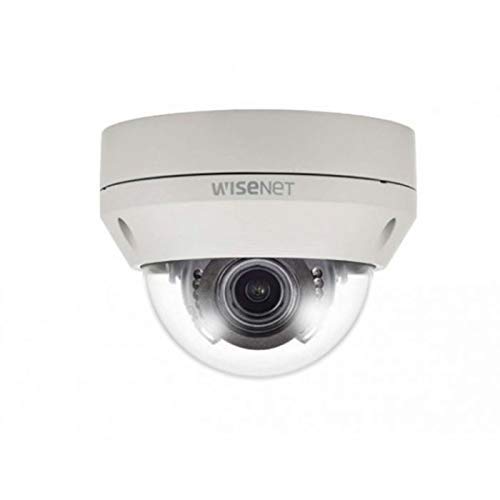
Figure 1: Hanwha Techwin HCV-6070R 2MP Outdoor Vandal-Resistant Dome Camera.
Informazioni di sicurezza
Please read all safety instructions carefully before installing or operating the camera. Keep this manual for future reference.
- Ensure the power supply matches the camera's requirements to prevent electrical shock or fire.
- Ùn espone micca a camera à temperature estreme, umidità o ambienti corrosivi.
- L'installazione deve esse effettuata da persunale qualificatu in cunfurmità cù i codici elettrici lucali.
- Evitate l'esposizione diretta di a lente à fonti di luce forti per periodi prolungati.
- Ùn pruvate micca di smuntà o mudificà a camera. Questu annullerà a garanzia.
Cuntenutu di u pacchettu
Verificate chì tutti l'articuli sò presenti in u pacchettu:
- Hanwha Techwin HCV-6070R Dome Camera (1 unit)
- Viti di Muntamentu è Ancore
- Template d'installazione
- Guida Quick Start
- Waterproof Cap (if applicable)
Istituisci
1. Mounting la Camera
The HCV-6070R is designed for wall mounting. Choose a suitable outdoor location that provides the desired surveillance coverage and is protected from direct impact.
- Use the provided installation template to mark the drilling holes on the wall.
- Drill holes according to the template and insert the wall anchors.
- Secure the camera base to the wall using the mounting screws.
- Ajustà a camera viewing angle as needed before tightening all screws.
2. Cablaggio è cunnessione
The camera utilizes a BNC connection for video output and requires a separate power supply. Ensure all connections are secure and weatherproof for outdoor use.
- Cunnessione Video: Connect a BNC cable from the camera's BNC port to the video input of your DVR (Digital Video Recorder).
- Cunnessione di putenza: Connect a 12V DC power adapter (not included) to the camera's power input. The camera operates at 8 watts.
- Connettività Wireless: The camera supports Wi-Fi for remote control and monitoring. Refer to the operating section for initial Wi-Fi setup.

Figura 2: Esample of a BNC coaxial cable for video connection. Ensure a secure connection to the camera and DVR.
3. Configurazione iniziale
After physical installation and power-up, access the camera settings via your connected DVR or a compatible mobile application (Android controller type specified).
- Pone a data è l'ora.
- Configure network settings for Wi-Fi connectivity.
- Adjust video quality and recording preferences.
Operazione di a Camera
1. Monitoraghju è Registrazione Video
The camera provides 2MP effective video resolution, capturing video at 1080p and a frame rate of 30 fps. Video is typically recorded in MPEG-4 format.
- Accessu in diretta view è foo registratutage through your connected DVR or the remote control application.
- Ensure your DVR is configured to record from the correct channel.
2. Adjusting Focus and Zoom
The HCV-6070R features a 2.8-12mm manual varifocal lens with optical zoom. Adjustments are made manually on the camera body.
- Loosen the focus and zoom locking screws on the camera lens assembly.
- Adjust the zoom ring to achieve the desired field of view.
- Adjust the focus ring until the image is clear and sharp.
- Tighten the locking screws to secure the settings.
3. Night Vision and Low Light Performance
Equipped with night vision and "Night Color" low light technology, the camera automatically switches to infrared mode in low light conditions to provide clear surveillance footage. The light source type is LED.
- Ensure no obstructions block the infrared LEDs on the camera.
- The camera will automatically activate its infrared illuminators when ambient light levels drop.
4. Motion Detection
The camera supports motion-only alerts. Configure motion detection zones and sensitivity settings through your DVR or the remote control application.
- Definisce zone specifiche in u campu di a camera view per a rilevazione di u muvimentu.
- Set the sensitivity level to minimize false alarms.
- Configure alert notifications (e.g., email, push notifications) via your DVR or application.
5. Control Remote
The camera can be controlled remotely using a compatible Android application. Ensure the camera is connected to your Wi-Fi network.
- Download and install the Hanwha Techwin mobile application on your Android device.
- Follow the in-app instructions to add and connect to your HCV-6070R camera.
- Per mezu di l'app, pudete view campà footage, access recordings, and adjust certain camera settings.
Mantenimentu
Una manutenzione regulare assicura prestazioni ottimali è longevità di a vostra camera.
- Pulizia di a lente: Gently wipe the camera lens with a soft, clean, lint-free cloth. For stubborn dirt, use a lens cleaning solution specifically designed for optical surfaces.
- Pulizia di l'Abitazione: Clean the camera's exterior housing with a damp tela. Ùn aduprate micca chimichi duri o detergenti abrasivi.
- Ispezione di u cable: Periodically check all cables and connections for signs of wear, damage, or corrosion, especially for outdoor installations.
- Actualizazioni di firmware: Check the Hanwha Techwin website for any available firmware updates to ensure your camera has the latest features and security patches.
Risoluzione di prublemi
| Prublemu | Causa Possibile | Soluzione |
|---|---|---|
| Nisuna output video | No power; Loose BNC connection; Incorrect DVR input selected. | Check power supply; Secure BNC cable; Select correct channel on DVR. |
| Imagine sfocata o sfocata | Lens out of focus; Dirty lens. | Manually adjust focus (refer to Operating section); Clean the lens. |
| A visione notturna ùn funziona micca | IR LEDs blocked; Insufficient power; Camera stuck in day mode. | Clear obstructions; Verify power supply; Restart camera. |
| A rilevazione di muvimentu ùn si attiva micca | Incorrect sensitivity settings; Motion detection zone not configured. | Adjust sensitivity; Configure motion detection zones in DVR/app. |
| Ùn si pò cunnette via Wi-Fi | Incorrect Wi-Fi password; Camera out of range; Network issues. | Verify Wi-Fi credentials; Move camera closer to router; Check network status. |
Specificazioni
| Mudellu | HCV-6070R |
| Marca | HANWHA Techwin |
| Risoluzione Video efficace | 2 MP (1080p) |
| Frame Rate | 30 fps |
| Tipu di lente | 2.8-12mm Manual Varifocal Lens |
| Tipu di Focus | Focus manuale |
| Tipu di zoom | Zoom otticu |
| Tecnulugia di cunnessione | Wireless (Wi-Fi), BNC Connection |
| Fonte d'energia | Manual (requires external 12V DC power adapter) |
| Wattage | 8 watts |
| Usu Indoor / Outdoor | Outdoor |
| Funzione speciale | Night Vision (Night Color low light technology) |
| Fattore di forma | Cupola |
| Tipu di muntatura | Muntu à u muru |
| Dispositivi compatibles | DVR |
| Metudu di cuntrollu | Remote (Android Controller Type) |
| Classificazione di Prutezzione Internaziunale | IP54 |
| Photo Sensor Technology | CMOS |
| Format Video Capture | MPEG-4 |
| Tipu d'alerta | Movimentu solu |
Garanzia è Supportu
For warranty information and technical support, please refer to the official Hanwha Techwin websitu o cuntattate direttamente u so serviziu clienti. Conservate a vostra ricevuta d'acquistu cum'è prova d'acquistu per e richieste di garanzia.
Produttore: Hanwha
Data prima dispunibule: 19 di ferraghju di u 2019


