Introduzione
This instruction manual provides essential information for the setup, operation, and maintenance of your Superior Electronics Universal Remote Control, model SUPTRB016. This remote is designed as a direct replacement for Telefunken televisions, including Smart TV models, and requires no programming for immediate use. Its ergonomic design and durable construction ensure comfortable and reliable control of your TV.
Istituisci
1. Inserting Batteries
The remote control requires two (2) AAA batteries (not included). Follow these steps to insert them:
- Truvate u coperchiu di u compartmentu di a batteria in u spinu di u telecomando.
- Fate scorrere u coperchio in giù o appughjà u chiavistellu per apre lu.
- Inserite duie batterie AAA, assicurendu chì i terminali pusitivi (+) è negativi (-) sianu allineati currettamente cù i marchi in l'internu di u compartimentu.
- Rimette u coperchiu di u compartimentu di a batteria, scorrendulu in u so postu finu à chì si sente un clic sicuru.

Figure 1: Inserting AAA batteries into the remote control.
2. Usu iniziale
Once batteries are inserted, the remote control is ready for immediate use. No additional programming or code entry is required. Simply point the remote at your Telefunken TV and begin operating it.
Istruzzioni di funziunamentu
The Superior Electronics SUPTRB016 remote control replicates the functions of your original Telefunken TV remote. Ensure a clear line of sight between the remote control and your TV's infrared receiver for optimal performance.

Figure 2: Remote control layout with streaming service buttons.
Funzioni chjave:
- Pulsante di putenza: Accende o spegne a TV.
- Pulsanti numerichi (0-9): Per a selezzione diretta di u canale.
- Volume su / giù: Ajuste u voluminu di u TV.
- Canale su / giù: Cambia i canali TV.
- Buttone Mutu: Disattiva o riattiva l'audio TV.
- Tastiera di navigazione (OK, Su, Giù, Sinistra, Destra): Adupratu per a navigazione è a selezzione di i menù.
- Torna / Esci: Ritorna à u screnu precedente o esce da un menu.
- Buttoni di Smart TV: Dedicated buttons provide quick access to popular streaming applications such as Netflix, YouTube, and Prime Video (functionality depends on your TV model and internet connection).
- Fonte/Ingressu: Selezziuna a fonte d'entrata (HDMI, AV, ecc.).
- Menu/Info: Accesses TV menus and displays information.
The remote operates effectively within a maximum range of 10 meters, provided there are no obstructions between the remote and the TV's infrared sensor.
Mantenimentu
Per assicurà a longevità è e prestazioni ottimali di u vostru telecomandu, seguitate queste semplici linee guida di manutenzione:
- Pulizia: Asciugate u telecomandu cù un pannu dolce è asciuttu. Evitate l'usu di detergenti liquidi o materiali abrasivi, postu chì questi ponu dannà a superficia o i cumpunenti interni.
- Sustituzione di batterie: Rimpiazzate e batterie quandu a risposta di u telecomandu diventa lenta o smette di funziunà. Rimpiazzate sempre e duie batterie à u listessu tempu cù batterie AAA nove. Ùn mischiate micca batterie vechje è nove, o tipi diversi di batterie.
- Conservazione: Conservate u telecomandu in un locu frescu è asciuttu, luntanu da a luce diretta di u sole è da temperature estreme.
- Evite Drops: While constructed with durable materials, excessive drops or impacts can cause damage.
Risoluzione di prublemi
Sè avete prublemi cù u vostru telecomandu, per piacè riferitevi à e seguenti suluzioni cumuni:
| Prublemu | Causa Possibile | Soluzione |
|---|---|---|
| U telecomandu ùn funziona micca affatto. | Batterie morte o inserite in modu incorrectu. | Check battery orientation. Replace with fresh AAA batteries. |
| U telecomandu funziona à intermittenza. | Weak batteries, obstruction, or remote too far from TV. | Replace batteries. Ensure clear line of sight to TV. Move closer to the TV (within 10 meters). |
| Specific buttons do not respond. | Button malfunction or TV not supporting the function. | Ensure your TV model supports the specific function (e.g., Smart TV apps). If other buttons work, the specific button might be faulty. |
| TV does not respond to remote. | TV's IR sensor blocked or TV is not a Telefunken model. | Clear any obstructions in front of the TV's IR sensor. Verify that your TV is a Telefunken brand. |
Specificazioni
- Mudellu: SUPTRB016
- Marca: Elettronica Superiore
- Dimensioni: 5 x 1.5 x 19 cm
- Pesu: 90 grammi
- Batterie necessarie: 2 x AAA (1.5 V)
- Batterie incluse: Innò
- Tecnulugia di cunnessione: infrarouge
- Gamma massima: 10 metri
- Dispositivi cumpatibili: Telefunken Televisions (LED, LCD, OLED, Smart TV models)
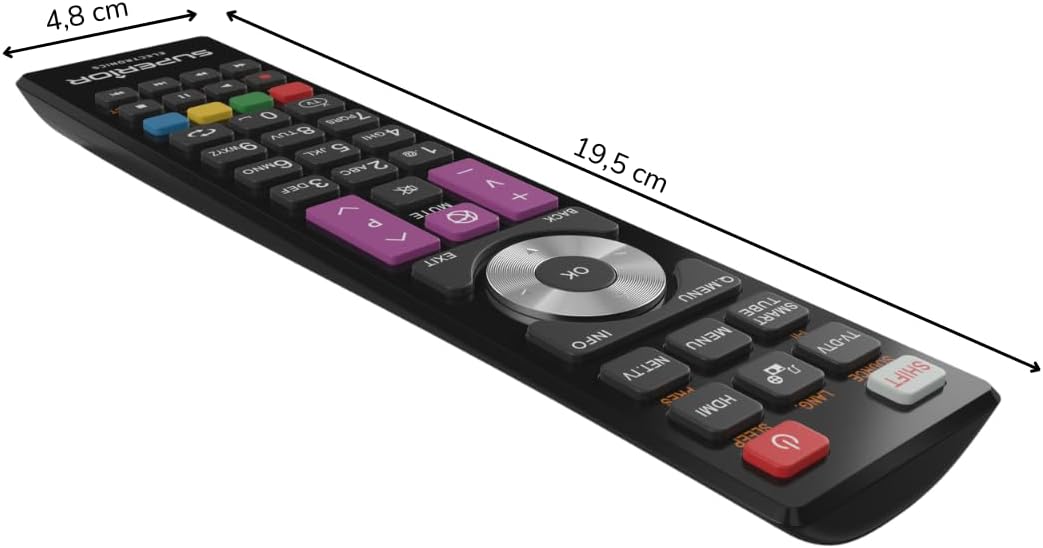
Figure 3: Remote control dimensions.
Garanzia è Supportu
For warranty information, please refer to the terms and conditions provided by your retailer at the time of purchase or contact Superior Electronics directly. For additional support or inquiries, you may visit the official Superior Electronics store on Amazon:


