1. Introduzione
This user manual provides detailed instructions for the safe and efficient operation of your Veidoo 10-inch Android Tablet PC. Please read this manual thoroughly before using the device and retain it for future reference. This tablet is designed for various uses, including communication, entertainment, and productivity.

This image shows the Veidoo 10-inch Android Tablet PC. The front of the tablet displays the home screen with the current time, date, and various application icons such as Camera, Gallery, Settings, and Music. The rear of the tablet, visible behind the front, is black with a subtle textured design and features the rear camera module.
2. Informazioni di sicurezza
- Ùn espone micca u dispusitivu à temperature estreme, à a luce diretta di u sole o à alta umidità.
- Evite di abbandunà o sottumette u dispusitivu à forti impatti.
- Aduprate solu caricatori è accessori appruvati da u fabricatore.
- Ùn pruvate micca di smuntà o riparà u dispusitivu da per voi. Cuntattate un persunale di serviziu qualificatu.
- Mantene u dispusitivu luntanu da i zitelli è animali.
- Smaltite u dispusitivu è a so batteria in modu rispunsevule secondu e regulazioni lucali.
3. Produttu Finituview
3.1 Funzioni fisiche
Familiarize yourself with the various ports and buttons on your Veidoo Tablet PC:

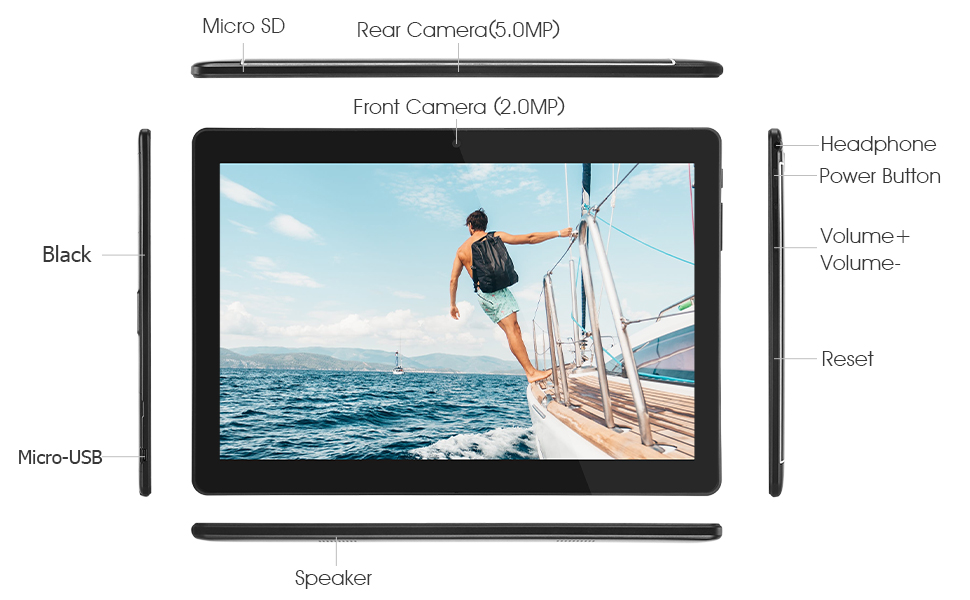
This diagram illustrates the various physical components and ports of the Veidoo 10-inch Android Tablet PC. It clearly labels the Micro SD card slot, the 5.0MP rear camera, the 2.0MP front camera, the headphone jack, the power button, the volume up and down buttons, the reset pinhole, the Micro-USB charging port, and the speaker.
- Slot Micro SD: Per un almacenamentu espansibile.
- Camera posteriore (5.0MP): Per fà foto è video.
- Camera frontale (2.0MP): Per e videochiamate è i selfie.
- Jack per cuffie: Cunnette vi cuffie da 3.5 mm.
- Pulsante di putenza: Press and hold to power on/off, short press to sleep/wake.
- Pulsanti di volume: Ajustà u vulume di l'audio.
- Reset Pinhole: Use a thin object to reset the device if unresponsive.
- Portu Micro-USB: Per carica è trasferimentu di dati.
- Speaker: Output audio.
3.2 Cuntenuti di u pacchettu
Ensure all items are present in your product box:

This image displays the items typically found inside the Veidoo 10-inch Android Tablet PC product box. It includes the tablet itself, a black protective case, a power adapter (wall charger), a USB charging and data cable, a service warranty card, and a leaflet containing frequently asked questions and support information.
- Veidoo 10-inch Android Tablet PC
- Adattatore di putenza
- Cavu USB
- Protective Case (optional, may vary by package)
- Manuale d'uso (stu documentu)
- Carta di Garanzia di serviziu
- FAQ Leaflet
4. Setup
4.1 Caricà a Batteria
Before first use, fully charge the tablet. Connect the USB cable to the tablet's Micro-USB port and the other end to the power adapter. Plug the adapter into a wall outlet. The charging indicator will show the charging status. A full charge typically takes 3-4 hours.

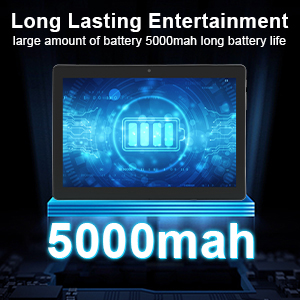
This image focuses on the Veidoo 10-inch Android Tablet PC's battery capacity, prominently displaying a battery icon and '5000mAh'. This signifies the tablet's 5000mAh battery, designed to provide extended usage time for entertainment and productivity.
4.2 Accensione / spegnimentu
- Per accende: Press and hold the Power button until the Veidoo logo appears on the screen.
- Per spegne: Appughjà è tene premutu u buttone d'accensione finu à chì appare un menu. Selezziunate "Spegne" è cunfirmate.
- Dormu / svegliu: Appughjà brevemente u buttone di accensione per mette a tableta in dorme o svegliarla.
4.3 Inserting SIM and Micro SD Cards
The tablet supports dual SIM cards for 3G phone calls and a Micro SD card for expandable storage.
- Locate the SIM/SD card slot on the side of the tablet.
- Aprite cù cura u coperchio di a fessura.
- Insert the SIM card(s) and/or Micro SD card into the designated slots with the gold contacts facing down. Ensure they are correctly seated.
- Chiude bè u coperchiu di a fessura.
This image demonstrates the storage capabilities of the Veidoo 10-inch Android Tablet PC, showing multiple applications and content open. It highlights the device's 16GB internal storage (ROM) and its ability to expand storage up to 32GB via a Micro SD card, allowing for ampspaziu per l'applicazioni, e foto è i video.
4.4 Configurazione iniziale
À a prima accensione, a tableta vi guiderà attraversu u prucessu di cunfigurazione iniziale:
- Sceglite a vostra lingua preferita.
- Cunnette vi à una reta Wi-Fi.
- Cunnettatevi cù u vostru contu Google o create un novu. Questu hè necessariu per scaricà l'applicazioni da Google Play Store.
- Cunfigurà u bloccu di u screnu (PIN, mudellu, password).
- Review è accettà i termini è e cundizioni.
5. Funziunamentu di a Tablet
5.1 Navigazione basica
- Tap: Selezziunate un articulu o aprite una applicazione.
- Tap & Hold: Access context menus or move icons.
- Swipe: Scorri trà schermi o liste.
- Pizzicà per Zoomà: Zoom avanti o indietro nantu à l'imagine è web pagine.
5.2 Connectivity (Wi-Fi & Bluetooth)
- Wi-Fi: Andà à Impostazioni > Rete è internet > Wi-Fi. Turn Wi-Fi on, select your network, and enter the password.
- Bluetooth: Andà à Impostazioni > Dispositivi cunnessi > BluetoothAttivate u Bluetooth, cercate i dispusitivi è assuciate cù l'accessoriu desideratu.
5.3 Making Phone Calls (3G)
With a valid SIM card inserted, you can make and receive 3G phone calls:

This image shows a group of four individuals participating in a video call using the Veidoo 10-inch Android Tablet PC. This illustrates the tablet's capability for video conferencing and its 3G phone call functionality, allowing users to connect with others remotely.
- Aprite u telefonu app.
- Dial the number using the keypad or select a contact.
- Toccate u buttone di chjama per inizià a chjama.
5.4 Utilizà e Camera
The tablet is equipped with a front and rear camera for photos and videos.
- Aprite u Camera app.
- Cambiate trà e camere anteriori è posteriori aduprendu l'icona di a camera.
- Toccate u buttone di l'otturatore per piglià una foto o inizià / fermà a registrazione video.
5.5 Gestione di u almacenamentu
Poi view and manage your tablet's internal and external storage:
- Andà à Settings> Storage.
- Here you can see storage usage and free up space by deleting unnecessary files or uninstalling apps.
5.6 Installing and Uninstalling Apps
This image features the Veidoo 10-inch Android Tablet PC showcasing its Android 10 operating system with a multitude of application icons. This highlights that the device is GMS (Google Mobile Services) certified, ensuring access to Google Play Store and other Google services.
- Installa: Aprite u Google Play Store app, cercate l'app desiderata è toccate Installa.
- Disinstalla: Andà à Settings > Apps & notifications > See all apps. Select the app you wish to uninstall and tap Disinstalla.
6. Mantenimentu
- Pulizia: Aduprate un pannu dolce è senza pelu per pulisce u schermu è u corpu. Evitate detergenti abrasivi o solventi.
- Actualizazioni di u software: Regularly check for system updates in Impostazioni > Sistema > Aghjurnamentu di u sistema per assicurà prestazioni è sicurezza ottimali.
- Cura di a batteria: To prolong battery life, avoid fully discharging the battery frequently. Store the tablet in a cool, dry place when not in use for extended periods.
- Backup di dati: Regularly back up important data to a cloud service or external storage device to prevent data loss.
7. Risoluzione di prublemi
| Prublemu | Soluzione Possibile |
|---|---|
| A tableta ùn si accende micca | Ensure the battery is charged. Connect the charger and wait a few minutes before attempting to power on. If unresponsive, try pressing the reset pinhole. |
| U screnu ùn risponde micca | Restart the tablet by holding the Power button. If that doesn't work, use the reset pinhole. Ensure the screen is clean and dry. |
| Ùn pò micca cunnette à Wi-Fi | Check if Wi-Fi is enabled in settings. Ensure the Wi-Fi password is correct. Restart your router and the tablet. |
| L'applicazioni si bloccanu o si bloccanu | Chjude è riapre l'app. Svuota a cache di l'app in Impostazioni> App & notificazioni. Update the app or uninstall and reinstall it. Ensure sufficient storage space. |
| Povera vita di a bateria | Reduce screen brightness. Close unused apps running in the background. Turn off Wi-Fi, Bluetooth, and GPS when not in use. Limit background data usage. |
8. Specificazioni
Key technical specifications for the Veidoo 10-inch Android Tablet PC (Model T10):

This image provides a visual summary of the Veidoo Tablet PC's key specifications. It highlights features such as 1GB RAM, a 2MP front and 5MP rear camera setup, a 10.1-inch IPS HD display with 1280x800 resolution, 16GB of internal storage, Android 10 operating system, Wi-Fi connectivity, a Quad-Core CPU, and dual SIM card support.
| Feature | Detail |
|---|---|
| Nome di mudellu | Touch (T10) |
| Dimensione di Display Standing Screen | 10.1 inch |
| Risoluzione di u screnu | 800 x 1280 (IPS) |
| RAM | 1 GB (DDR3 SDRAM) |
| Dimensione di u discu duru / di a memoria flash | 16 GB (expandable up to 32GB via Micro SD) |
| Tipu wireless | 802.11b, 802.11b/g (Wi-Fi), Bluetooth |
| A vita media di a bateria | 6 Hours (5000mAh Lithium Polymer) |
| Piattaforma Hardware | Android |
| Sistema upirativu | Android 6.0 Marshmallow (GMS Certified) |
| Pesu di l'articulu | 2.86 liri |
| Dimensioni di u produttu | 9.49 x 6.69 x 0.37 inch |
| daretu WebRisoluzione camma | 5 MP |
| Fronte WebRisoluzione camma | 2 MP |
| Numero di Processori | 4 (Quad-Core) |
| Fonte d'energia | Alimentatu à Batteria, Elettricu Corded |
9. Garanzia è Support
Your Veidoo Tablet PC comes with a service warranty. Please refer to the included Service Warranty Card for specific terms and conditions, including warranty period and coverage details.
For technical support, troubleshooting assistance, or warranty claims, please contact Veidoo customer service. Contact information can typically be found on the warranty card or the official Veidoo website. When contacting support, please have your model number (T10) and purchase information ready.
You can also visit the official Veidoo store on Amazon for more information and support resources: Veidoo Store


