1. Introduzione
The SanA Smart Light Switch is designed to provide wireless control of your home lighting using your existing Wi-Fi network. This device allows for remote control via a mobile application, voice commands through compatible smart assistants, and traditional manual operation. It integrates seamlessly into modern smart home ecosystems without requiring a separate hub.
Funzionalità chjave include:
- Control lights from any location with internet access.
- Set schedules for lights to turn on or off automatically.
- Compatibilità di u cuntrollu vocale cù Amazon Alexa è Google Home.
- LED indicators for night navigation and status.
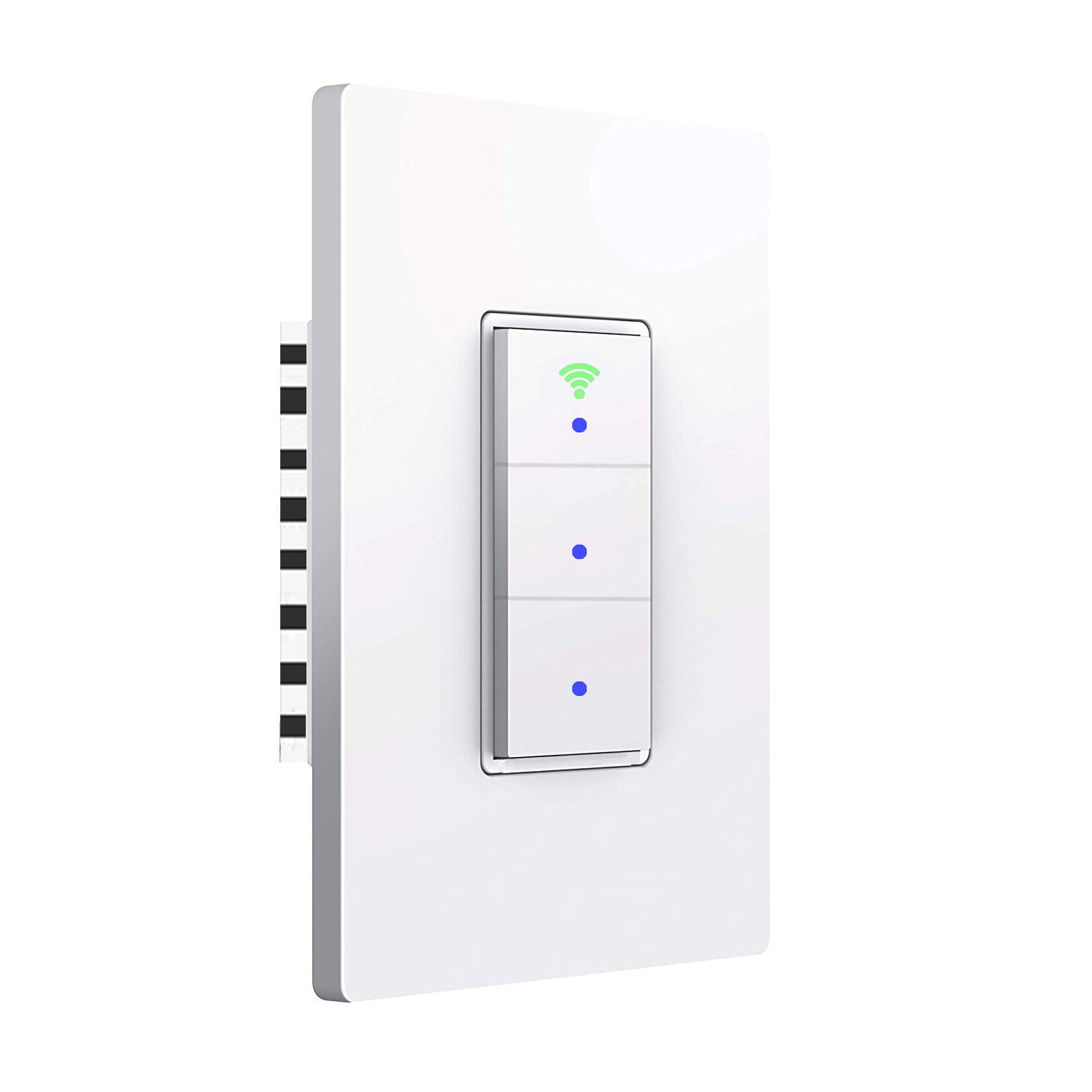
Image: Front view of the SanA Smart Light Switch, showing its three buttons and Wi-Fi indicator.
2. Impurtante Information Safety
ATTENZIONE: RISCHIO DI SCOSSA ELETTRICA.
- Installation must be performed by a qualified electrician or a person with thorough knowledge of electrical wiring.
- Disattivate sempre l'alimentazione à l'interruttore automaticu prima di installà o di fà a manutenzione di l'interruttore.
- Ensure the switch is rated for the load it will control.
- This device requires a neutral wire for proper operation. If your existing wiring does not include a neutral wire, consult a professional electrician.
- Ùn installate micca cù e mani bagnate o quandu site in piedi nantu à una superficia bagnata o secca.amp superfici.
- Aduprà solu in casa.
3. Cuntenutu di u pacchettu
Verificate chì tutti i cumpunenti sò presenti in u pacchettu:
- 1x SanA Smart Wall Light Switch (3 Switches in 1 Gang)
- 1x Manuale d'usu (stu documentu)
- 2x Viti per a stallazione
4. Specifications Product
| Feature | Detail |
|---|---|
| Tipu | Interruttore Smart Wall Light |
| Materiale | PC flame retardant polymer, Copper, Brass |
| Voltage | AC 100V-240V / 50Hz ~ 60Hz |
| Max Power (Resistance Load) | 1100W / gang |
| Max Power (Capacitive Load) | 400W / gang |
| Corrente di travagliu | Massimu 10 A |
| Umidità di travagliu | <80% |
| Protocolu Radio | WiFi 2.4GHz (5GHz not supported) |
| Cunsumu di energia in standby | <0.1 mA |
| Temperature di l'ambiente di funziunamentu | -20 ~ 45 ° C (-4 ~ 113 ° F) |
| Life Long | > 100,000 volte |
| Cambia a dimensione | 5.04 x 3.31 x 0.91 inch (12.8 x 8.4 x 2.3 cm) |
| Tipu di Circuitu | 3-way (Note: This switch is not a 3-way switch replacement, it controls 3 separate loads from one location) |
| Tipu di cunnessu | Wireless |
| Tipu di attuatore | Pulsante |

Image: Diagram showing the dimensions of the SanA Smart Light Switch: 5.04 inches height, 3.31 inches width, and 0.91 inches depth.
5. Guida d'installazione
5.1 Lista di cuntrollu di preinstallazione
- Filu neutru necessariu: This smart switch requires a neutral wire for operation. Confirm your electrical box has a neutral wire (usually white). If not, consult a qualified electrician.
- Spegnimentu: Before starting, turn off the power to the switch location at the circuit breaker. Verify power is off using a voltagè testatore.
- Rete Wi-Fi 2.4GHz: Ensure your home Wi-Fi network is 2.4GHz. This switch does not support 5GHz Wi-Fi.
5.2 Istruzzioni di cablaggio
- Spegne l'energia à u circuit breaker.
- Remove the existing wall plate and switch from the wall box.
- Identificà i fili:
- Live Wire (L): Usually black, carries power from the breaker.
- Neutral Wire (N): Usually white, required for the smart switch.
- Load Wires (Load1, Load2, Load3): Wires going to the light fixtures.
- Ground Wire (Optional): Usually green or bare copper.
- Connect the wires from the wall box to the corresponding terminals on the SanA Smart Light Switch using wire nuts (not included, but recommended for secure connections):
- Cunnette u filu vivu à u terminale "L".
- Cunnette u filu neutru à u terminale 'N'.
- Connect Load1 to the 'Load1' terminal, Load2 to 'Load2', and Load3 to 'Load3'.
- Connect the Ground wire (if present) to the 'Ground' terminal.
- Carefully push the wired switch into the wall box.
- Secure the switch to the wall box with the provided screws.
- Attaccate a nova piastra murale.
- Accende u putere à u circuit breaker.

Image: Detailed wiring diagram showing connections for Live, Neutral, Ground (optional), and three Load wires to the smart switch terminals.
5.3 Scaricamentu di l'app è accoppiamentu
- Scarica l'App: Cerca "Smart Life" in the Apple App Store (for iOS) or Google Play Store (for Android) and download the application.
- Registrazione/Accessu: Aprite l'app Smart Life è registratevi per un novu contu o cunnettatevi se ne avete digià unu.
- Aghjunghjite u dispositivu:
- Tap the "+" icon in the top right corner of the app to add a device.
- Select "Electrical" then "Switch (Wi-Fi)" or "Wall Switch".
- Follow the on-screen instructions to put the switch into pairing mode. This usually involves pressing and holding one of the switch buttons until the Wi-Fi indicator light blinks rapidly.
- Inserite u nome è a password di a vostra rete Wi-Fi 2.4GHz quandu vi sarà dumandatu.
- The app will then search for and connect to the switch. Once connected, you can rename the switch and individual gangs within the app.

Image: Icons representing key features: Timing Function, Voice Control, Sharing, Remote Control, and 2.4GHz WiFi compatibility.
6. Operating Instructions
6.1 Control manuale
Each button on the switch functions as a traditional light switch. Press a button to toggle the connected light on or off.
The Wi-Fi indicator light on the switch will show its status:
- Luce blu: Indicates the switch is working and powered on.
- Luce verde: Indicates the switch is successfully connected to your Wi-Fi network.

Image: Illustration showing the smart switch with blue dots indicating power on, and a green Wi-Fi icon indicating network connection.
6.2 App Control
Once paired, you can control your lights from the "Smart Life" app:
- Aprite l'app Smart Life.
- Select your SanA Smart Light Switch from the device list.
- Tap on the individual switch icons within the app to turn lights on or off.
- You can also set up scenes, groups, and automations within the app for more advanced control.
6.3 Cuntrollu Vocale (Alexa è Google Home)
To enable voice control, link your Smart Life account to your Amazon Alexa or Google Home app:
- Aprite l'app Alexa o Google Home.
- Navigate à a sezzione "Skills" (Alexa) o "Works with Google" (Google Home).
- Cerca "Smart Life" and enable the skill/service.
- Log in with your Smart Life account credentials.
- Once linked, discover devices (Alexa) or sync devices (Google Home).
- You can now use voice commands like:
- "Alexa, turn on living room light."
- "Hey Google, turn off kitchen light."
- "Alexa, set bedroom light to 50%." (If dimmable bulbs are used and supported by the switch/app)
6.4 Timer and Schedule Settings
The Smart Life app allows you to set schedules and timers for your lights:
- Pianificazione: Set specific times for lights to turn on or off daily or on selected days of the week.
- Timer di u Countdown: Set a countdown for a light to turn off after a certain duration.

Image: Screenshot of the Smart Life app interface showing the timer function, allowing users to set schedules for lights to work automatically.
6.5 Dispositivu spartera
You can share control of your smart switch with family members or other users through the Smart Life app. This allows multiple users to control the lights from their own devices.
7. Mantenimentu
- Pulizia: To clean the switch, wipe it with a soft, dry cloth. Do not use abrasive cleaners or solvents. Ensure power is off before cleaning.
- Actualizazioni di firmware: Periodically check the Smart Life app for firmware updates for your switch. Updates can improve performance and add new features.
- Stabilità di a rete: Assicuratevi chì a vostra rete Wi-Fi sia stabile è forte in a zona induve hè installatu u switch per prestazioni ottimali.
8. Risoluzione di prublemi
| Prublemu | Possibile Causa / Soluzione |
|---|---|
| Switch not turning on/off manually. |
|
| Cannot connect to Wi-Fi / App control not working. |
|
| U cuntrollu vocale ùn risponde micca. |
|
| E luci sfarfallanu o ùn si spegnenu micca cumpletamente. |
|
| Switch feels warm. |
|
9. Garanzia è Support
For any questions regarding installation, operation, or troubleshooting, please contact SanA customer support. Refer to the contact information provided on the product packaging or the seller's information on the purchase platform.
This product comes with a standard manufacturer's warranty. Please retain your proof of purchase for warranty claims.
For further assistance, you may visit the SanA official websitu o cuntattate direttamente a so squadra di supportu.


