1. Introduzione
This manual provides detailed instructions for the installation, operation, and maintenance of your Cooler Master Silencio S400 mATX Tower. The Silencio S400 is designed for optimal noise reduction without compromising thermal performance, featuring sound dampening materials, a reversible front panel, and efficient airflow design. Please read this manual thoroughly before beginning installation to ensure proper setup and functionality.
2. Funzioni chjave
- Sonu Dampening Material: Sonu integratu dampening material on the front, both side panels, and top for effective noise reduction.
- Removable Sound Dampening Cover: The top panel features a removable cover, allowing for increased ventilation when higher airflow is required.
- Reversible Steel Front Door: The front door can be mounted to open from either the left or right side of the case, offering flexible placement options.
- Silencio FP 120mm PWM Fans: Equipped with two 120mm PWM fans (800-1400 RPM) for quiet operation and rubber padding to minimize vibration noise.
- Integrated I/O Panel: Features an SD card reader and a single 4-pole headset jack for simultaneous audio and microphone capabilities, alongside USB 2.0 and USB 3.0 ports.
3. Cumpunenti Overview
Familiarize yourself with the main components of the Silencio S400 chassis.


4. Setup è Installazione
4.1 Preparazione di u Casu
- Unpacking: Carefully remove the case from its packaging. Inspect for any damage.
- Accessu à l'internu: Unscrew the captive thumb screws on the rear of the side panels and slide them backward to remove.
- Reversing the Front Door (Optional): If desired, the front door can be reversed. Refer to the detailed instructions in the included accessory manual for this procedure.
4.2 Installazione di i cumpunenti
- Scheda madre: Install your mATX motherboard onto the pre-installed standoffs. Secure it with the provided screws.
- Unità di alimentazione (PSU): Mount the PSU in the bottom rear compartment. Ensure the fan faces downwards for optimal cooling and dust filtration.
- Unità di almacenamentu:
- 2.5-inch SSDs: Utilize the tool-less mounting points behind the motherboard tray or on top of the PSU shroud.
- 3.5-inch HDDs: Install into the drive cage located under the PSU shroud.
- 5.25-inch ODD: Slide into the top front bay and secure.
- Carte d'espansione: Install graphics cards or other expansion cards into the PCIe slots on your motherboard and secure them with screws.
- Ventilatori/Radiatori di Raffreddamentu: The case supports various fan and radiator configurations. Refer to the specifications for compatible sizes and locations. Ensure fans are oriented for proper airflow (intake/exhaust).
4.3 Gestione di Cable
Utilize the cable routing cutouts and tie-down points behind the motherboard tray to organize cables. This improves airflow and maintains a clean interior.
5. Operazione
5.1 Accensione / spegnimentu
Press the power button located on the top I/O panel to turn your system on or off. A subtle LED indicator will confirm power status.
5.2 Using Front I/O Ports
The front I/O panel provides convenient access to USB 3.0 and USB 2.0 ports for peripherals, an SD card reader for media, and a 4-pole headset jack for audio input/output.
5.3 Gestione di u flussu d'aria
The Silencio S400 offers flexibility in managing airflow versus noise. For maximum silence, keep the top sound dampening cover installed and the front door closed. For increased thermal performance, remove the top cover to allow for additional exhaust and open the front door to improve intake.
Video 5.1: An official Cooler Master video showcasing the Silencio S400 and S600 cases, highlighting their quiet operation and design features.
6. Mantenimentu
Una manutenzione regulare aiuta à assicurà a longevità è e prestazioni ottimali di u vostru chassis di PC.
- Pulizia di u filtru di polvere: The Silencio S400 includes dust filters on the front and bottom (for the PSU). Regularly remove and clean these filters to prevent dust buildup and maintain airflow.
- Pulizia esterna: Aduprà un soft, damp pannu per asciugà e superfici esterne. Evitate i detergenti abrasivi.
- Pulizia interna: Periodically open the case and use compressed air to remove dust from internal components and fans. Ensure the system is powered off and unplugged before cleaning.
7. Risoluzione di prublemi
- Sonu eccessivu:
- Ensure all fans are securely mounted and free from obstructions.
- Verify side panels and the top cover are properly closed.
- Check for loose components inside the case.
- Scarsa circulazione d'aria / Alte temperature:
- Pulite tutti i filtri di polvere.
- Consider removing the top sound dampening cover for increased ventilation.
- Ensure fans are correctly oriented for intake and exhaust.
- Verify no cables are obstructing airflow paths.
- Front I/O Ports Not Functioning:
- Check that all front panel cables are securely connected to the motherboard headers.
- Consult your motherboard manual for correct header pinouts.
8. Specificazioni
| Feature | Detail |
|---|---|
| Nome di mudellu | S400 |
| Numeru di mudellu di l'articulu | MCS-S400-KN5N-S00 |
| Marca | Cooler Master |
| Tipu di casu | Mini-torre |
| Cumpatibilità di a scheda madre | mATX |
| Materiale | Alloy Steel |
| Culore | Silencio S400 (Black/Grey) |
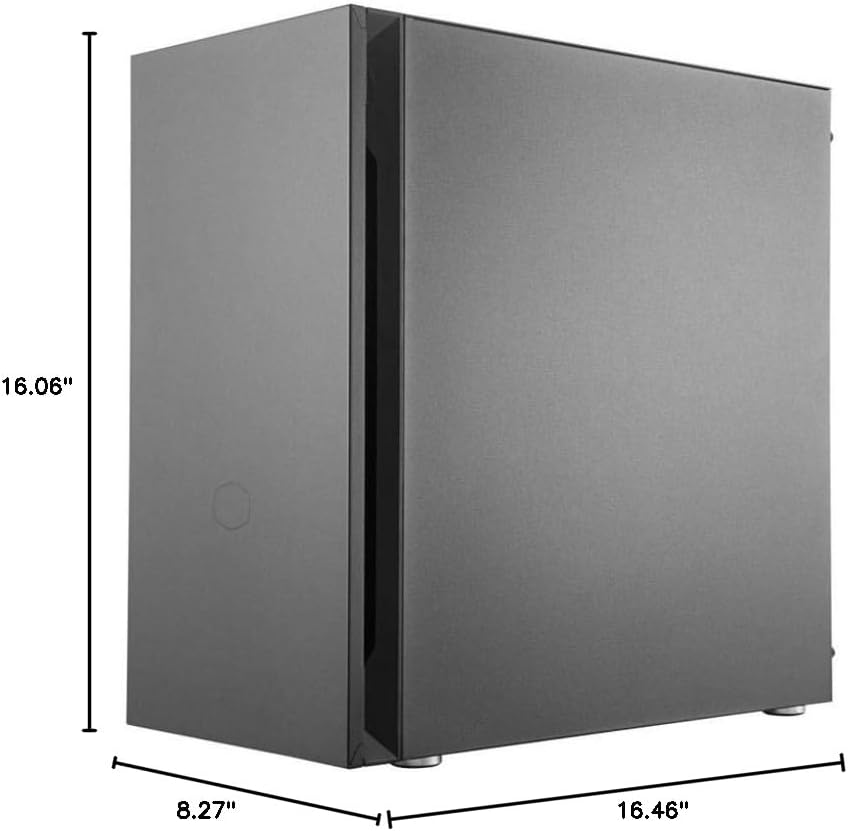
| Dimensioni (LxPxH) | 8.27 x 16.46 x 16.06 inch (210 x 418 x 408 mm) |
| Pesu di l'articulu | 15.4 liri (7 kg) |
| Metudu di rinfrescante | Aria |
| Dimensione di u fan | 120 Millimeters (Pre-installed) |
| Tipu di muntatura di l'alimentatore | Munti di fondu |
| Porti USB 3.0 | 2 |
| Porti USB 2.0 | 2 |
| Lettore di schede SD | Iè |
| Jack per cuffie | 1 (4 poli) |
9. Garanzia è Support
For warranty information, technical support, or to download the latest drivers and manuals, please visit the official Cooler Master websitu. Conservate a vostra prova d'acquistu per e richieste di garanzia.
Ufficiale Websitu: www.coolermaster.com


