Introduzione
This manual provides comprehensive instructions for the setup, operation, and maintenance of your Geemarc CL595 Amplified Corded Telephone. Designed for ease of use, particularly for seniors and individuals with moderate to severe hearing loss, the CL595 features amplified sound, large buttons, and specialized functions like photo memory keys and an SOS emergency call system. Please read this manual thoroughly to ensure proper use and to maximize the benefits of your telephone.
1. Setup
Follow these steps to set up your Geemarc CL595 telephone:
- Unpacking: Carefully remove all components from the packaging. Ensure you have the telephone base, handset, coiled handset cord, telephone line cord, and power adapter.
- Installazione di batterie: The telephone requires 3 AAA batteries (not included) for certain functions like memory retention during power outages. Open the battery compartment on the underside of the base and insert the batteries, observing polarity.
- Cunnette u telefuninu: Plug one end of the coiled handset cord into the handset and the other end into the designated port on the left side of the telephone base.
- Cunnette a linea telefonica: Plug one end of the telephone line cord into the "LINE" port on the back of the telephone base and the other end into your wall telephone jack.
- Cunnette l'adattatore di alimentazione: Plug the power adapter into the "DC IN" port on the back of the telephone base, then plug the adapter into a standard electrical outlet.
- Accensione iniziale: The telephone display should light up. Follow any on-screen prompts to set the date, time, and language.

Image 1: Front view of the Geemarc CL595 telephone, showing the handset, large keypad, display, and photo memory buttons. This illustrates the overall design and key user interface elements.
2. Operating Instructions
This section details the various functions and how to operate your CL595 telephone.
2.1 Funzioni di chjama basiche
- Fà una Chjama: Lift the handset, wait for a dial tone, then dial the desired number using the large keypad.
- Riceve una Chjama: Quandu u telefunu sona, alzate u microtelefonu per risponde.
- Finisce una chjama: Place the handset back on the base.
- Speakerphone: Press u SPEAKER button to activate the speakerphone function. Press it again to deactivate.
2.2 Amplified Volume and Hearing Aid Compatibility
- Reception Volume: The telephone offers 6 levels of reception amplification. Adjust the volume during a call using the dedicated volume buttons.
- Funzione Boost: Press u SOS/AMPLIFY button during a call to instantly amplify the reception volume by up to 50dB. Press again to return to normal volume.
- Volume suoneria: The powerful ringer can reach up to 80dB. Adjust the ringer volume using the settings menu.
- Compatibilità di apparecchi acustici: If you use hearing aids, switch them to the "T" position for optimal sound quality during calls.
2.3 Photo Memory Keys
The CL595 features three customizable photo memory keys (M1, M2, M3) for quick dialing of frequently called numbers.
- Prugrammazione:
- Sollevate u telefuninu.
- Press u STORE button (if available, or refer to specific menu instructions).
- Dial the phone number you wish to save.
- Press the desired photo memory key (M1, M2, or M3).
- Sustituite u telefuninu.
- Fate una Chjama: Simply lift the handset and press the desired photo memory key (M1, M2, or M3) to dial the stored number.
- Customizing Photos: Lift the transparent cover on each photo key, insert a small photo of the contact, and replace the cover.
2.4 Segreteria telefonica
A segreteria telefonica integrata pò arregistrà finu à 30 minuti di missaghji.
- Accessu à i missaghji: Press the dedicated answering machine button on the base to play back messages.
- Slow Playback: If a message is spoken too quickly, activate the "slow playback" function (refer to the menu for specific steps) to listen at a reduced speed.
2.5 Funzione d'emergenza SOS
U rossu SOS button on the base activates an emergency call sequence.
- Prugrammazione di i numeri SOS:
- Access the SOS settings in the telephone menu.
- Program up to four emergency contact numbers in the desired calling order.
- Attivazione di SOS: Pulsà u rossu SOS button on the base. The telephone will automatically dial the pre-programmed numbers one after another until a connection is made.
2.6 VIP Directory and Call Blocking
- VIP Directory: You can store up to 50 trusted numbers in a special "VIP" directory. The telephone can be configured to only accept incoming calls from numbers listed in this directory.
- Chjama bluccatu: The CL595 allows you to block up to 100 unwanted numbers. Access the call blocking settings in the menu to add numbers to the block list.
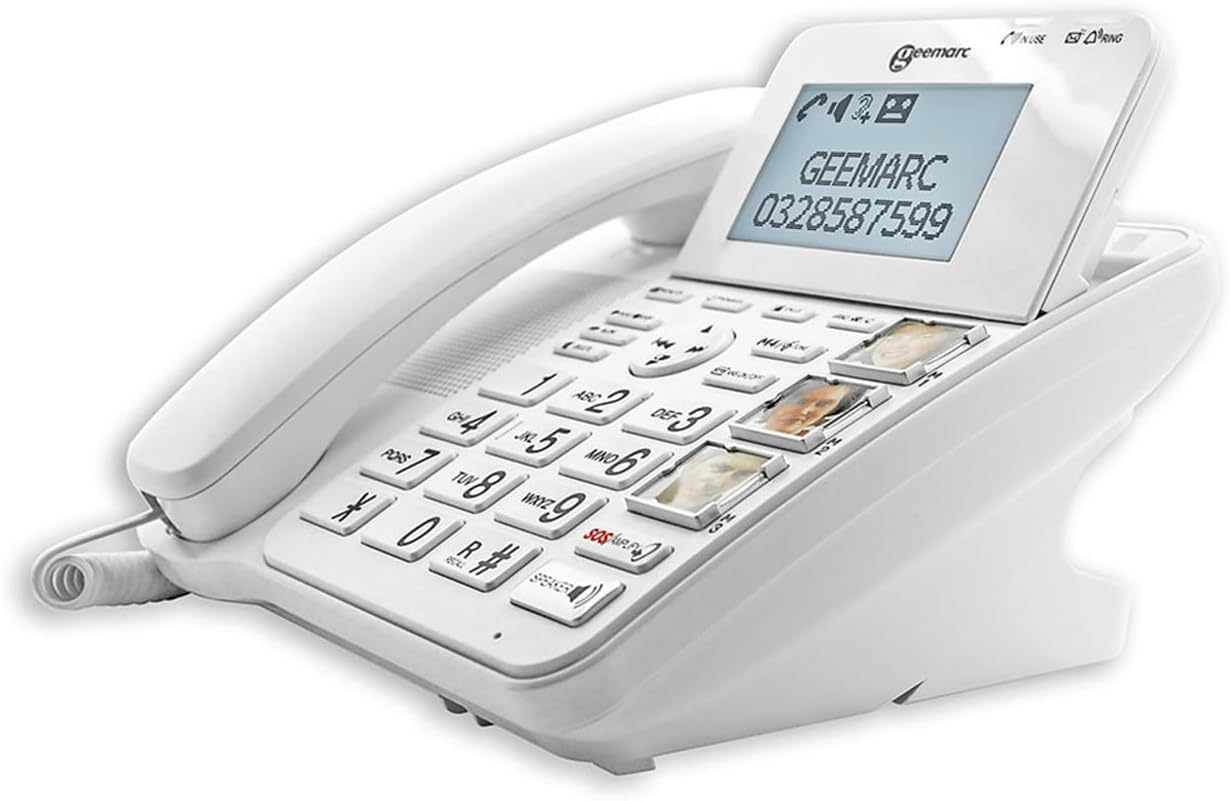
Imagine 2: Angolata view of the Geemarc CL595, highlighting the large, well-spaced buttons, the digital display, and the three photo memory keys. This image demonstrates the user-friendly interface for dialing and accessing features.
3. Mantenimentu
Una manutenzione adatta assicura a longevità è e prestazioni ottimali di u vostru telefunu.
- Pulizia: Aduprà un soft, damp cloth to clean the telephone's exterior. Do not use abrasive cleaners or solvents. Ensure no liquid enters the telephone's openings.
- Sustituzione di batterie: If the telephone uses AAA batteries for backup, replace them periodically (e.g., annually) or if the low battery indicator appears.
- Conservazione: Store the telephone in a cool, dry place away from direct sunlight and extreme temperatures when not in use for extended periods.
4. Risoluzione di prublemi
If you encounter issues with your Geemarc CL595, refer to the following common problems and solutions:
| Prublemu | Causa Possibile | Soluzione |
|---|---|---|
| Nisun tonu di dial | U cavu di a linea telefonica hè scollegatu o difettu. | Assicuratevi chì u cavu di a linea telefonica sia cunnessu currettamente à u telefunu è à a presa murale. Pruvate cù un altru telefunu se pussibule. |
| Ùn possu sente u chjamante / U chjamante ùn mi pò sente | Volume settings are too low; handset or line cord issue. | Adjust reception volume using the dedicated buttons or activate the Boost function. Check handset cord connection. |
| U telefunu ùn sona micca | Ringer volume is off or set too low. | Check ringer volume settings in the menu. Ensure "Do Not Disturb" or similar features are not active. |
| A visualizazione hè in biancu | Power adapter is disconnected or power outage. | Ensure the power adapter is securely connected to the phone and a working electrical outlet. Check household power. |
If the problem persists after trying these solutions, please contact Geemarc customer support for further assistance.
5. Specificazioni
- Mudellu: CL595
- Tipu: Telefonu cù Cordu
- Dimensioni (L x W x H): 19 x 20 x 27 cm (circa)
- Pesu: 1 chilògrammu
- Fonte di energia: Cavu elettricu
- Batterie: 3 x AAA (for backup, not included)
- Dimensione di u screnu: 5 pollici (schermu)
- Reception Amplificazione: Up to +50dB (with Boost function)
- Volume suoneria: Finu à 80 dB
- Compatibilità di apparecchi acustici: Yes (T-position)
- Risponditore: Digitale, finu à 30 minuti di tempu di registrazione
- Photo Memory Keys: 3 tasti di memoria diretta
- VIP Directory Capacity: Finu à 50 numeri
- Capacità di bloccu di chjamate: Finu à 100 numeri
- Dispositivi cumpatibili: PSTN (Rete Telefonica Pubblica Commutata)
- Produttore: Geemarc Telecom
- Paese d'origine: Cina
6. Garanzia è Support
Garanzia: The Geemarc CL595 typically comes with a 1-year parts availability guarantee. For specific warranty terms and conditions, please refer to the documentation provided with your purchase or contact your retailer.
Assistenza Clienti: For technical assistance, troubleshooting beyond this manual, or warranty inquiries, please contact Geemarc customer service. Contact details can usually be found on the manufacturer's websitu o in l'imballu di u vostru pruduttu.


