1. Introduzione
This manual provides detailed instructions for the Amazon Basics Aluminum Type-C Docking Station. This device expands the connectivity of your USB-C enabled laptop or tablet, offering a wide range of ports for various peripherals and external displays. Please read this manual thoroughly before use to ensure proper operation and to maximize the product's functionality.
2. Caratteristiche di u produttu
- 11-in-1 Multi-Port Design: Integrates Mini DisplayPort, HDMI, VGA, 3 USB-A ports, Ethernet, SD/TF card reader, 3.5mm audio jack, and a Type-C charging port (PD 100W).
- Uscita video ad alta risoluzione: Supports Ultra HD 4K output via Mini DisplayPort/HDMI and Full HD 1080P via VGA, allowing for mirroring or extending your display to HDTVs, monitors, or projectors. Note: 4K resolution is supported at 30Hz refresh rate.
- Trasferimentu rapidu di dati: Three USB 3.0 A ports provide data transfer speeds up to 5Gbps, backward compatible with USB 2.0/1.0.
- Cunnessione di rete stabile: 1000Mbps RJ45 Ethernet port ensures a fast and reliable wired network connection.
- Lettore di carte universale: Integrated SD and TF slots allow simultaneous reading of universal SD and Micro SD memory cards.
- Fornitura di energia: Type-C charging port supports Power Delivery (PD) up to 100 watts for charging your host device.
- Connettività audio: Jack audio da 3.5 mm per cuffie o altoparlanti.
- Custruzzione durabile: Features an aluminum pedestal-style housing for enhanced durability and heat dissipation.
3. Cuntenutu di u pacchettu
- Amazon Basics Aluminum Type-C Docking Station
- Manuale d'usu
4. Produttu Finituview è Disposizione di u Portu
Familiarize yourself with the various ports and their functions on your docking station.

Imagine: Primu pianu view of the Amazon Basics Type-C Docking Station's ports, including Ethernet, Mini DisplayPort, HDMI, VGA, and USB-C.
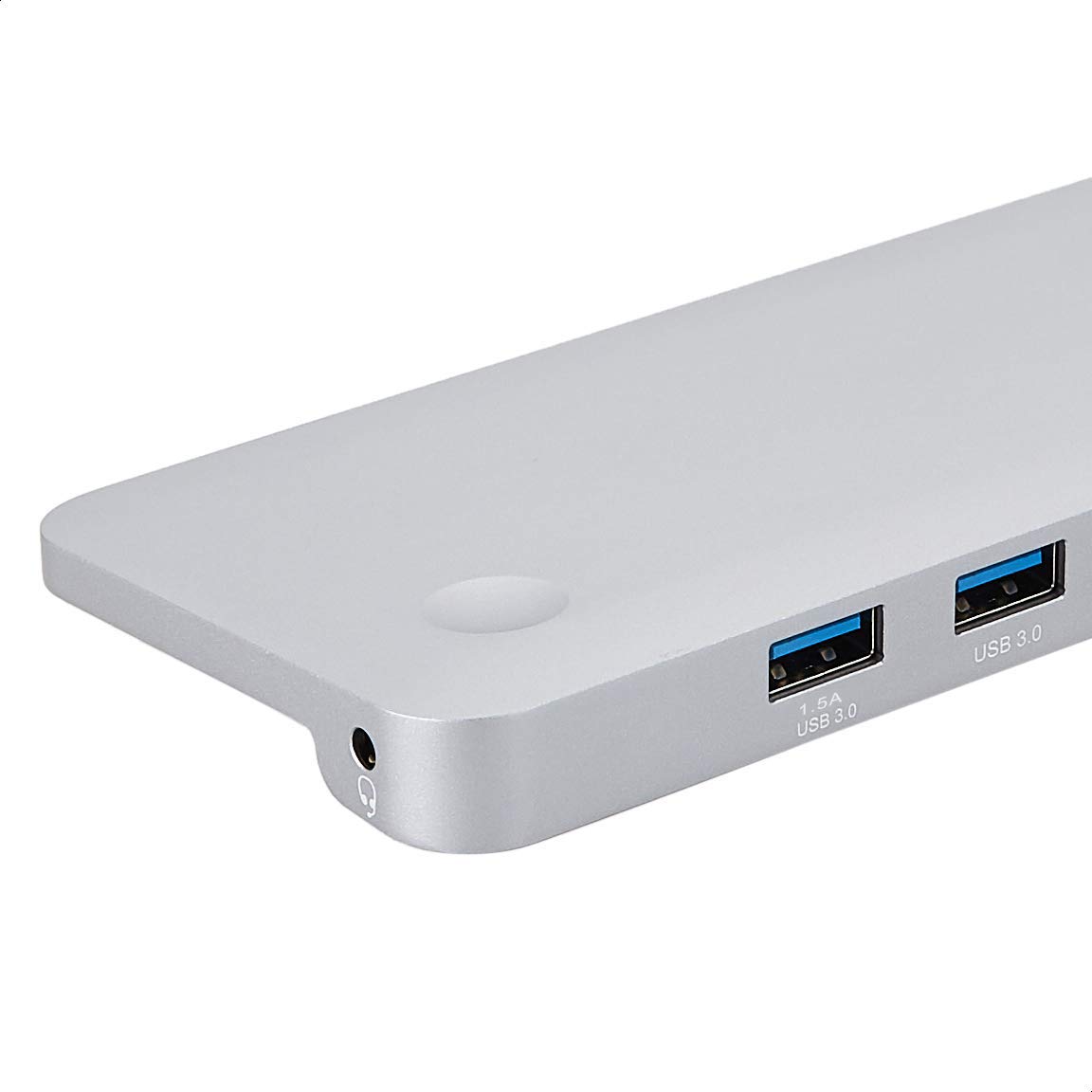
Imagine: Dettagliata view of the USB 3.0 ports and 3.5mm audio jack on the Amazon Basics Type-C Docking Station.
- Cunnettore USB-C Host: Connects to your laptop or tablet's USB-C port.
- Porti USB 3.0 (x3): For connecting USB devices such as external hard drives, keyboards, mice, or USB flash drives.
- Slot per carta SD: Per a lettura di carte di memoria SD standard.
- TF Card Slot (Micro SD): Per a lettura di carte di memoria Micro SD.
- Port Ethernet RJ45: Per cunnessione di rete cablata.
- Mini DisplayPort: Per cunnette si à un display esternu.
- Portu HDMI: Per cunnette si à un display esternu.
- Portu VGA: Per cunnette si à un display esternu.
- Jack audio da 3.5 mm: Per cunnette cuffie o altoparlanti.
- Portu di carica USB-C PD: For connecting a USB-C power adapter to charge your host device and power the docking station.
5. Setup Instructions
Segui sti passi per cunfigurà a vostra stazione di docking:
- Cunnette si à u dispusitivu ospitante: Plug the integrated USB-C host connector cable from the docking station into an available USB-C port on your laptop or tablet. Ensure your host device's USB-C port supports DisplayPort Alt Mode (DP Alt Mode) for video output functionality.
- Cunnette l'alimentazione (opzionale ma cunsigliatu): If your host device requires charging or if you are connecting power-intensive peripherals, connect your USB-C power adapter (up to 100W) to the USB-C PD Charging Port on the docking station. This will charge your host device and provide stable power to the docking station and connected peripherals.
- Cunnette i periferichi: Connect your desired peripherals (e.g., external monitors, USB devices, Ethernet cable, SD/TF cards, audio devices) to the corresponding ports on the docking station.

Image: Amazon Basics Type-C Docking Station connected to a laptop, with multiple peripherals like a USB drive and external display cables plugged in.
6. Operating Instructions
6.1. Output Video
- Connect your monitor or projector to the HDMI, Mini DisplayPort, or VGA port.
- Your operating system should automatically detect the external display. You may need to adjust display settings (e.g., extend, duplicate) in your computer's display preferences.
- The docking station supports 4K resolution at 30Hz refresh rate via HDMI and Mini DisplayPort. For optimal performance, ensure your display and cables support the desired resolution and refresh rate.
- Dual video display is supported, allowing you to mirror or expand your screen across multiple monitors.
6.2. Trasferimentu di dati USB
- Plug your USB devices into the USB 3.0 ports.
- The ports support data transfer speeds up to 5Gbps.
6.3. Cunnessione Ethernet
- Connect an Ethernet cable from your router or modem to the RJ45 Ethernet port on the docking station.
- Your computer should automatically establish a wired network connection.
6.4. SD/TF Card Reader
- Insert your SD or TF (Micro SD) card into the corresponding slot.
- The cards will appear as removable drives on your computer, allowing you to access and transfer files. E duie slot ponu esse aduprate simultaneamente.
6.5. Output Audio
- Connect your headphones or speakers to the 3.5mm audio jack.
- You may need to select the docking station as the default audio output device in your computer's sound settings.
6.6. Erogazione di putenza (PD)
- Connect your laptop's USB-C power adapter to the USB-C PD Charging Port on the docking station.
- This port supports up to 100W power delivery to charge your host device while using the docking station.
7. Cumpatibilità
This docking station is compatible with a wide range of USB-C enabled devices, including but not limited to:
- MacBook Pro 2018/2017/2016
- iPad Pro 2018
- Mac mini 2018
- MacBook Air
- iMac 2017
- Samsung Note9
- HUAWEI MateBook X
- Dell XPS 13
- ThinkPad
- Chromebook
Impurtante: This product functions only with computers that support DisplayPort Alt Mode (DP Alt Mode) via their USB-C port. Please verify your computer's specifications for compatibility before use.
8. Risoluzione di prublemi
- Nisuna uscita di visualizazione:
- Assicuratevi chì u portu USB-C di u vostru dispositivu ospitante supporti a modalità DisplayPort Alt.
- Check all cable connections (USB-C to host, video cable to monitor).
- Verify the external monitor is powered on and set to the correct input source.
- Pruvate riavvia u vostru urdinatore.
- 4K Resolution Not Working at 60Hz:
- This docking station supports 4K resolution at a maximum refresh rate of 30Hz. If your monitor is set to 4K@60Hz, it will not display correctly. Adjust your display settings to 4K@30Hz or a lower resolution with a higher refresh rate if desired.
- USB Devices Not Recognized or Disconnecting:
- Ensure the docking station is receiving sufficient power. Connect a USB-C power adapter to the PD port if you are using multiple power-intensive USB devices.
- Try connecting the USB device directly to your computer to confirm it is functional.
- Reconnect the docking station to your computer.
- No Network Connection via Ethernet:
- Verificate a cunnessione di u cavu Ethernet à a stazione di docking è à u vostru router/modem.
- Verify your network settings on your computer.
- Assicuratevi chì u vostru router/modem funziona currettamente.
- Nisuna uscita audio:
- Assicuratevi chì e vostre cuffie o altoparlanti sianu cunnessi currettamente à a presa audio di 3.5 mm.
- Check your computer's sound settings and select the docking station as the default audio output device.
- U dispusitivu òspite ùn hè micca in carica:
- Ensure a compatible USB-C power adapter is connected to the docking station's USB-C PD Charging Port.
- Verificate chì u vostru dispositivu ospitante supporta USB-C Power Delivery.
- Verificate l'adattatore di corrente è u cavu per eventuali danni.
9. Specificazioni
| Feature | Specificazione |
|---|---|
| Marca | Amazon Basics |
| Numero di mudellu | UTC-DOCK01-PRO |
| Culore | Grisgiu |
| Dimensioni (LxPxH) | 28 x 7.5 x 1.4 centimetri (11.02 x 2.95 x 0.55 pollici) |
| Pesu di l'articulu | 317 g (0.32 chilogrammi) |
| Porti Totali | 11 |
| Porti USB | 3 x USB 3.0 Type-A |
| Porti di Output Video | 1 x HDMI, 1 x Mini DisplayPort, 1 x VGA |
| Risoluzione HDMI | Finu à 4K @ 30Hz |
| Mini DisplayPort Resolution | Finu à 4K @ 30Hz |
| Port Ethernet | RJ45 Gigabit Ethernet (10/100/1000Mbps) |
| Lettore di carte | SD and TF (Micro SD) slots, simultaneous read |
| Portu Audio | Jack Audio 3.5 mm |
| Portu di Ricarica USB-C PD | Finu à 100 Watts |
| Interfaccia Hardware | Ethernet, HDMI, Mini DisplayPort, VGA, USB-A, USB-C, SD/TF, Audio |
10. Mantenimentu
- Pulizia: Use a soft, dry cloth to clean the docking station. Avoid using liquid cleaners or aerosols.
- Conservazione: Conservate l'apparechju in un locu frescu è asciuttu, luntanu da a luce diretta di u sole è da temperature estreme.
- Trattamentu: Avoid dropping or subjecting the device to strong impacts. Do not attempt to disassemble or modify the docking station.
11. Informazioni di sicurezza
- Keep the device away from water, fire, and high humidity environments.
- Ùn espone micca u dispusitivu à temperature estreme.
- Aduprate solu adattatori di alimentazione è cavi cumpatibili.
- Mantene fora di a portata di i zitelli.
- Sè u dispusitivu hè dannighjatu o ùn funziona micca bè, smette subitu di utilizà lu è cuntattate l'assistenza clienti.
12. Garanzia è Support
This Amazon Basics product comes with a Garanzia limitata di 1 anni from the date of purchase. This warranty covers manufacturing defects and workmanship under normal use. It does not cover damage caused by misuse, accident, modification, or unauthorized repair.
For warranty claims, technical support, or further assistance, please contact Amazon Basics customer service through your Amazon purchase history or the official Amazon Basics support channels.


