Introduzione
This instruction manual provides detailed information on the installation, operation, and maintenance of your Blaupunkt DENVER 212 DAB BT car radio. Please read this manual thoroughly before using the device to ensure proper functionality and to prevent damage. Keep this manual for future reference.

Image: Blaupunkt DENVER 212 DAB BT product banner.
Informazioni di sicurezza
- Assicuratevi una stallazione curretta da un prufessiunale qualificatu per evità periculi elettrichi o danni à u vostru veiculu.
- Ùn aduprate micca l'apparechju in modu chì vi distragga da a guida. Date sempre priorità à a sicurezza stradale.
- Evitate d'espone l'unità à temperature estreme, à a luce diretta di u sole o à l'umidità.
- Aduprate solu accessori è pezzi appruvati.
- Disconnect the vehicle's battery before installation to prevent short circuits.
Cuntenutu di u pacchettu
Verificate chì tutti l'articuli sò presenti in u pacchettu:
- Blaupunkt DENVER 212 DAB BT Car Radio Unit
- Montatura Montatura
- Wiring Harness (ISO connector)
- DAB+ Antenna (if included with specific models)
- Microfonu esternu
- Disassembly Keys
- Manuale d'uso (stu documentu)
Product Overview
The Blaupunkt DENVER 212 DAB BT is a 1-DIN car radio featuring DAB+ digital radio, Bluetooth hands-free calling, and media streaming. It offers a robust design and short installation depth for versatile vehicle compatibility.

Image: Front panel of the Blaupunkt DENVER 212 DAB BT, showing display, control knobs, and buttons.
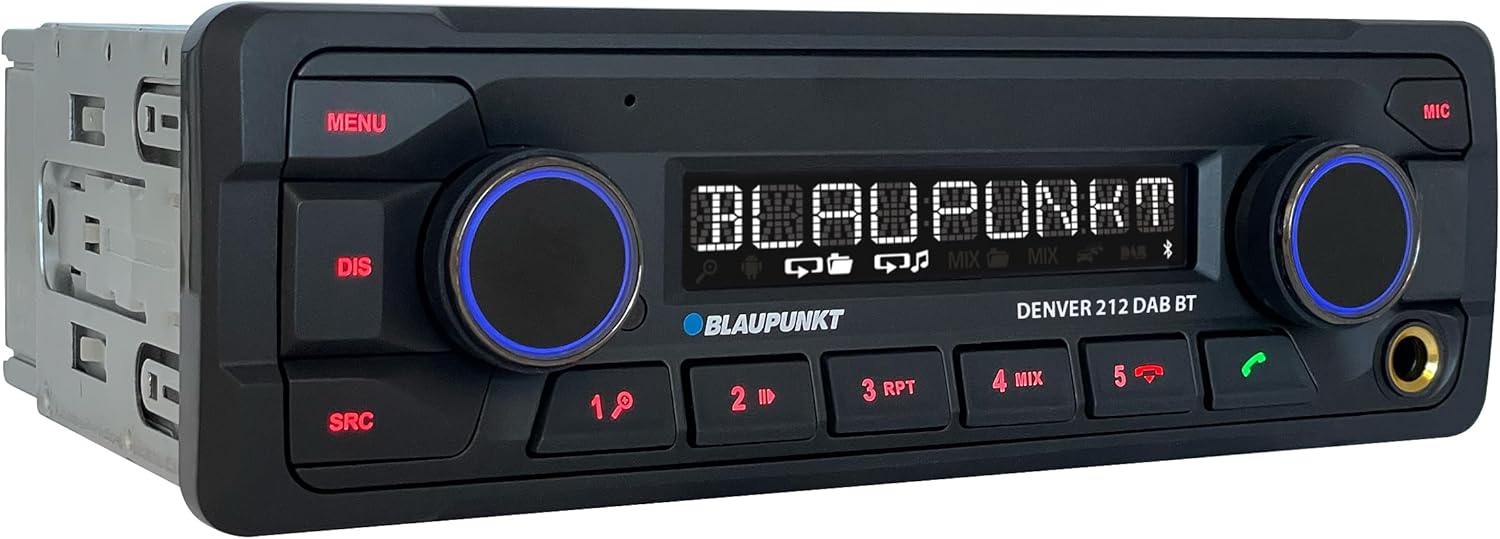
Imagine: Angulata view of the Blaupunkt DENVER 212 DAB BT, highlighting its compact design.
Cuntrolli di u pannellu frontale:
- Pulsante MENU: Accede à i paràmetri è l'opzioni di u sistema.
- DIS Button: Cambia l'infurmazioni di visualizazione.
- SRC Button: Selects audio source (Radio, DAB, Bluetooth, USB, AUX).
- Volume Knob (Left): Adjusts audio volume. Press to mute/unmute.
- Selection Knob (Right): Naviga i menu è selezziuna l'opzioni.
- Pulsanti preimpostati (1-6): Store and recall radio stations, control media playback.
- Call Buttons (Green/Red): Answer/end Bluetooth calls.
- Port USB: Cunnette i dispositivi di almacenamentu USB per a riproduzione multimediale.
- Ingressu AUX (Jack 3.5 mm): Cunnette fonti audio esterne.
Installazione è installazione
Passi di stallazione:
- Preparazione: Scollegate u terminal negativu di a batteria di u vostru veiculu.
- Muntamentu: Insert the supplied mounting frame into the vehicle's 1-DIN opening. Bend the tabs to secure it.
- cablaggio: Connect the wiring harness according to the diagram below. Ensure all connections are secure.
- Cunnessione antenna: Connect the FM antenna and the DAB+ antenna (if applicable) to the corresponding inputs on the rear of the radio.
- Cunnessione microfonu: Connect the external microphone to the designated input for optimal hands-free call quality.
- Inserisce l'unità: Slide the radio unit into the mounting frame until it clicks into place.
- Verificazione finale: Reconnect the vehicle's battery and test the unit.
Wiring Diagram (General):
| Colore di filu | Funzione |
|---|---|
| Ghjallu | 12V custante (Batteria) |
| Rossu | Commutatu 12V (Ignizione) |
| Neru | Terra |
| Turchinu | Antenna di putenza / Amplifier Remote |
| Arancione / biancu | Illuminazione |
| Speaker Wires (e.g., White, Grey, Green, Purple pairs) | Connect to vehicle speakers (Front Left, Front Right, Rear Left, Rear Right) |
| Input di cuntrollu di u volante | Connect to vehicle's steering wheel control interface (if applicable) |
Note: Specific wire colors may vary. Always refer to your vehicle's wiring diagram and the radio's included diagram for precise connections.

Image: The Blaupunkt DENVER 212 DAB BT car radio seamlessly integrated into a vehicle's dashboard.
Istruzzioni di funziunamentu
1. Funzioni basi:
- Accensione / spegnimentu: Press the volume knob (left) briefly to turn the unit on. Press and hold to turn off.
- Controlu di u voluminu: Rotate the volume knob (left) to adjust the sound level.
- Selezzione di fonte: Press u SRC button repeatedly to cycle through available audio sources (FM, DAB, Bluetooth Audio, USB, AUX).
- Navigazione di menu: Press u MENU button to enter the main menu. Use the right knob to navigate and select options.
2. Radio (FM/DAB+):
- Selezzione di u modu Radio: Press SRC until FM or DAB is selected.
- Sintonizazione automatica: In FM/DAB mode, press and hold the right knob or seek buttons (if available) to automatically search for stations.
- Tuning Manuale: Briefly press the right knob or seek buttons to fine-tune frequencies.
- Salvà i Presets: Tune to a desired station, then press and hold one of the numeric preset buttons (1-6) until you hear a confirmation beep.
- Ricurdendu Presets: Briefly press a numeric preset button (1-6) to recall a stored station.
3. Funziunamentu Bluetooth:
- Accoppiamentu di un dispositivu:
- Assicuratevi chì Bluetooth hè attivatu nantu à u vostru dispositivu mobile.
- Select "Bluetooth" as the source on the car radio. The display will show "PAIRING".
- On your mobile device, search for Bluetooth devices and select "BLAUPUNKT DENVER".
- Cunfirmate l'accoppiamentu nantu à i dui dispusitivi s'ellu hè dumandatu.
- Chjama senza mani:
- Risponde à una Chjama: Appughjà u buttone verde chjamatu.
- Finisce una chjama: Press the red call button.
- Fà una Chjama: Dial from your phone; audio will transfer to the car radio.
- Streaming audio Bluetooth: Once paired, select "Bluetooth Audio" as the source. Play music from your mobile device, and it will stream through the car radio. Use the preset buttons (e.g., 4 for MIX, 5 for RPT) for playback control (play/pause, skip tracks).
4. USB and AUX Input:
- Riproduzione USB: Insert a USB storage device into the front USB port. The unit will automatically switch to USB mode and begin playback.
- Ingressu AUX: Connect an external audio device (e.g., MP3 player) to the 3.5mm AUX input jack using an audio cable. Select "AUX" as the source.
5. Sound Settings (Equalizer):
- Press u MENU button, then navigate to "AUDIO" or "EQ" settings.
- Adjust bass, treble, balance, and fader settings to your preference.
- Pre-set equalizer modes (e.g., Pop, Rock, Classic) may be available.
Video: Un overview of the Blaupunkt DENVER 212 DAB BT car radio's features and basic operation.
Mantenimentu
- Pulizia: Aduprate un pannu dolce è asciuttu per pulisce u pannellu frontale di l'unità. Ùn aduprate micca detergenti abrasivi o solventi.
- Port USB: Mantene a porta USB libera da polvere è detriti.
- Actualizazioni di firmware: Check the official Blaupunkt webVisitate u situ periodicamente per qualsiasi aghjurnamenti di firmware dispunibili per u vostru mudellu.
Risoluzione di prublemi
| Prublemu | Causa Possibile | Soluzione |
|---|---|---|
| Nisun putere | Blown fuse; incorrect wiring (constant/switched 12V); loose connection. | Check vehicle fuses and the radio's fuse. Verify wiring connections, especially constant and ignition power. Ensure the unit is properly seated. |
| Nisun sonu | Vulume troppu bassu; mute attivatu; cablaggio di l'altoparlanti incorrectu; ampprublemi di vita. | Increase volume. Check if mute is active. Verify speaker connections. If an external ampSè vo aduprate un lifer, verificate a so putenza è e so cunnessione. |
| Poor radio reception (FM/DAB) | Antenna micca cunnessa; antenna dannighjata; zona di signale debule. | Ensure antenna is securely connected. Check antenna for damage. Consider a stronger antenna or signal booster if in a weak signal area. For DAB+, ensure the DAB antenna is correctly installed and positioned. |
| Problemi di cunnessione Bluetooth | Device not in pairing mode; incorrect wiring (ignition+ and constant+); interference. | Ensure both devices are in pairing mode. Delete previous pairings and try again. Verify that the constant 12V and switched 12V wires are correctly connected to the radio, as improper wiring can affect Bluetooth stability. Move away from other Bluetooth devices. |
| USB micca ricunnisciutu | Senza supportu file format; USB drive not formatted correctly; damaged USB drive. | Assicurà l'audio files are in supported formats (e.g., MP3, WMA). Format the USB drive to FAT32. Try a different USB drive. |
Specificazioni
| Feature | Detail |
|---|---|
| Marca | BLAUPUNKT |
| Numero di mudellu | Denver 212 DAB BT |
| Culore | Neru |
| Tecnulugia di cunnessione | Bluetooth, USB |
| Tipu di cunnessu | Jack di 3.5 mm, USB |
| Funzioni spiciali | DAB, RDS, Equalizer, Bluetooth Hands-free |
| Dispositivi compatibles | Smartphone |
| Total Ports USB | 1 |
| Modu Output Audio | Stereo |
| Cunfigurazione di u Canale Sonu Surround | 4.0 |
| Dimensioni di u produttu | 12D x 17.8W x 5.2H centimetri |
| U fabricatore | Blaupunkt |
| Disponibilità di pezzi di ricambio | 1 anni |
Garanzia è Supportu
This Blaupunkt product comes with a manufacturer's warranty. For specific warranty terms and conditions, please refer to the warranty card included with your product or visit the official Blaupunkt website. For technical support, troubleshooting assistance, or spare parts inquiries, please contact Blaupunkt customer service through their official channels.
Spare parts are generally available for 1 year from the date of purchase.
Official Blaupunkt Websitu: www.blaupunkt.com


