Introduzione
This manual provides essential instructions for the proper use, setup, and maintenance of your BYTECH Lightning Cable (Model: CLMFCBLASST). This cable is designed for charging and data transfer with compatible Apple iOS devices, including iPhones, iPads, and iPods, as well as connecting to laptops and personal computers.
Product Overview
The BYTECH Lightning Cable is a durable accessory for your Apple devices. It features a Lightning connector on one end and a USB-A connector on the other, facilitating both power delivery for charging and data exchange. The cable supports fast charging capabilities for compatible devices.
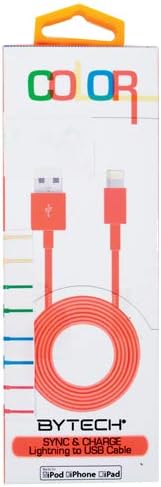
This image displays the retail packaging for the BYTECH Lightning to USB Cable. The packaging is white with 'COLOR' printed at the top in multi-colored letters. An orange Lightning to USB cable is visible through a clear window, coiled neatly. The bottom of the package indicates 'BYTECH SYNC & CHARGE Lightning to USB Cable' and compatibility with iPod, iPhone, and iPad.
Cumpunenti:
- Cunnettore di fulmini: Connects to your Apple iOS device (iPhone, iPad, iPod).
- Cunnettore USB-A: Connects to a USB power adapter, computer USB port, or other USB charging source.
- Cable: The flexible cord connecting the two connectors, designed for durability and efficient power/data transfer.
Istituisci
To begin using your BYTECH Lightning Cable, follow these steps:
- Identificà i cunnettori: Locate the Lightning connector (smaller, 8-pin) and the USB-A connector (larger, rectangular).
- Cunnette si à a fonte d'alimentazione o à l'urdinatore:
- For charging, insert the USB-A connector into a compatible USB wall adapter or car charger.
- For charging and data transfer, insert the USB-A connector into an available USB port on your laptop or personal computer.
- Cunnette vi à u dispusitivu iOS: Insert the Lightning connector into the charging port of your iPhone, iPad, or iPod. Ensure it is fully seated.
- Verificate a cunnessione: Your device should indicate that it is charging or connected to a computer.
Istruzzioni di funziunamentu
Caricà u vostru Dispositivu:
Once connected as described in the "Setup" section, your iOS device will begin charging automatically. The cable supports fast charging when paired with a compatible power adapter and device.
Trasferimentu di dati:
When connected to a computer, the cable enables data transfer between your iOS device and the computer. This allows for syncing media, documents, and other files using iTunes or Finder (macOS Catalina and later).
- Connect your iOS device to your computer using the BYTECH Lightning Cable.
- Unlock your iOS device and respond to any "Trust This Computer?" prompts by tapping "Trust" and entering your passcode if required.
- Open iTunes (Windows/older macOS) or Finder (macOS Catalina and later) on your computer.
- Select your device within the application to manage and transfer data.
Mantenimentu
Una cura adatta allunga a vita di u vostru cavu:
- Conservazione: Quandu ùn hè micca in usu, arrotolate u cavu senza stringhjelu. Evitate l'avvolgimenti stretti o e pieghe strette, soprattuttu vicinu à i connettori, postu chì questu pò dannà i fili interni.
- Pulizia: Use a soft, dry cloth to gently wipe the cable and connectors. Do not use liquid cleaners or abrasive materials.
- Trattamentu: Always grasp the connector head when plugging or unplugging the cable. Avoid pulling directly on the cable itself.
- Ambiente: Mantene u cavu luntanu da temperature estreme, luce solare diretta è umidità.
Risoluzione di prublemi
If you encounter issues with your BYTECH Lightning Cable, consider the following:
- U dispositivu ùn si carica micca:
- Assicuratevi chì e duie estremità di u cable sò cunnesse in modu sicuru.
- Try a different USB power adapter or computer USB port.
- Check the charging port on your iOS device for debris or lint.
- Test the cable with a different compatible iOS device, if available.
- Problemi di trasferimentu di dati:
- Ensure your iOS device is unlocked and you have tapped "Trust This Computer" when prompted.
- Restart both your iOS device and your computer.
- Update iTunes or Finder to the latest version.
- Pruvate un portu USB differente in u vostru urdinatore.
- Dannu à u cable: Inspect the cable for any visible signs of damage, such as fraying, cuts, or bent connectors. Discontinue use if damage is found.
Specificazioni
| Attributu | Detail |
|---|---|
| Marca | Bytech |
| Numero di mudellu | CLMFCBLASST |
| UPC | 805112016938 |
| Tipu di cunnessu | Lightning (Male) to USB-A (Male) |
| Tipu di cable | Fulmine |
| Dispositivi compatibles | iPhone, iPad, iPod, Laptop, Personal Computer |
| Funzione speciale | Carica rapida |
| Usi cunsigliati | Charging, data transfer for iOS devices |
| Numero di Pins | 8 (Lightning) |
| Pesu di l'articulu | 1.76 once |
| Dimensioni di u produttu | 1 x 1 x 1 pollici (Imballaggio) |
Garanzia è Supportu
For warranty information or technical support regarding your BYTECH Lightning Cable, please refer to the official Bytech websitu o cuntattate direttamente u so serviziu clienti. Conservate a vostra ricevuta d'acquistu per e richieste di garanzia.
Per dumande generali, pudete visità u Bytech brand page on Amazon.


