Introduzione
This manual provides detailed instructions for the proper use and maintenance of your Casio G-Shock DW-5610SU-3 digital watch. Designed for durability and functionality, this watch features shock resistance, 200-meter water resistance, an electro-luminescent backlight, and various timekeeping functions.

Image: Front view of the Casio G-Shock DW-5610SU-3 digital watch, showcasing its square case and digital display.
Funzioni di u buttone
Your G-Shock watch has four buttons, typically labeled as follows:
- AGGIUSTÀ (In cima à manca): Adupratu per entre è sorte da i modi di paràmetri, è per cunfirmà i paràmetri.
- MODU (In fondu à manca): Used to cycle through the watch's various modes (Timekeeping, Stopwatch, Countdown Timer, Alarm).
- LUCE (In cima à diritta): Activates the electro-luminescent backlight.
- START/STOP (Bottom Right): Used to start/stop stopwatch operations, change selections in setting modes, and activate the flash alert.

Imagine: Latu view of the watch, highlighting the top left (ADJUST) and bottom left (MODE) buttons.

Image: Opposite side view of the watch, showing the top right (LIGHT) and bottom right (START/STOP) buttons.
Cunfigurazione: Impostazione di l'ora è di a data
- In u modu di misurazione di l'ora, tene premutu è tene premutu u buttone ADJUST button until the city code starts to flash, indicating the setting screen.
- Aduprà u START/STOP button to cycle through the settings (City Code, DST, 12/24-hour format, Seconds, Hour, Minute, Year, Month, Day).
- Aduprà u LUCE button to increase a value or the START/STOP button to decrease a value (for time/date settings).
- Una volta chì tutti i paràmetri sò cunfigurati, appughjà u buttone ADJUST buttone per esce da u modu di cunfigurazione.
Istruzzioni di funziunamentu
Modi di navigazione
Press u MODE buttone per andà à traversu i seguenti modi:
- Timekeeping Mode (current time, date, day)
- Modu Cronometru
- Modu di Timer à Conta Risposta
- Modu d'alarma
- Hourly Time Signal Mode
Usendu u Cronometru
- Entre in a modalità Cronometru appughjendu u buttone MODE buttone.
- Press u START/STOP buttone per inizià u cronometru.
- Press u START/STOP buttone di novu per fermallu.
- Press u ADJUST buttone per resettà u cronometru à zeru.
- The stopwatch measures up to 23 hours, 59 minutes, 59.99 seconds.
Utilizà u Timer Countdown
- Entre in a modalità di cronometru di contu à rebours appughjendu u buttone MODE buttone.
- Appughjà è tene premutu ADJUST button until the hour setting flashes.
- Aduprà u LUCE è START/STOP buttons to set the desired countdown time (up to 24 hours).
- Press ADJUST to confirm and exit the setting mode.
- Press START/STOP per inizià u countdown.
- Press START/STOP torna per mette in pausa / ripiglià.
- Quandu u contu à rebours ghjunghje à zeru, una sveglia sunerà. Appughjà un buttone qualsiasi per fermà a sveglia.
Setting Alarms
- Entre in u modu d'allarme premendu u buttone MODE buttone.
- Appughjà è tene premutu ADJUST button until the hour setting flashes.
- Aduprà u LUCE è START/STOP buttons to set the alarm hour and minute.
- Press ADJUST to confirm and exit the setting mode.
- Press u START/STOP button to toggle the alarm ON/OFF. An indicator will show when the alarm is active.
Electro-luminescent Backlight
Press u LUCE buttone per illuminà u display per una facilità viewing in low-light conditions. The backlight duration is typically a few seconds.
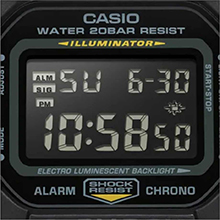
Image: Close-up of the watch display showing the electro-luminescent backlight active, illuminating the time and date.
Mantenimentu
Pulizia
Asciugate l'orologio cù un pannu dolce è asciuttu. Per a sporcizia ostinata, aduprate un pannu dolce.ampSciacquate cù acqua è un detergente neutru dolce, poi asciugate. Evitate l'usu di agenti volatili cum'è diluenti o benzina.
Resistenza à l'acqua
This watch is water resistant to 200 meters. It is suitable for showering, swimming, and shallow diving. Do not operate buttons while the watch is wet or submerged to prevent water ingress.

Image: The Casio G-Shock DW-5610SU-3 watch partially submerged in water, illustrating its 200-meter water resistance.
Sustituzione di batterie
The watch uses one CR2016 battery with an approximate life of 2 years. When the display becomes dim or functions malfunction, it may be time for a battery replacement. It is recommended to have the battery replaced by an authorized service center to ensure water resistance is maintained.
Risoluzione di prublemi
- U display hè viotu o scuru: A batteria pò esse bassa. Rimpiazzà a batteria.
- I buttoni ùn rispundenu micca: Ensure the watch is not in a locked mode (if applicable, though this model typically doesn't have a lock). If issues persist, a full reset might be needed (consult service center).
- U tempu hè imprecisu: Re-set the time and date as per the "Setting Time and Date" section. If inaccuracy continues, the watch may require servicing.
- Acqua in l'orologio: Purtate subitu l'orologio à un centru di assistenza autorizatu. Ùn pruvate micca à apre lu voi stessu.
Specificazioni
| Feature | Specificazione |
|---|---|
| Numero di mudellu | DW-5610SU-3 |
| Materiale di a cassa/lunetta | Resina |
| Materiale di banda | Resina |
| Tipu di vetru | Vetru minerale |
| Resistenza à l'acqua | 200 metri (20 BAR) |
| Resistenza à u Shock | Iè |
| Retroilluminazione | Electro-luminescent backlight with Afterglow |
| Cronometru | 1/100-second, measuring capacity 23:59'59.99" |
| Timer di Countdown | Measuring unit 1 second, range 24 hours, auto-repeat |
| Alarma | Multi-function alarm, Hourly signali di tempu |
| Calendariu | Calendariu automaticu cumpletu (finu à l'annu 2099) |
| Formatu di u tempu | Formatu 12/24 ore |
| Accuratezza | ± 15 seconde per mese |
| Tipu di batterie | CR2016 |
| Durata apprussimativa di a batteria | 2 anni |
| Dimensioni di a cassa (A × L × P) | 48.9 × 43.8 × 13.5 mm |
| Pesu tutale | 52 g |

Image: Diagram showing the dimensions of the Casio G-Shock DW-5610SU-3 watch, with a credit card for scale, indicating a case height of 48.9 mm and width of 43.8 mm.
Garanzia è Supportu
Your Casio G-Shock DW-5610SU-3 watch comes with a Limited Warranty. For warranty claims, service, or technical support, please contact Casio India Co Pvt Ltd.
Manufacturer/Importer Contact:
Casio India Co Pvt Ltd
A-41, 1st Floor, MCIE, Mathura Road,
New Delhi-110044, India
For additional information and support, please visit the official Casio website or an authorized service center.


