1. Produttu Finituview
The Philips SRP5016/10 is a modern and elegant 6-in-1 universal remote control designed to simplify your home entertainment experience. It allows you to control up to six different devices, such as televisions, DTVs, DVRs, home theater systems, soundbars, and streaming devices. This remote features a learning function, enabling it to receive and store infrared codes from your original remote controls, providing comprehensive control over various brands and models.
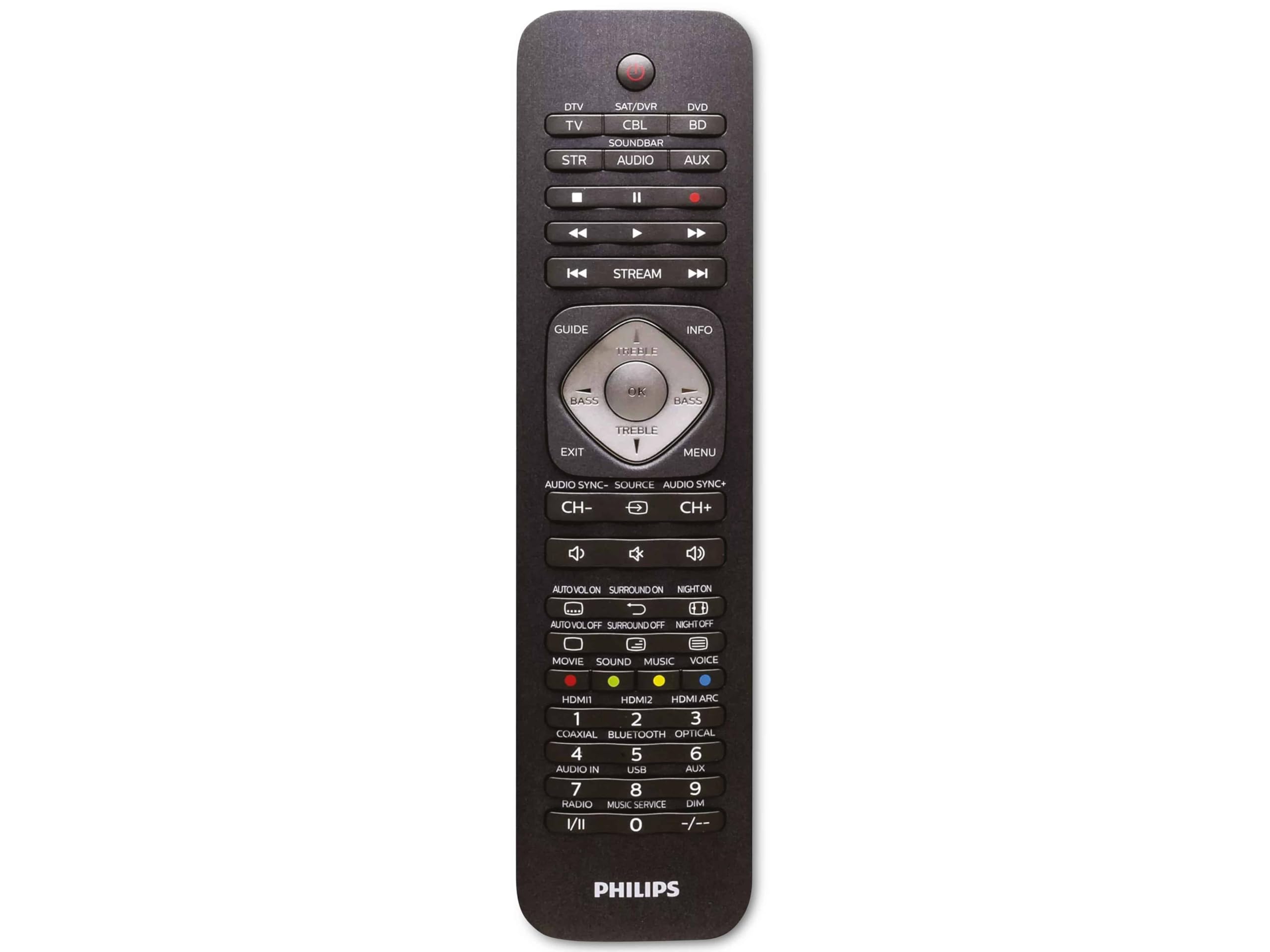
Image 1.1: Philips SRP5016/10 6-in-1 Universal Remote Control. This image displays the front view of the black universal remote control, highlighting its ergonomic design and button layout.
2. Setup
2.1. Installazione di batterie
- Aprite u coperchiu di u compartimentu di e batterie situatu daretu à u telecomandu.
- Inserite duie batterie AAA, assicurendu a polarità curretta (+ è -) cum'è indicata in l'internu di u compartimentu.
- Chiudere in modu sicuru u coperchiu di u compartimentu di a batteria.
Nota: E batterie ùn sò micca incluse è devenu esse acquistate separatamente.
2.2. Dispositivi di prugrammazione
The Philips SRP5016/10 can be programmed using either direct code entry or the learning function.
2.2.1. Direct Code Entry (Recommended for common brands)
- Accendete l'apparecchiu chì vulete cuntrullà (per esempiu, TV, lettore DVD).
- Press and hold the desired device button on the universal remote (e.g., TV, DVD) for approximately 3 seconds until the device button lights up.
- Enter the 4-digit code for your device's brand (refer to the code list provided with your remote, if available, or search online for Philips universal remote codes).
- If the device turns off or responds, the code is correct. Press the device button again to save the code. If not, try the next code for your brand.
2.2.2. Learning Function (For devices not in the code list or advanced functions)
- Place the universal remote and your original remote control head-to-head, approximately 1-3 cm apart.
- Press and hold the desired device button on the universal remote (e.g., TV) for approximately 3 seconds until the device button lights up.
- Appughjà è tene premutu Impara button on the universal remote until the device button starts blinking.
- On your original remote, press the button you wish to teach (e.g., POWER). The device button on the universal remote will blink rapidly and then stay solid, indicating successful learning.
- Repeat step 4 for all other buttons you wish to learn.
- Press u Impara button again to exit learning mode.
3. Operating Instructions
3.1. Selezzione di un dispusitivu
To control a specific device, press the corresponding device button (e.g., TV, DVD, SAT, AUX, BARRA SONORE, STREAM) once. The selected device button will light up briefly to confirm your selection. You can then use the remote's buttons to control that device.
3.2. Funzioni basi
- PUTERE: Accende o spegne u dispusitivu sceltu.
- VOLUME +/-: Ajusta u vulume di u dispusitivu audio sceltu.
- CANALE +/-: Changes channels on the selected TV or DTV device.
- MUTE: Silenzia l'audio.
- NUMBER PULSANTI (0-9): Per l'inserimentu direttu di u canale o altri input numerichi.
- NAVIGATION (Arrow buttons, OK): Per a navigazione è a selezzione di u menù.
4. Mantenimentu
4.1. Sustituzione di batterie
When the remote control's range decreases or buttons become unresponsive, it is time to replace the batteries. Follow the battery installation steps in Section 2.1. Always replace both AAA batteries simultaneously with new ones.
4.2. Pulizia
Per pulisce u telecomandu, aduprate un pannu dolce è asciuttu. Per a sporcizia ostinata, asciugate leggermente.ampen the cloth with water or a mild cleaning solution. Avoid using abrasive cleaners, solvents, or alcohol, as these can damage the remote's surface or internal components.
5. Risoluzione di prublemi
- A distanza ùn funziona:
- Verificate s'è e batterie sò inserite currettamente è ùn sò micca esaurite. Rimpiazzatele s'ellu hè necessariu.
- Assicuratevi chì ùn ci sò micca ostaculi trà u telefuninu è u dispusitivu.
- Verify that the correct device button (e.g., TV, DVD) is selected.
- L'apparechju ùn risponde micca à i cumandamenti:
- The device code may be incorrect. Try reprogramming the device using a different code from the code list or use the learning function.
- Ensure the remote's infrared emitter is pointed directly at the device's infrared receiver.
- A funzione d'apprendimentu ùn funziona micca:
- Ensure the original remote's batteries are fresh and it is functioning correctly.
- Make sure the remotes are positioned correctly (head-to-head, 1-3 cm apart) during the learning process.
- Try learning the button again. Some original remotes have weaker IR signals that require multiple attempts.
6. Specificazioni
| Feature | Specificazione |
|---|---|
| Marca | Philips |
| Nome di mudellu | 6-in-1 |
| Numero di mudellu | SRP5016/10 |
| Dispositivi compatibles | Home Theater, DVD/Blu-ray Player, SoundBar, Television, Streaming Device |
| Funzione speciale | Universal, Learning Function |
| Tecnulugia di cunnessione | infrarouge |
| Maximum Number of Supported Devices | 6 |
| Tipu di cuntrollu | Button Control |
| Numero di Buttons | Not specified (typical universal remote layout) |
| Gamma massima | 10 metri |
| Fonte d'energia | 2 x Batterie AAA (micca incluse) |
| Tipu di materiale | Plastica |
| Dimensioni di u produttu | 21.4 x 5.3 x 2.2 cm |
| Pesu di u produttu | 130 g |
7. Garanzia è Support
For warranty information, please refer to the documentation provided at the time of purchase or contact your retailer. Philips offers customer support for their products. If you encounter issues that cannot be resolved using this manual, please visit the official Philips support websitu o cuntattate u so serviziu di u cliente per assistenza.
Per piacè conservate a vostra prova di compra per rivendicazioni di garanzia.


