Introduzione
This manual provides comprehensive instructions for the assembly, operation, and maintenance of your FLEXISPOT EN2 Electric Height Adjustable Standing Desk. Please read this manual thoroughly before use to ensure proper function and longevity of your product.
The FLEXISPOT EN2 features a whole-piece bamboo desktop, a removable power outlet with USB ports, a 6-button digital controller with 4 memory presets, and a durable steel frame designed for a stable and productive workspace.
Informazioni di sicurezza
- Maximum weight capacity: 176 pounds (80 kg). Do not exceed this limit.
- Assembly requires an electric drill (not included). Exercise caution during assembly.
- Assicuratevi chì tutte e cunnessione sianu sicure prima di fà funziunà u scrivania.
- Mantene i zitelli è l'animali domestici luntanu da u scrivania durante l'operazione.
- Avoid contact with water or abrasive materials during cleaning.
Setup è Assemblea
Your FLEXISPOT EN2 desk will arrive in two separate packages, which may be shipped separately. Assembly is required and is recommended for two people to facilitate handling of components. An electric drill is necessary for proper setup, but is not included.
Cumpunenti Overview

Figura 1: Overview of FLEXISPOT EN2 desk components. This image displays the various parts included for assembly, such as the desktop, leg frames, and hardware.
Gestione di cavi
The desk includes a cable management device to help organize cords, contributing to a tidy workspace. Fasteners and Velcro straps are provided to secure cables neatly under the desktop.

Figure 2: Illustration of effective cable management. The "Before" section shows disorganized cables, while the "After" section demonstrates how the integrated cable management system tidies them.
Video di l'Assemblea
Video 1: Flexispot Standing Desk - Embrace a Healthier Lifestyle. This official video demonstrates the desk's features and includes brief segments on assembly and operation.
Istruzzioni di funziunamentu
Controller multifunzionale
The desk is equipped with a 6-button digital controller for easy height adjustment and memory preset functions. The controller features an LED display showing the current height.

Figura 3: Detailed view of the multifunctional controller. It shows the LED display, up/down arrows, and four programmable height setting buttons.
Ajustamentu di l'altezza
- Aduprà u Su (^) è Giù (v) arrows to manually adjust the desk height.
- The motorized system adjusts smoothly from 28.1 inches (71.4 cm) to 45.7 inches (116.1 cm).
- The motor operates quietly at less than 50 dB.
Presets di memoria
The controller allows you to save up to 4 preferred height settings for quick transitions between sitting and standing positions.
- Ajustate u scrivanu à l'altezza desiderata aduprendu e frecce su/giù.
- Press u "M" button. The LED display will flash.
- Appughjà unu di i buttoni preselezionati numerati (1, 2, 3 o 4) while the display is flashing to save the current height to that preset.
- Per richiamà una altezza salvata, basta à appughjà u buttone preimpostatu numeratu currispundente.
Removable Desktop Power Outlet
The desktop includes a removable power outlet with 3 AC outlets and 2 USB charging ports (5V/2A). This can be clipped to the back or side of your desk for convenient access.

Figure 4: The removable desktop power outlet, featuring 3 AC outlets (125V/12A) and 2 USB ports (5V/2A) for charging devices.
Sistema Anticollisione
The desk is equipped with a smart anti-collision system. If the desk encounters an obstruction during height adjustment, it will stop and reverse slightly to prevent damage.
Mantenimentu
- Dust regularly with a dry cloth to keep the desktop clean.
- Avoid contact with water or abrasive cleaning materials to prevent damage to the bamboo surface.
- Verificate periodicamente tutte e viti è e cunnessione per assicurassi ch'elle restinu strette è sicure.
Risoluzione di prublemi
If you encounter any issues with your FLEXISPOT EN2 desk, please refer to the following general advice:
- Scrivania chì ùn si move micca: Check all power connections and ensure the power outlet is functioning. Verify that the control panel is properly connected.
- Muvimentu irregulare: Ensure the desk is placed on a level surface. Check that all leg components are securely fastened.
- Codici d'errore in visualizazione: Consult the full troubleshooting guide available on the FLEXISPOT website or contact customer support for specific error code interpretations.
Per più assistenza, cuntattate l'assistenza clienti di FLEXISPOT.
Specificazioni
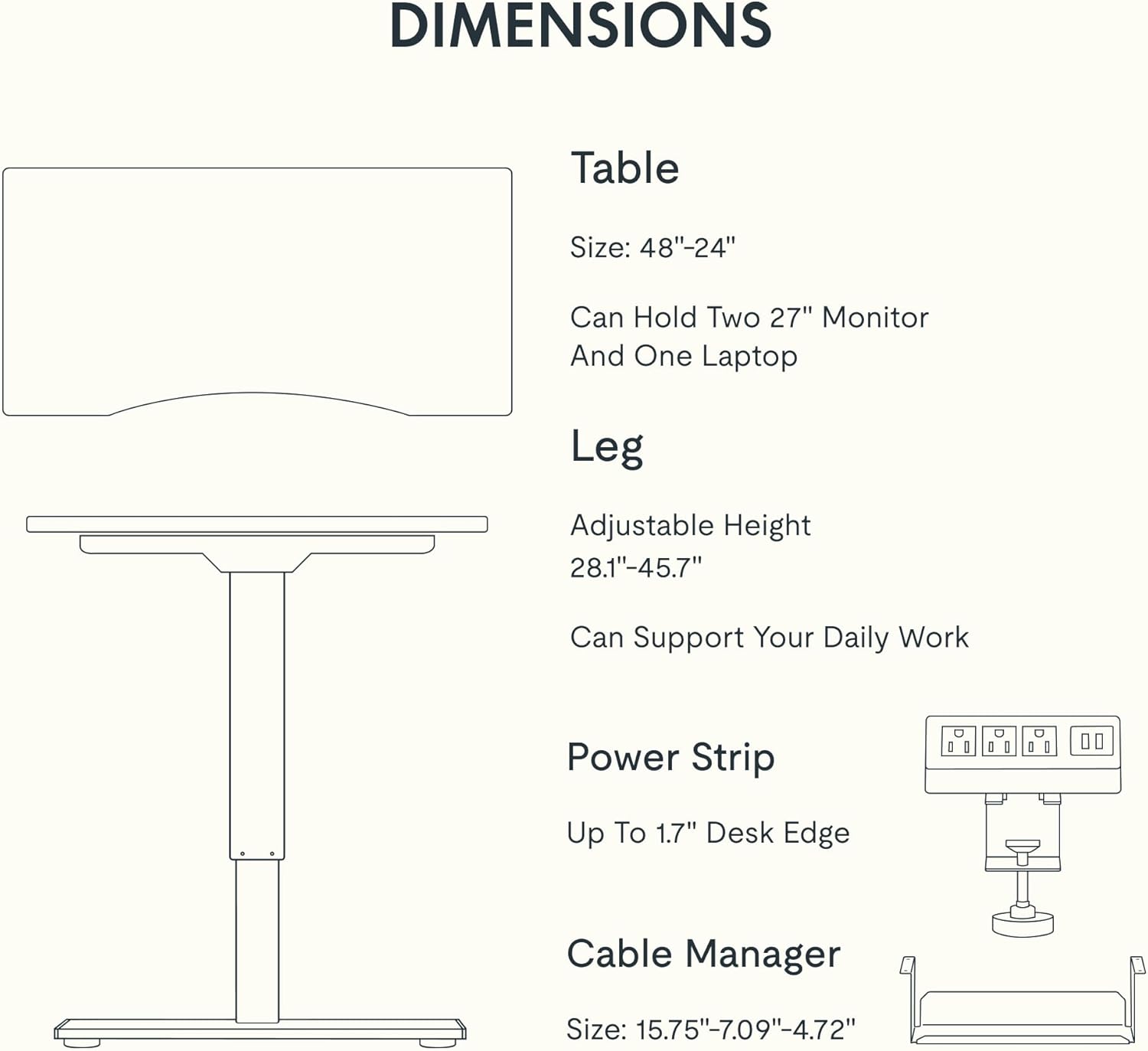
Figure 5: Dimensional specifications of the FLEXISPOT EN2 desk. This diagram illustrates the table size, adjustable height range, and dimensions of the power strip and cable manager.
| Feature | Detail |
|---|---|
| Marca | FLEXISPOT |
| Numero di mudellu | EN2 |
| Materiale di Scrivania | Whole-Piece Bamboo |
| Materiale di quadru | Alloy Steel |
| Dimensioni di u produttu (P x L x A) | 24"P x 48"L x 28"A (61cm P x 122cm L x 71cm A) |
| Gamma d'altezza regulabile | 28.1" - 45.7" (71.4 cm - 116.1 cm) |
| Capacità massima di pesu | 176 lbs (80 kg) |
| Livellu di rumore di u mutore | Meno di 50 dB |
| Presa di Potenza | 3 AC Outlets (125V/12A), 2 USB Charging Ports (5V/2A) |
| Assemblea Necessaria | Yes (Recommended 2 people, electric drill not included) |
Garanzia è Supportu
FLEXISPOT provides the following warranty for your EN2 standing desk:
- Garanzia di 5 anni: Copre telai, motori è altri dispositivi meccanichi.
- Garanzia di 2 anni: Copre i cuntrolli, l'interruttori è l'elettronica.
For customer support, warranty claims, or additional product information, please visit the official FLEXISPOT websitu o cuntattate u so serviziu clienti. Pudete ancu visità u Negoziu FLEXISPOT nant'à Amazon.