Introduzione
This manual provides instructions for the operation and maintenance of your WIITHINK Portable CD Boombox, model WTB771. This device features multiple audio playback options including CD, FM radio, Bluetooth, USB, and AUX input, designed for versatile use.

Image: Front view of the WIITHINK Portable CD Boombox WTB771, black color, showing the display, control buttons, speakers, and handle.
Cuntenutu di u pacchettu
- 1 x WIITHINK Portable CD Radio Boombox (WTB771)
- 1 x Cavu d'alimentazione
- 1 x Linea AUX
- 1 x Manuale d'utilizatore
- 1 x Control remoto
Istituisci
Alimentazione elettrica
The boombox can be powered by AC power or batteries.
- Alimentazione AC: Connect the provided power cable to the AC port on the back of the unit and plug it into a standard wall outlet (AC voltage: 220V / 50Hz, 110V / 60Hz).
- Alimentazione di a batteria: For portable use, insert 4 C-sized batteries (not included) into the battery compartment located on the bottom of the unit. Ensure correct polarity.
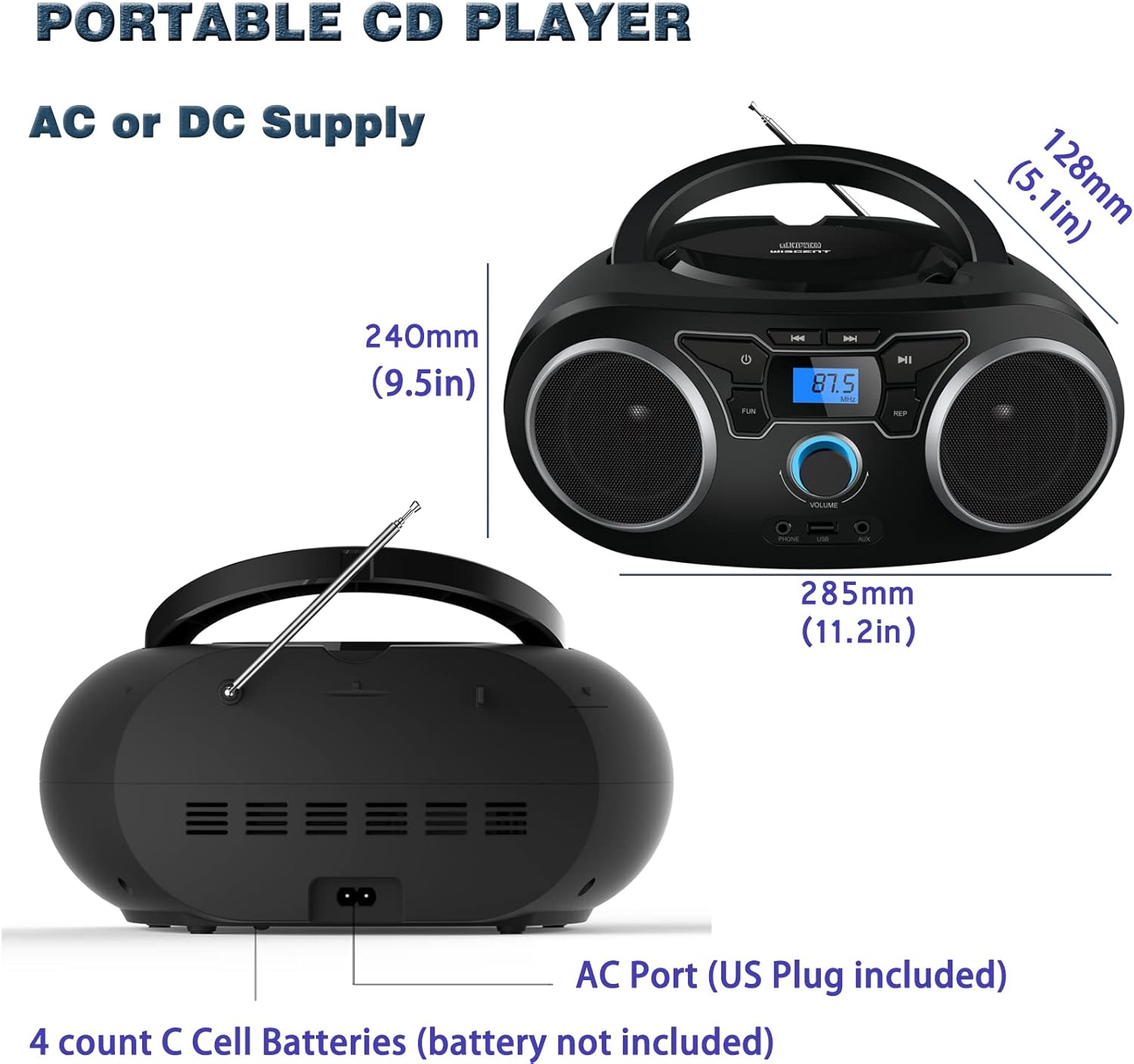
Imagine: Daretu view of the boombox, highlighting the AC power port and the battery compartment for 4 C-sized batteries.
Istruzzioni di funziunamentu
Cuntrolli Generali
The unit features a digital LCD screen and various control buttons and knobs. The main volume control is a rotary knob on the front. A remote control is also included for convenient operation.

Imagine: Da cima à fondu view of the boombox, showing the CD compartment, control buttons, and volume knob.
1. Riproduzione CD
- Open the CD compartment lid located on the top of the unit.
- Place a CD (CD, CD-R, CD-RW, MP3-CD) onto the spindle with the label side facing up.
- Chiude u coperchio di u compartimentu CD.
- Press u MODE buttone per selezziunà u modu CD.
- Press u PLAY/PAUSE buttone per inizià a riproduzione.
- Aduprà u SALTA / RICERCA buttoni per navigà trà e tracce.
- U REPETI button allows for repeating a single track or all tracks.
- U U prugramma function allows you to create a custom playback order for tracks.
The boombox supports MP3 and WMA audio formats on compatible discs.
2. Operazione Radio FM
- Stende l'antenna telescopica per una ricezione ottimale.
- Press u MODE button to select FM Radio mode.
- Per scansà automaticamente è salvà e stazioni, tene premutu u buttone SCAN button. The unit will automatically search for and store up to 30 FM stations.
- Per sintonizà manualmente, utilizate u TUNING buttone o SALTA / RICERCA buttons to find desired frequencies.
- Aduprà u PRESET buttoni per navigà per e stazioni salvate.
Video: A user demonstrating the FM radio tuning function on the WIITHINK Portable CD Boombox WTB771, showing the digital display changing frequencies.
3. Connectivity Bluetooth
- Press u MODE button to select Bluetooth mode. The display will indicate "BT" and the unit will enter pairing mode.
- On your Bluetooth-enabled device (e.g., smartphone, tablet), search for available devices and select "WTB771".
- Una volta assuciatu, pudete trasmette l'audio in streaming senza filu da u vostru dispositivu à u boombox.
Video: Una breve premessaview demonstrating Bluetooth connectivity, showing a smartphone wirelessly connected to the boombox.
4. Riproduzione USB
- Inserite una unità flash USB chì cuntene MP3 files in u portu USB in fronte di l'unità.
- Press u MODE buttone per selezziunà u modu USB.
- L'unità rileverà automaticamente è cumincierà à ghjucà MP3 files da u discu USB.
- Use the playback controls (PLAY/PAUSE, SKIP/SEARCH) to manage your music.
5. Input AUX
- Connect an external audio device (e.g., MP3 player, laptop) to the AUX input jack on the front of the unit using the provided 3.5mm AUX cable.
- Press u MODE buttone per selezziunà a modalità AUX.
- Audio from the connected device will now play through the boombox speakers. Control playback from your external device.
Controls and Ports Overview
| Feature | Descrizzione |
|---|---|
| Pulsante di putenza | Accende / spegne l'unità. |
| Pulsante MODE | Switches between CD, FM, Bluetooth, USB, and AUX modes. |
| Manopola di Volume | Adjusts the audio output level (up to 32 levels). |
| Pulsante PLAY / PAUSE | Starts or pauses playback in CD, USB, and Bluetooth modes. |
| Buttoni SALTÀ/RICERCA | Navigates tracks in CD/USB mode; tunes frequencies in FM mode. |
| Pulsante REPEAT | Repeats current track or all tracks in CD/USB mode. |
| Pulsante PROGRAM | Sets a custom playback order for CD/USB tracks. |
| Antenna FM | Antenna telescopica per a ricezione di e frequenze radio FM. |
| Port USB | Cunnetta unità flash USB per a riproduzione MP3. |
| Jack di ingresso AUX | Ingressu di 3.5 mm per cunnette dispositivi audio esterni. |
| Jack per cuffie | Uscita di 3.5 mm per l'ascolta privata. |
| Control remoto | Provides wireless control over all functions. |

Image: Close-up of the front panel, showing the USB port, AUX input, and headphone jack.
Mantenimentu
- Pulite l'unità cù un pannu dolce è asciuttu. Ùn aduprate micca detergenti abrasivi o solventi.
- Keep the CD compartment clean and free of dust.
- Evitate d'espone l'unità à temperature estreme, umidità o luce solare diretta.
- When not in use for extended periods, remove batteries and unplug the AC power cable.
Risoluzione di prublemi
| Prublemu | Soluzione |
|---|---|
| Nisun putere |
|
| Nisun sonu |
|
| Salta di CD / Micca riproduzione |
|
| Ricezione FM scarsa |
|
| Problemi di accoppiamentu Bluetooth |
|
Specificazioni
- Mudellu: WTB771
- Dimensioni di u pruduttu: 7 x 10 x 4.8 inch (17.8 x 25.4 x 12.2 cm)
- Pesu di l'articulu: 2.64 liri (1.2 kg)
- Potenza di uscita: 2 x 2 W RMS
- Connettività: Ausiliariu, Bluetooth, USB
- Tipu di parlante: Custruitu
- Alimentazione elettrica: AC (220V/50Hz, 110V/60Hz) or 4 x C batteries (not included)
- Tipi di discu supportati: CD, CD-R, CD-RW, MP3-CD
- Formati audio supportati: MP3, WMA
- Presintonizzazioni di a radio FM: Finu à 30 stazioni
Garanzia è Supportu
WIITHINK offers an 18-month after-sales service for this product. For any inquiries or technical support, please contact WIITHINK customer service through your purchase platform. Lifetime technical support is provided.
For further assistance, you may refer to the "Your Orders" section on Amazon, locate your order, and contact "WIITHINK Direct".
Image: Graphic illustrating WIITHINK's customer support, including 18-month replacement and lifetime technical support.
