Introduzione
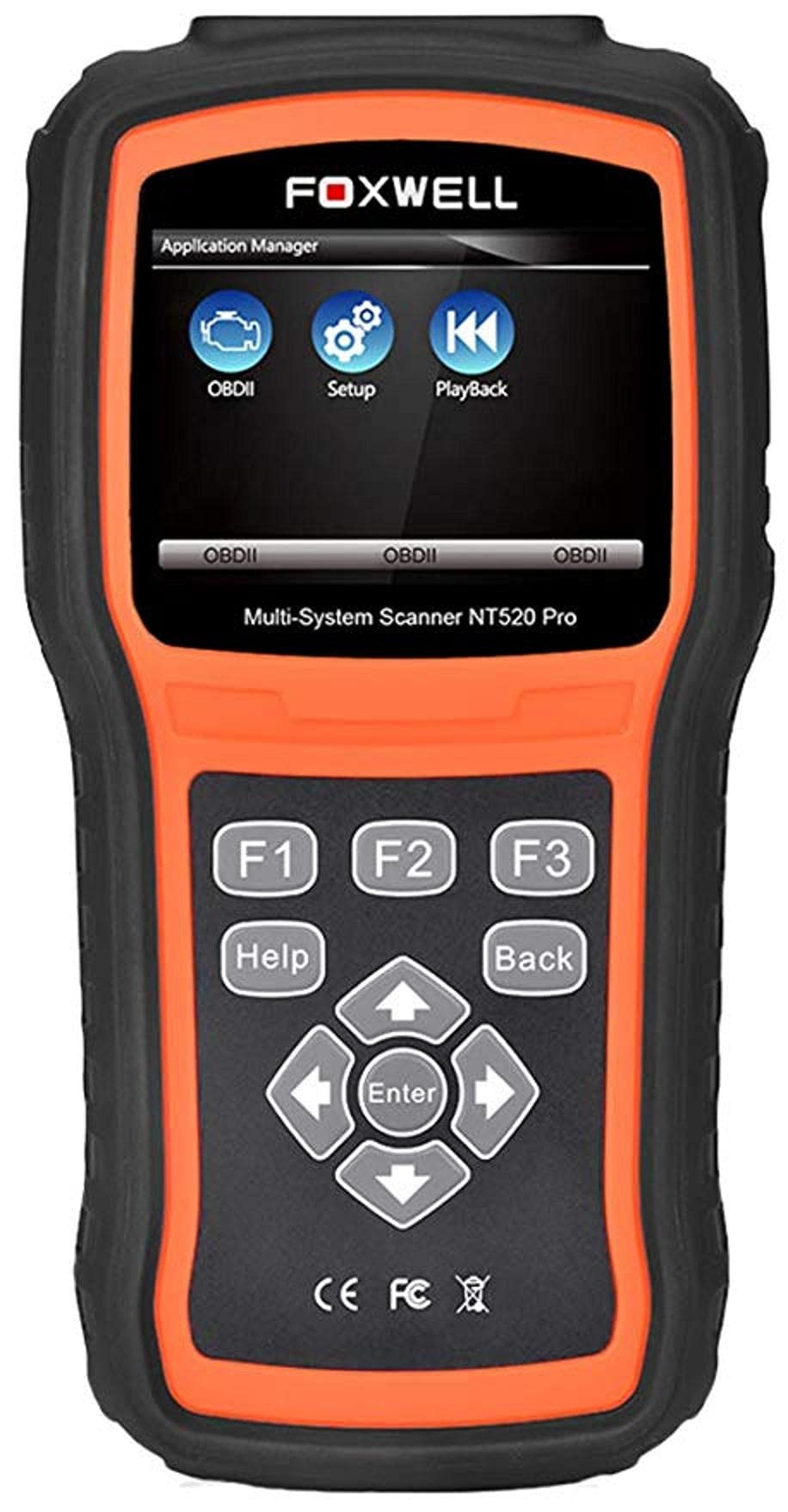
The Foxwell NT520 PRO is a professional-grade car fault diagnostic tool designed to help users identify and resolve issues in various vehicle systems. This device offers comprehensive diagnostic functions, including reading and clearing fault codes, viewing live data streams, and performing specialized tests and coding functions. It supports a wide range of car makes and models equipped with an OBD II - 16 pin connector.
1. Setup
1.1 Cuntenuti di u pacchettu
- Foxwell NT520 PRO Diagnostic Tool
- Cable di diagnosticu OBD II
- USB Cable (for updates and data transfer)
- Manuale d'uso (stu documentu)
1.2 Accensione iniziale di u dispusitivu
- Connect the OBD II diagnostic cable to the NT520 PRO device.
- Locate the vehicle's OBD II port, typically found under the dashboard on the driver's side.
- Plug the diagnostic cable into the vehicle's OBD II port. The device should power on automatically. If not, ensure the vehicle's ignition is in the ON position.
1.3 Actualizazioni di u Software
The NT520 PRO offers free updates for one selected car brand. Additional brands (up to five) can be added via internet for a fee. Regular software updates ensure compatibility with newer vehicle models and provide access to the latest diagnostic features.
- Cunnette vi u dispusitivu à un urdinatore cù u cavu USB furnitu.
- Install the Foxwell update client software on your computer (refer to the official Foxwell website for download).
- Follow the on-screen instructions in the update client to register your device and perform software updates.
2. Operating Instructions
The NT520 PRO features a color screen for easy navigation and data display.
2.1 Navigazione basica
- Aduprate i tasti freccia per navigà in i menu.
- Press the 'Enter' or 'OK' button to select an option.
- Press the 'Back' or 'Exit' button to return to the previous screen.
2.2 Funzioni di diagnosticu
The device supports diagnostics for most available control units in a vehicle, including:
- Modulu di cuntrollu di u mutore (ECM)
- Modulu di cuntrollu di trasmissione (TCM)
- Sistema di frenu antibloccaggio (ABS)
- Sistema di Airbag
- Modulu di cuntrollu di u corpu (BCM)
2.2.1 Lettura è Cancellazione di i Codici di Errore
- From the main menu, select 'Diagnostics' or 'Scan'.
- Choose the vehicle make and model.
- Select the desired control unit (e.g., Engine, ABS).
- Selezziunate "Leghje i codici" per view current and stored Diagnostic Trouble Codes (DTCs).
- Select 'Clear Codes' to erase the detected fault codes. This will also turn off the Malfunction Indicator Lamp (MIL) if the fault is no longer present.
2.2.2 Flussu di dati in diretta
View dati in tempu reale da diversi sensori è cumpunenti.
- After selecting the control unit, choose 'Live Data'.
- Select the parameters you wish to monitor.
- I dati saranu visualizati in furmatu numericu o graficu.
2.2.3 Information ECU
Access information about the Electronic Control Unit.
- After selecting the control unit, choose 'ECU Information'.
- View details such as VIN, calibration ID, and software version.
2.2.4 Component Testing and Coding
The device can perform tests on various car parts and supports programming and coding for different components.
- Component Tests: Select 'Active Test' or 'Component Test' from the menu to activate specific components and check their functionality.
- Programming and Coding: This function allows for programming and coding of various parts. Use with caution and only if you are familiar with the specific vehicle's requirements.
- Key Coding: For certain models, the device supports key coding functionality. Refer to your vehicle's service manual for specific procedures.
3. Mantenimentu
3.1 Cura di u Dispositivu
- Mantene l'apparecchiu pulitu è senza polvere è umidità.
- Mantene u dispusitivu in un locu frescu è seccu quandu ùn hè micca in usu.
- Evitate di abbandunà u dispusitivu o di sottumessu à forti impatti.
- Do not use harsh chemicals for cleaning; a soft, damp tela hè abbastanza.
3.2 Mantenimentu di u Software
Regularly check for and install software updates to ensure optimal performance and compatibility with the latest vehicle models. Refer to section 1.3 for update instructions.
4. Risoluzione di prublemi
4.1 U dispusitivu ùn s'accende micca
- Ensure the OBD II cable is securely connected to both the device and the vehicle's OBD II port.
- Verify that the vehicle's ignition is in the ON position.
- Check the vehicle's fuse for the OBD II port (consult your vehicle's owner's manual).
4.2 Errore di cumunicazione
- Confirm the vehicle supports the OBD II protocol (most vehicles manufactured after 1996 do).
- Assicuratevi chì u cavu di diagnostica ùn sia micca dannighjatu.
- Pruvate à cunnette vi à un altru veiculu per escludere un prublema specificu di u veiculu.
- Update the device software to the latest version.
4.3 Indicatore di malfunzionamentu Lamp (MIL) Remains On
After clearing fault codes, if the MIL (Check Engine Light) remains illuminated, it indicates that the underlying fault has not been resolved or a new fault has occurred. Address the root cause of the fault before attempting to clear codes again.
5. Specificazioni
| Feature | Detail |
|---|---|
| U fabricatore | Foxwell |
| Marca | Foxwell |
| Numero di mudellu | 111111111111 |
| Numero di parte di u fabricatore | 111111111111 |
| Fonte d'energia | Corded Electric |
| Pesu di l'articulu | 818 g |
| Dimensioni di spedizione | 21.2 x 17.8 x 8.2 cm |
| ASIN | B092326PXZ |
| Prima Data Disponibile | 8 d'aprile di u 2021 |
6. Garanzia è Support
6.1 Garanzia di u Produttu
Please refer to the warranty card included with your product or visit the official Foxwell website for detailed warranty information. Warranty terms typically cover manufacturing defects for a specified period from the date of purchase.
6.2 Assistenza tecnica
For technical assistance, software updates, or troubleshooting not covered in this manual, please contact Foxwell customer support through their official website or authorized service centers. Have your product model and serial number ready when contacting support.


