Introduzione
This manual provides essential instructions for the safe and efficient operation of your Miroir M600 1080p Battery-Powered Projector. Please read this manual thoroughly before using the device and retain it for future reference.
Chì ci hè in u Box
Verificate chì tutti l'articuli elencati quì sottu sò inclusi in u vostru pacchettu:
- Miroir M600 Projector
- Cavu HDMI
- AC Adapter and Charger

Image: Contents of the Miroir M600 Projector package.
Product Overview
The Miroir M600 is a compact, portable 1080p projector designed for various projection needs. Familiarize yourself with its components:
Fronte View

Image: Front view of the Miroir M600 Projector, showing the projection lens and ventilation grille.
daretu View è i porti

Imagine: Daretu view of the Miroir M600 Projector, highlighting the various input/output ports.
- Uscita audio da 3.5 mm: Per cunnette altoparlanti esterni o cuffie.
- USB-C Video Port: For video input from compatible USB-C devices.
- Portu HDMI: For video input from HDMI-enabled devices.
- Portu di Carica USB: Per caricare dispositivi esterni.
- Input d'alimentazione DC: For connecting the AC adapter to power and charge the projector.
Istituisci
1. Powering On è Charging
- Connect the AC adapter to the DC Power Input port on the projector and then to a power outlet. The projector can operate while charging.
- Press and hold the power button (location not specified in data, assume standard placement) for a few seconds until the projector powers on.
- The internal battery provides portable operation. Ensure it is sufficiently charged for use without the AC adapter.
2. Piazzamentu è Pruiezione
Position the projector on a stable, flat surface or mount it on a compatible stand. Ensure the lens is unobstructed and pointed towards your desired projection surface (wall or screen).

Image: Miroir M600 Projector positioned on a stand for optimal projection.
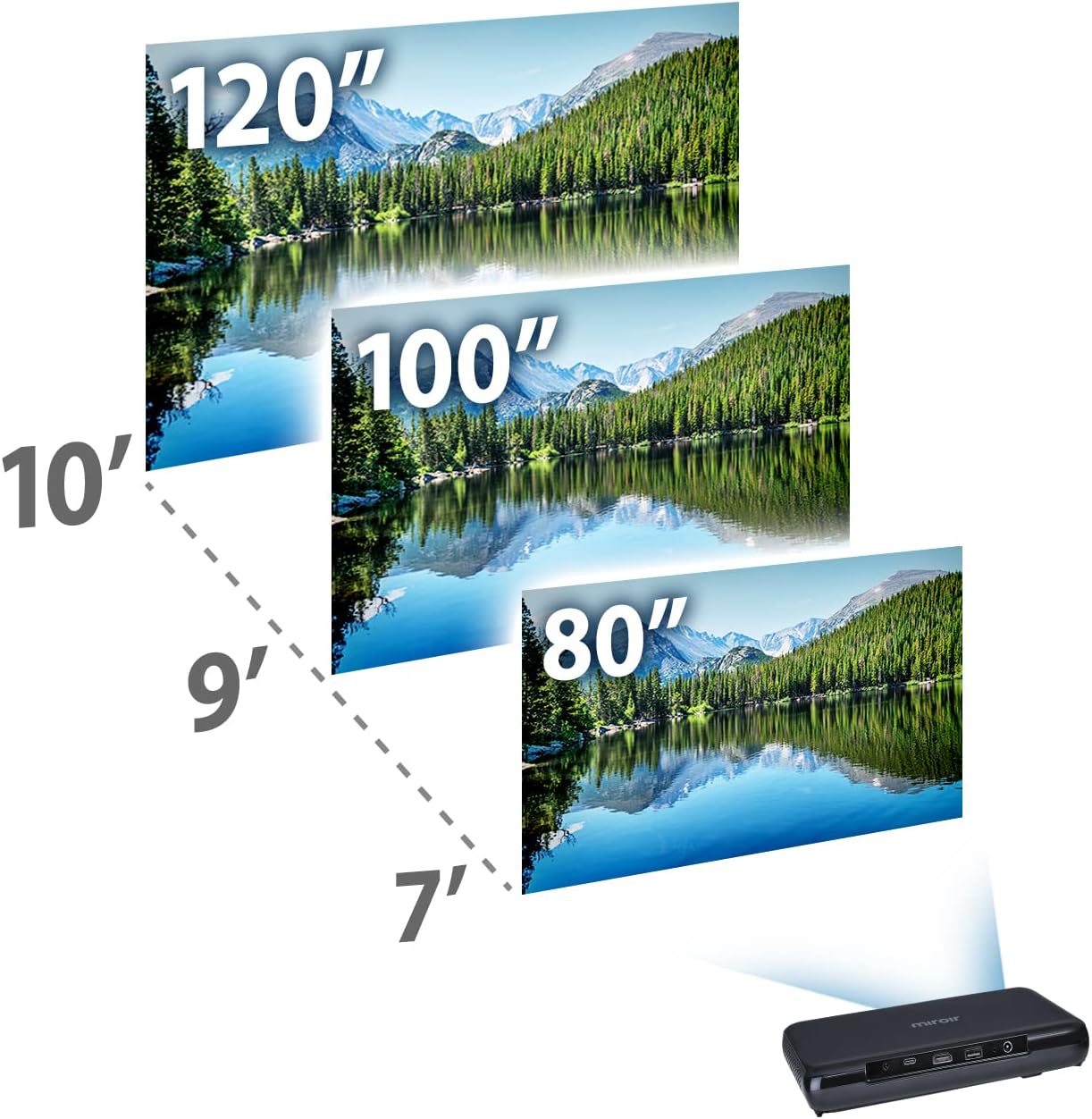
Image: Guide for projection distances to achieve various screen sizes (e.g., 7 feet for 80 inches, 10 feet for 120 inches).
Operazione
1. Connecting Input Devices
- HDMI: Connect an HDMI cable from your source device (laptop, streaming stick, game console) to the HDMI port on the projector.
- USB-C Video: For compatible devices, connect a USB-C cable from your source to the USB-C Video port on the projector.
2. Adjusting Image and Focus
The Miroir M600 features automatic keystone correction to adjust the image shape. For focus, manual adjustment may be required via a focus wheel (location not specified in data, assume standard placement near lens).
3. Output Audio
The projector includes a built-in 5-watt speaker. For enhanced audio, connect external speakers or headphones to the 3.5mm Audio Out jack.
4. Lamp Modi
U LED lamp offers two modes:
- Modu normale: Up to 20,000 hours of lamp vita.
- Modu ECO: Up to 30,000 hours of lamp life, providing extended usage and reduced power consumption.
Mantenimentu
1. Pulizia di u pruiettore
- Lenti: Aduprate un pannu dolce è senza pelu specificamente cuncipitu per lenti ottiche. Ùn aduprate micca detergenti abrasivi o forza eccessiva.
- Esternu: Asciugate l'esternu di u prughjettore cù un pannu dolce è asciuttu. Evitate d'utilizà detergenti liquidi direttamente nantu à u dispusitivu.
- Ventilazione: Assicuratevi chì e griglie di ventilazione sianu libere da polvere è detriti per impedisce u surriscaldamentu.
2. Cura di batterie
- Per una durata ottimale di a batteria, evitate di scaricà cumpletamente a batteria spessu.
- Store the projector in a cool, dry place when not in use for extended periods.
Risoluzione di prublemi
If you encounter issues with your Miroir M600 projector, refer to the following common solutions:
- No Image: Ensure the input source is correctly connected and selected. Check all cable connections.
- Immagine sfocata: Adjust the focus manually. Ensure the projection surface is flat and the projector is stable.
- Nisun sonu: Verify that the volume is not muted on both the projector and the source device. If using external speakers, ensure they are properly connected and powered.
- Surriscaldamentu: Assicuratevi una ventilazione adatta intornu à u pruiettore. Ùn bluccate micca e prese d'aria.
For more detailed troubleshooting steps, please consult the full user manual available for download (see Support section).
Specificazioni
| Feature | Detail |
|---|---|
| Dimensioni di u produttu | 9 x 5 x 1 inch |
| Pesu di l'articulu | 1.6 liri |
| Numeru di mudellu di l'articulu | M600 |
| Batterie | 1 Batteria Lithium Polymer (inclusa) |
| U fabricatore | Miroir |
| Marca | Miroir |
| Usi cunsigliati | Affari |
| Funzione speciale | Pico, Speakers |
| Tecnulugia di cunnessione | USB, HDMI |
| Risoluzione di visualizazione | 1920 x 1080 (1080p) |
| Lamp Life (Normal Mode) | Finu à 20,000 ore |
| Lamp Life (ECO Mode) | Finu à 30,000 ore |
| Speaker integratu | 5-watt |
| Diagonale di u screnu visibile | 120" / 305 cm |
Infurmazioni di Garanzia
Specific warranty details are not provided in this document. Please refer to the official Miroir website or the warranty card included with your product for comprehensive warranty terms and conditions.
Supportu & Cuntattu
For further assistance, detailed instructions, or to contact customer support:
- Manuale Utente Pienu: A comprehensive PDF user manual is available for download quì.
- U fabricatore Websitu: Visit the official Miroir website for product registration, FAQs, and support resources.


