1. Produttu Finituview
The SonicWall NSa 6700 Gen 7 Firewall is an enterprise-grade next-generation firewall appliance designed for large organizations and service providers requiring high scalability and robust security. This unit provides advanced threat prevention and network management capabilities.
E caratteristiche chjave includenu:
- High throughput: 36 Gbps firewall throughput and 19 Gbps threat prevention.
- Extensive connection support: Up to 8 million concurrent connections.
- Advanced threat protection: Utilizes Capture ATP sandboxing, RTDMI inspection, Intrusion Prevention System (IPS), and Deep Packet Inspection for SSL (DPI-SSL) for defense against malware and encrypted threats.
- Flexible port configuration: Includes 40 GbE, 25 GbE, 10 GbE, and 1 GbE options for diverse network deployments.
- Scalability: Supports thousands of VPN tunnels and remote users.
- High availability: Features redundant power supplies and clustering support for continuous operation.
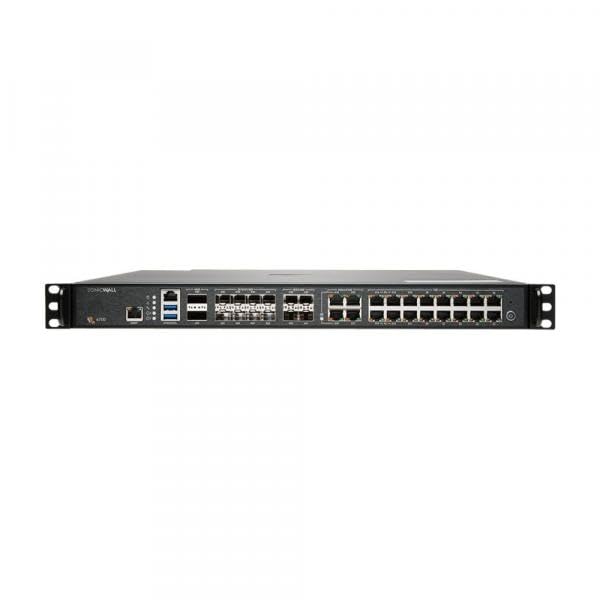
Image 1.1: Front view of the SonicWall NSa6700 Gen 7 Firewall appliance, showcasing its port configuration and indicators.
2. Setup è Installazione
2.1 Unpacking è Inspection
Carefully unpack the SonicWall NSa6700 appliance and its accessories. Verify that all components listed in the packing slip are present and inspect the unit for any physical damage. Report any damage or missing items to your vendor immediately.
2.2 Installazione fisica
The NSa6700 is designed for rack-mounting in a standard 19-inch equipment rack. Ensure adequate ventilation around the unit to prevent overheating. Connect the power cables to the redundant power supply units and then to appropriate power sources. Connect network cables to the desired interfaces (WAN, LAN, DMZ, etc.) according to your network design.
2.3 Configurazione iniziale
To perform initial configuration:
- Connect a management workstation to the management interface (typically X0 or MGMT port) using an Ethernet cable.
- Configure your workstation's IP address to be on the same subnet as the firewall's default management IP (refer to the Quick Start Guide for default IP).
- apre a web browser and navigate to the firewall's management IP address.
- Log in using the default credentials (refer to the Quick Start Guide). You will be prompted to change the default password upon first login.
- Segui l'assistente di cunfigurazione in schermu per cunfigurà i paràmetri di rete basi, u fusu orariu è e password amministrative.
For users participating in the SonicWall Secure Upgrade Plus program, ensure your qualifying device information is ready for registration and activation of the service subscription.
3. Operating the Firewall
3.1 SonicOS Management Interface
The SonicWall NSa6700 operates on SonicOS, providing a comprehensive web-based management interface. This interface allows for configuration of all firewall features, monitoring, and reporting.
3.2 Cunfigurazione di Rete
Configure network zones, interfaces, routing, and VPN tunnels through the Network section of the management interface. The NSa6700 supports various VPN types, including site-to-site and remote access VPNs, to secure communications across distributed environments.
3.3 Security Services
Activate and configure the Advanced Protection Service Suite (APSS) features:
- Antivirus Gateway: Scans incoming and outgoing traffic for known malware signatures.
- Sistema di Prevenzione di l'Intrusione (IPS): Prutege contr'à l'attacchi è l'exploit basati nantu à a rete.
- Cuntrollu di l'applicazione: Manages and restricts application usage on the network.
- Filtru di cuntenutu: Blocca l'accessu à informazioni inappropriate o maliziose websiti.
- Capture ATP (Advanced Threat Protection): Provides multi-engine sandboxing for zero-day threat detection.
- RTDMI (Ispezione di Memoria Profonda in Tempu Reale): Analyzes memory for advanced malware.
- DPI-SSL: Ispeziona u trafficu criptatu per e minacce nascoste.
Rigularmente riview and update security policies to ensure optimal protection.
3.4 Monitoraghju è Rapportu
Utilize the dashboard and logging features within SonicOS to monitor network activity, security events, and system performance. Generate reports to analyze traffic patterns and threat landscapes.
4. Mantenimentu
4.1 Aghjornamenti di u firmware
Periodically check for and apply the latest firmware updates from the SonicWall support portal. Firmware updates often include security patches, new features, and performance enhancements. Always back up your configuration before performing a firmware update.
4.2 Cunfigurazione Backup and Restore
Regularly back up your firewall configuration to an external location. This allows for quick recovery in case of configuration errors or system failures. The SonicOS interface provides options to export and import configuration files.
4.3 Hardware Health Check
Monitor the system status indicators on the front panel of the appliance. Ensure that cooling fans are operating correctly and that the environment temperature remains within specified limits. Clean dust from air vents as needed to maintain proper airflow.
4.4 Service Subscription Management
Ensure your Advanced Protection Service Suite (APSS) subscription is active and up-to-date to receive continuous threat intelligence updates and access to support services.
5. Risoluzione di prublemi
5.1 Basic Connectivity Issues
- Verify physical cable connections to all interfaces.
- Check interface status in the SonicOS management interface.
- Confirm IP address configurations and routing tables.
- Use diagnostic tools like ping and traceroute from the firewall's command line interface (CLI) or diagnostic page.
5.2 Degradazione di e prestazioni
- Monitor CPU, memory, and connection usage from the SonicOS dashboard.
- Review security service logs for high threat activity or excessive scanning.
- Ensure firmware is up-to-date.
5.3 Accessing Logs and Diagnostics
The SonicOS management interface provides detailed logs for system events, security services, and network traffic. These logs are crucial for identifying the root cause of issues. The diagnostic tools section offers packet capture, network monitoring, and other utilities.
5.4 Cuntattate u Supportu
If you are unable to resolve an issue, contact SonicWall Technical Support. Have your product serial number, support contract details, and a description of the problem ready. Your 2-year Advanced Protection Service Suite includes 24x7 support.
6. Specificazioni
| Attributu | Valore |
|---|---|
| Numero di mudellu | NSa6700 |
| Marca | Sonicwall |
| Sistema upirativu | SonicOS |
| Dimensioni di u pacchettu | 28 x 24 x 8 inch |
| Pesu di l'articulu | 31 liri |
| ASIN | B09CHL19M2 |
| UPC | 758479295808 |
| U fabricatore | SonicWall |
| Data Prima Disponibile | 12 d'aostu di u 2021 |
7. Garanzia è Support
This SonicWall NSa6700 unit includes a 2-Year Advanced Protection Service Suite (APSS) as part of the SecureUpgradePlus program. This suite provides comprehensive security services and 24x7 technical support.
7.1 Advanced Protection Service Suite (APSS)
The APSS includes:
- Gateway Anti-Virus, Intrusion Prevention, Application Control, and Content Filtering.
- Capture ATP (Advanced Threat Protection) for sandboxing.
- Real-Time Deep Memory Inspection (RTDMI).
- 24x7 technical support.
- Firmware updates and hardware warranty.
For detailed terms and conditions of your warranty and support services, please refer to the official SonicWall website or your purchase agreement.
7.2 Risorse in linea
Additional documentation, knowledge base articles, and support tools are available on the official SonicWall support portal: https://www.sonicwall.com/support


