Introduzione
This manual provides instructions for setting up, operating, and maintaining your HP 235 Wireless Keyboard and Mouse Combo. Please read this guide thoroughly before using the product to ensure proper functionality and longevity.
Cuntenutu di u pacchettu
- Tastiera senza filu HP
- Mouse senza filu HP
- USB Type-A Wireless Receiver
- AA Batteries (pre-installed or included separately)
Istituisci
Follow these steps to set up your HP 235 Wireless Keyboard and Mouse Combo:
- Inserite batterie: If not already installed, open the battery compartments on the underside of both the keyboard and the mouse. Insert the AA batteries, ensuring correct polarity. Close the compartments.
- Cunnette u Ricevitore USB: Locate an available USB Type-A port on your computer. Insert the USB wireless receiver into the port. Your computer should automatically detect the device.
- Power On: Turn on the keyboard and mouse using their respective power switches, usually located on the underside. The devices should connect automatically to the receiver.

Operazione di a Tastiera
The HP 235 Wireless Keyboard features a standard layout with additional function keys.
- Chjavi Standard: Use the alphanumeric keys for typing text and numbers.
- Tasti di funzione (F1-F12): These keys may have secondary functions (e.g., volume control, media playback, brightness adjustment) when pressed in combination with the Fn key. Refer to your computer's documentation for specific Fn key combinations.
- Tastiera numerica: The dedicated numeric keypad on the right provides quick entry for numbers and calculations. Ensure Num Lock is active for numeric input.
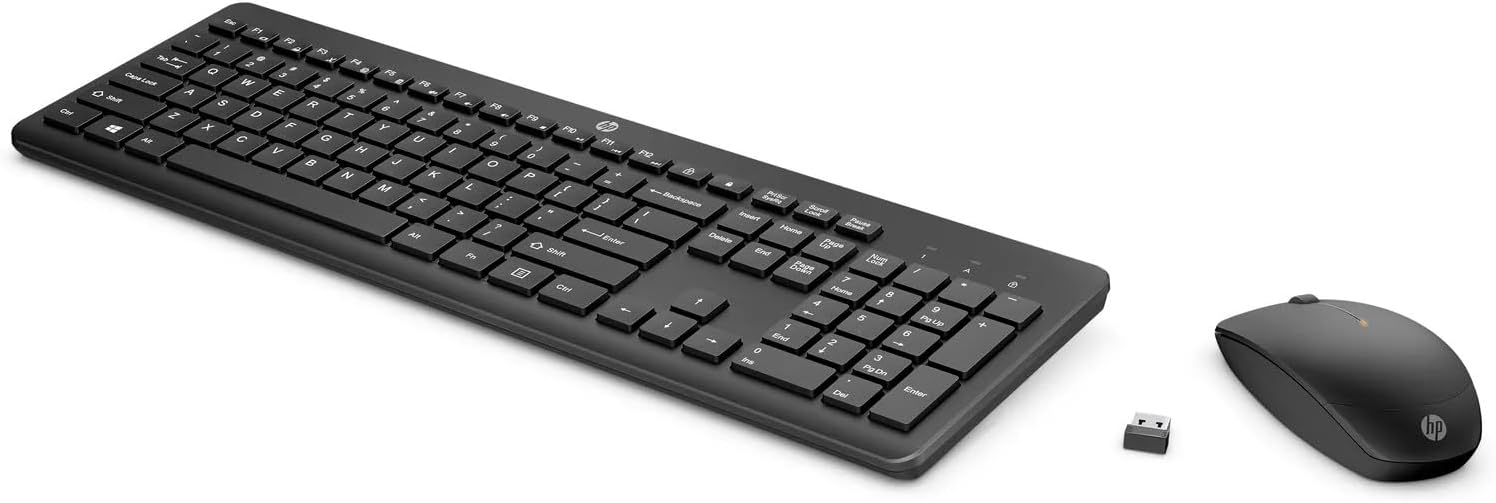
Funziunà u mouse
The HP 235 Wireless Mouse provides precise cursor control.
- Pulsante di manca: Primary click function, typically used for selecting items or opening applications.
- Pulsante drittu: Secondary click function, typically used for context menus.
- Rotella di scorrimentu: Roll the wheel to scroll through documents or web pagine. A rota di scorrimentu pò ancu funziunà cum'è un buttone di cliccu centrale.
Mantenimentu
Proper maintenance ensures the longevity of your wireless combo.
- Pulizia: Use a soft, dry cloth to clean the surfaces of the keyboard and mouse. For stubborn dirt, slightly dampSciacquate u pannu cù acqua. Evitate prudutti chimichi aggressivi o materiali abrasivi.
- Sustituzione di batterie: When performance degrades (e.g., delayed response, intermittent connection), replace the batteries in both the keyboard and mouse with new AA batteries. Dispose of old batteries according to local regulations.
- Conservazione: When not in use for extended periods, turn off the devices to conserve battery life. Store the USB receiver in a safe place, possibly inside the mouse's battery compartment if available.
Risoluzione di prublemi
If you encounter issues with your HP 235 Wireless Combo, try the following solutions:
| Prublemu | Soluzione |
|---|---|
| A tastiera/u mouse ùn risponde micca |
|
| Cunnessione intermittente |
|
| U cursore di u mouse hè erraticu o ùn si move micca bè |
|
Specificazioni
- Marca: HP
- Mudellu: 235
- Tecnulugia di cunnessione: Wireless (USB Type A receiver)
- Cumpatibilità di u Sistema Operativu: Windows 10
- Pesu di l'articulu: Circa 1.83 liri (0.83 kg)
- Dimensioni di u pruduttu (LxWxH): Circa 18 x 8.8 x 1.9 inches (45.7 x 22.4 x 4.8 cm)
- Fonte di energia: Alimentatu da batterie (batterie AA)
Garanzia è Supportu
For warranty information and technical support, please visit the official HP support website or contact HP customer service. Keep your purchase receipt for warranty claims.
Pudete truvà più infurmazioni è risorse di supportu à www.hp.com/support.