1. Introduzione
This manual provides essential information for the safe and efficient operation of your RCF Art 945-A Powered Speaker. Please read this manual thoroughly before using the product and retain it for future reference. The RCF Art 945-A is a high-performance, bi-amplified active speaker designed for professional audio applications, featuring a 15-inch neodymium woofer and a 4-inch titanium/neodymium compression driver, delivering 2,100W of power.
2. Informazioni di sicurezza
Istruzzioni di sicurezza impurtanti:
- Leghjite sti struzzioni.
- Mantene queste istruzioni.
- Ascoltate tutti i avvisi.
- Segui tutte e struzzioni.
- Ùn aduprate micca stu apparatu vicinu à l'acqua.
- Pulite solu cù un pannu seccu.
- Ùn bluccà ogni apertura di ventilazione. Installa in cunfurmità cù e struzzioni di u fabricatore.
- Ùn installate micca vicinu à fonti di calore cum'è radiatori, registri di calore, stufe, o altri apparecchi (cumpresu amplifiers) chì producenu calore.
- Ùn scunfighja micca u scopu di sicurità di u plug polarizatu o di terra. Un plug polarizatu hà duie pale cù una più larga di l'altru. Un plug di tipu di terra hà duie lame è una terza punta di terra. A lama larga o a terza punta sò furnite per a vostra sicurità. Se a presa furnita ùn si mette micca in a vostra presa, cunsultate un electricista per a sostituzione di a presa obsoleta.
- Prutegge u cordone di alimentazione da esse camminatu o pinzatu, in particulare in i tappi, i recipienti di cunvenzione, è u puntu induve esce da l'apparechju.
- Aduprate solu accessori / accessori specificati da u fabricatore.
- Scollegate stu apparatu durante e tempeste di fulmini o quandu ùn hè micca utilizatu per longu periodi di tempu.
- Riferite tutte l'assistenza à u persunale di serviziu qualificatu. U serviziu hè necessariu quandu l'apparechju hè statu danatu in ogni modu, cum'è u cordone di l'alimentazione o u plug hè dannatu, u liquidu hè statu versatu o l'uggetti sò caduti in l'apparechju, l'apparechju hè statu espostu à a pioggia o l'umidità, ùn funziona micca nurmale. , o hè stata abbandunata.
Attenzione: To prevent electrical shock, do not remove the cover. No user-serviceable parts inside. Refer servicing to qualified personnel.
3. Cuntenutu di u pacchettu
Verificate chì tutti l'articuli elencati quì sottu sò inclusi in u vostru pacchettu:
- RCF Art 945-A Powered Speaker
- Cavu di putenza
- Vertical mount bracket
- Muntagna à palu
- Prutezzione di pioggia
- Manuale d'uso (stu documentu)
4. Produttu Finituview

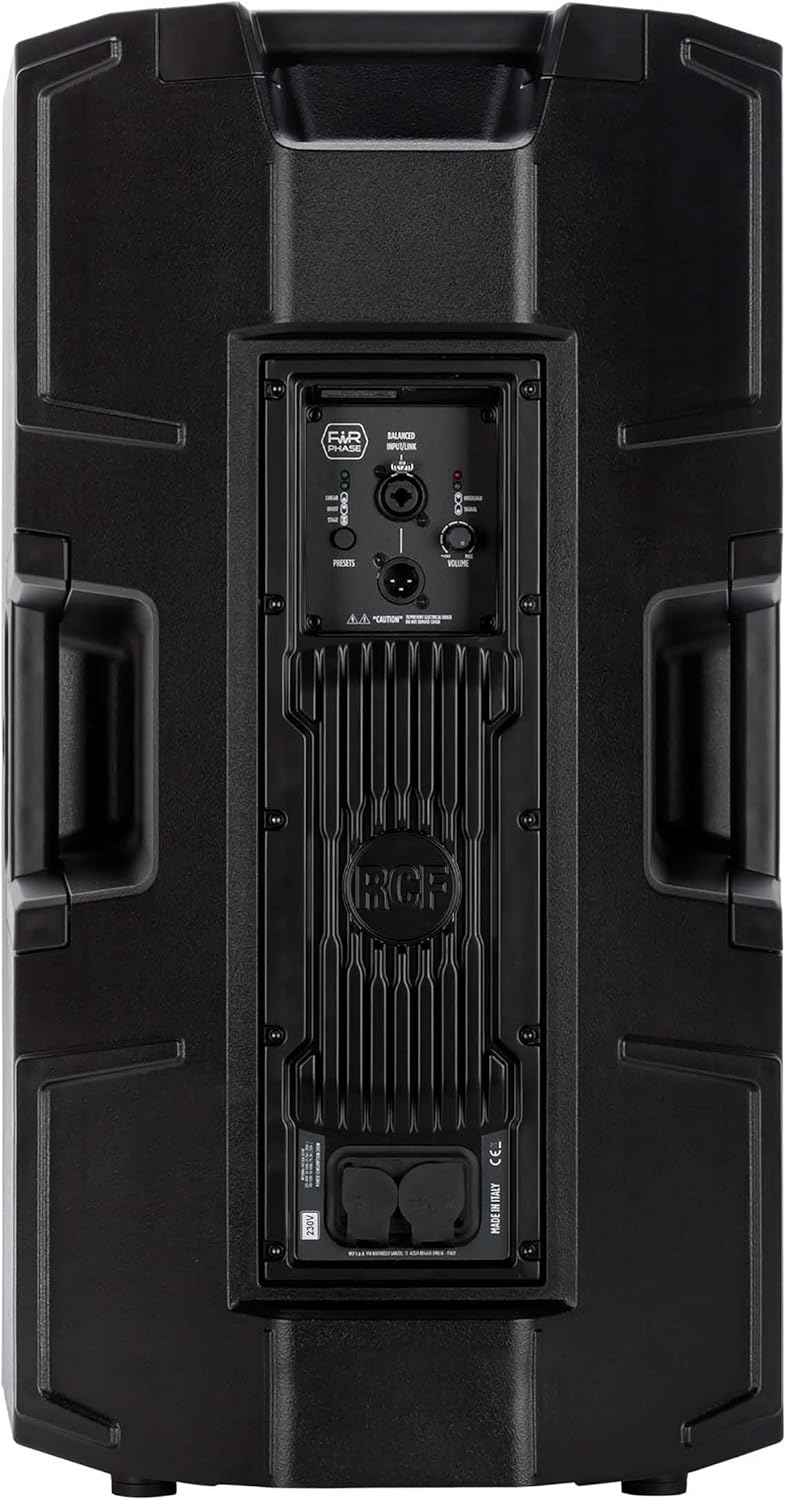

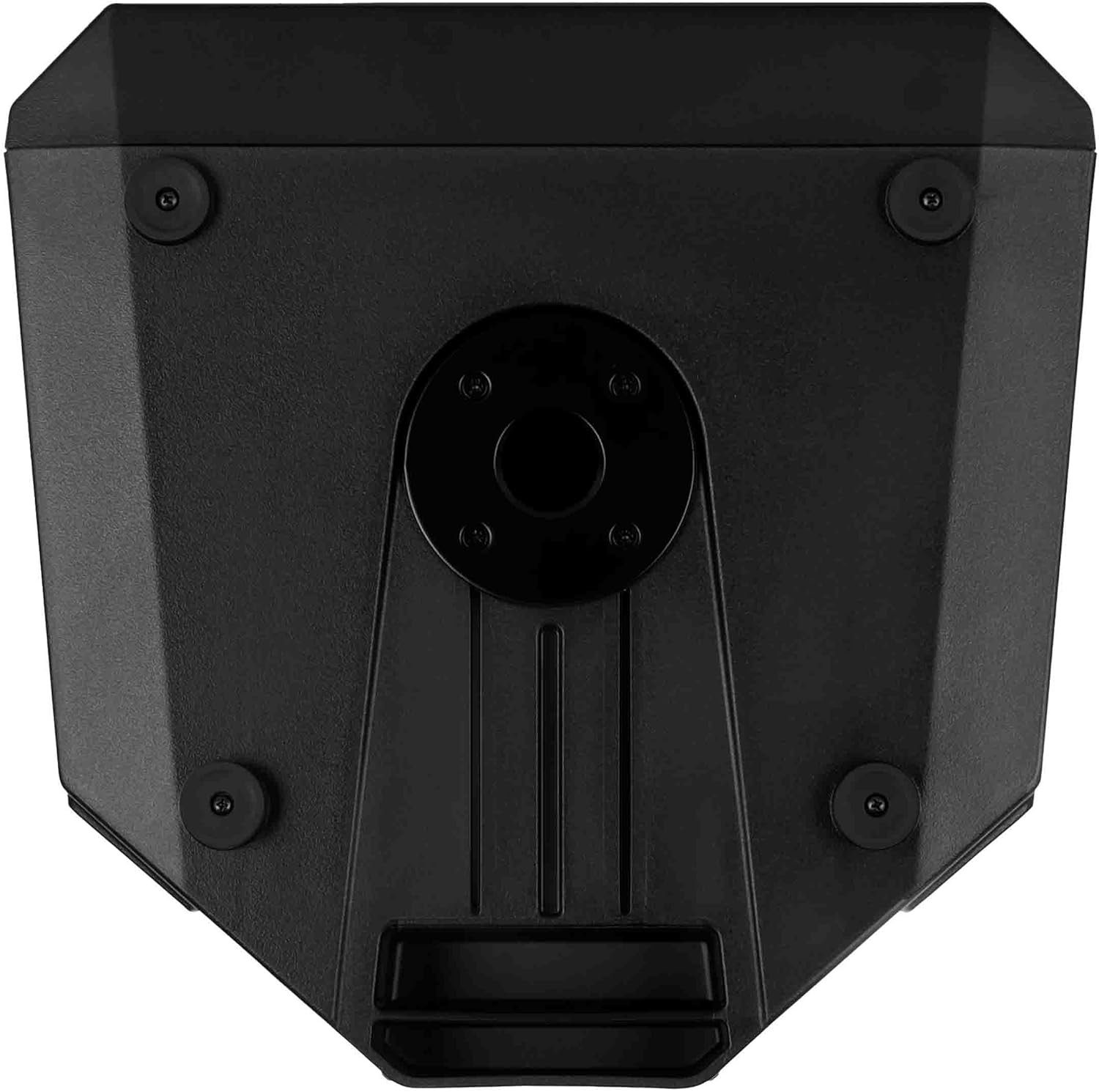

4.1. Rear Panel Controls and Connections
- BALANCED INPUT/LINK (XLR): XLR input for audio signal and XLR link output to connect to another speaker.
- PRESETS Button: Cycles through different DSP presets (LINEAR, BOOST, STAGE) to optimize sound for various applications.
- LINEAR LED: Indicates the 'Linear' preset is active, providing a flat frequency response.
- BOOST LED: Indicates the 'Boost' preset is active, enhancing bass and treble frequencies.
- STAGE LED: Indicates the 'Stage' preset is active, optimized for stage applicazioni di monitoraghju.
- Manopola VOLUME: Ajusta u livellu generale di output di l'altoparlante.
- OVERLOAD LED: Illuminates when the input signal is too high, indicating potential clipping. Reduce input level if this LED lights up consistently.
- LED SEGNALE: Illuminates when an audio signal is present at the input.
- POWERCON TRUE1 Input: Secure power connector for AC mains input.
- POWERCON TRUE1 Link: Power output to link power to another speaker.
5. Setup
5.1. Piazzamentu
The RCF Art 945-A speaker can be used in various configurations:
- Montaggio di u polu: Insert the speaker onto a standard 35mm speaker pole or tripod stand using the integrated pole mount socket on the bottom of the speaker. Ensure the stand is stable and rated for the speaker's weight (approximately 49.3 lbs / 22.4 kg).
- Posizionamentu di u pianu: The speaker can be placed directly on a flat, stable surface. The rubber feet on the bottom provide stability and isolation.
- Stage Monitor: U disignu di u cabinet permette l'usu cum'ètage monitor. Position the speaker on its side with the appropriate angle for monitoring.
- Montatura à u muru: Utilize the provided vertical mount bracket for secure wall installation. Ensure the wall structure can support the speaker's weight.
5.2. Connection Power
- Ensure the speaker's VOLUME knob is set to minimum (fully counter-clockwise).
- Connect the supplied Powercon TRUE1 power cable to the POWERCON TRUE1 Input on the rear panel of the speaker.
- Connect the other end of the power cable to a suitable AC mains outlet. Verify that the voltage matches the speaker's requirements (e.g., 100-120V or 220-240V).
- If linking power to another speaker, use a Powercon TRUE1 link cable from the POWERCON TRUE1 Link output to the input of the next speaker.
5.3. Cunnessioni Audio
- Connect your audio source (e.g., mixer, audio interface) to the BALANCED INPUT (XLR) on the rear panel using a balanced XLR cable.
- If connecting multiple speakers in a daisy chain, use an XLR cable from the BALANCED LINK output of the first speaker to the input of the next speaker.
6. Uperativu
6.1. Powering On / Off
- Before powering on, ensure all connections are secure and the VOLUME knob is at its minimum setting.
- Locate the power switch (typically near the power input) and switch it to the 'ON' position. The power LED on the front of the speaker will illuminate.
- To power off, set the VOLUME knob to minimum, then switch the power switch to 'OFF'.
6.2. Control Volume
The VOLUME knob on the rear panel controls the output level of the speaker. Slowly turn the knob clockwise to increase the volume to the desired level. Monitor the OVERLOAD LED to prevent clipping.
6.3. Preset Selection
The PRESETS button allows you to select between three different DSP modes:
- LINEARI: Provides a flat frequency response, suitable for general sound reinforcement where a neutral sound is desired.
- BOOST: Enhances low and high frequencies, often used for music playback or when a more pronounced bass and treble response is needed.
- STAGE: Ottimizatu per aduprà cum'ètage monitor, providing clarity and feedback suppression for performers.
Press the PRESETS button repeatedly to cycle through these modes. The corresponding LED (LINEAR, BOOST, or STAGE) will illuminate to indicate the active preset.
6.4. Signal and Overload Indicators
- LED SEGNALE: This green LED illuminates when an audio signal is detected at the input. It indicates that the speaker is receiving an audio signal.
- OVERLOAD LED: This red LED illuminates when the input signal level is too high, causing the amplifier to clip. If this LED lights up frequently or stays on, reduce the input level from your source or the speaker's VOLUME knob to prevent distortion and potential damage.
7. Mantenimentu
7.1. Pulizia
Per mantene l'aspettu è e prestazioni di u vostru altoparlante:
- Disconnect the speaker from the power supply before cleaning.
- Use a soft, dry cloth to wipe down the cabinet.
- Per a sporcizia ostinata, un pocu di damp Un pannu cù sapone dolce pò esse adupratu, seguitatu da un pannu asciuttu.
- Ùn aduprate micca detergenti abrasivi, solventi o chimichi aggressivi, postu chì questi ponu dannà a finitura.
- Keep the grille free of dust and debris to ensure proper sound dispersion.
7.2. Storage
Quandu ùn hè micca in usu per periodi prolungati:
- Conservate l'altoparlante in un locu frescu è asciuttu, luntanu da a luce diretta di u sole è da temperature estreme.
- If possible, use the original packaging or a protective cover to shield the speaker from dust and physical damage.
8. Risoluzione di prublemi
This section addresses common issues you might encounter with your RCF Art 945-A speaker.
| Prublemu | Causa Possibile | Soluzione |
|---|---|---|
| Nisuna uscita di sonu |
|
|
| Distorted sound / OVERLOAD LED on |
|
|
| Un ronzio o un ronzio |
|
|
| U parlante ùn si accende micca |
|
|
If the problem persists after attempting these solutions, please contact RCF customer support or a qualified service technician.
9. Specificazioni
The following table outlines the technical specifications for the RCF Art 945-A Powered Speaker:
| Feature | Specificazione |
|---|---|
| Nome di mudellu | 13000691 |
| Numeru di mudellu di l'articulu | ART945-A |
| Tipu di parlante | Woofer |
| Diametru di u woofer | 15 inch |
| Diametru di Tweeter | 4 inch |
| Potenza massima di output di Speaker | 2100 Watt |
| Modu Output Audio | Classe D |
| Tecnulugia di cunnessione | Coassiale |
| Fonte d'energia | Corded Electric |
| Metudu di cuntrollu | Touch (for presets) |
| Dimensioni di u produttu | 16.34"L x 28.23"A |
| Pesu di l'articulu | 49.3 liri (22.4 chilògrammi) |
| Cumpunenti inclusi | Vertical mount bracket, pole mount, rain protection |
| Tipu di muntatura | Muntu à u Muru, Muntu Pollu |
| Hè Impermeabile | FALSE |
| U fabricatore | RCF |
| ASIN | B09GWCSX7R |
10. Garanzia
The RCF Art 945-A Powered Speaker comes with a Garanzia limitata. Specific terms and conditions of the warranty may vary by region and retailer. Please refer to the warranty card included with your product or visit the official RCF website for detailed warranty information. Retain your proof of purchase for any warranty claims.
11. Supportu
For technical assistance, service, or further information regarding your RCF Art 945-A Powered Speaker, please contact RCF customer support:
- Supportu in ligna: Visit the official RCF websitu (www.rcf.it) for FAQs, product registration, and support resources.
- Informazioni di cuntattu: Refer to the contact section on the RCF website for regional phone numbers or email support.
When contacting support, please have your product model (ART945-A) and serial number (if applicable) ready.