1. Introduzione
The FLYLINKTECH CF600 Car Jump Starter is a portable, powerful device designed to start vehicles with dead batteries. It features a 1500A peak current, suitable for gasoline engines up to 8.0 liters and diesel engines up to 6.0 liters. Beyond its primary function, it also serves as a 16000mAh power bank for charging electronic devices and includes a multi-function LED light for various utility purposes. This manual provides essential information for safe and effective operation, maintenance, and troubleshooting of your jump starter.

Figure 1: FLYLINKTECH Car Jump Starter with smart clamps and charging cables.
2. Informazioni di sicurezza
Leghjite attentamente tutti l'avvertimenti di sicurezza è l'istruzzioni prima di utilizà stu pruduttu. A mancanza di seguitu di l'avvertimenti è di l'istruzzioni pò causà scosse elettriche, incendi è/o ferite gravi.
- Assicuratevi sempre chì u starter di emergenza sia cumpletamente caricatu prima di l'usu.
- Do not attempt to jump start a vehicle if the jump starter or cables are damaged.
- Cunnette u clamps currettamente: Cl rossuamp à u terminale pusitivu (+), cl neruamp to negative (-) terminal. Reverse polarity can cause damage.
- Ùn cunnette micca u cl pusitivu è negativuamps inseme.
- Mantene fora di a portata di i zitelli.
- Ùn espone micca u pruduttu à a pioggia o à e condizioni umide.
- Ùn smuntate micca l'unità. Cunfidate tutta a manutenzione à persunale qualificatu.
- Assicuratevi chì l'accensione di u veiculu sia spenta prima di cunnette u starter di emergenza.
- Remove the jump starter from the vehicle battery within 30 seconds after the engine starts.
- Funzioni di u dispusitivu 8 Smart Safe Clamp Prutezzione, including reverse polarity, overcharge, short circuit, high temperature, over voltage, and over current protection. However, always exercise caution.

Figure 2: Intelligent clamps with built-in safety features for protection against common errors.
3. Cuntenutu di u pacchettu
Verificate chì tutti l'articuli sò presenti in u pacchettu:
- FLYLINKTECH Car Jump Starter Unit
- Smart Jumper Clamps (Rossu è Neru)
- Cavu di carica USB
- EC5 Female Adapter
- Manuale d'uso (Stu documentu)
- Casu di almacenamentu
4. Produttu Finituview
The FLYLINKTECH Car Jump Starter is a versatile device designed for emergency vehicle starting and portable power.
Funzioni chjave:
- Avviamentu di emergenza putente: 1500A peak current, capable of starting 12V vehicles with up to 8.0L gasoline or 6.0L diesel engines.
- Power Bank Portable: 16000mAh capacity with two USB ports, including one QC3.0 port for fast charging mobile phones, tablets, and other USB-powered devices.
- Multi-Function LED Light: Features Torch, SOS, Quick Flash, and Blue & Red Flashing modes for illumination and emergency signaling.
- Smart Safety Clamps: Equipped with 8 intelligent protections: reverse polarity, overcharge, short circuit, high temperature, over voltage, and over current.
- EC5 Adapter and Safety Hammer: Includes an EC5 female adapter for powering 12V car accessories (e.g., car cleaner, air pump) and a built-in safety hammer for emergency window breaking.
- Compact è ligeru: Weighs approximately 1kg with dimensions of 18.5 x 9.5 x 4.5 cm, making it easy to store and carry.

Figure 3: Compact dimensions and lightweight design of the jump starter.

Figure 4: Engine compatibility for the 1500A peak current jump starter.
5. Cunfigurazione è carica iniziale
Before first use, fully charge the jump starter.
- Connect the provided USB charging cable to the jump starter's input port.
- Connect the other end of the USB cable to a 5V/2A or higher USB wall adapter (not included) or a computer USB port.
- The LED indicator lights on the jump starter will illuminate to show the charging progress. All four lights will be solid when fully charged.
- A full charge typically takes several hours. It is recommended to charge the unit every 3-6 months to maintain battery health, even if not in use.
6. Operating Instructions
6.1. Avviamentu di un veiculu cù l'aiutu di l'avviamentu di un veiculu
Ensure the jump starter is sufficiently charged (at least 3-4 indicator lights).
- Preparate u Veiculu: Turn off the vehicle's ignition and all electrical loads (headlights, radio, air conditioning, etc.). Engage the parking brake.
- Cunnette vi Clamps à Jump Starter: Insert the blue plug of the smart jumper clamps into the jump starting port on the jump starter unit. Ensure it is fully inserted. The indicator light on the clamps should flash green and red, indicating it's ready.
- Cunnette vi Clamps à a batteria:
- Cunnette u ROSSU (+) clamp à u terminale pusitivu (+) di a batteria di u veiculu.
- Cunnette u NERU (-) clamp à u terminale negativu (-) di a batteria di u veiculu.
- Cumincià u veiculu: Return to the vehicle and start the engine within 30 seconds.
- Eliminate Clamps: Una volta chì u mutore si avvia, caccià subitu u cl.amps da a batteria di u veiculu, dopu scollegà u clamps da l'unità di avviamentu di salvataggio.
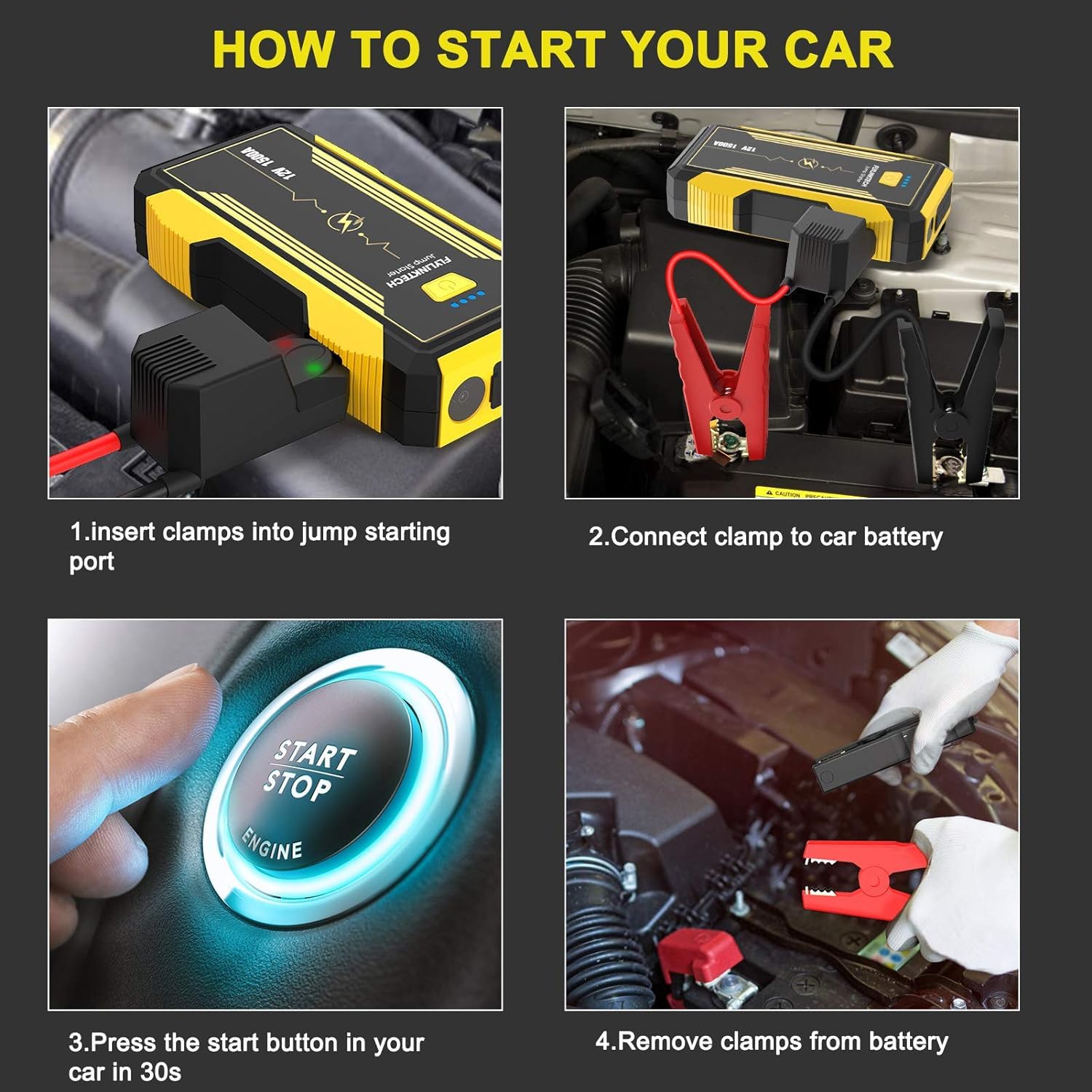
Figure 5: Step-by-step guide for jump starting a vehicle.
6.2. Usu cum'è una batteria esterna
The jump starter can charge various electronic devices via its USB output ports.
- Cunnette u cavu di carica USB di u vostru dispositivu à unu di i porti di uscita USB di u starter di jump.
- Connect the other end of the cable to your electronic device (e.g., smartphone, tablet, Bluetooth speaker).
- The jump starter will automatically begin charging your device. The QC3.0 port offers faster charging for compatible devices.
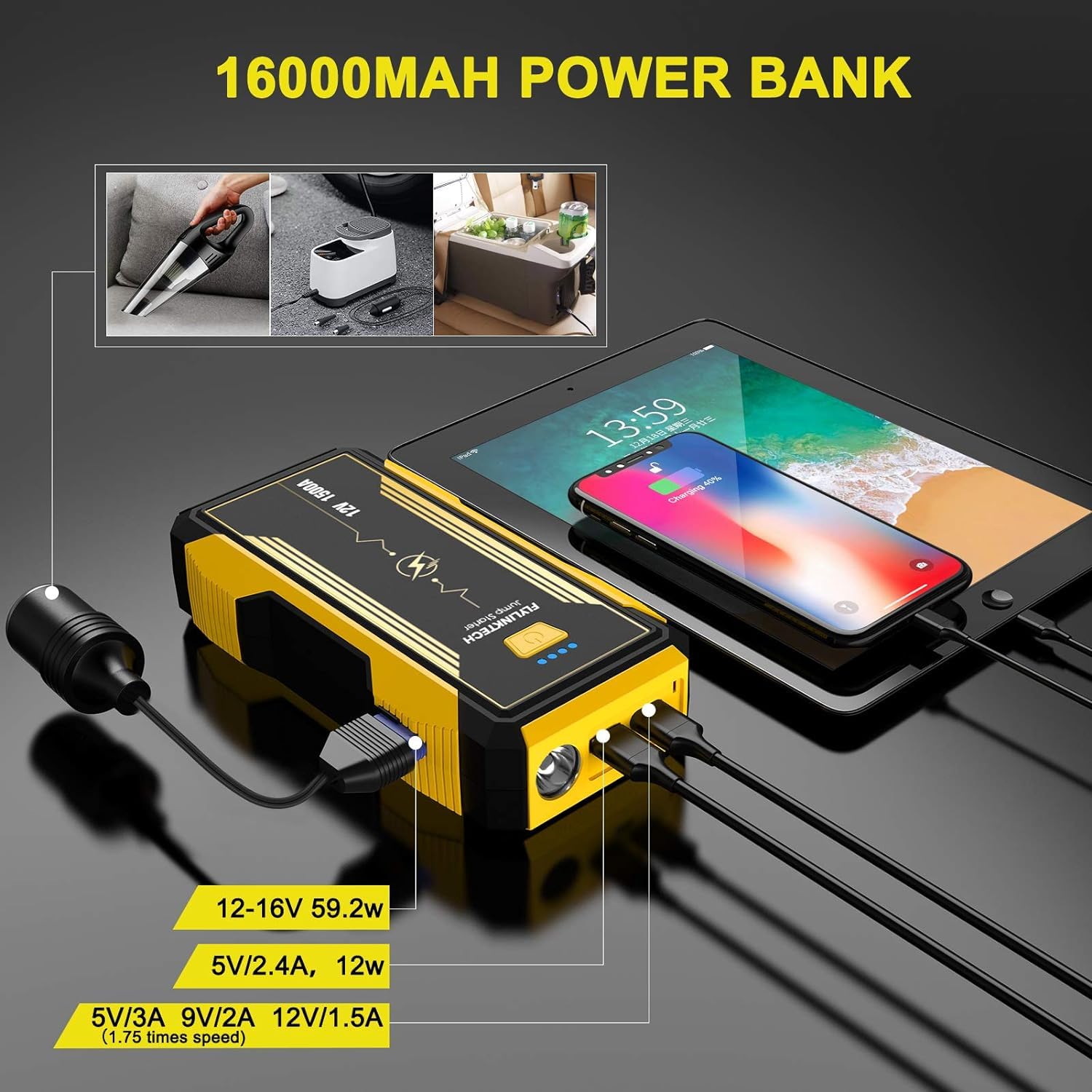
Figure 6: The jump starter's power bank functionality and EC5 adapter use.
6.3. Usendu a luce LED
The built-in LED light offers multiple modes for different situations.
- Press and hold the power button for 3 seconds to turn on the LED light (Torch mode).
- Press the power button briefly to cycle through the modes: Torch → SOS → Quick Flash → Blue & Red Flash → Off.
- Press and hold the power button again for 3 seconds to turn off the LED light from any mode.

Figure 7: The multi-function LED light in operation, illustrating its various modes.
7. Mantenimentu
Proper maintenance ensures the longevity and optimal performance of your jump starter.
- Ricarica: Recharge the unit after each use. If not used frequently, recharge every 3-6 months to prevent deep discharge and extend battery life.
- Pulizia: Asciugate l'unità cù un pannu dolce è asciuttu. Ùn aduprate micca prudutti chimichi aggressivi o detergenti abrasivi.
- Conservazione: Store the jump starter in a cool, dry place, away from direct sunlight, moisture, and extreme temperatures. Keep it in its provided storage case for protection.
- Cura di a batteria: The internal lithium-ion battery is not user-replaceable. Do not attempt to open the unit.
8. Risoluzione di prublemi
If you encounter issues with your FLYLINKTECH Car Jump Starter, refer to the following common problems and solutions:
| Prublemu | Causa Possibile | Soluzione |
|---|---|---|
| U starter di emergenza ùn si accende micca. | A batteria hè cumpletamente scarica. | Caricate cumpletamente u starter di emergenza. |
| U veiculu ùn parte micca dopu a cunnessione. |
|
|
| Smart clamps indicator light flashes red or beeps. | Reverse polarity, short circuit, or other connection error. | Disconnect clamps immediately. Reconnect ensuring RED to (+) and BLACK to (-). Ensure clampùn si toccanu micca. |
| A carica USB ùn funziona micca. |
|
|
9. Specificazioni
| Feature | Detail |
|---|---|
| Mudellu | CF600 |
| Peak Output Current | 1500 Amps |
| Capacità batterie | 16000 mAh (Lithium Ion) |
| Start Voltage | 12V |
| Cumpatibilità di u mutore | Up to 8.0L Gasoline, Up to 6.0L Diesel |
| Uscita USB 1 | 5V/2.4A, 12W |
| Uscita USB 2 (QC3.0) | 5V/3A, 9V/2A, 12V/1.5A |
| DC Output (EC5 Adapter) | 12-16V, 59.2W |
| Dimensioni di u produttu (LxWxH) | 18.5 x 9.5 x 4.5 cm |
| Pesu di l'articulu | 1 kg |
Nota: E specificazioni sò soggette à cambiamenti senza avvisu.
10. Garanzia è Support
FLYLINKTECH products are manufactured to high-quality standards. For information regarding warranty coverage, technical support, or service inquiries, please refer to the warranty card included with your product or visit the official FLYLINKTECH websitu.
When contacting support, please have your product model number (CF600) and purchase details readily available.