1. Introduzione
Thank you for choosing the Fansbe Portable Sound Machine. This device is designed to create a peaceful environment for sleep and relaxation by offering a wide selection of soothing sounds and an adjustable ambient night light. It is suitable for use by babies, children, and adults in various settings such as nurseries, bedrooms, offices, and during travel.

Image 1.1: The Fansbe Portable Sound Machine, showcasing its compact design and ambient light feature.
2. Informazioni di sicurezza
Leghjite è capite tutte l'istruzzioni di sicurezza prima di utilizà stu pruduttu. Cunservate stu manuale per riferimenti futuri.
- Ùn espone micca u dispusitivu à l'acqua o à l'umidità eccessiva.
- Ùn smuntate micca o pruvate micca di riparà l'apparechju da per voi. Affidate tutta a manutenzione à persunale qualificatu.
- Mantene l'apparecchiu luntanu da fonti di calore, luce solare diretta è materiali inflammabili.
- Assicuratevi chì e batterie sianu inserite currettamente secondu i segni di polarità.
- Eliminate e batterie se u dispusitivu ùn serà micca usatu per un periudu prolongatu.
- Keep small parts and batteries out of reach of children to prevent choking hazards.
3. Produttu Finituview
The Fansbe Portable Sound Machine features intuitive controls for easy operation.

Image 3.1: Control panel of the Fansbe Sound Machine, indicating button functions.
Cuntrolli:
- Big Button (Top): Power On/Off, Sound Mode Selection.
- Volume Button (Side): Adjusts sound output level.
- Interruttore di rumore biancu: Activates white noise sounds.
- Lullaby Switch: Activates lullaby sounds.
- Interruttore Off: Turns off sound output.
4. Setup
4.1 Installazione di batterie
The Fansbe Portable Sound Machine is powered by 3 AAA batteries (included).
- Truvate u compartimentu di a batteria in fondu à u dispusitivu.
- Use a small screwdriver (often included) to open the battery compartment cover.
- Inserite 3 batterie AAA, assicurendu a polarità curretta (+/-) cum'è indicata in l'internu di u compartimentu.
- Sustituite a tappa di u compartmentu di a bateria è assicuratelu cù a vite.

Image 4.1: The sound machine powered by AAA batteries.
5. Operating Instructions
5.1 Power On/Off and Sound Selection
- Per accende u dispusitivu, appughjà u buttone Big Button on the top. The night light will illuminate, and a default sound will begin playing.
- To cycle through the available sound modes (White Noise, Lullaby), use the switches on the side of the device.
- Per disattivà u dispusitivu, appughjà è tene premutu Big Button until the light and sound cease. Alternatively, use the 'Off' switch on the side.

Image 5.1: The sound machine providing soothing sounds for a sleeping baby.

Imagine 5.2: Esempiuamples of the 95 soothing sounds available.
5.2 Ajuste Volume
Press u Pulsante Volume on the side of the device to increase or decrease the sound volume to your preferred level.
5.3 Funziunamentu di a luce notturna
The integrated night light provides a soft, ambient glow. To adjust its brightness:
- With the device powered on, the night light will be active.
- Appughjà è tene premutu Big Button on the top of the device. The brightness will cycle through different levels. Release the button when the desired brightness is reached.

Image 5.3: The sound machine functioning as a soft glow night light.
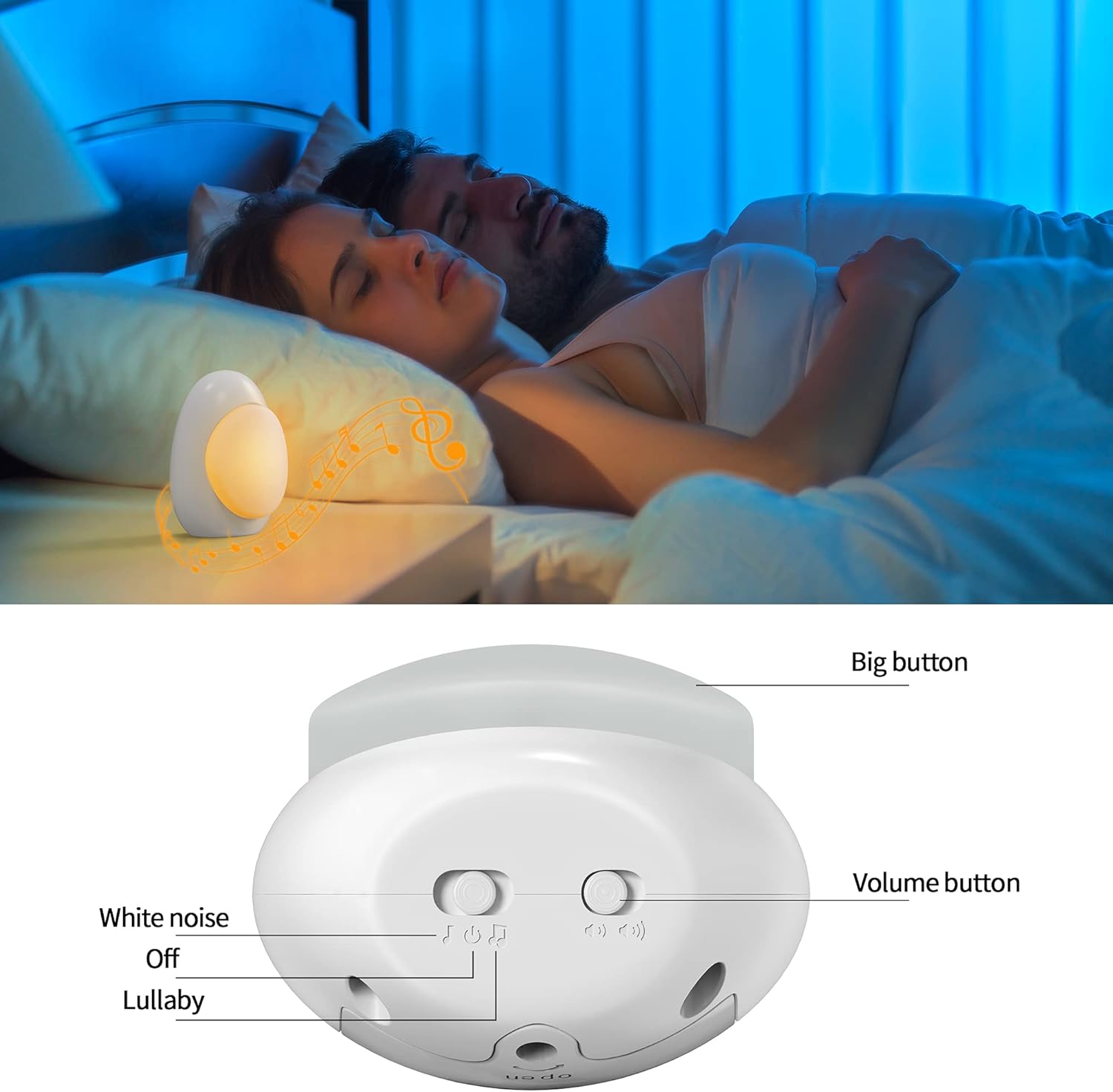
Image 5.4: Visual guide for adjusting night light brightness.
6. Mantenimentu
To ensure the longevity and optimal performance of your Fansbe Portable Sound Machine, follow these maintenance guidelines:
- Pulizia: Wipe the device with a soft, dry cloth. Do not use abrasive cleaners, solvents, or immerse the device in water.
- Storage: Store the device in a cool, dry place when not in use. If storing for an extended period, remove the batteries.
- Sustituzione di batterie: Replace all three AAA batteries simultaneously when the sound or light output diminishes. Do not mix old and new batteries or different types of batteries.
7. Risoluzione di prublemi
If you encounter any issues with your Fansbe Portable Sound Machine, please refer to the following common solutions:
| Prublemu | Causa Possibile | Soluzione |
|---|---|---|
| U dispositivu ùn accende micca. | E batterie sò morte o inserite in modu incorrectu. | Sustituite e batterie cù novi, assicurendu a polarità curretta. |
| Nisuna uscita di sonu. | Volume is too low or sound mode is off. | Increase volume using the volume button. Ensure the sound mode switch is set to White Noise or Lullaby, not Off. |
| Night light is dim or not working. | Low battery power or brightness setting is low. | Replace batteries. Adjust brightness by long-pressing the Big Button. |
| A qualità di u sonu hè scarsa. | Bassu putere di bateria. | Sustituite batterie. |
8. Specificazioni
- Marca: Fansbe
- Modellu (ASIN): B09JBFB2H4
- Fonte d'energia: 3 x AAA Batteries (Included)
- Opzioni di sonu: 95 Soothing Sounds (5 White Noise, 90 Lullaby)
- Funzione di luce: Adjustable Ambient Night Light
- Dimensioni di u pacchettu: 4.69 x 4.02 x 3.31 inch
- Pesu di l'articulu: 5.61 once
- Tipu di cunnessu: 3.5mm Jack (for headphones, not explicitly mentioned in features but in specs)
- U fabricatore: Fansbe
- Prima Data Disponibile: 13 ottobre 2021
9. Garanzia è Support
Fansbe products are manufactured with quality and performance in mind. For warranty information or technical support, please refer to the contact details provided with your purchase or visit the official Fansbe websitu. Per piacè cunservate a vostra prova d'acquistu per e richieste di garanzia.


