1. Introduzione
The EBYTE ECAN-401 is an intelligent protocol conversion product designed for bidirectional data exchange between CAN-BUS and RS485/RS232/RS422 serial interfaces. This device supports a wide voltage power supply range of 8V to 28V and integrates multiple communication interfaces, making it suitable for various industrial control and data analysis applications.
This manual provides detailed instructions for the installation, configuration, and operation of the ECAN-401 converter to ensure optimal performance and reliable data transmission.

Figure 1: EBYTE ECAN-401 CAN to Serial Protocol Converter
2. Funzioni chjave
- Bidirectional conversion between CAN and RS485/RS232/RS422 protocols.
- Supports multiple data conversion modes: transparent conversion, transparent conversion with logo, protocol conversion, Modbus RTU conversion, and custom protocol conversion.
- Configurable RS485/RS232/RS422 interface parameters.
- Parameter configuration via AT commands and host computer software.
- Equipped with power, status, and data indicators for easy monitoring.
- Multi-master and multi-slave functionality.
- CAN interface features high protection isolation design for enhanced reliability in harsh environments.

Figure 2: Electrical isolation of communication ports for robust operation
3. Dispositivu Finituview
3.1 Cumponenti è Interfacce
The ECAN-401 converter features clearly labeled interfaces for power, CAN-BUS, RS485, RS232, and RS422 connections. Refer to the device's front panel for specific pin assignments and port locations.
3.2 Indicatori LED
The device includes several LED indicators to provide real-time status information:
- PWR (Rossu): Power indicator. Illuminates when the device is powered on.
- ERR (Red): CAN bus error indicator. Illuminates when a CAN bus error is detected.
- DATA (Green): CAN bus data indicator. Flashes when data is being transmitted or received on the CAN bus.
- RX (Green): Serial port receiving indicator. Flashes when data is being received on the serial port (RS485/RS232/RS422).
- TX (Green): Serial port sending indicator. Flashes when data is being transmitted on the serial port (RS485/RS232/RS422).

Figure 3: LED Indicators and their meanings
4. Installazione
4.1 Installazione fisica
The ECAN-401 is designed for convenient DIN rail installation. Simply click the device onto a standard DIN rail. Ensure the installation location is stable, well-ventilated, and within the specified operating temperature range.

Figure 4: Simple DIN rail installation
4.2 Connessioni Wiring
Connect the power supply, CAN-BUS, and serial interfaces (RS485/RS232/RS422) according to the pinout diagrams provided in the product's detailed technical documentation. Ensure all connections are secure and correctly polarized to prevent damage to the device or connected equipment.
- Alimentazione elettrica: Connect 8V-28V DC to the V+ and V- terminals.
- CAN-BUS: Connect CAN_H and CAN_L to your CAN network.
- RS485: Connect T+(A) and T-(B) to your RS485 network.
- RS232: Connect via the DB9 female connector.
- RS422: Connect R+, R-, T+, T- terminals.
5. Modi upirativu
The ECAN-401 supports five distinct data conversion modes, allowing flexibility for various application requirements:

Figure 5: Five working modes of the ECAN-401
- Trasmissione trasparente: Data is transmitted directly between CAN and serial interfaces without protocol interpretation.
- Transparent Transmission with Logo: Similar to transparent transmission, but with added identifiers or logos for data framing.
- Protocol Conversion: Converts data between specific CAN and serial protocols.
- Modbus RTU Conversion: Enables communication between CAN devices and Modbus RTU serial devices.
- Custom Protocol Conversion: Allows users to define and implement their own conversion rules for specific applications.
The desired operating mode can be configured using AT commands or the dedicated host computer software.
6. Configurazione
The ECAN-401 converter's parameters and operating modes can be configured through two primary methods:
- AT Command Configuration: Connect the device to a computer via a serial port and use a terminal program to send AT commands. This method allows for detailed control over various settings, including baud rates, data formats, and conversion rules.
- Host Computer Software: EBYTE provides dedicated software for Windows that offers a graphical user interface (GUI) for easier configuration. This software simplifies parameter setup and mode selection.
Both methods also support restoring the device to factory default settings.
7. Specificazioni
The following table outlines the key technical specifications of the EBYTE ECAN-401 converter:

Figure 6: ECAN-401 Parameters Table
| Parametru | Valore |
|---|---|
| Corsu Voltage | 8V ~ 28V |
| CAN Baud Rate | 6kbps - 1Mbps |
| Velocità di baud di u portu seriale | 600 ~ 921600bps (RS232 supports 230400 only) |
| Data Receiving Capability | 1000 frames/s |
| Data Sending Capability | 1000 frames/s |
| RS232 Interface Standard | DB9 Femmina |
| RS485 Interface Standard | 5.08 Terminali |
| RS422 Interface Standard | 5.08 Terminali |
| U fabricatore | EBYTE |
| ASIN | B09P11KFGD |
7.1 Dimensioni
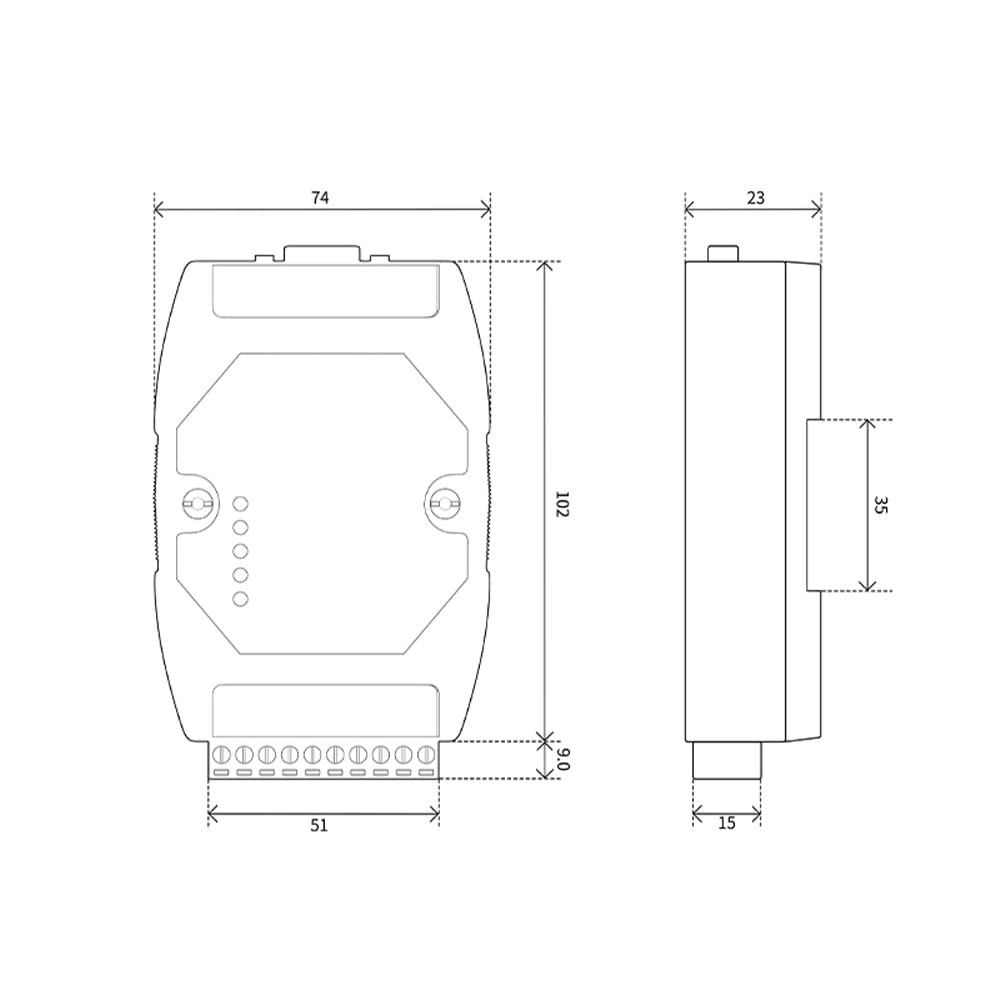
Figure 7: ECAN-401 Dimensional Drawing (Dimensions in mm)
8. Risoluzione di prublemi
If you encounter issues with your ECAN-401 converter, consider the following:
- Nisun putere: Check the power supply connection and ensure it is within the 8V-28V range. Verify the PWR LED is illuminated.
- Nisuna trasmissione/ricezione di dati: Verify all CAN and serial connections are correct. Check the DATA, RX, and TX LEDs for activity. Ensure baud rates and other communication parameters are correctly configured for both CAN and serial interfaces.
- AT Command Issues: If the device does not respond to AT commands, ensure the serial connection settings (baud rate, data bits, parity, stop bits) in your terminal program match the device's default or previously configured settings. Incorrect baud rate settings are a common cause for AT command communication failure.
- CAN Bus Errors: If the ERR LED is illuminated, check the CAN bus wiring for shorts, open circuits, or incorrect termination. Ensure the CAN baud rate matches the network.
- Incorrect Conversion: Double-check the selected operating mode and any custom protocol configurations.
If problems persist, refer to the detailed technical documentation or contact EBYTE technical support.
9. Mantenimentu
The ECAN-401 converter is designed for reliable operation with minimal maintenance. To ensure longevity and optimal performance:
- Mantene u dispusitivu pulito è liberu da polvera è detriti.
- Assicuratevi una ventilazione curretta per prevene u surriscaldamentu.
- Evitate d'espone u dispusitivu à temperature estreme, umidità o ambienti corrosivi.
- Regularly check all cable connections for security and integrity.
No user-serviceable parts are inside the enclosure. Do not attempt to open or repair the device yourself, as this may void the warranty.
10. Supportu
For technical assistance, detailed documentation, or further inquiries regarding the EBYTE ECAN-401, please visit the official EBYTE website or contact their customer support channels. Ensure you have your product model and any relevant error messages or observations ready when seeking support.


