Introduzione
The AOLION Stereo Headset Adapter is designed to enhance your gaming experience on Xbox One controllers. This adapter allows you to connect most wired stereo gaming headsets with a 3.5mm audio jack (CTIA plug standard) directly to your Xbox controller, providing convenient control over game sound and voice chat.
Cuntenutu di u pacchettu
- 1 × AOLION Stereo Headset Adapter
- 1 × Manuale d'usu
Product Overview
The adapter features intuitive controls for managing your audio experience during gameplay.

Figura 1: Fronte view of the headset adapter showing control buttons.
- Game Balance Button: Adjusts the balance towards game audio.
- Chat Balance Button: Adjusts the balance towards voice chat audio.
- Pulsante Mute Microphone: Attiva/disattiva u microfonu.
- Pulsante Volume Up: Increases overall volume.
- Pulsante Volume Down: Decreases overall volume.
- Jack audio da 3.5 mm: For connecting your stereo gaming headset.
- Connettore USB: For connecting to the Xbox controller.
Cumpatibilità
This headset adapter is compatible with a wide range of Xbox One controllers and stereo gaming headsets:
- Xbox Controllers: Xbox One, Xbox One S, Xbox One X, Xbox Elite Wireless Controller Series 1, Xbox Elite Wireless Controller Series 2, Xbox Series S, and Xbox Series X Controllers.
- Cuffie: Most wired stereo gaming headsets featuring a 3.5mm audio jack (using the CTIA plug standard).

Figure 2: The adapter is compatible with multiple Xbox controller models.

Figure 3: The adapter supports standard 3.5mm CTIA headsets.
Istituisci
Setting up your AOLION Stereo Headset Adapter is a simple plug-and-play process.
- Connect the Adapter to the Controller: Align the USB connector of the headset adapter with the expansion port at the bottom of your Xbox controller. Gently push until it clicks securely into place.
- Cunnette u vostru auriculare: Plug your wired stereo gaming headset's 3.5mm audio jack into the corresponding port on the bottom of the headset adapter.
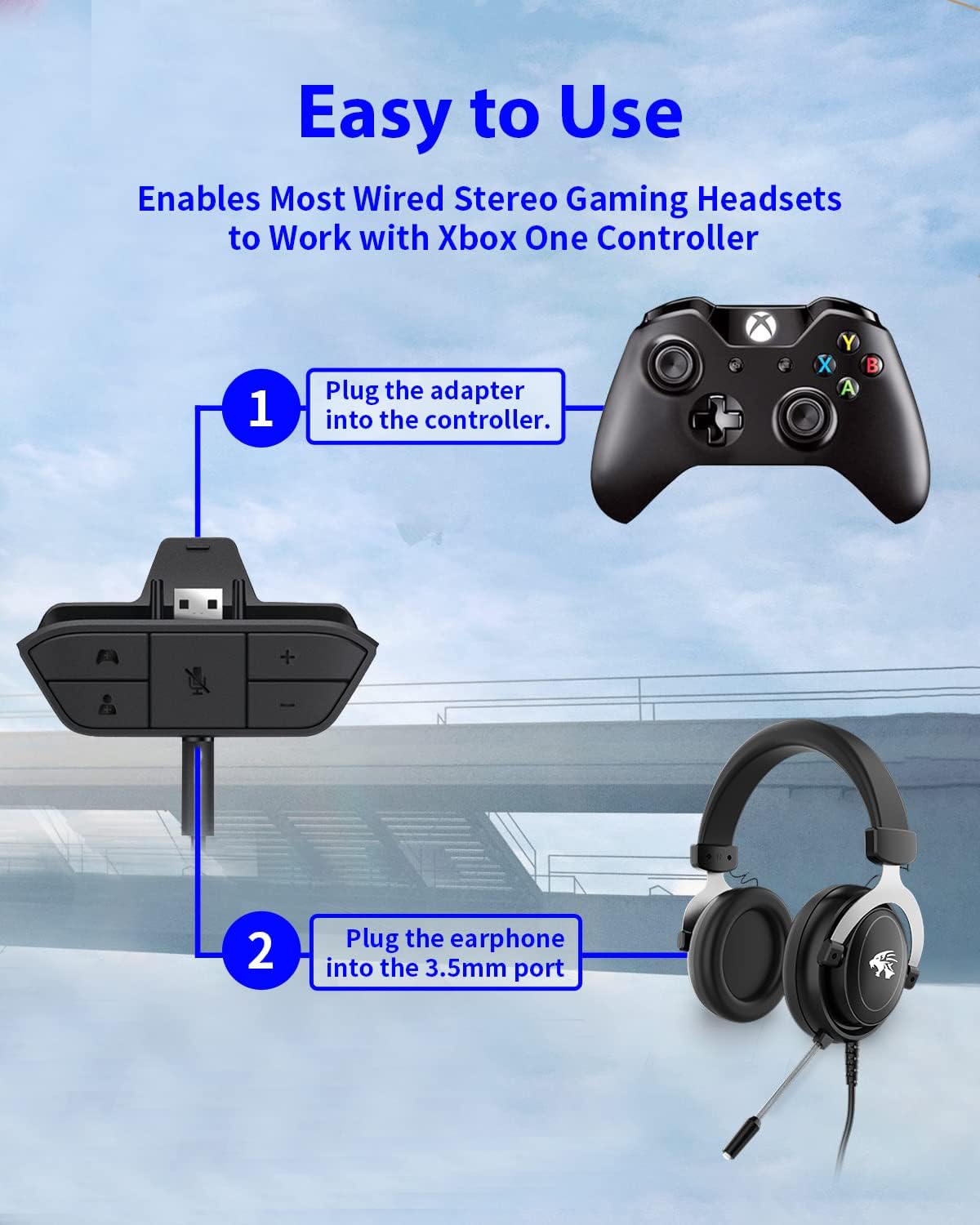
Figure 4: Step-by-step connection guide for the headset adapter.
Video 1: Demonstration of connecting the headset adapter to an Xbox controller.
Nota impurtante: For optimal performance and to resolve potential audio issues, it is recommended to update your Xbox controller's firmware after connecting the adapter. This can typically be done through your Xbox console's settings (Settings > Devices & connections > Accessories > Select your controller > ... > Controller settings > Update firmware).
Istruzzioni di funziunamentu
Once connected, use the buttons on the adapter to control your audio:
- Volume Up/Down (+/-) : Press the '+' button to increase the overall volume of both game and chat audio. Press the '-' button to decrease it.
- Microphone Mute (Microphone Icon): Press this button to mute or unmute your microphone. An indicator light (if present) or on-screen notification may confirm the mute status.
- Game/Chat Balance (Controller Icon / Person Icon):
- Press u Icona di cuntrollu button to increase game audio volume and decrease chat audio volume.
- Press u Icona di persona button to increase chat audio volume and decrease game audio volume.
Figura 5: Detailed view of the adapter's control buttons.
Mantenimentu
To ensure the longevity and optimal performance of your headset adapter, follow these simple maintenance guidelines:
- Mantene l'adattatore pulitu è senza polvere è detriti. Aduprate un pannu dolce è asciuttu per a pulizia.
- Evitate d'espone l'adattatore à temperature estreme, umidità o luce solare diretta.
- Ùn pruvate micca di smuntà o riparà l'adattatore voi stessu, postu chì questu annullerà a garanzia.
- Conservate l'adattatore in un locu sicuru quandu ùn hè micca in usu per impedisce danni fisichi.
Risoluzione di prublemi
If you encounter issues with your AOLION Stereo Headset Adapter, please refer to the following common solutions:
| Prublemu | Possibile Causa / Soluzione |
|---|---|
| No audio or poor audio quality (buzzing, peaking) |
|
| U microfonu ùn funziona micca |
|
| Game/Chat balance not working |
|
Sè u prublema persiste dopu avè pruvatu sti passi, cuntattate l'assistenza clienti.
Specificazioni
| Feature | Detail |
|---|---|
| Numero di mudellu | WGXB004005 |
| Marca | AOLION |
| Dimensioni di u produttu (L x W x H) | 3.15 x 1.57 x 0.79 inch (8 x 4 x 2 cm) |
| Culore | Neru |
| Tipu di cunnessu | Auxiliary (3.5mm CTIA standard) |
| Dispositivi compatibles | Xbox One, One S, One X, Elite 1, Elite 2, Series S, Series X Controllers; 3.5mm CTIA Stereo Headsets |
Garanzia è Supportu
AOLION stands behind the quality of its products. This Stereo Headset Adapter comes with:
- Garanzia di rimborsu di 60 ghjorni: If you are not entirely satisfied with your purchase within 60 days, you may be eligible for a full refund.
- Garanzia di 24 mesi: We provide a 24-month warranty against manufacturing defects from the date of purchase.
For any questions, concerns, or warranty claims, please contact us through Amazon. We are committed to responding to your inquiries within 12 hours to ensure your complete satisfaction.


