Importante infurmazione di sicurezza
Please read this manual carefully before assembly and use to ensure safe operation and to prevent damage to the product or injury to yourself.
- Ùn superate micca a capacità di carica massima di 100 kgU sovraccaricu pò causà instabilità è danni.
- Ensure all cables are properly managed and secured to prevent tripping hazards or damage during height adjustments.
- Mantene i zitelli è l'animali domestici luntanu da u scrivania durante l'operazione.
- Do not place hands or other body parts near moving parts of the desk frame during height adjustment.
- Only use the desk for its intended purpose as a workstation.
- Verificate regularmente tutte e viti è i bulloni per assicurassi ch'elli sianu ben serrati.
Product Overview
The FLEXISPOT E1B Electric Standing Desk is designed to provide a versatile and ergonomic workspace. It features a robust dual-motor system for smooth height adjustments and a durable tabletop.
Funzioni chjave:
- Sistema Dual Motor: Ensures stable and efficient height adjustment at 25 mm/s.
- Gamma d'altezza: Adjustable from 70 cm to 119 cm to suit various user heights and work preferences.
- Capacità di carica: Supports up to 100 kg, accommodating multiple monitors and office equipment.
- Presets di memoria: Control panel with memory functions for saving preferred height settings.
- High-Quality Tabletop: 160x80cm black tabletop, made in the EU from FSC-certified MDF with scratch-resistant high-pressure laminate.
Cuntenutu di u pacchettu
Before starting assembly, verify that all components listed below are present and undamaged. If any parts are missing or damaged, please contact customer support.
- Desk Frame (E1B) components (legs, feet, crossbar, motor, control box)
- Tabletop (DT1608-BLACK-EU18)
- Control Panel with Memory Functions
- Adattatore d'alimentazione è Cable
- Assembly Hardware (screws, bolts, Allen keys)
- Accessori di gestione di cable
- Manuale d'usu
Istruzzioni di installazione è di montaggio
Assembly is designed to be straightforward. It is recommended to assemble the desk on a soft, clean surface to prevent scratches. Two people are recommended for easier assembly.
Passu 1: Disimballà i cumpunenti
Eliminate cù cura tutte e parte da l'imballu è disponetele. Verificate cù a lista di u cuntenutu di l'imballu.
Passu 2: Assemblà a struttura di u scrivania
- Attach the lifting columns to the crossbar using the provided screws.
- Assicurate i pedi di u scrivania à u fondu di e colonne di sollevamentu.
- Mount the control box to the designated area on the frame.
- Connect the motor cables from the lifting columns to the control box.
- Connect the control panel cable to the control box.

Image: The FLEXISPOT E1B desk frame in black and white, illustrating the height adjustment range from 70cm to 119cm, highlighting the dual motor system, 25mm/s adjustment speed, and low noise operation (less than 50dB).
Passu 3: Attaccate u pianu di a tavula
Carefully place the tabletop upside down on a soft surface. Position the assembled desk frame onto the tabletop, aligning the pre-drilled holes. Secure the tabletop to the frame using the provided screws.

Image: A FLEXISPOT desk with a black tabletop, featuring a laptop, books, and a pen holder, demonstrating a functional and organized workspace.
Step 4: Connect Power and Cable Management
Connect the power adapter to the control box and then to a power outlet. Use the included cable management accessories to organize and secure all cables, preventing them from interfering with the desk's movement.
Istruzzioni di funziunamentu
Pannellu di cuntrollu Overview:
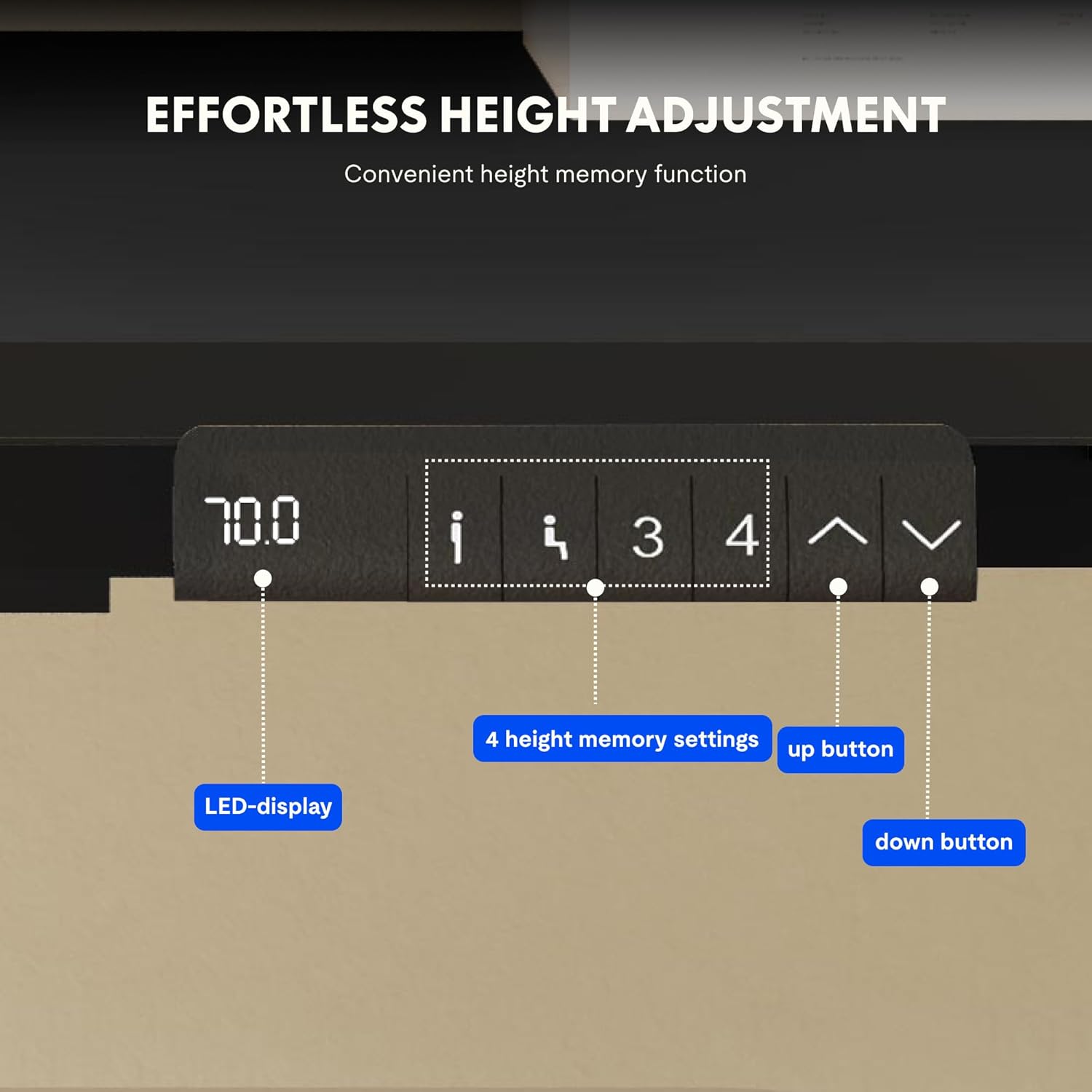
Image: Close-up of the FLEXISPOT desk control panel, showing the LED display for current height, up and down arrow buttons for manual adjustment, and four numbered buttons for saving and recalling height memory presets.
Manual Height Adjustment:
- Appughjà è tene premutu Up arrow (^) buttone per alzà u scrivania.
- Appughjà è tene premutu Down arrow (v) buttone per calà u scrivania.
- Rilasciate u buttone à l'altezza desiderata. U display LED mostrerà l'altezza attuale.
Impostazione di i preimpostazioni di memoria:
- Ajustate u scrivanu à l'altezza desiderata aduprendu e frecce Su/Ghju.
- Press u "M" or "IMPOSTÀ" button (if available, otherwise proceed to step 3).
- Press one of the numbered memory buttons (1, 2, 3 o 4) within 3 seconds. The display will show "S-" followed by the number, indicating the height is saved.
Richiamu di i preset di memoria:
Simply press the desired numbered memory button (1, 2, 3 o 4). U scrivanu si moverà automaticamente à l'altezza salvata.
Funzione di reset:
If the desk encounters an error or does not move smoothly, a reset may be required. Press and hold the "Ghjò" button until the desk reaches its lowest position, then release and press it again for 5-10 seconds until the display shows "RST" or "E-1" and then returns to the lowest height. The desk will then reset to its factory lowest position.
Mantenimentu
- Pulizia: Asciugate a superficia di u scrivania è a struttura cù un pannu dolce èamp pannu. Evitate detergenti abrasivi o chimichi aggressivi.
- Ispezione: Verificate periodicamente tutte e viti è e cunnessione per assicurassi ch'elle sianu strette. Stringhjitele di novu se necessariu.
- Gestione di Cable: Ensure cables remain tidy and do not obstruct the desk's movement.
- Distribuzione di pesu: Distribute weight evenly on the tabletop to prevent strain on the motors and frame.
Risoluzione di prublemi
| Prublemu | Causa Possibile | Soluzione |
|---|---|---|
| U scrivanu ùn si move micca. | Power cable disconnected; control box error; overloaded desk. | Check power connections. Perform a reset (see Operating Instructions). Reduce weight on the desk. |
| U scrivania si move in modu irregulare o face rumori inusuali. | Loose connections; obstruction; uneven weight distribution. | Check all screws and connections. Remove any obstructions. Redistribute weight evenly. Perform a reset. |
| U display mostra un codice d'errore (per esempiu, E01, E02). | Errore di sistema internu. | Perform a reset. If the error persists, contact customer support. |
| I preset di memoria ùn funzionanu micca. | I preset ùn sò micca salvati currettamente. | Re-save the memory presets following the instructions. |
Specificazioni
| Feature | Detail |
|---|---|
| Marca | FLEXISPOT |
| Numero di mudellu | E1B+DT1608-BLACK-EU18 |
| Dimensioni di u pianu di u tavulinu (L x L) | 160 cm x 80 cm |
| Gamma di regulazione di l'altezza | 70 cm - 119 cm |
| Capacità di carica | 100 kg |
| Velocità di aghjustamentu | 25 mm/s |
| Tipu di Motore | Dual Motors |
| Materiale di tavulinu | FSC-certified MDF with high-pressure laminate |
| Materiale di quadru | Alloy Steel |
| Culore | Black Tabletop + Black Frame |
Garanzia è Supportu
FLEXISPOT products are manufactured to high-quality standards. For warranty information and customer support, please refer to the official FLEXISPOT websitu o cuntattate u vostru rivenditore.
- Garanzia: Specific warranty terms may vary by region and product. Please check your purchase documentation or the manufacturer's websitu per i dettagli.
- Assistenza Clienti: For technical assistance, missing parts, or operational questions, please visit the FLEXISPOT Brand Store o cuntattate i so canali di supportu ufficiali.


