Introduzione
Thank you for choosing the iJoy Ultra Wireless Over-Ear Bluetooth Headphones. These headphones are designed to provide a versatile audio experience with multiple connectivity options and comfortable wear. This manual will guide you through the features, setup, and operation of your new headphones.

Image: iJoy Ultra Wireless Over-Ear Bluetooth Headphones, showcasing the sleek design and over-ear cushions.
Chì ci hè in u Box
Assicuratevi chì tutti l'articuli sò presenti in u vostru pacchettu:
- iJoy Ultra Wireless Over-Ear Bluetooth Headphones
- Cavu di Carica USB Tip C.
- AUX Cable (3.5mm)
Product Overview
Familiarize yourself with the headphone controls and ports:

Imagine: Latu view of the headphone ear cup, highlighting the control buttons for volume, track skipping, and power/play/pause/call management.
- Volume + / Skip Song: Hold for Volume Up, Press for Next Song.
- Power / Play / Pause / Answer/Reject Calls: Press to Play/Pause or Answer/Reject Calls. Hold to Power On/Off.
- Volume - / Canzone precedente: Hold for Volume Down, Press for Previous Song.
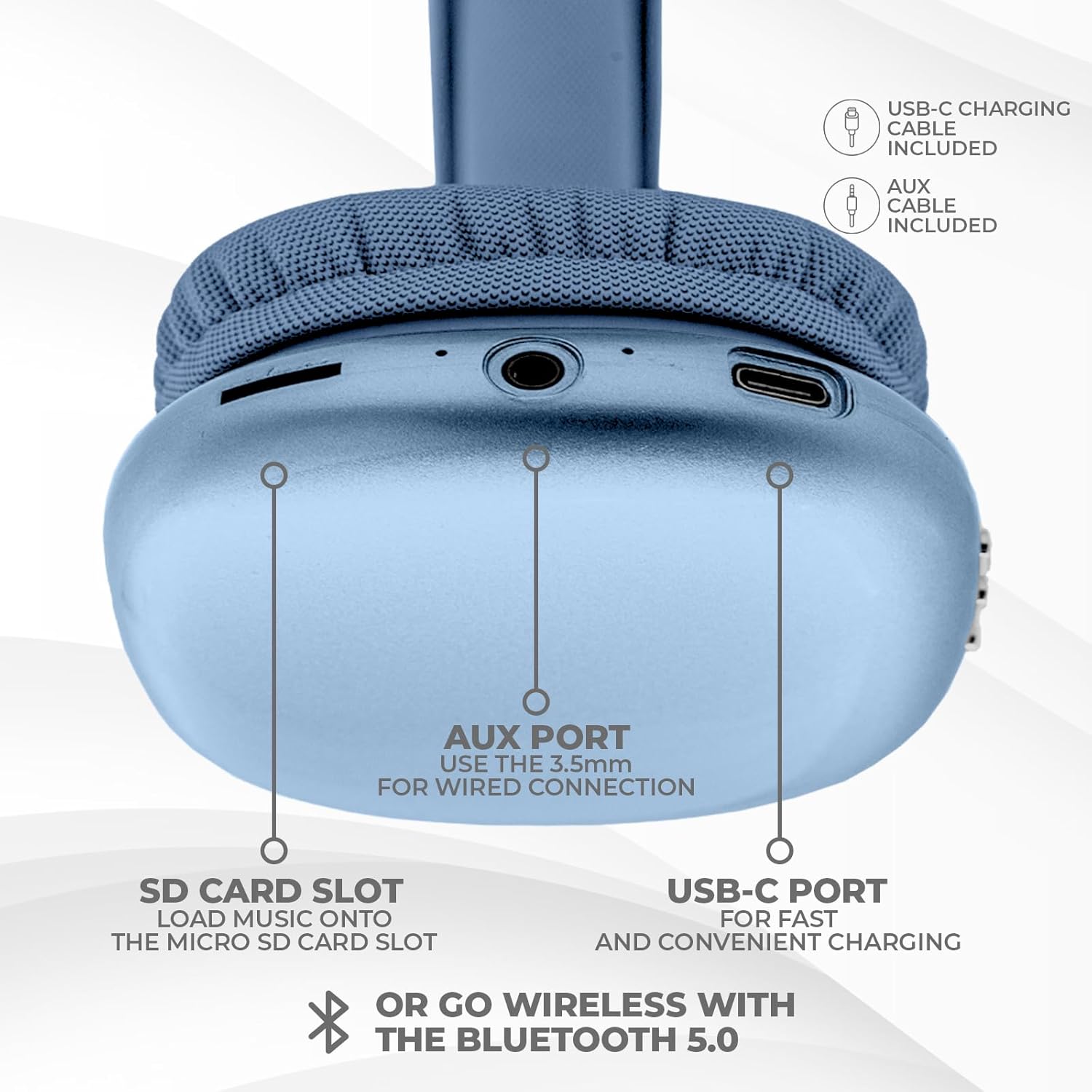
Imagine: In fondu view of the headphone ear cup, showing the USB-C charging port, AUX port, and SD card slot.
- Portu USB-C: Per carica l'auriculare.
- Porta AUX (3.5 mm): Per cunnessione audio cablata.
- Slot per carta SD: For direct audio playback from a Micro SD card.
Istituisci
1. Charging the Headphones
Prima di u primu usu, caricate cumpletamente e vostre cuffie. Una carica cumpleta dura circa 2 ore.
- Connect the provided USB Type C charging cable to the USB-C port on the headphone.
- Cunnette l'altra estremità di u cavu USB à una fonte d'alimentazione USB cumpatibile (per esempiu, adattatore murale, porta USB di l'urdinatore).
- L'indicatore LED mostrerà u statu di carica è si spegnerà o cambierà di culore quandu hè cumpletamente caricatu.
2. Abbinamentu Bluetooth
Per cunnette i vostri auricolari senza filu:
- Assicuratevi chì l'auricolari sianu cariche è spente.
- Tenite premutu u buttone di accensione finu à chì l'indicatore LED lampeggi, chì indica a modalità di accoppiamentu.
- Nant'à u vostru apparechju (smartphone, tableta, laptop), attivate Bluetooth è cercate l'apparechji dispunibili.
- Select "iJoy Ultra" from the list of devices.
- Once connected, the LED indicator will typically show a solid light or slow flash.
Note: The Bluetooth range is approximately 10 meters (33 feet).
3. Cunnessione cablata (AUX)
For a non-wireless connection or when the battery is low:
- Connect one end of the provided 3.5mm AUX cable to the AUX port on the headphone.
- Connect the other end of the AUX cable to the 3.5mm audio jack on your device.
- L'auricolari passeranu automaticamente in modalità cablata.
4. Riproduzione di a carta SD
Per ascultà musica direttamente da una carta Micro SD:
- Insert a Micro SD card (with music files) into the SD card slot on the headphone.
- The headphones will automatically detect the card and begin playing music.
- Use the track control buttons to navigate your music.
Istruzzioni di funziunamentu
Power On/Off
- Power On: Appughjà è tene premutu u buttone di accensione per circa 3 secondi.
- Spegnimentu: Appughjà è tene premutu u buttone di accensione per circa 3 secondi.
Riproduzione musicale
- Play/Pause: Pulsà u buttone Power una volta.
- Prussima pista: Press the Volume + button once.
- Pista Precedente: Press the Volume - button once.
- Aument du volume : Hold the Volume + button.
- Volume Imbruglia: Hold the Volume - button.
Gestione di Chjamate
When connected via Bluetooth:
- Rispondi à a chjama: Pulsà u buttone Power una volta.
- Chjama finita: Appughjà u buttone di accensione una volta durante una chjama.
- Reject Call: Appughjà è tene premutu u buttone di accensione per circa 2 secondi.
A vita di a batteria
The headphones offer up to 10 hours of wireless playtime on a single charge.

Image: Visual representation of the headphones' battery life, indicating up to 10 hours of wireless playtime.
Mantenimentu
To ensure the longevity and optimal performance of your iJoy Ultra headphones:
- Pulite l'auricolari regularmente cù un pannu dolce è asciuttu.
- Evitate d'espone l'auricolari à temperature estreme, umidità o luce solare diretta.
- Ùn aduprate micca detergenti abrasivi o solventi.
- Mantene l'auriculare in un locu frescu è seccu quandu ùn sò micca in usu.
- Evitate di fà cascà o di sottumette l'auricolari à impatti forti.
Risoluzione di prublemi
Sè avete prublemi cù e vostre cuffie, cunsultate e seguenti suluzioni cumuni:
| Prublemu | Soluzione |
|---|---|
| L'auricolari ùn s'accendenu micca. | Assicuratevi chì l'auricolari sianu cumpletamente cariche. Cunnetteli à una fonte d'alimentazione cù u cavu USB-C. |
| Ùn si pò micca accoppià via Bluetooth. | Make sure the headphones are in pairing mode (flashing LED). Turn off and on Bluetooth on your device. Ensure no other devices are currently connected to the headphones. Try 'forgetting' the device on your phone and re-pairing. |
| No sound or choppy audio. | Check volume levels on both headphones and your device. Ensure Bluetooth connection is stable or try a wired AUX connection. If using an SD card, ensure it is properly inserted and the files sò cumpatibili. |
| Headphones are uncomfortable or too tight. | Adjust the headband for a better fit. The over-ear cushions are designed for comfort, but individual fit may vary. |
| Cannot connect to multiple devices simultaneously. | These headphones typically support connection to one device at a time. Disconnect from the current device before attempting to connect to another. |
Specificazioni
| Feature | Detail |
|---|---|
| Nome di mudellu | Ultra |
| Numeru di mudellu di l'articulu | IJHP21 |
| Tecnulugia di cunnessione | Senza filu (Bluetooth), Cablatu (AUX 3.5 mm) |
| Tecnulugia di cumunicazione wireless | Bluetooth |
| Gamma Bluetooth | 10 metri (33 piedi) |
| Jack per cuffie | Jack da 3.5 mm |
| Funzioni spiciali | SD Card Slot, Soft Cushion Padding, USB Type C |
| A vita di a batteria | Finu à 10 ore |
| Tempu di carica | 2 Ore |
| Tipu di cuntrollu | Volume Control, Track Management, Call Management |
| Posizionamentu di l'arechja | Over Ear |
| Materiale | Plastica |
| Pesu di l'articulu | 8 Ounces |
| Dimensioni di u produttu | 7 x 3 x 8 inch |
| UPC | 842700193053 |
Video ufficiale di u produttu
Video: An official product video from iJoy Electronics showcasing the features and design of the iJoy Ultra Bluetooth Over-Ear Headphones.
Garanzia è Supportu
For warranty information or technical support, please refer to the documentation included with your product or contact iJoy customer service directly. Keep your proof of purchase for any warranty claims.


