Introduzione
This manual provides comprehensive instructions for the safe and efficient use of your WIKO T10 smartphone. Please read this manual carefully before using your device to ensure optimal performance and longevity. Keep this manual for future reference.
Importante infurmazione di sicurezza
- Ùn espone micca u dispusitivu à temperature estreme, à a luce diretta di u sole o à alta umidità.
- Use only WIKO-approved chargers and accessories.
- Evitate di lascià cascà o di sottumette u dispusitivu à impatti severi.
- Ùn pruvate micca di smuntà o riparà u dispusitivu da per voi. Cuntattate u persunale di serviziu autorizatu.
- Smaltite u dispusitivu è a so batteria in modu rispunsevule secondu e regulazioni lucali.
Cuntenutu di u pacchettu
Ensure all items are present in your WIKO T10 package:
- Smartphone WIKO T10
- Caricatore
- Cable USB Type-C
- Strumentu di espulsione SIM
- Guida Quick Start
- Informazioni di Sicurezza è Garanzia
Product Overview
Familiarize yourself with the physical components of your WIKO T10 smartphone.

Figura 1: Fronte è Posteriore View of the WIKO T10 Smartphone. The front features a large display with a dewdrop notch, and the rear shows the camera module and WIKO branding.
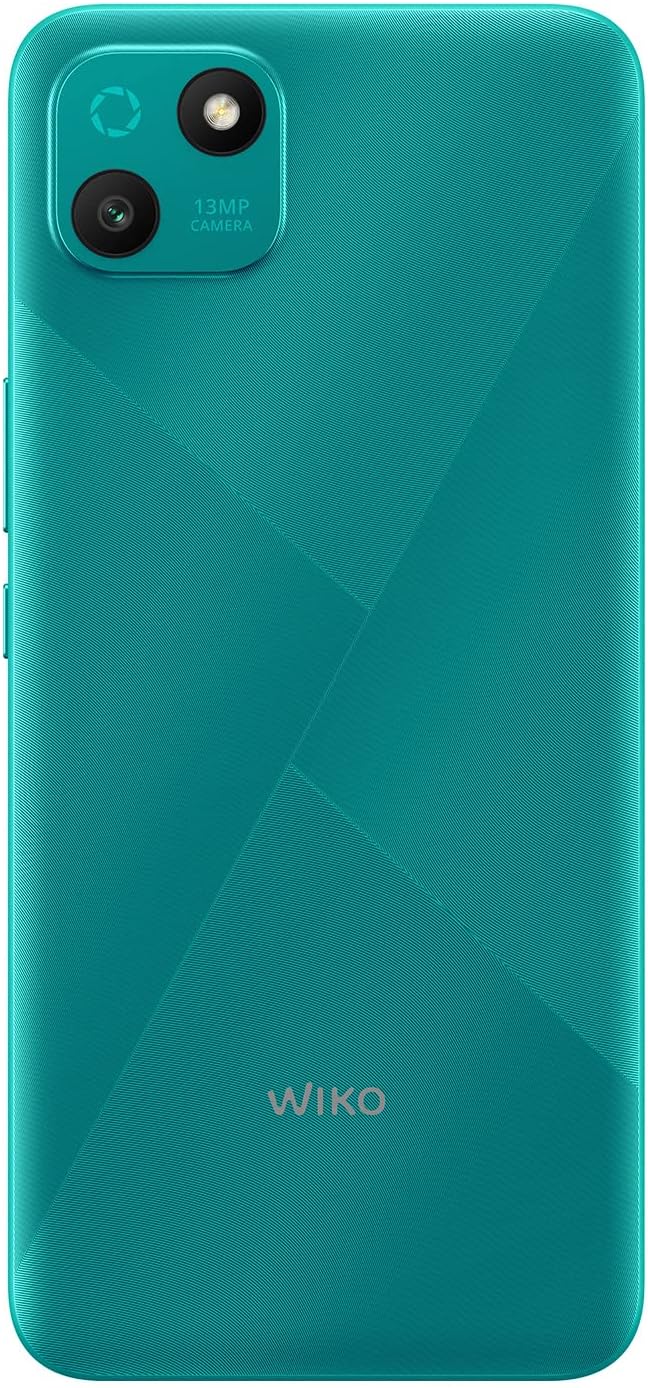
Figura 2: Parte posteriore dettagliata view of the WIKO T10, highlighting the 13MP camera module and textured back panel.

Figura 3: Side profile of the WIKO T10, illustrating its slim design and button placement.
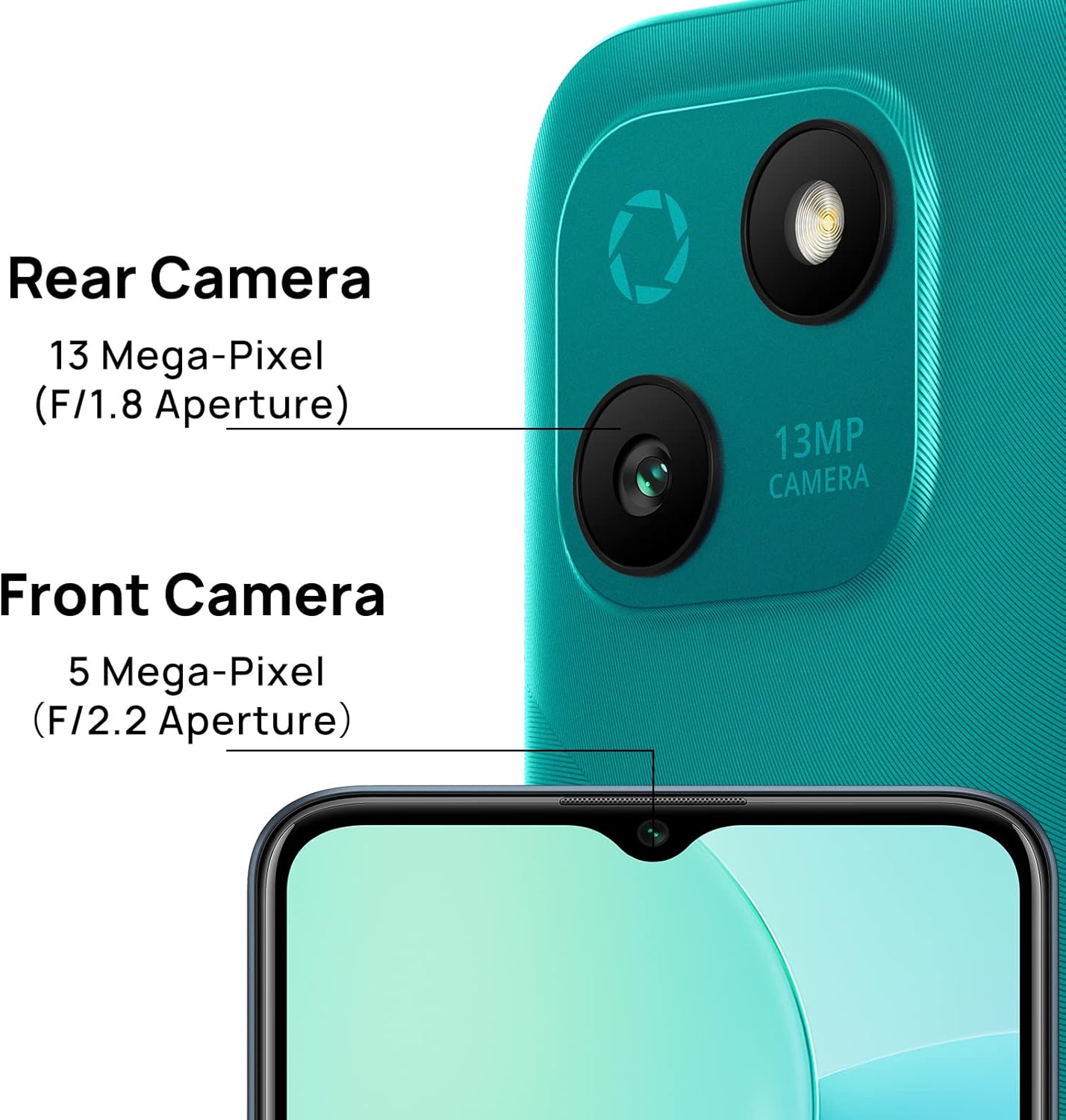
Figura 4: Camera specifications for the WIKO T10, indicating a 13 Mega-Pixel Rear Camera (F/1.8 Aperture) and a 5 Mega-Pixel Front Camera (F/2.2 Aperture).

Figura 5: The WIKO T10 features a 6.5-inch Dewdrop Display, offering an immersive visual experience with minimal bezels.
Guida di installazione
7.1 Inserimentu di a carta SIM è SD
The WIKO T10 supports Dual SIM functionality. Follow these steps to insert your SIM card(s) and an optional microSD card for expanded storage:
- Truvate u cassettu di a carta SIM à u latu di u dispusitivu.
- Inserite u strumentu d'espulsione di a SIM in u picculu foru accantu à u vassoio è appughjà delicatamente finu à chì u vassoio esce fora.
- Pone a vostra carta Nano-SIM è/o carta microSD in l'appositi slot nantu à u vassoio, assicurendu chì i cuntatti d'oru sò rivolti versu u bassu.
- Spinghje cù cura u cassettu in u slot finu à ch'ellu sia à livellu cù u corpu di u telefunu.
7.2 Accensione iniziale è cunfigurazione
To power on your WIKO T10 for the first time:
- Press and hold the Power button (usually on the right side) until the WIKO logo appears.
- Follow the on-screen prompts to select your language, connect to Wi-Fi, set up your Google account, and configure other initial settings.
7.3 Caricà u dispusitivu
Before first use, it is recommended to fully charge your WIKO T10.
- Cunnette u cavu USB Type-C à u portu di carica in fondu à u telefunu.
- Cunnette l'altra estremità di u cavu à l'adattatore di corrente, dopu inserite l'adattatore in una presa di corrente.
- L'indicatore di carica apparirà nantu à u screnu. Scollegate u caricatore una volta chì a batteria hè piena.
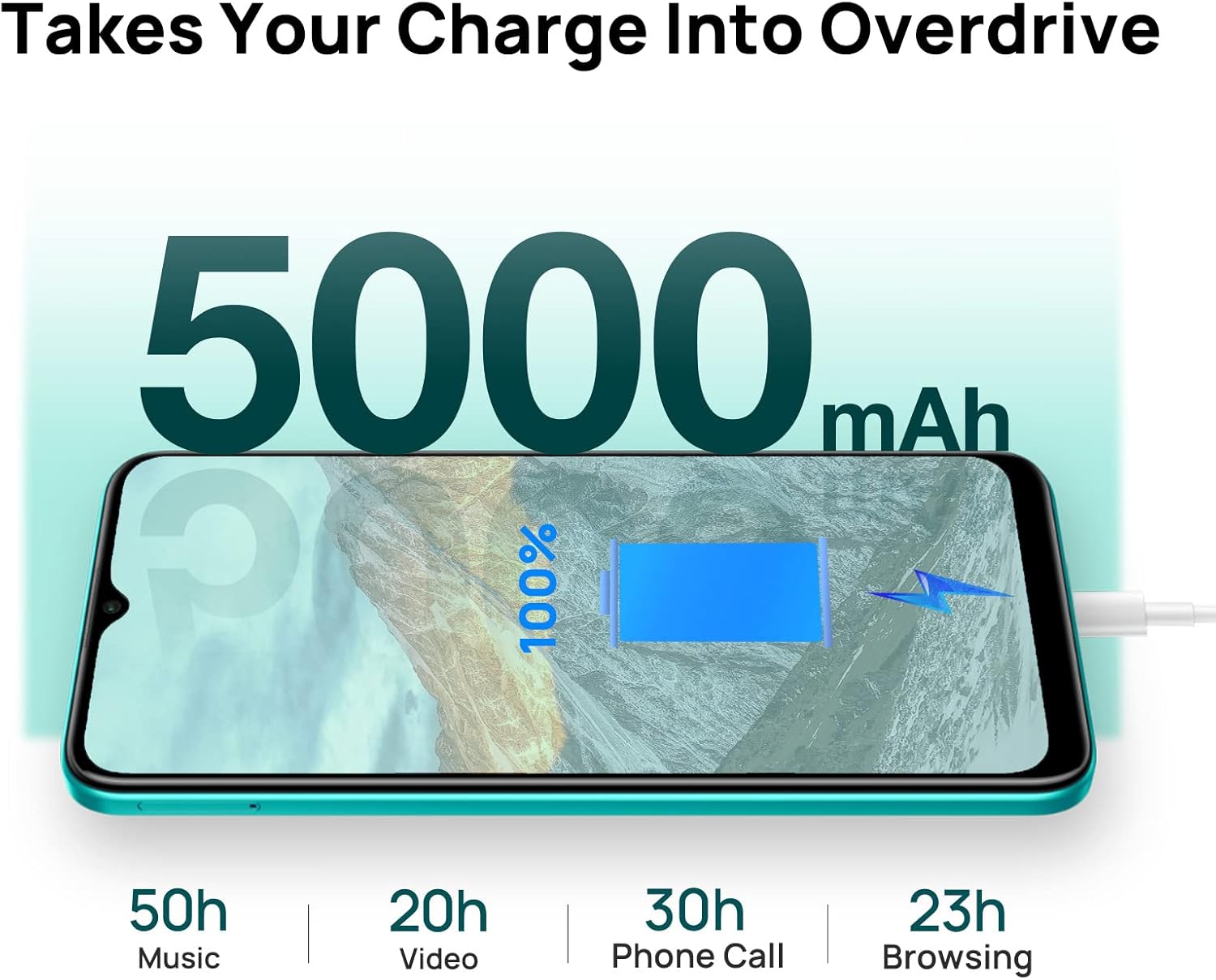
Figura 6: The WIKO T10 features a 5000mAh battery, providing extended usage times such as 50 hours of music, 20 hours of video, 30 hours of phone calls, and 23 hours of browsing on a full charge.
Operating Your WIKO T10
8.1 Navigazione basica
Your WIKO T10 uses a capacitive touchscreen for interaction:
- Tap: Per apre l'applicazioni, selezziunate elementi o appughjate i buttoni nantu à u screnu.
- Tocca è tene premutu: Per accede à i menu cuntestuali o spustà elementi.
- Swipe: To scroll through lists, switch between home screens, or navigate through photos.
- Pizzicà: Per zoomà in o ingrandisce l'imagine è web pagine.
8.2 Fà chjame è mandà missaghji
To make a call, open the Phone app and dial the number or select a contact. To send a message, open the Messages app, start a new conversation, and type your text.
8.3 Cunnessione à e rete
Your WIKO T10 supports Wi-Fi and 4G cellular networks.
- Wi-Fi: Andà à Impostazioni > Rete è internet > Wi-Fi, attivate u Wi-Fi è selezziunate a rete desiderata.
- Dati mobili (4G): Andà à Settings> Network & internet> Network mobile and ensure Mobile data is enabled.
8.4 Usendu a Camera
The WIKO T10 features a 13MP rear camera and a 5MP front camera. Open the Camera app to capture photos and videos.
- Toccate u buttone di l'otturatore per piglià una foto.
- Cambia trà i modi foto è video.
- Use the front/rear camera toggle for selfies or main shots.
8.5 Gestione di batterie
A batteria di 5000 mAh permette un usu prolongatu. Per ottimizà a durata di a batteria:
- Aghjustate a luminosità di u screnu.
- Attivà a modalità Risparmiatore di Batteria in Settings> Battery.
- Chiudi l'applicazioni inutilizate chì funzionanu in background.
8.6 Storage Management
Your WIKO T10 comes with 64GB of internal storage. You can expand this using a microSD card.
- Per verificà l'usu di u almacenamentu, andate à Settings> Storage.
- Svuotate regularmente a cache è ciò chì hè inutile files per liberà u spaziu.

Figura 7: Key features of the WIKO T10, including its 5000mAh Mega Battery, 6.5" Edgeless Dewdrop Display, 13MP Rear Camera, 64GB Large Storage, and Android 11 operating system.
Mantenimentu
9.1 Pulizia di u vostru dispositivu
To keep your WIKO T10 clean and in good condition:
- Aduprate un pannu dolce è senza pelu per asciugà u schermu è u corpu.
- Evitate l'usu di prudutti chimichi aggressivi, detergenti abrasivi o spray aerosol.
- Do not allow moisture into openings.
9.2 Actualizazioni di u Software
Verificate regularmente l'aghjurnamenti di u software per assicurà chì u vostru dispositivu abbia l'ultime funzionalità è patch di sicurezza. Andate à Impostazioni > Sistema > Aghjurnamentu di u sistema.
9.3 Cura di a batteria
Per prolongà a vita di a vostra batteria:
- Evitate di scaricà cumpletamente a batteria spessu.
- Do not leave the phone charging for extended periods after it's full.
- Keep the device within recommended operating temperatures.
Risoluzione di prublemi
| Prublemu | Soluzione Possibile |
|---|---|
| U dispusitivu ùn si accende | Assicuratevi chì a batteria sia carica. Appughjà è tene premutu u buttone d'accensione per almenu 10 secondi per furzà u riavviu. |
| Ùn pò micca cunnette à Wi-Fi | Check if Wi-Fi is enabled. Restart your router. Forget the network and reconnect. |
| L'applicazioni sò lente o si bloccanu | Chjude l'applicazioni in background. Svuota a cache di l'app. Riavvia u dispusitivu. Assicurà un spaziu di almacenamentu sufficiente. |
| Povera vita di a bateria | Reduce screen brightness. Disable unused features (Bluetooth, GPS). Enable Battery Saver mode. |
| Ùn possu fà o riceve chjamate | Check SIM card insertion. Ensure mobile data is enabled. Contact your network provider. |
Specificazioni
| Feature | Detail |
|---|---|
| Marca | Wiko |
| Nome di mudellu | T10 |
| Sistema upirativu | Android 11.0 (Edizione Go) |
| Size Screen | 6.5 inch |
| Risoluzione | 2340 x 1080 (HD+) |
| Dimensione RAM | 2 GB |
| Capacità di almacenamiento | 64 GB |
| Risoluzione di a camera posteriore | 13 MP |
| Risoluzione Camera Front | 5 MP |
| Capacità batterie | 5000 mAh (Lithium-polymer) |
| Tecnulugia cellulare | 4G |
| Connettività | Cellular, USB Type C |
| Funzioni spiciali | Integrated GPS, Dual SIM |
| Culore | Verde Smeralda |
Garanzia è Supportu
For warranty information and customer support, please refer to the warranty card included in your product package or visit the official WIKO websitu. Conservate a vostra prova d'acquistu per e richieste di garanzia.
For further assistance, you may contact WIKO customer service through their official channels.