1. Introduzione
This manual provides detailed instructions for the installation, operation, and maintenance of your Spedal MINIEYE AC1 Dash Cam. Please read this manual thoroughly before using the device to ensure proper functionality and safety. The MINIEYE AC1 is designed to record your driving journey in high definition and offers advanced features for enhanced road safety.
2. Produttu Finituview
2.1 Funzioni chjave
- 1944P Ultra Full HD Recording: Cattura video chjaritage with a 140° wide-angle field of view.
- AI ADAS (Advanced Driver-Assistance System): Provides real-time alerts for collision avoidance.
- Sensore G integratu: Automatically detects sudden movements or impacts and locks footage.
- Monitoraghju di parcheghju 24 ore su 24: Monitors your vehicle even when parked (requires hardwire kit, sold separately).
- Visione notturna potente: Ensures clear recordings in low-light conditions.
- Registrazione in loop: Overwrites the oldest footage quandu a carta di memoria hè piena, assicurendu una registrazione cuntinua.
- Cuntrollu APP: Gestisce i paràmetri, view foutage, and download videos via a dedicated mobile application.
2.2 Cuntenuti di u pacchettu
Verificate chì tutti l'articuli elencati quì sottu sò presenti in u vostru pacchettu:
- MINIEYE AC1 Dash Cam Unit
- Caricatore di vittura
- Cavu di putenza
- Cavu Monitor
- Host Base
- Modulu GPS
- Sticker elettrostaticu
- Piede di corvo (per u passaghju di cavi)
- Livellu di bolla
- Free 32GB TF Card (MicroSD Card)
- Manuale d'uso (stu documentu)
2.3 Cumpunenti di u dispusitivu
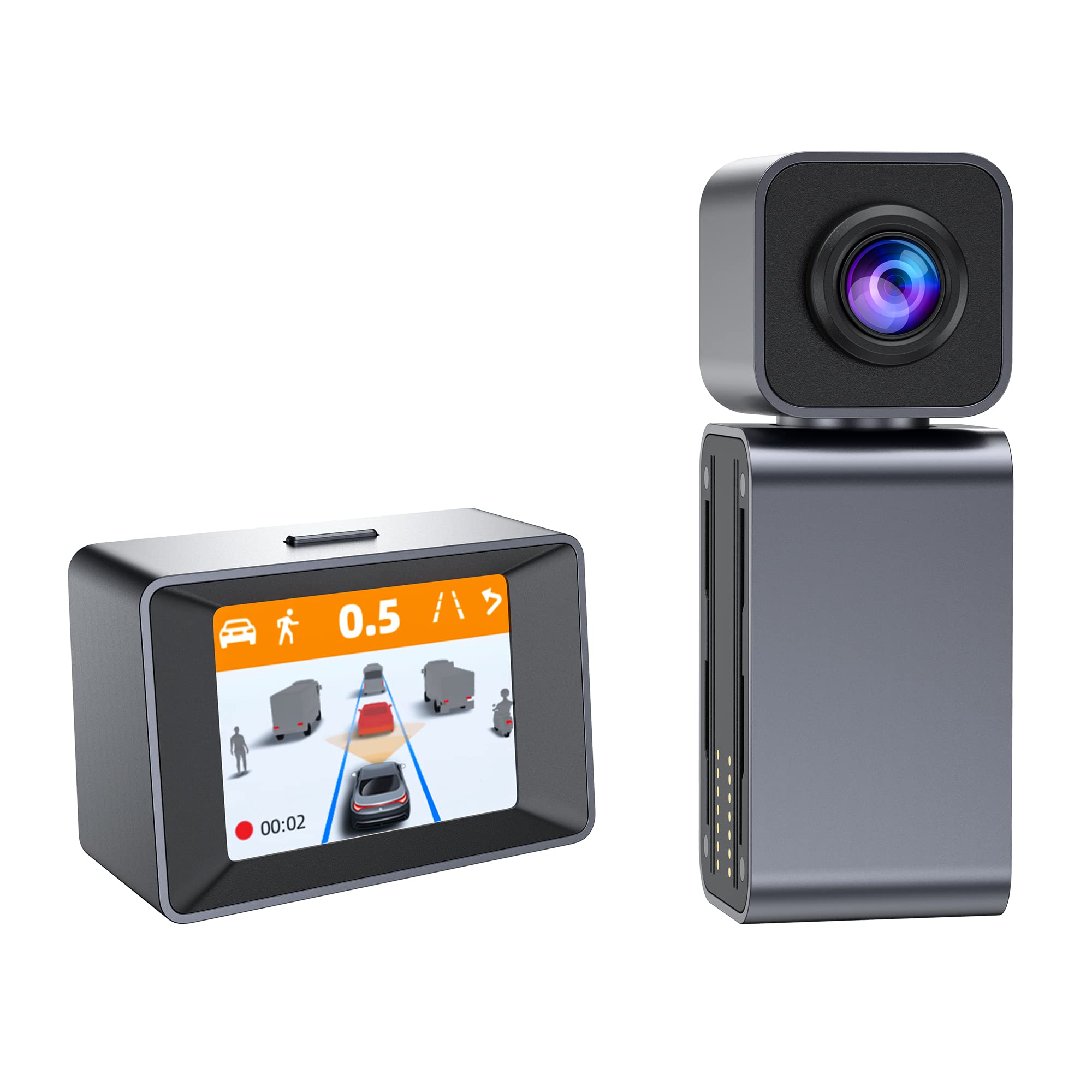
Image: The MINIEYE AC1 Dash Cam showing the main recording unit with its lens and the separate display unit. The display unit shows a simulated traffic scenario with distance warnings, illustrating the ADAS functionality.
3. Setup
3.1 Installazione
- Preparate u parabrisa: Clean the area on your windshield where the dash cam will be mounted. Ensure it is free of dust and grease.
- Applicà l'adesivu elettrostaticu: Apply the electrostatic sticker to the cleaned area. This helps in easy removal and prevents residue on the windshield.
- Attach Host Base: Secure the host base to the electrostatic sticker. Use the bubble level to ensure the base is level for optimal camera angle.
- Muntà a Dash Cam: Attach the MINIEYE AC1 Dash Cam unit to the host base.
- Inserite a carta TF: Insert the provided 32GB TF card into the designated slot on the dash cam. Ensure it is inserted correctly until it clicks into place.
- Connect Power: Connect the power cable to the dash cam and route it along the windshield edge and dashboard using the crowbar to tuck it neatly. Plug the car charger into your vehicle's cigarette lighter socket.
- Connect Monitor (if applicable): If using an external monitor, connect it using the monitor cable.
- Connect GPS Module: Attach the GPS module to the dash cam for location and speed data recording.
3.2 Accensione iniziale è impostazioni
- Power On: Start your vehicle. The dash cam will automatically power on and begin recording.
- Formate a carta TF: It is recommended to format the TF card upon first use and periodically thereafter to ensure optimal performance. This can usually be done through the device settings or the mobile app.
- Ajuste l'angolo di a camera: Adjust the camera lens to ensure it captures the road ahead clearly, covering the desired field of view.
3.3 Cunfigurazione di u cuntrollu di l'app
- Scaricate l'App: Cerca the "MINIEYE" in your smartphone's app store (iOS or Android) and install it.
- Cunnette vi Wi-Fi: Enable Wi-Fi on your smartphone and connect to the dash cam's Wi-Fi network. The network name and password can typically be found in the dash cam's settings or manual.
- Coppiu Dispositivu: Open the MINIEYE app and follow the on-screen instructions to pair your dash cam.
- Configure Settings: Use the app to adjust recording resolution, G-sensor sensitivity, parking monitoring settings, and other preferences.
4. Operating Instructions
4.1 Registrazione di basa
Once powered on, the MINIEYE AC1 automatically begins continuous loop recording. Video files are saved in segments (e.g., 1, 3, or 5 minutes) to the TF card. When the card is full, the oldest unprotected files sò soprascritti.
4.2 G-Sensor and Emergency Recording
The built-in G-Sensor detects sudden impacts or rapid acceleration/deceleration. When triggered, the current video segment is automatically locked and saved to a protected folder, preventing it from being overwritten by loop recording. The sensitivity of the G-Sensor can be adjusted via the mobile app.
4.3 Surveglianza di Parking
With the optional hardwire kit (not included), the dash cam can monitor your vehicle while parked. If an impact or motion is detected, the dash cam will automatically record a short video segment. Ensure this feature is enabled and configured in the app settings.
4.4 ADAS (Advanced Driver-Assistance System)
The AI ADAS features provide real-time alerts to enhance driving safety:
- Avvisu di collisione frontale (FCW): Alerts you if you are approaching a vehicle ahead too quickly.
- Avvisu di partenza di corsia (LDW): Vi avvisa se u vostru veiculu esce da a so corsia senza signalà.
- Front Vehicle Start Alert: Informs you when the vehicle in front of you has started moving after a stop.
These alerts are typically visual on the display and/or audible. Calibration may be required for optimal ADAS performance.
4.5 Viewing è Scaricamentu Footage
Foutage pò esse viewed directly on the dash cam's display (if available) or more conveniently through the MINIEYE mobile application. Use the app to browse recorded videos, download important clips to your smartphone, or share them.
5. Mantenimentu
- Pulite a lente: Pulite regularmente l'obiettivo di a camera cù un pannu dolce è senza pelu per assicurà una qualità video chjara.
- Formate a carta TF: Format the TF card every 2-4 weeks to prevent data corruption and maintain optimal recording performance. Back up any important files prima di furmatu.
- Actualizazioni di firmware: Check the MINIEYE app or official website periodically for firmware updates. Keeping your dash cam's firmware updated ensures access to new features and performance improvements.
- Conservazione: Quandu ùn hè micca aduprata per periodi prolungati, conservate a dash cam in un locu frescu è asciuttu, luntanu da a luce diretta di u sole.
6. Risoluzione di prublemi
- A Dash Cam ùn s'accende micca:
- Check the car charger connection and ensure the vehicle's cigarette lighter socket is functioning.
- Ensure the power cable is securely connected to the dash cam.
- Recording Issues (e.g., freezing, corrupted files):
- Formattate a carta TF.
- Try a different high-speed (Class 10 or U1/U3) TF card.
- Ensure the TF card is not full of locked files.
- Problemi di cunnessione di l'app:
- Assicuratevi chì u Wi-Fi di a dash cam sia attivatu.
- Riavviate sia a dash cam sia u vostru smartphone.
- Verify you are connecting to the correct Wi-Fi network and using the correct password.
- ADAS Alerts Not Functioning:
- Ensure ADAS features are enabled in the app settings.
- Perform ADAS calibration if available in the app.
- Assicuratevi chì a lente di a camera sia pulita è senza ostaculi.
7. Specificazioni
| Feature | Detail |
|---|---|
| Nome di mudellu | MINIEYE AC1 |
| Marca | Spedale |
| Risoluzione Video Capture | 1944 p |
| Angulu reale di View | 140 gradi |
| Tecnulugia di cunnessione | USB, Wireless (for App Control) |
| Metudu di cuntrollu | App |
| Tipu di muntatura | Muntagna d'aspirazione |
| Tipu di Serviziu di Veiculu | Car |
| U fabricatore | Shenzhen Youjia Innov Tech Co., Ltd |
8. Garanzia è Support
For warranty information, technical support, or service inquiries, please refer to the warranty card included with your product or visit the official Spedal website. You may also contact Spedal customer service directly through the contact information provided on their website or within the MINIEYE mobile application.
Per piacè conservate a vostra prova di compra per rivendicazioni di garanzia.


