1. Introduzione
Thank you for choosing the XDOBO X8 Portable Bluetooth Speaker. This manual provides essential information for the safe and efficient use of your device. The X8 speaker features a powerful 60W output, True Wireless Stereo (TWS) connectivity for an immersive audio experience, a 3-band equalizer, advanced DSP technology for enhanced bass, and an IP65 waterproof rating, making it suitable for various environments.
Leghjite attentamente stu manuale prima di l'usu è conservallu per riferimentu futuru.
2. Cuntenutu di u pacchettu
Assicuratevi chì tutti l'articuli sianu presenti quandu si disimballa:
- XDOBO X8 Bluetooth Speaker Unit
- USB Type-C Charging Cable (Power adapter not included)
- Cavu audio stereo da 3.5 mm
- Simple Instruction Manual (Japanese)
3. Disposizione è cuntrolli di u pruduttu
Familiarize yourself with the speaker's buttons and ports for optimal operation.
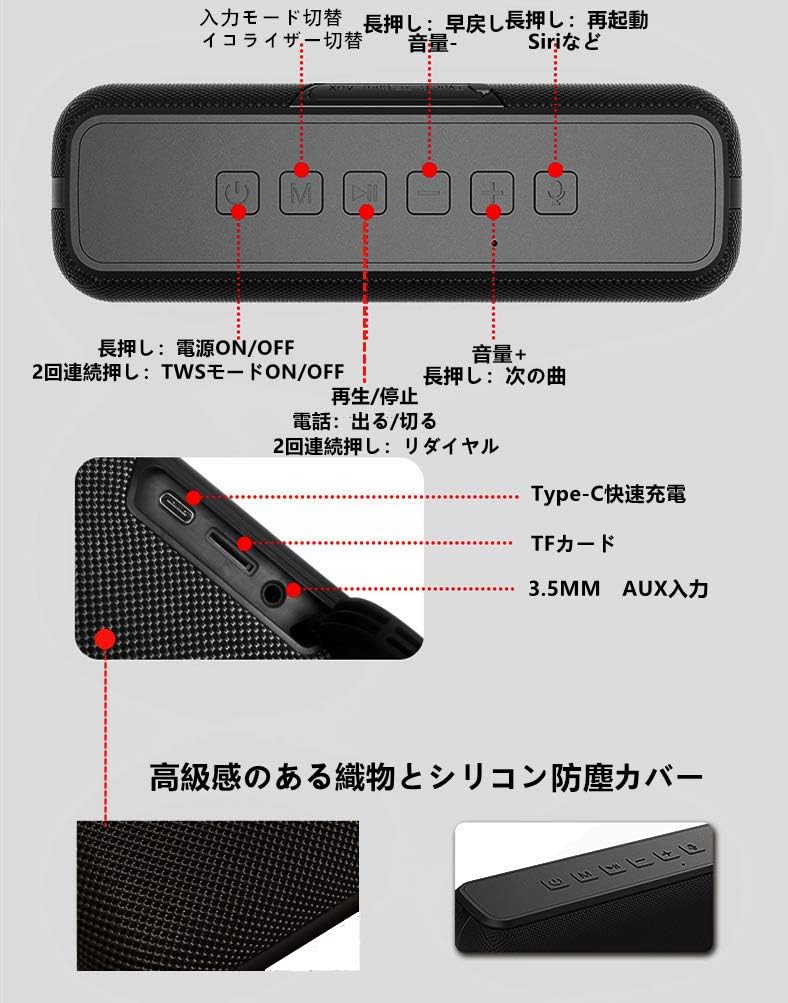
Image: Top view of the XDOBO X8 speaker showing the control panel buttons.
This image displays the control buttons located on the top surface of the speaker. From left to right, these include the Power button, Mode (M) button, Play/Pause button, Volume Down/Previous Track button, Volume Up/Next Track button, and Voice Assistant button.
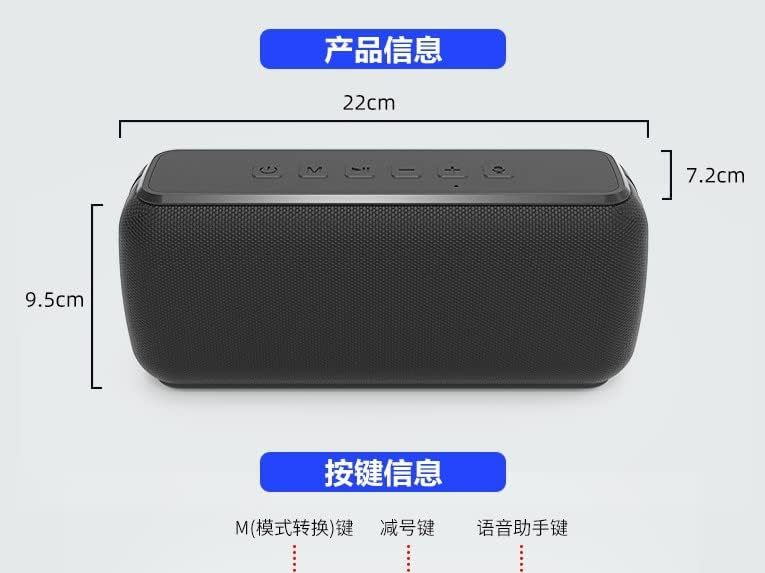
Image: Latu view of the XDOBO X8 speaker showing the input ports.
This image illustrates the various input ports on the side of the speaker, including the Type-C fast charging port, TF card slot, and 3.5mm AUX input port.
Funzioni di u buttone:
- Pulsante di putenza: Long press to power ON/OFF. Double press to toggle TWS mode ON/OFF.
- Pulsante M (Mode): Short press to switch between input modes (Bluetooth, TF Card, AUX). Long press to cycle through equalizer settings.
- Pulsante Play/Pause: Short press to Play/Pause music. Short press to Answer/End calls. Double press to Redial the last number.
- Buttone di calata di vulume / traccia precedente (-): Appughjà brevemente per calà u vulume. Appughjà longu per a traccia precedente.
- Volume Aumentà / Pulsante di Traccia Seguente (+): Appughjà brevemente per aumentà u vulume. Appughjà longu per a traccia successiva.
- Buttone di l'Assistente Vocale: Short press to activate your device's voice assistant (Siri, Google Assistant, etc.).
4. Setup
4.1 Caricamentu di l'altoparlante
Before first use, fully charge the speaker. Connect the provided USB Type-C cable to the speaker's charging port and the other end to a USB power adapter (not included) or a computer's USB port. The charging indicator light will show the charging status. Always use the included USB cable for charging.
4.2 Accensione / spegnimentu
- Per accende: Press longu u putenza button until you hear an audible prompt.
- Per spegne: Press longu u putenza button again until you hear an audible prompt.
4.3 Accoppiamentu Bluetooth
The XDOBO X8 speaker is compatible with most Bluetooth-enabled devices (smartphones, tablets, PCs).
- Accendete l'altoparlante. Entrerà automaticamente in modalità di accoppiamentu Bluetooth, indicatu da una luce LED chì lampeggia.
- In u vostru dispositivu, attivate u Bluetooth è cercate i dispositi dispunibili.
- Select "XDOBO X8" from the list of devices.
- Once paired, the speaker will emit a confirmation sound, and the LED light will remain solid.
4.4 Accoppiamentu Stereo True Wireless (TWS)
Connect two XDOBO X8 speakers for a stereo sound experience.
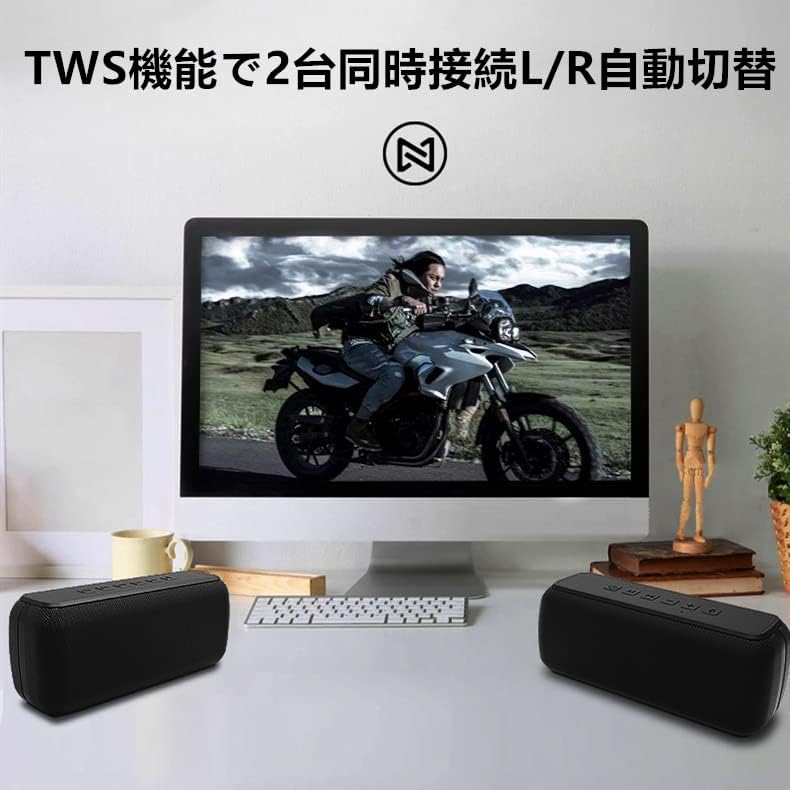
Image: Two XDOBO X8 speakers connected via TWS, providing stereo sound with a computer monitor.
This image demonstrates the TWS functionality, showing two XDOBO X8 speakers positioned for stereo playback, enhancing the audio experience for media consumption.
- Ensure both XDOBO X8 speakers are powered on and not connected to any Bluetooth device.
- On one of the speakers (this will become the primary speaker), double press the putenza buttone. L'altoparlante entrerà in modalità di accoppiamentu TWS.
- I dui altoparlanti si cunnetteranu automaticamente trà di elli. Un sonu di cunferma indicarà l'accoppiamentu TWS riesciutu.
- Avà, cunnette u vostru apparechju à l'altoparlante principale via Bluetooth cum'è descrittu in a sezione 4.3. Tramindui l'altoparlanti riproduceranu l'audio in stereo.
4.5 AUX and TF Card Mode
The speaker supports audio playback via a 3.5mm AUX cable and from a TF (Micro SD) card.
- Modu AUX: Insert the 3.5mm audio cable into the AUX port on the speaker and connect the other end to your audio source. Short press the M buttone per passà à a modalità AUX.
- Modalità TF Card: Insert a TF card (up to 64GB, supporting MP3, FLAC, WAV formats) into the TF card slot. Short press the M button to switch to TF card mode. The speaker will automatically begin playing audio from the card.
5. Operating Instructions
5.1 Controlli Audio Basi
- Play/Pause: pressa brevemente u Play / Pausa buttone.
- Ajuste di u voluminu: pressa brevemente u + buttone per aumentà u vulume, è u - button to decrease volume. Note that volume levels on your connected device and the speaker may be independent.
- Prussima pista: Press longu u + buttone.
- Pista Precedente: Press longu u - buttone.
5.2 Impostazioni di l'equalizzatore (EQ)
The XDOBO X8 features 3 distinct equalizer settings to customize your audio experience, including enhanced bass. Long press the M button to cycle through the available EQ modes. You will hear an audible prompt indicating the current EQ setting.
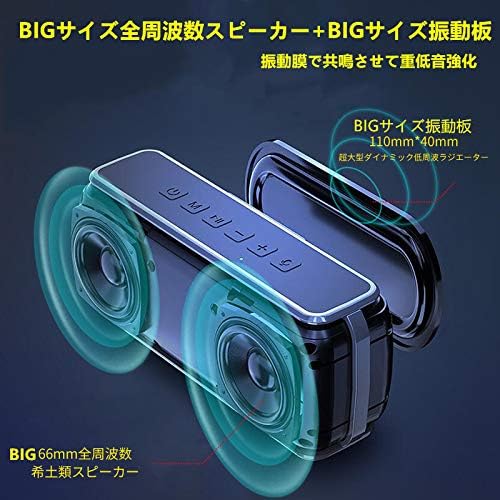
Image: XDOBO X8 speaker with visual representation of sound waves and passive radiators.
This image highlights the speaker's large passive radiators and full-range drivers, which contribute to its powerful and deep bass output, a key feature enhanced by the DSP technology.
5.3 Chjamate à mani libere
When connected via Bluetooth, you can use the speaker for hands-free phone calls.
- Rispondi / Finisce a chjama: pressa brevemente u Play / Pausa buttone.
- Ripeti l'ultimu numeru: Doppiu appughjà u Play / Pausa buttone.
6. Mantenimentu
To ensure the longevity and optimal performance of your XDOBO X8 speaker, follow these maintenance guidelines:
- Pulizia: Wipe the speaker with a soft, dry cloth. Do not use abrasive cleaners, alcohol, or other chemical solvents.
- Resistenza à l'acqua: The speaker has an IP65 waterproof rating, meaning it is protected against dust ingress and low-pressure water jets from any direction. Do not submerge the speaker in water. Ensure the charging port cover is securely closed when exposed to water.
- Conservazione: Conservate l'altoparlante in un locu frescu è asciuttu, luntanu da a luce diretta di u sole è da temperature estreme.
- Cura di a batteria: Per priservà a durata di a batteria, evitate di scaricà cumpletamente l'altoparlante spessu. Caricatelu regularmente, ancu s'ellu ùn hè micca adupratu per periodi prolungati.
7. Risoluzione di prublemi
If you encounter issues with your XDOBO X8 speaker, refer to the following common problems and solutions:
| Prublemu | Causa Possibile | Soluzione |
|---|---|---|
| L'altoparlante ùn s'accende micca. | Batteria bassa. | Caricate l'altoparlante cù u cavu USB Type-C furnitu. |
| Ùn si pò micca accoppià via Bluetooth. | Speaker is not in pairing mode; Bluetooth is off on device; Speaker is already connected to another device. | Ensure speaker is powered on and flashing (pairing mode). Turn Bluetooth on your device. Disconnect from other devices or restart the speaker. |
| Nisun sonu o un vulume bassu. | Volume too low on speaker or device; Incorrect input mode; Speaker is muted. | Increase volume on both the speaker and your connected device. Press the 'M' button to ensure the correct input mode (Bluetooth, AUX, TF Card). |
| L'accoppiamentu TWS fiasca. | Speakers are already connected to other devices; Incorrect TWS pairing procedure. | Ensure both speakers are disconnected from other devices. Follow the TWS pairing steps in section 4.4 carefully. |
| Sonu distortu à u voluminu altu. | Volume troppu altu. | Riduce u vulume sia di l'altoparlante sia di u vostru dispositivu cunnessu. |
| Loud, repetitive warning sound (low battery). | A batteria hè criticamente bassa. | Charge the speaker immediately. The warning sound indicates the battery is about to run out. |
8. Specificazioni
Detailed technical specifications for the XDOBO X8 Portable Bluetooth Speaker:
| Feature | Specificazione |
|---|---|
| Marca | XDOBO |
| Numero di mudellu | X8 |
| Dimensioni di u produttu | 22 x 9.5 x 7.2 cm (circa 8.66 x 3.74 x 2.83 pollici) |
| Pesu | Circa. 860 g (1.9 lbs) |
| Tecnulugia di cumunicazione wireless | Bluetooth |
| Tecnulugia di cunnessione | AUX, Bluetooth |
| Potenza massima di output di Speaker | 60 Watt |
| Valutazione impermeabile | IP65 |
| Metudu di cuntrollu | Touch buttons |
| Usi cunsigliati per u pruduttu | Computer, Smartphone |
| Fonte d'energia | Power Cord (Rechargeable Battery) |
| Batteria necessaria | Iè |
| Tipu di muntatura | Munti di tavulinu |
| Funzioni spiciali | Bluetooth, Portable, Wireless |
9. Garanzia è Support
For warranty information or technical support, please refer to the documentation included with your purchase or contact XDOBO customer service through the retailer where you purchased the product. Keep your proof of purchase for warranty claims.
Note impurtanti
- Product specifications and appearance are subject to change without prior notice due to continuous product improvement.
- The English instructions provided in this manual are based on the latest available information. Minor discrepancies with other language versions or product updates may occur.


