Introduzione
Thank you for choosing the TOMZON T4W Foldable Camera Drone. This manual provides essential information for the safe operation, setup, and maintenance of your drone. Please read this manual thoroughly before operating the drone to ensure proper use and to avoid damage or injury.
The TOMZON T4W is a beginner-friendly FPV drone equipped with a 2K camera, offering features such as Altitude Hold, Headless Mode, One Key Fly, and various intelligent flight functions like Circle Fly, Self Spin, Trajectory Fly, and Gravity Mode. Its foldable design and included handbag make it highly portable.
Linee guida di sicurezza
Priurità sempre a sicurità quandu si usa u drone. U mancatu rispettu di ste linee guida pò causà ferite, danni à u drone o danni à a pruprietà.
- Operate the drone in open areas, away from people, animals, buildings, and obstacles.
- Do not fly near airports or restricted airspace. Check local regulations before flying.
- Mantene una distanza di sicurezza da u drone durante l'operazione.
- Assicuratevi chì tutte l'eliche sianu attaccate bè è intatte prima di ogni volu.
- Do not operate the drone in strong winds, rain, or other adverse weather conditions.
- Tenite e mani è a faccia luntanu da l'eliche in rotazione.
- Survegliate i zitelli quand'elli utilizanu u drone.
- Only use original TOMZON parts and accessories.
- Ùn pruvate micca di mudificà u drone o i so cumpunenti.
- Be aware of the drone's battery level and the Low-Power/Signal Alarm to prevent unexpected landings.
Cuntenutu di u pacchettu
Verificate chì tutti l'articuli sò presenti in u pacchettu:
- TOMZON T4W Foldable Drone
- Controller Remote
- Batterie ricaricabili per droni (x2)
- Cavu di carica USB
- Eliche di riserva
- Propeller Guards (optional)
- cacciavite
- Manuale d'uso (stu documentu)
- Borsa portatile

Image: The TOMZON T4W drone, its remote controller with a smartphone attached, two drone batteries, and the included portable handbag, illustrating the complete package contents.
Product Overview
Cumpunenti di Drone
- Bracci pieghevoli: Allow for compact storage and portability.
- Hélices : Quattru eliche principali per a sustentazione è a spinta.
- Motori: Power the propellers.
- Camera 2K: Front-mounted camera with 90° adjustable lens for capturing photos and videos.
- Compartimentu di batterie: Situatu daretu à u drone.
- Indicatori luminosi: Provide status information during flight and operation.
- Slot per Carta TF: Supports 4-128G TF cards for direct storage of media (TF card not included).
Controller Remote
- Sticks di cuntrollu: Left stick for throttle/yaw, right stick for forward/backward/left/right movement.
- Supportu di u telefunu: Ajustable clamp per assicurà u vostru smartphone per FPV viewing.
- One Key Take-off/Landing Button: Simplifies initial flight and landing.
- Pulsante di cambiamentu di velocità: Toggles between 3 flight speeds.
- Pulsante di modalità senza testa: Attiva u volu senza testa.
- Pulsante Foto / Video: Cattura imagine o avvia/ferma a registrazione video.
- Pulsante di calibrazione: For gyroscope calibration.
Istituisci
1. Charging the Batteries
Before first use, fully charge both drone batteries and the remote controller battery (if applicable). Use the provided USB charging cable. The indicator light on the charger will change when charging is complete.
2. Installazione di a batteria di u drone
- Spiegate i bracci di u drone.
- Insert a fully charged battery into the battery compartment at the rear of the drone until it clicks into place.
3. Propeller Installation (if needed)
If propellers are not pre-installed, attach them according to the markings (A and B) on the propellers and drone arms. Ensure they are securely fastened.
4. Installazione di e batterie di u telecomandu
Open the battery compartment on the back of the remote controller and insert the required batteries (usually AA, not included) according to polarity markings.
5. Scaricatu l'APP
Cerca the official TOMZON drone app (refer to the packaging or quick start guide for the exact app name) on your smartphone's app store (iOS App Store or Google Play Store) and install it. This app is required for FPV viewing and advanced flight functions.
6. Pairing the Drone and Remote Controller
- Pone u drone nantu à una superficie piatta è pianata.
- Power on the drone by pressing the power button. The drone's indicator lights will flash.
- Accende u cuntrollu remoto.
- Push the left control stick (throttle) all the way up, then all the way down. The drone's indicator lights will become solid, indicating successful pairing.
7. Connecting to Wi-Fi (FPV)
- After pairing, go to your smartphone's Wi-Fi settings.
- Connect to the Wi-Fi network named "TOMZON-T4W-XXXXXX" (or similar, check drone label).
- Open the TOMZON drone app. You should see the live FPV feed from the drone's camera.
Funziunamentu di u Drone
Cuntrolli basi di u volu
- Una chjave di partenza: Press the One Key Take-off button on the remote controller. The drone will automatically ascend to a certain height and hover.
- Acceleratore (Levetta sinistra in su/in giù): Controls the drone's altitude.
- Imbardata (Levetta sinistra sinistra/destra): Gira u drone orizzontalmente.
- Forward/Backward (Right Stick Up/Down): Moves the drone forward or backward.
- Left/Right Sideways Flight (Right Stick Left/Right): Moves the drone left or right sideways.
- Un atterraggio chjave: Press the One Key Landing button. The drone will slowly descend and land automatically.
Funzioni di volu avanzate

Image: Visual representation of the drone's three adjustable speed modes, the simplicity of one-key start, the functionality of headless mode, and the stability provided by altitude hold.
- Mantenimentu di l'altitudine: The drone maintains a consistent altitude, making it easier to control and capture stable footage. This feature is automatically active.
- Modu senza testa: When activated, the drone's orientation becomes irrelevant. The drone will move relative to the pilot's position, regardless of which way the drone's front is facing. Press the Headless Mode button to activate/deactivate.
- 3 Speeds Adjust: Press the Speed Switch button on the remote controller to cycle through low, medium, and high-speed modes, suitable for different skill levels and wind conditions.
Intelligent Flight Functions (via APP)

Image: The TOMZON T4W drone executing a 'Circle Fly' stunt, orbiting around a central point in a desert landscape, demonstrating its automated flight capabilities.
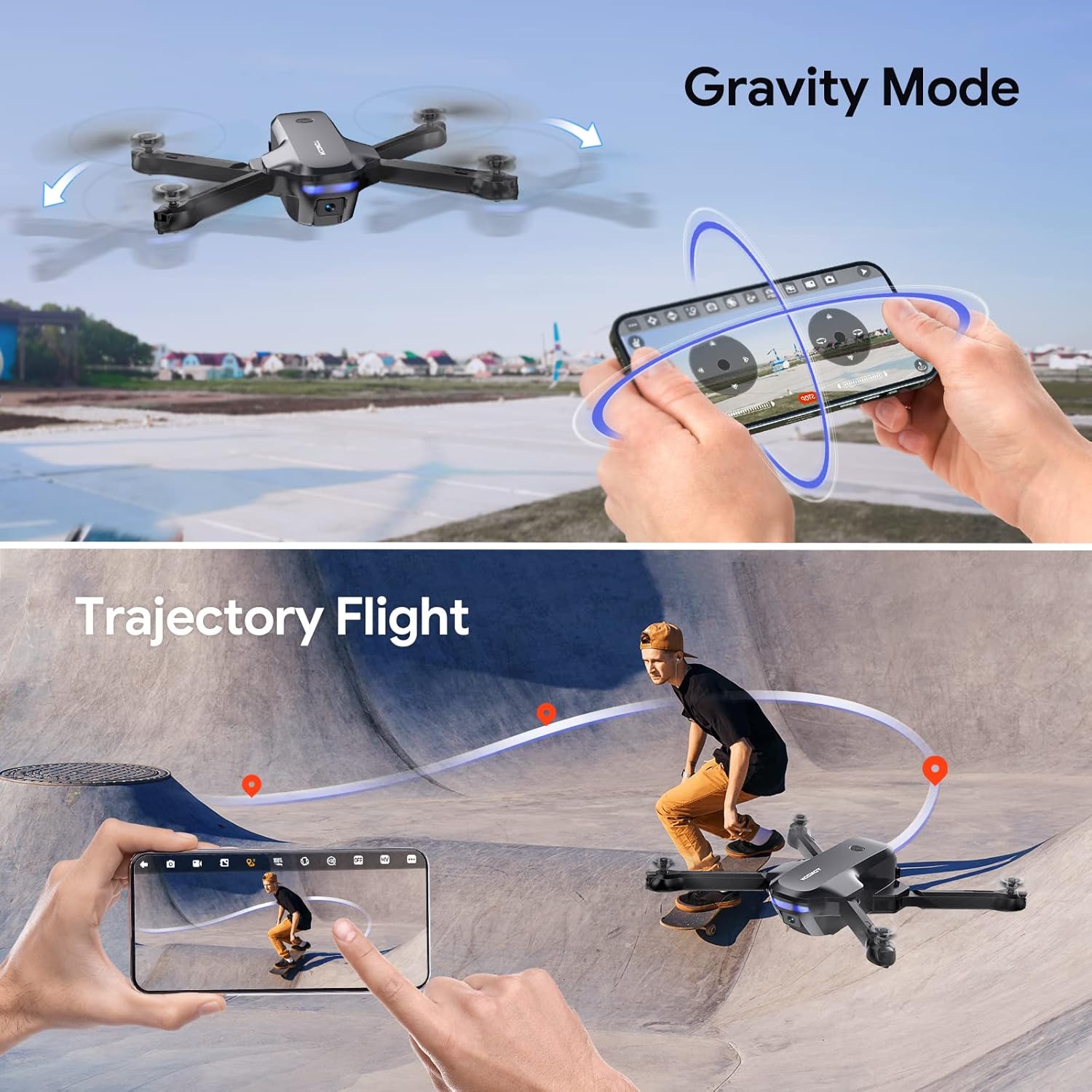
Image: Two distinct intelligent flight modes: 'Gravity Mode' where the drone responds to phone tilting, and 'Trajectory Flight' where the drone follows a pre-drawn path on the app screen.
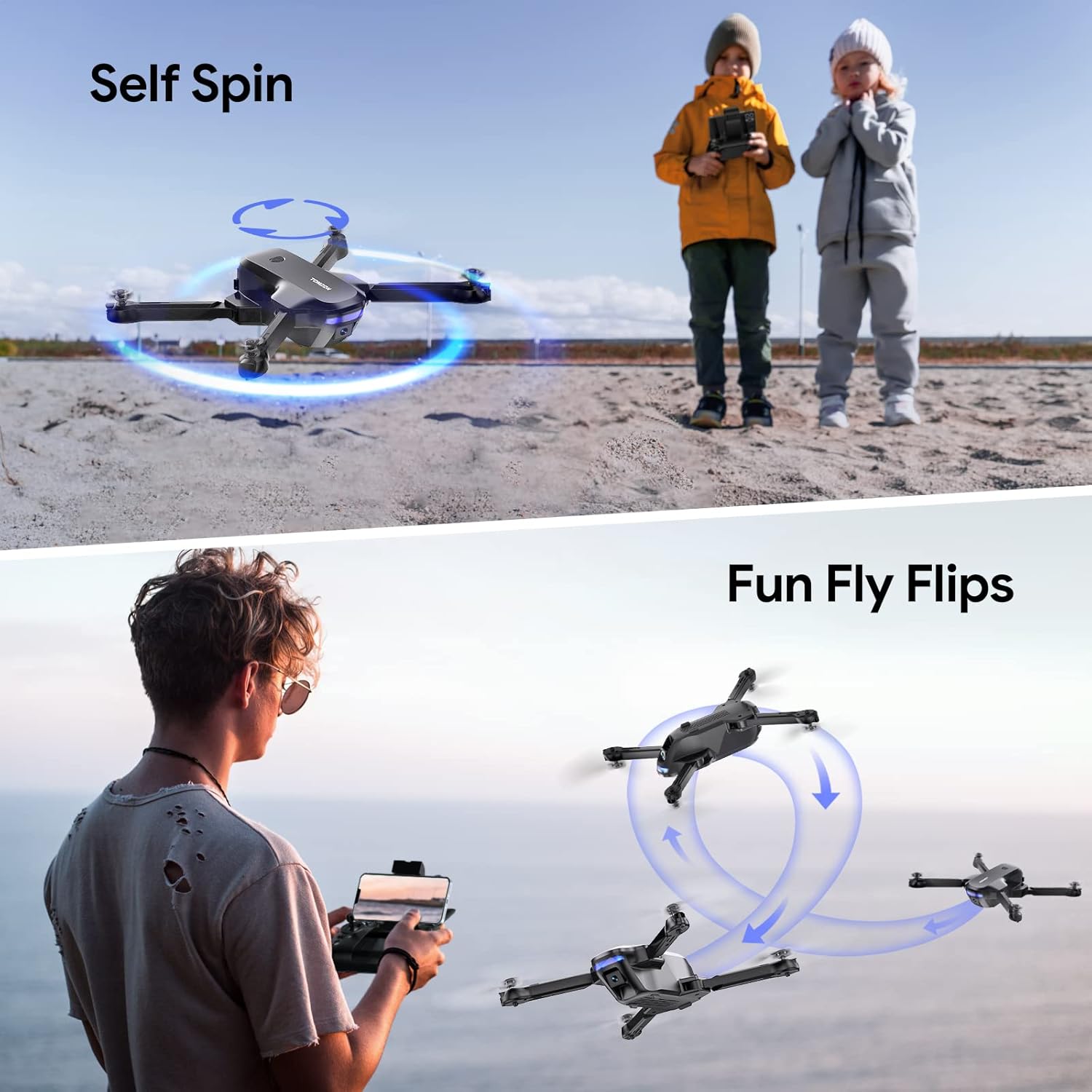
Image: The drone performing a 'Self Spin' maneuver, rotating in place, and a sequence of 'Fun Fly Flips', showing the drone executing 360-degree rolls in the air.
- Circle Fly: In the app, select Circle Fly mode. The drone will automatically fly in a circular path around a designated point.
- Self Spin: Activate Self Spin mode in the app, and the drone will rotate in place, providing a dynamic view.
- Volu di traiettoria: Draw a desired flight path on your smartphone screen within the app. The drone will follow this trajectory automatically.
- Modu di gravità: Control the drone's movement by tilting your smartphone. This mode uses the phone's internal gyroscope.
- Capovolgimenti 3D: While flying, press the 3D Flips button on the remote controller (or activate in app) and push the right stick in a direction to perform a 360° roll. Ensure sufficient altitude before attempting.
Funziunamentu di a Camera è FPV
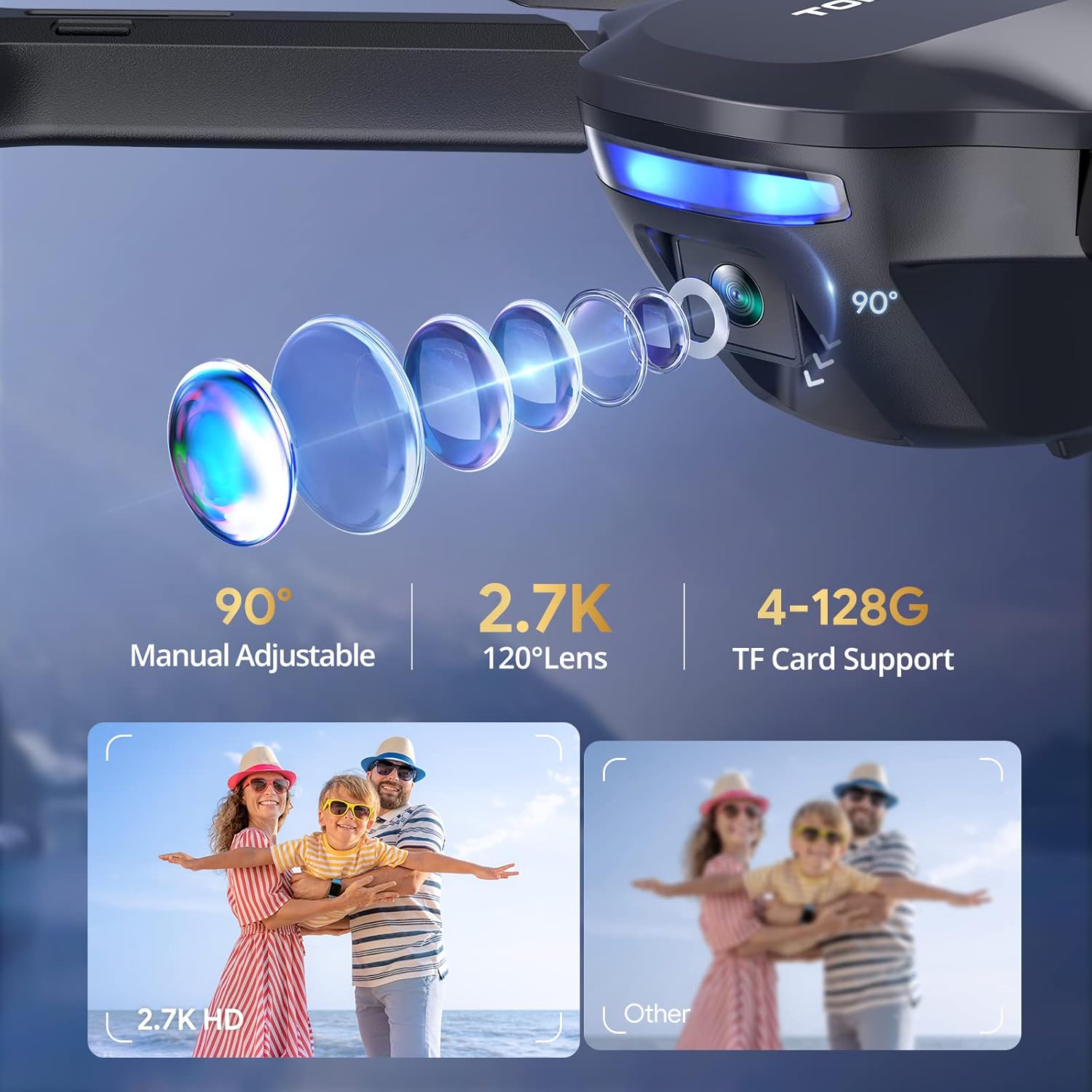
Imagine: Primu pianu view of the drone's camera, highlighting its 90-degree manual adjustability, 2.7K resolution with a 120-degree wide-angle lens, and support for 4-128GB TF cards for media storage.
The TOMZON T4W is equipped with a 2K UHD camera for high-resolution photo and video capture, and FPV (First Person View) transmission to your smartphone.
- Trasmissione FPV: Once connected to the drone's Wi-Fi and the app is open, you will see a live video feed from the drone's camera on your smartphone screen. The image transmission range is approximately 263 feet.
- Adjustable Camera Lens: The camera lens can be manually adjusted 90 degrees to capture different angles.
- Cattura foto / video: Use the dedicated buttons on the remote controller or the controls within the app to take photos or start/stop video recording.
- Supportu di carta TF: For clearer video and image storage, insert a 4-128G TF card (not included) into the drone's TF card slot. Media will be saved directly to the card.
Mantenimentu
- Pulizia: Aduprate un pannu dolce è asciuttu per pulisce u drone è u telecomandu. Ùn aduprate micca prudutti chimichi aggressivi o solventi.
- Hélices : Regularly inspect propellers for cracks, bends, or damage. Replace damaged propellers immediately using the provided spare parts.
- Motori: Keep motors free from dust and debris. Avoid operating in sandy or dusty environments.
- Cura di a batteria: Store batteries in a cool, dry place. Do not overcharge or over-discharge batteries. If storing for extended periods, charge them to about 50% capacity.
- Conservazione: When not in use, fold the drone arms and store the drone and all accessories in the portable handbag to protect them from damage.
Risoluzione di prublemi
| Prublemu | Causa Possibile | Soluzione |
|---|---|---|
| U drone ùn risponde micca à u controller. | Not paired; Low battery on drone or controller; Out of range. | Re-pair the drone and controller; Charge batteries; Fly within range (328FT). |
| U drone si move à a deriva durante u volu. | Gyroscope not calibrated; Uneven surface during take-off; Wind interference. | Perform gyroscope calibration on a flat surface; Fly in calm conditions. |
| FPV feed is laggy or disconnected. | Signale Wi-Fi debule; Troppu luntanu da u drone; Interferenza. | Ensure strong Wi-Fi connection; Fly within image transmission range (263FT); Avoid areas with strong Wi-Fi interference. |
| U drone ùn decolla micca. | Low battery; Propellers installed incorrectly; Not paired. | Charge drone battery; Check propeller installation (A/B markings); Ensure successful pairing. |
| Low-Power/Signal Alarm sounds. | Drone battery is low; Drone is losing signal with controller. | Land the drone immediately and replace/recharge battery; Fly closer to the controller. |
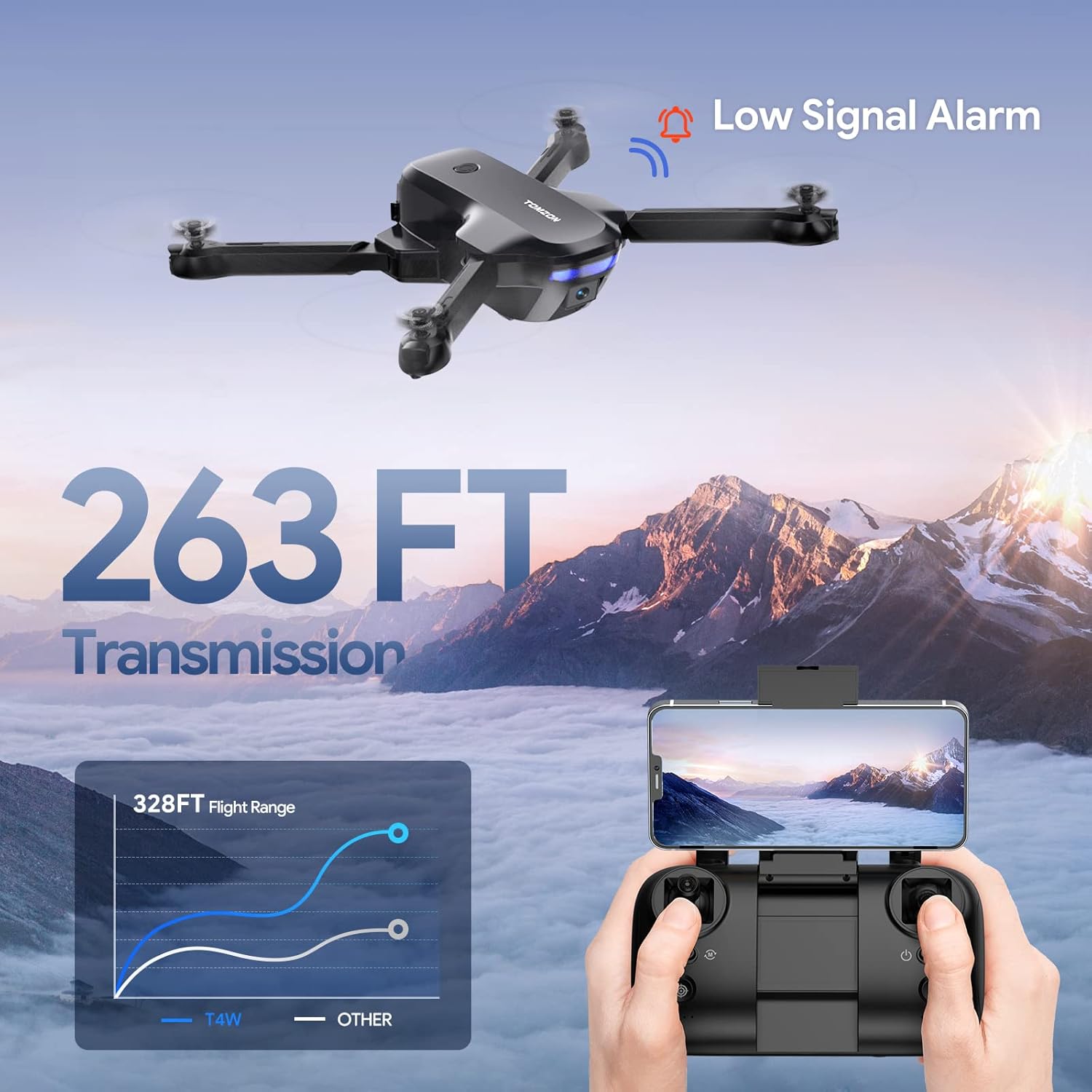
Image: Diagram illustrating the drone's flight range (328FT) and image transmission range (263FT), along with a visual cue for the low signal alarm, emphasizing operational limits and safety warnings.
Specificazioni
| Feature | Detail |
|---|---|
| Marca | TOMZON |
| Nome di mudellu | T4W |
| Risoluzione Camera | 2K UHD (2.7K mentioned in feature bullets, 2K in title) |
| Camera Lens | 120° Wide Angle, 90° Adjustable |
| Tempu di volu | Finu à 36 minuti (cù 2 batterie) |
| Gamma di cuntrollu | Approx. 328 FT (100 meters) |
| Gamma di trasmissione di l'imagine | Approx. 263 FT (80 meters) |
| Pesu | 948 g |
| Dimensioni | 21.08 x 21.08 x 5.08 cm |
| Supportu per a carta TF | 4-128G (TF card not included) |
| Funzioni spiciali | Altitude Hold, Headless Mode, One Key Fly, 3 Speeds, Circle Fly, Self Spin, Trajectory Flight, Gravity Mode, 3D Flips, Low-Power/Signal Alarm, Portable Handbag |
Garanzia è Supportu
For warranty information and technical support, please refer to the warranty card included in your product packaging or visit the official TOMZON websitu. Conservate a vostra ricevuta di compra cum'è prova di compra.
If you encounter any issues not covered in this manual, please contact TOMZON customer service for assistance.


