1. Introduzione
This manual provides instructions for the Waveshare 5G Dongle Module, an adapter designed to integrate 5G modules with M.2 (NGFF) Key B interface into various host devices via a USB 3.1 Type A port. It includes quad antennas and an aluminum alloy heatsink for optimal performance and heat dissipation. Please note that the 5G module itself is not included and must be purchased separately.

Figura 1: Overview of the Waveshare 5G Dongle Module components.
2. Features
- Supports 5G modules with M.2 (NGFF) Key B interface, compatible with SIMCom and Quectel 5G modules.
- Supports 5G modules with 3042/3052 form factor, such as SIM82XX and RM50XQ series 5G modules.
- USB 3.1 Type A port for connecting to PC, Raspberry Pi, or Jetson Nano host boards to enable high-speed 5G network access.
- Includes 4x SMA antenna connectors for easy antenna installation.
- Onboard SIM card slot for Nano SIM cards.
- Onboard power and network indicators, with multiple reserved pads, for checking module operating status and testing other functions.
- PCB ENIG process, with reserved multi-slots and positioning holes for integration.
- Comes with a customized aluminum alloy heatsink for effective heat dissipation, protection, and durability.
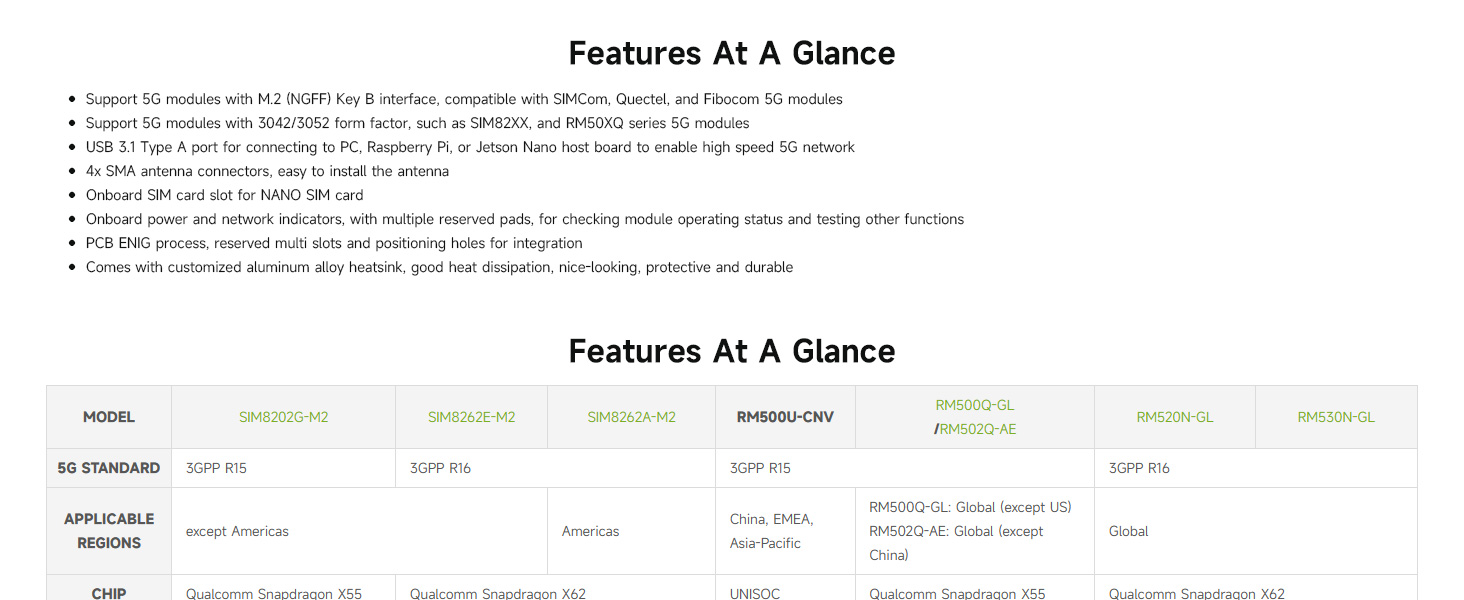
Figure 2: Key features and compatibility overview.
3. Setup è Installazione
3.1 Package Contents Verification
Prima di cuntinuà cù l'installazione, verificate chì tutti i cumpunenti sò presenti in u vostru imballaggio:
- Waveshare USB TO M.2 B KEY board
- Aluminum alloy heatsink
- Quad antennas
- USB 3.1 Type A cable (with auxiliary power option)
- SMA to IPEX adapter cables (for antenna connection)
- Screws and thermal pads
Note: A 5G module (e.g., SIMCom, Quectel) is NOT included and must be purchased separately.
3.2 Assemblea Modulu
- Install the 5G Module: Carefully insert your compatible 5G module (3042/3052 form factor) into the M.2 Key B slot on the Waveshare board. Secure it with the provided screws.
- Apply Thermal Pad and Heatsink: Place the thermal pad onto the 5G module. Then, attach the aluminum alloy heatsink over the 5G module and secure it to the Waveshare board using the appropriate screws. Ensure good contact for effective heat dissipation.
- Cunnette l'antenne: Connect the SMA to IPEX adapter cables to the 5G module's antenna ports and the SMA connectors on the Waveshare board. Then, screw the quad antennas onto the SMA connectors.
- Insert Nano SIM Card: Locate the Nano SIM card slot on the board and insert your activated Nano SIM card.
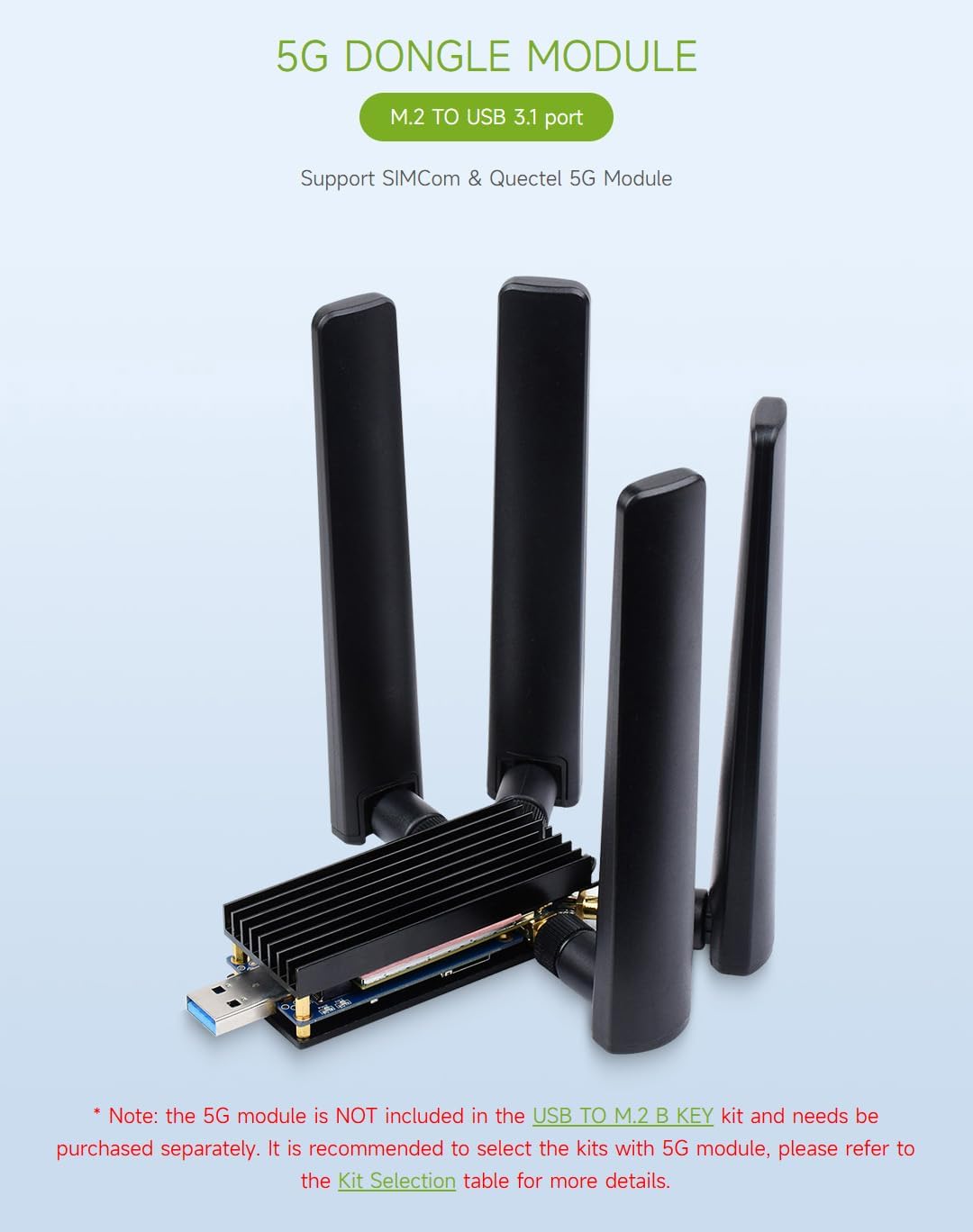
Figure 3: Fully assembled 5G Dongle Module with antennas and heatsink.
3.3 Cunnessione à un dispositivu host
Connect the assembled 5G Dongle Module to your host device (PC, Raspberry Pi, Jetson Nano) using the provided USB 3.1 Type A cable. If your 5G module has high power consumption, use the auxiliary power supply cable by connecting both USB male ports to your host device or a suitable power source.
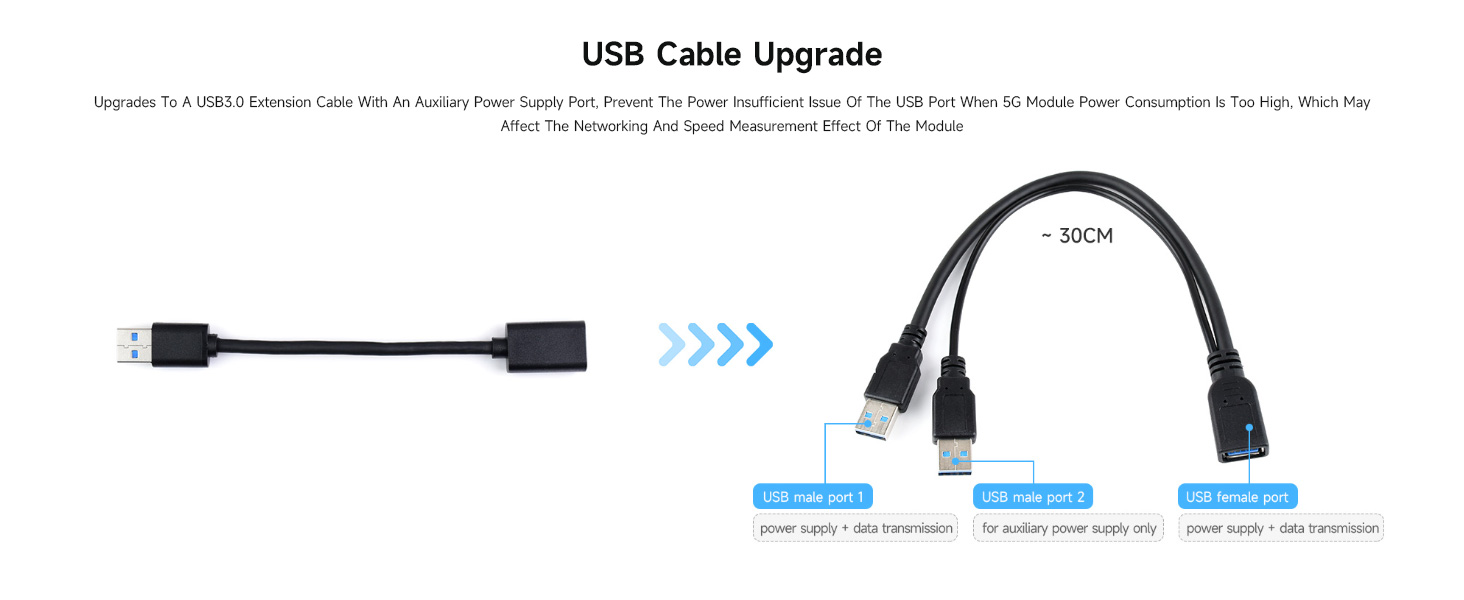
Figura 4: Cunnessione examples with various host devices.

Figure 5: USB cable with auxiliary power for high-power 5G modules.
4. Operating Instructions
4.1 Compatibilità di u sistema
The Waveshare 5G Dongle Module supports Windows and Linux operating systems. After connecting the module, your system should detect the new hardware.
4.2 Installazione di Driver
Depending on your specific 5G module and operating system, you may need to install drivers. Refer to the documentation provided with your 5G module or visit the Waveshare official website for driver downloads and detailed setup guides for your specific module and OS combination.
4.3 Cunnessione di Rete
Once drivers are installed and the module is recognized, configure your network settings according to your operating system's instructions to establish a 5G network connection. The onboard power and network indicators will provide visual feedback on the module's operational status.

Figure 6: Multi-system support and heatsink function.
5. Mantenimentu
The Waveshare 5G Dongle Module is designed for durability. To ensure its longevity and optimal performance:
- Mantene l'apparechju pulitu è senza polvere. Aduprate un pannu dolce è asciuttu per a pulizia.
- Avoid exposing the module to extreme temperatures, humidity, or direct sunlight.
- Ensure the heatsink remains clear of obstructions to allow for proper airflow and heat dissipation.
- Handle the module and its components with care to prevent physical damage to connectors or the PCB.
6. Risoluzione di prublemi
6.1 Module Not Recognized by Host Device
- Verificate e cunnessione: Ensure the USB cable is securely connected to both the dongle and the host device.
- Potenza Ausiliaria: If using a high-power 5G module, ensure the auxiliary power USB cable is also connected to provide sufficient power.
- Installazione di driver: Verify that the correct drivers for your specific 5G module are installed on your operating system. Refer to the 5G module manufacturer's website or Waveshare's support resources.
- Module Seating: Ensure the 5G module is correctly seated in the M.2 Key B slot and secured.
6.2 Prublemi di surriscaldamentu
- Installazione di dissipatore di calore: Confirm the aluminum alloy heatsink is properly installed with the thermal pad making good contact with the 5G module.
- Flussu d'aria: Ensure the heatsink is not obstructed and has adequate airflow.
- Alimentazione elettrica: Insufficient power can sometimes lead to instability and heat. Use the auxiliary power cable if needed.
6.3 Nisun segnale di rete
- Cunnessioni di l'antenna: Verify that all four antennas are securely connected to the SMA connectors and that the IPEX cables are properly attached to the 5G module.
- Carta SIM: Ensure the Nano SIM card is correctly inserted and activated with a valid data plan.
- 5G Module Compatibility: Confirm that your 5G module is compatible with the network bands available in your region.
- Cunfigurazione Software: Check your operating system's network settings and the 5G module's software for correct APN settings and network selection.
6.4 Parti mancanti o danneggiate
If you find any parts missing or damaged upon arrival, please contact your vendor or Waveshare support immediately for assistance.
7. Specificazioni
| Feature | Detail |
|---|---|
| Numero di mudellu | USB TO M.2 B KEY |
| Interfaccia Hardware | USB 3.1 Type A. |
| Moduli cumpatibili | 5G modules with M.2 (NGFF) Key B interface (3042/3052 form factor), e.g., SIMCom, Quectel SIM82XX, RM50XQ series |
| Connettori d'antenna | 4x SMA |
| Slot per carta SIM | Nano SIM |
| Protokollu Data Link | USB |
| Rate di trasferimentu di dati | 5 Gigabit Per Second |
| Dispositivi compatibles | PC, Raspberry Pi, Jetson Nano |
| Materiale di u dissipatore di calore | Alloy d'aluminium |
| Dimensioni di u pacchettu | 7.17 x 5.31 x 1.81 inch |
| Pesu di l'articulu | 8.4 ounces (0.24 kilogrammi) |
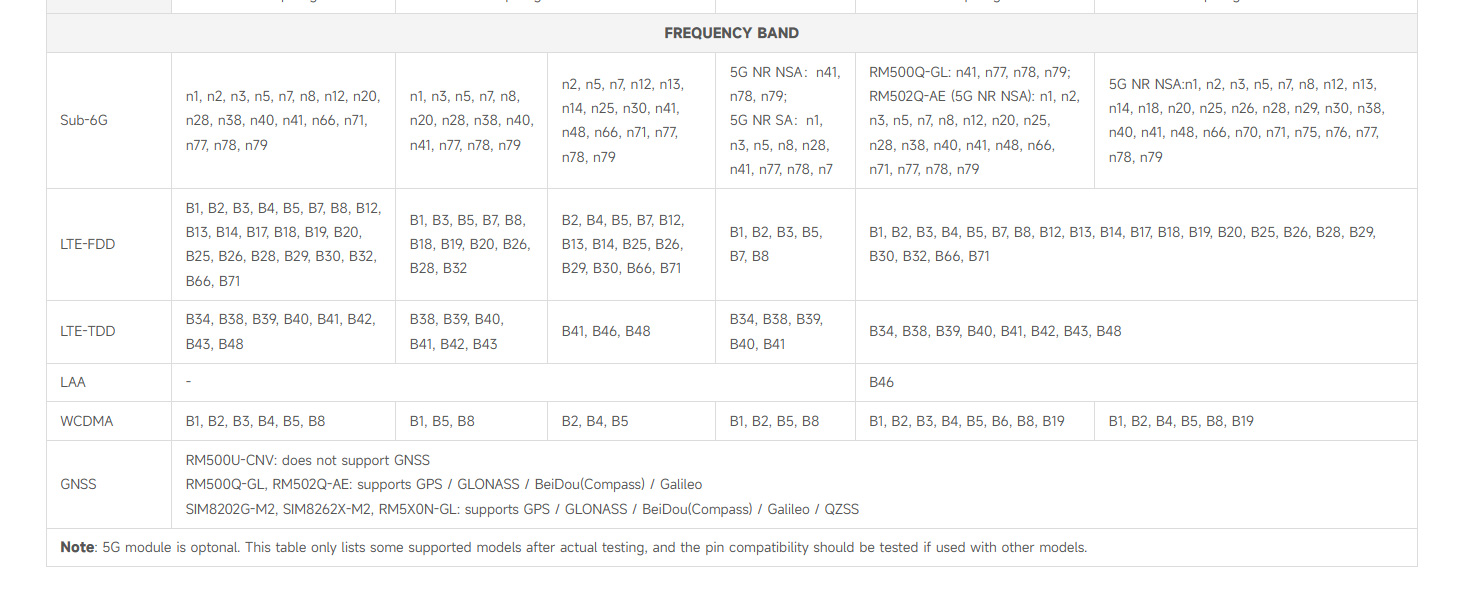
Figure 7: Detailed table of compatible 5G modules and their specifications.

Figure 8: Multiple size compatibility for M.2 modules.
8. Garanzia è Support
Specific warranty information for the Waveshare 5G Dongle Module is not provided in this document. For warranty details, technical support, or further assistance, please refer to the official Waveshare websitu o cuntattate direttamente u so serviziu clienti. Conservate a vostra ricevuta d'acquistu per e richieste di garanzia.


