1. Introduzione
This manual provides essential information for the proper use, setup, and maintenance of your WIWU SW01 Pro Smartwatch Series 8. Please read this manual thoroughly before using the device to ensure optimal performance and longevity. The WIWU SW01 Pro Smartwatch is designed for daily wear, offering advanced features for communication, fitness tracking, and convenience.
2. Produttu Finituview
2.1 Funzioni chjave
- Toughness and Durability: Equipped with a 1.95-inch IPS HD screen, built to withstand challenging environments.
- Durata di a batteria estesa: Offers up to 5 days of typical usage or 4 days with heavy usage on a single charge.
- Resistenza à l'acqua: IP68 rated, water-resistant up to 1.5 meters for 30 minutes, suitable for swimming and water activities.
- Modi Multi-Sport: Tracks critical data such as heart rate, movement speed, and calories burned across various sports.
- Personal Assistant: Provides notifications for text messages, supports Bluetooth calls with independent ringtone, and allows music playback control.
- Ricarica wireless: Convenient and fast charging experience.
- Voice Assistant & NFC: Integrated voice assistant and NFC capabilities for enhanced functionality.
2.2 Cumpunenti
The WIWU SW01 Pro Smartwatch features a sleek design with essential components for interaction and functionality.

Figura 2.2.1: Fronte view of the WIWU SW01 Pro Smartwatch, showcasing the display and side button.
- Display: 1.95-inch IPS HD touchscreen for clear visuals and intuitive navigation.
- Buttone laterale/corona: Used for power on/off, navigating menus, and selecting options.
- Sensori: Located on the rear of the watch for health monitoring, including heart rate tracking.
- cinturione: Durable and comfortable strap for secure wearing.
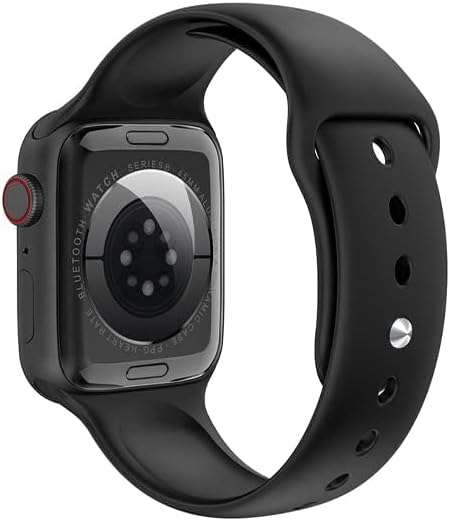
Figura 2.2.2: Posteriore view of the WIWU SW01 Pro Smartwatch, showing the optical sensors for health monitoring.

Figure 2.2.3: Various color options of the WIWU SW01 Pro Smartwatch, highlighting different watch faces and designs.
3. Setup Guide
3.1 Carica iniziale
Before first use, fully charge your WIWU SW01 Pro Smartwatch. The watch supports wireless charging for convenience.
- Place the back of the smartwatch onto the wireless charging pad.
- Ensure the watch is correctly aligned with the charging coils; the watch display will indicate charging status.
- Allow the watch to charge until the battery indicator shows 100%. A full charge typically takes approximately 2 hours.

Figure 3.1.1: The WIWU SW01 Pro Smartwatch being charged wirelessly, illustrating the ease of connection to the charging cable.
3.2 Accoppiamentu cù u vostru dispositivu
To unlock the full functionality of your smartwatch, pair it with your smartphone via Bluetooth.
- Ensure your smartwatch is powered on and sufficiently charged.
- Attivà u Bluetooth in u vostru smartphone.
- Open the companion application on your smartphone (refer to the watch's on-screen instructions or packaging for app name).
- Follow the in-app instructions to search for and connect to your WIWU SW01 Pro Smartwatch. The watch name should appear in the list of available Bluetooth devices.
- Cunfirmate a dumanda di accoppiamentu sia nant'à u vostru smartphone sia nant'à u vostru smartwatch.
4. Operating Instructions
4.1 Navigazione basica
- Touchscreen: Scorri à manca/destra, in su/in giù per navigà trà i menu è e notificazioni. Tocca per selezziunà l'elementi.
- Buttone laterale/corona: Press to return to the home screen or access the app list. Rotate to scroll through lists or adjust settings.
4.2 Funzioni di cumunicazione
Once paired with your smartphone, the smartwatch allows for convenient communication.
- Chjama Bluetooth: Receive and make calls directly from your watch. When a call comes in, push it to the watch to answer with a single tap.
- Notificazioni: Receive alerts for incoming text messages and other app notifications.

Figure 4.2.1: The WIWU SW01 Pro Smartwatch displaying an incoming call, demonstrating the Bluetooth call feature.
4.3 Seguimentu di a forma fisica è di a salute
The smartwatch is equipped with sensors to monitor your physical activity and health metrics.
- Modi Multi-Sport: Select from various sports modes to track specific activities. The watch monitors real-time data such as workout heart rate, movement speed, and calories burned.
- Monitoramentu di a Frequenza Cardiaca: Monitorizza continuamente a vostra frequenza cardiaca durante u ghjornu.
4.4 Daily Assistant Features
The WIWU SW01 Pro Smartwatch offers several features to assist with daily tasks.
- Assistente vocale: Access your smartphone's voice assistant directly from the watch.
- NFC: Utilize NFC for compatible functions (specific functionality may vary by region and setup).
- Cuntrolla di musica: Cuntrolla a riproduzione di musica nant'à u vostru smartphone assuciatu.
- Camera Bluetooth: Cuntrolla à distanza a camera di u vostru smartphone per piglià foto.
- Display di u tempu: View cundizioni meteo attuali è previsioni.
- torcia: Activate a simple flashlight function for convenience.

Figura 4.4.1: Overview of daily assistant features including Bluetooth music control, Bluetooth camera, weather display, and flashlight function.
5. Mantenimentu
5.1 Pulizia di u vostru Smartwatch
To maintain the appearance and functionality of your smartwatch, follow these cleaning guidelines:
- Asciugate u schermu è u corpu cù un pannu dolce è senza pelu.
- Per e macchie ostinate, leggermente dampSciacquate u pannu cù acqua. Evitate l'usu di prudutti chimichi aggressivi o materiali abrasivi.
- Clean the sensors on the back of the watch regularly to ensure accurate readings.
5.2 Linee guida per a resistenza à l'acqua
The WIWU SW01 Pro Smartwatch has an IP68 water resistance rating, meaning it can withstand immersion in water up to 1.5 meters for 30 minutes. However, it is important to note the following:
- Evitate d'espone l'orologio à acqua calda, vapore o getti d'acqua à alta pressione.
- Do not press buttons or operate the touchscreen underwater.
- Rinse the watch with fresh water after exposure to saltwater or chlorinated water, then dry thoroughly.
- Water resistance is not a permanent condition and may decrease over time with normal wear and tear.
5.3 Cura di a batteria
To maximize the lifespan of your smartwatch battery:
- Avoid extreme temperatures (very hot or very cold) as they can degrade battery performance.
- Ùn lasciate micca chì a batteria si scarichi cumpletamente spessu.
- Sè vo conservate l'orologio per un periodu prolongatu, caricatelu à circa 50% prima di almacenallu.
6. Risoluzione di prublemi
If you encounter issues with your WIWU SW01 Pro Smartwatch, refer to the table below for common problems and solutions.
| Prublemu | Causa Possibile | Soluzione |
|---|---|---|
| L'orologio ùn s'accende micca | Batteria bassa; malfunzionamentu di u dispusitivu | Charge the watch for at least 30 minutes. If still unresponsive, contact support. |
| Ùn si pò micca accoppià cù u smartphone | Bluetooth off; watch not in pairing mode; app issue | Ensure Bluetooth is enabled on both devices. Restart both devices. Reinstall the companion app. |
| A batteria si scarica rapidamente | Frequent use of features; high brightness; too many notifications | Reduce screen brightness. Limit background app refresh. Disable unnecessary notifications. |
| Heart rate readings are inaccurate | Watch not worn correctly; dirty sensors | Ensure the watch is snug on your wrist. Clean the optical sensors on the back of the watch. |
| U touchscreen ùn risponde micca | Software glitch; water on screen | Restart the watch. Wipe the screen dry. If issue persists, contact support. |
7. Specificazioni
Detailed technical specifications for the WIWU SW01 Pro Smartwatch Series 8.
| Feature | Specificazione |
|---|---|
| Numero di mudellu | SW01P8BLK |
| Size Screen | 1.95 Inches IPS HD |
| Capacità batterie | 270 mAh Lithium Ion |
| Connettività | Bluetooth 5.0 |
| Resistenza à l'acqua | IP68 (1.5 meters for 30 minutes) |
| Capacità di almacenamiento di memoria | 128 MB |
| Sistema upirativu | watchOS (as per product data, note: this might be a generic OS name) |
| Dimensioni di u produttu | 18.4 x 9.7 x 3.6 cm |
| Pesu di l'articulu | 200 g |
| Funzioni spiciali | Wireless Charging, Voice Assistant, NFC, Multi Sports Modes |
8. Garanzia è Support
For warranty information and customer support, please refer to the documentation included with your purchase or visit the official WiWU website. Warranty terms and conditions may vary by region and retailer. Keep your proof of purchase for any warranty claims.
For technical assistance or further inquiries, please contact WiWU customer service through their official channels.


