1. Introduzione
Thank you for choosing the DELTACO Gaming PM80 Wireless Optical Gaming Mouse. This manual provides essential information for setting up, operating, and maintaining your new gaming mouse. Please read these instructions carefully before use to ensure optimal performance and longevity of your device.
2. Cuntenutu di u pacchettu
- DELTACO Gaming PM80 Wireless Optical Gaming Mouse
- Ricevitore wireless USB
- Cavu di carica USB
- Manuale d'usu
3. Produttu Finituview
The DELTACO Gaming PM80 is a high-performance wireless optical gaming mouse designed for precision and comfort. It features 7 programmable buttons, adjustable DPI up to 4800, and customizable illumination. The mouse is rechargeable, ensuring uninterrupted gaming sessions.
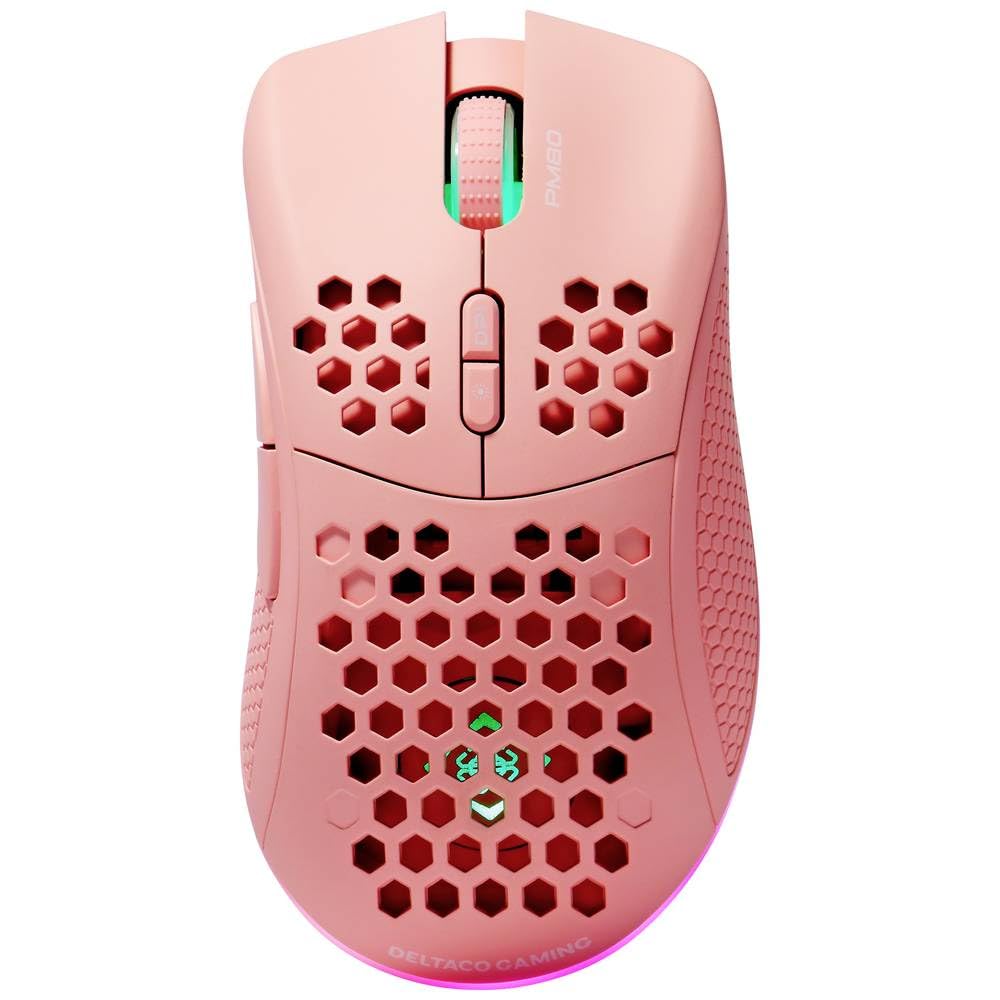
Image: DELTACO Gaming PM80 Wireless Optical Gaming Mouse. This image displays the mouse from a top-down perspective, highlighting its ergonomic design, the central scroll wheel, and the arrangement of its seven buttons.
Funzioni di u buttone:
- Buttone di cliccà sinistro: Funzione di clic principale standard.
- Buttone di cliccà drittu: Funzione di clic secundariu standard.
- Rotella di scorrimentu: Scorre in su/in giù, è agisce cum'è un buttone di cliccu centrale.
- Buttone di Ciclu DPI: Changes the mouse's sensitivity (DPI).
- Pulsante avanti: Naviga in avanti in web navigatori o file esploratori.
- Pulsante in daretu: Naviga in daretu in web navigatori o file esploratori.
- Illumination Mode Button: Cycles through different lighting effects or turns illumination on/off.
4. Setup
4.1. Caricamentu di u mouse
- Connect the small end of the USB charging cable to the charging port on the front of the mouse.
- Connect the larger end of the USB charging cable to an available USB port on your computer or a USB wall adapter.
- The mouse's illumination will indicate charging status (e.g., breathing effect, specific color). A full charge typically takes 2-3 hours.
- Once fully charged, the illumination may change or turn off. Disconnect the charging cable.
4.2. Connecting the USB Wireless Receiver
- Truvate u ricevitore wireless USB, di solitu almacenatu in un compartimentu sottu à u mouse.
- Remove the receiver from its storage slot.
- Cunnette u ricevitore wireless USB à una porta USB dispunibile di u vostru urdinatore.
- U vostru urdinatore duveria rilevà è installà automaticamente i driver necessarii. Questu pò piglià uni pochi di mumenti.
4.3. Powering On / Off
- Localisate l'interruttore di putenza nantu à a parte sottu di u mouse.
- Slide the switch to the 'ON' position to power on the mouse. The illumination will light up.
- To conserve battery life, slide the switch to the 'OFF' position when the mouse is not in use for extended periods.
5. Operating Instructions
5.1. Usage Basic
Once connected and powered on, the mouse is ready for use. Move the mouse on a flat surface to control the cursor on your screen. Use the left and right click buttons for primary and secondary actions, and the scroll wheel for navigation.
5.2. Ajustamentu DPI
The DPI (Dots Per Inch) setting determines the sensitivity of your mouse. The DELTACO Gaming PM80 offers multiple DPI levels up to 4800 DPI. To adjust the DPI:
- Press u Pulsante di cicculu DPI (typically located behind the scroll wheel).
- Each press will cycle through the available DPI settings. The mouse's illumination may change color or flash to indicate the current DPI level.
- Select the DPI setting that best suits your preference for gaming or general use.
5.3. Illumination Control
The DELTACO Gaming PM80 features customizable illumination. To change the lighting effects:
- Press u Illumination Mode Button (refer to Product Overview per u locu).
- Each press will cycle through different lighting modes, such as static colors, breathing effects, or off.
6. Mantenimentu
6.1. Pulizia
- Assicuratevi chì u mouse sia spento prima di pulisce.
- Aduprate un pannu dolce, asciuttu è senza pelu per asciugà a superficia di u mouse.
- Per a sporcizia ostinata, d ligeramenteampSciacquate u pannu cù acqua o un detergente dolce è micca abrasivu. Evitate l'umidità eccessiva.
- Ùn aduprate micca prudutti chimichi aggressivi, solventi o materiali abrasivi, postu chì questi ponu dannà a finitura di u mouse.
- Aduprate un tampone di cuttone o aria compressa per pulisce intornu à a rotella di scorrimentu è e fessure di i buttoni.
6.2. Storage
When not in use for extended periods, store the mouse in a cool, dry place away from direct sunlight and extreme temperatures. Ensure the power switch is in the 'OFF' position to preserve battery life.
7. Risoluzione di prublemi
- U mouse ùn risponde micca:
- Assicuratevi chì u mouse hè alimentatu.
- Verificate se u ricevitore wireless USB hè cunnessu currettamente à una porta USB funzionale.
- Verify the mouse battery is charged. Connect the charging cable and try again.
- Pruvate à cunnette u ricevitore à un altru portu USB.
- Restart u vostru urdinatore.
- Cunnessione ritardata o intermittente:
- Ensure the mouse is within close proximity to the USB receiver (ideally within 10 meters).
- Avoid placing the receiver near other wireless devices or sources of interference (e.g., Wi-Fi routers, cordless phones).
- Assicuratevi chì u mouse sia cumpletamente caricatu.
- U muvimentu di u cursore hè erraticu o imprecisu:
- Pulite u sensore otticu situatu sottu à u mouse cù un pannu dolce è asciuttu.
- Assicuratevi d'utilizà u mouse nantu à una superficia adatta (per esempiu, un tappetinu di mouse). Evitate superfici assai riflettenti o trasparenti.
- Ajustate l'impostazione DPI à una sensibilità più bassa se u cursore hè troppu veloce.
- L'illuminazione ùn funziona micca:
- Assicuratevi chì u mouse hè alimentatu.
- Press the Illumination Mode Button to cycle through modes, ensuring it's not set to 'off'.
- Check battery level; low battery might disable illumination.
8. Specificazioni
| Feature | Detail |
|---|---|
| Marca | GAMING DELTACO |
| Numero di mudellu | GAM-120-P |
| Connettività | Wireless (Ricevitore USB) |
| Tipu di sensor | otticu |
| DPI | Finu à 4800 DPI (Ajustabile) |
| Numero di Buttons | 7 |
| Orientazione di a manu | Diritta |
| Illuminazione | Iè |
| Rechargeable | Iè |
| Batterie necessarie | No (Internal Rechargeable) |
9. Garanzia è Support
For warranty information and technical support, please refer to the warranty card included with your product or visit the official DELTACO Gaming websitu. Conservate a vostra prova d'acquistu per qualsiasi reclamazione di garanzia.


