1. Introduzione
The 1Mii B310Pro is a versatile Bluetooth 5.2 audio adapter designed to enhance your audio experience. It functions as a transmitter (TX), receiver (RX), and offers a bypass mode, providing flexible connectivity for various audio setups. This device supports aptX Low Latency and aptX HD codecs for high-quality, synchronized audio, and features a long-range transmission capability.
2. Cuntenutu di u pacchettu
Verificate chì tutti l'articuli sò presenti in u pacchettu:
- 1Mii B310Pro Bluetooth Transmitter Receiver
- Cavu di Alimentazione USB
- 3.5mm Male to RCA Male Cable
- Cavo audio da 3.5 mm
- Cavu otticu
- Adattatore DC
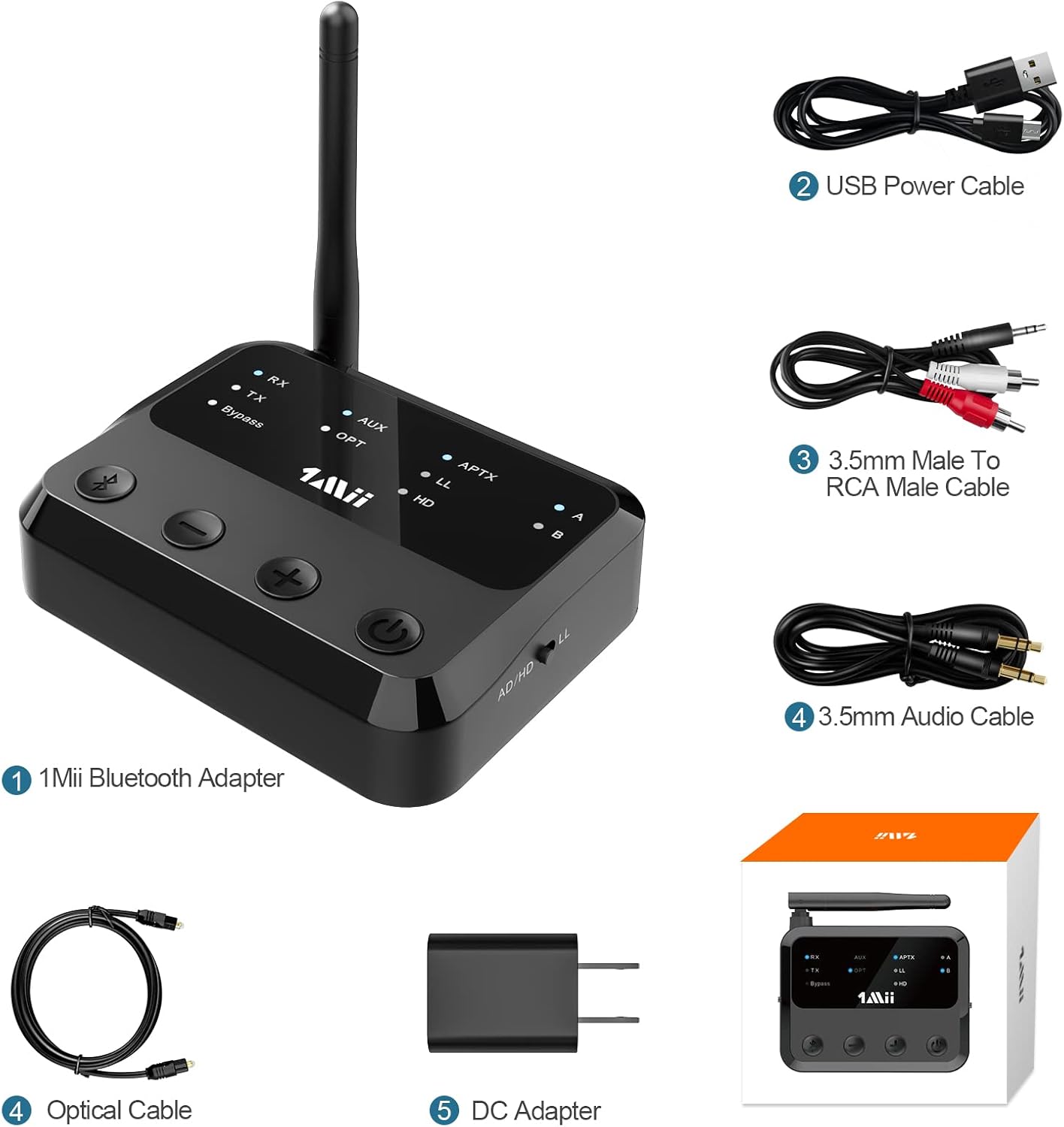
Figura 2.1: 1Mii B310Pro Bluetooth adapter and its included accessories, showing the device, USB power cable, 3.5mm to RCA cable, 3.5mm audio cable, optical cable, and DC adapter.
3. Produttu Finituview è Features
The 1Mii B310Pro offers multiple modes and advanced features for a seamless audio experience.
3.1. Modi di funziunamentu
- Modu di trasmettitore (TX): Transmits audio from non-Bluetooth devices (e.g., TV, PC) to Bluetooth headphones or speakers.
- Modu di ricevitore (RX): Receives audio from Bluetooth-enabled devices (e.g., smartphone) and outputs to wired speakers or home stereo systems.
- Modu di bypass: Acts as a digital-to-analog converter (DAC), allowing direct audio pass-through without Bluetooth functionality.

Figura 3.1: Overview of the 1Mii B310Pro's three operational modes: Transmitter (TX), Receiver (RX), and Bypass.
3.2. Funzioni chjave
- Bluetooth 5.2: Ensures stable and fast wireless connections.
- Long Range: Up to 164 feet (50 meters) barrier-free transmission.
- Supportu aptX: Includes aptX Adaptive, aptX Low Latency, and aptX HD for high-quality, synchronized audio. Note: Your receiving device must also support aptX LL for low-latency audio.
- Ampia cumpatibilità: Supports Optical, RCA, and 3.5mm AUX input/output. Compatible with TVs, home stereo systems, Bluetooth headphones, and speakers.
- Funzione di doppia cunnessione: Connects to two Bluetooth headphones or speakers simultaneously with independent volume control.
- Memory Connection: Automatically reconnects to the last paired device.

Figura 3.2: The 1Mii B310Pro features an advanced Bluetooth 5.2 chip for enhanced connectivity.

Figura 3.3: The 1Mii B310Pro offers an extended Bluetooth range of up to 164 feet (50m).
4. Setup Instructions
4.1. Powering On u dispusitivu
- Connect the B310Pro to a power supply using the included USB charging cable and DC adapter.
- U dispusitivu si accende automaticamente.
Video 4.1: This video demonstrates how to connect the 1Mii B310Pro to a power source and initiate pairing with AirPods. It shows the process of plugging in the USB cable and then pairing the device with Apple AirPods.
4.2. Connecting in Transmitter (TX) Mode
- Slide the mode switch on the B310Pro to the "TX" side.
- The B310Pro will enter pairing mode with the LED flashing blue and red. If not, press the Bluetooth button for about 2 seconds to enter pairing mode.
- Connect the B310Pro to your audio source (e.g., TV, PC) using the appropriate cable (Optical, RCA, or 3.5mm AUX).
- Mette i vostri auricolari o altoparlanti Bluetooth in modalità di accoppiamentu.
- Once paired, the "TX" LED will stop flashing, and the "A" or "B" LED will stay blue, indicating a successful connection.

Figura 4.1: The 1Mii B310Pro supports dual link, allowing two Bluetooth headphones to connect simultaneously in TX mode.
Video 4.2: This video illustrates the process of pairing a second Bluetooth headphone to the 1Mii B310Pro. It shows pressing the Bluetooth button to re-enter pairing mode and connecting the second device.
4.3. Connecting in Receiver (RX) Mode
- Slide the mode switch on the B310Pro to the "RX" side.
- The B310Pro will enter pairing mode with the LED flashing blue and red.
- Connect the B310Pro to your wired speakers or home stereo system using the appropriate cable (RCA or 3.5mm AUX).
- Enable Bluetooth on your smartphone or other audio device and select "1Mii B310Pro" from the list of available devices to pair.
- Once paired, the "RX" LED will stop flashing, and the "A" LED will stay blue.
4.4. Using Bypass Mode
- Slide the mode switch on the B310Pro to the "Bypass" position.
- Connect your audio source (e.g., TV) to the B310Pro's input and your wired speakers/stereo to the B310Pro's output using the appropriate cables.
- In this mode, audio passes directly through the device without Bluetooth processing.
5. Operating u dispusitivu
5.1. Controls è Indicators
The B310Pro features intuitive controls and LED indicators for easy operation.

Figura 5.1: Front panel controls and LED indicators of the 1Mii B310Pro.
- Button Bluetooth: Mantene premutu per 2 seconde per entre in u modu di accoppiamentu.
- Volume - / Traccia precedente: Diminuisce u vulume o salta à a traccia precedente.
- Volume + / Pista successiva: Aumenta u vulume o salta à a traccia successiva.
- Pulsante di accensione / spegnimentu: Accende o spegne u dispusitivu.
- Mode Switch (RX/TX/Bypass): Sceglie u modu di funziunamentu desideratu.
- Indicatori LED: Show current mode (RX/TX/Bypass), input/output type (AUX/OPT), audio codec (APTX/LL/HD/AD), and paired devices (A/B).
5.2. Optical Audio Settings for TV
When using the optical connection with your TV, ensure the TV's audio settings are configured correctly.
- Navigate to your TV's audio settings.
- Set the sound output to "OPTICAL".
- Set the audio output format to "PCM".

Figura 5.2: Optical fiber connection between TV and 1Mii B310Pro.
Video 5.1: This video demonstrates how to adjust the optical audio settings on a television to ensure proper sound output to the 1Mii B310Pro. The relevant segment shows navigating through the TV's sound menu to select 'Optical' output and 'PCM' format (from 0:39 to 0:49 in the video).
6. Risoluzione di prublemi
- Nisun sonu: If there is no sound, ensure your TV's audio output is set to "OPTICAL" and the audio format is "PCM" when using an optical connection. Check all cable connections.
- Problemi di accoppiamentu: If the device does not pair, ensure both the B310Pro and your receiving device are in pairing mode. Try resetting the B310Pro.
- Alta latenza: For aptX Low Latency to function, both the B310Pro and your Bluetooth headphones/speakers must support aptX LL.
- Interferenza: Keep the B310Pro away from other wireless devices that might cause interference.
6.1. Resetting the B310Pro
Per resettate u dispusitivu à i paràmetri di fabbrica:
- Press and hold the Bluetooth button for approximately 10 seconds.
- All indicator lights will flash once, confirming the reset.
Video 6.1: This video demonstrates how to perform a factory reset on the 1Mii B310Pro by pressing and holding the Bluetooth button until all indicators flash (from 0:49 to 0:59 in the video).
7. Specificazioni
| Feature | Detail |
|---|---|
| Numero di mudellu | B310Pro |
| Versione Bluetooth | 5.2 |
| Modi di funziunamentu | TX (Transmitter), RX (Receiver), Bypass |
| Codecs audio supportati | aptX Adaptive, aptX HD, aptX Low Latency, SBC, AAC |
| Tecnulugia di cunnessione | Otticu, RCA, AUX 3.5 mm |
| Range Wireless | Up to 164 feet (50 meters) barrier-free |
| Dimensioni di u produttu | 3.11 x 3.94 x 0.98 inch |
| Pesu di l'articulu | 9.6 once |
| Fonte d'energia | Adattatore DC |
| Funzione speciale | Volume Control |
8. Informazioni di sicurezza
- Manipulate u dispusitivu cun cura per evità danni.
- Tenir à l'écart de l'eau et des températures extrêmes.
- Assicuratevi una ventilazione curretta per prevene u surriscaldamentu.
- Avoid interference with other wireless devices.
- Handle the battery with care (if applicable).
9. Garanzia è Support
Per infurmazioni nantu à a garanzia è l'assistenza tecnica, vi pregu di cunsultà u situ ufficiale di 1Mii. websitu o cuntattate direttamente u so serviziu clienti. Conservate a vostra ricevuta d'acquistu per e richieste di garanzia.
Websitu: www.1mii.com


