1. Produttu Finituview
The ProtoArc K100-A is an ultra-slim wireless Bluetooth keyboard specifically designed for Mac devices. It features a full-size layout with a numeric keypad, responsive scissor-switch keys for quiet typing, and adjustable white LED backlighting. This keyboard supports connection to up to three devices simultaneously, allowing for seamless switching between your MacBook, iMac, iPad, or iPhone. Its built-in rechargeable battery ensures long-lasting use.

Image: The ProtoArc K100-A keyboard connected to a MacBook, iPad, and iPhone, showcasing a so capacità multi-dispositivi.
2. Cuntenutu di u pacchettu
- Tastiera Bluetooth retroilluminata ProtoArc K100-A
- Cavu di carica USB-C
- Manuale d'uso (stu documentu)
3. Getting Started
3.1 Caricamentu di a tastiera
Before first use, fully charge the keyboard. Connect the provided USB-C charging cable to the keyboard's Type-C port and the other end to a USB power source (e.g., computer USB port, USB wall adapter). A full charge takes approximately 4-5 hours. The built-in 1200mAh lithium-ion battery provides a standby time of 3-4 months.

Image: The keyboard's Type-C charging port with the charging cable inserted.
3.2 Power On/Off
Locate the power switch on the side or back of the keyboard. Slide it to the "ON" position to power on the keyboard. Slide it to "OFF" when not in use to conserve battery.
4. Cunnessione Bluetooth
The ProtoArc K100-A keyboard supports connection to three different devices via Bluetooth. Follow these steps to pair your devices:
- Assicuratevi chì u teclatu hè alimentatu.
- Press and hold one of the Bluetooth channel keys (BT1, BT2, o BT3) per 3-5 secondi finu à chì a luce indicatrice currispundente lampeggi rapidamente. Questu indica chì a tastiera hè in modalità di accoppiamentu.
- On your Mac device (MacBook, iMac, iPad, iPhone), go to Paràmetri di u sistema (o Preferenze di u Sistema) > Bluetooth.
- Attivate u Bluetooth è cercate i dispusitivi dispunibili.
- Selezziunate "ProtoArc K100-A" da a lista di i dispusitivi.
- Follow any on-screen prompts to complete the pairing process. The indicator light will stop flashing and remain solid for a few seconds, then turn off, indicating successful pairing.
- Ripetite sti passi per un massimu di dui dispusitivi supplementari chì utilizanu l'altri tasti di u canale Bluetooth.

Image: The dedicated Bluetooth channel keys (BT1, BT2, BT3) on the keyboard.
4.1 Cambià trà i dispusitivi
To switch between paired devices, simply press the corresponding Bluetooth channel key (BT1, BT2, o BT3) once. The keyboard will connect to the selected device within a few seconds.
5. Operating Instructions
5.1 Controlu di retroilluminazione
The keyboard features soft white LED backlighting with three adjustable brightness levels (low, medium, high). To adjust the backlight brightness, press the backlight key (often indicated by a sun icon or similar) located on the top right of the keyboard. Pressing it repeatedly cycles through the brightness levels and turns the backlight off.

Image: The keyboard with its white adjustable backlight at different brightness levels.
5.2 Tasti di scelta rapida
The keyboard includes 12 shortcut keys for enhanced productivity on Mac devices. These keys provide quick access to functions such as brightness adjustment, mission control, media playback, volume control, and more. Refer to the key labels for specific functions.

Image: Detail of the keyboard's silent scissor-switch keys, designed for quiet and responsive typing.
6. Mantenimentu è Cura
- Keep the keyboard clean by wiping it with a soft, dry cloth. Avoid using harsh chemicals or abrasive materials.
- Ùn espone micca a tastiera à temperature estreme, umidità o luce solare diretta.
- Avoid spilling liquids on the keyboard. If a spill occurs, immediately power off the keyboard and allow it to dry completely before use.
- When not in use for extended periods, power off the keyboard to preserve battery life.
- The keyboard automatically enters sleep mode after 30 minutes of inactivity to save power. Press any key to wake it up.
7. Risoluzione di prublemi
- Keyboard not connecting/disconnecting frequently:
- Assicuratevi chì a tastiera sia cumpletamente carica.
- Verify Bluetooth is enabled on your device and the keyboard is within range (up to 10 meters).
- Pruvate à riaccoppià a tastiera cù u vostru dispusitivu.
- Assicuratevi chì ùn ci sianu altri segnali wireless forti chì interferiscenu.
- Keys not responding or delayed response:
- Verificate u livellu di a batteria è caricatela se necessariu.
- Assicuratevi chì a tastiera sia cunnessa currettamente via Bluetooth.
- If the keyboard has entered sleep mode, press any key and wait a few seconds for it to reconnect.
- A retroilluminazione ùn funziona micca:
- Assicuratevi chì u teclatu hè alimentatu.
- Press the backlight key to cycle through brightness levels and turn it on.
- If the battery is very low, the backlight may not function to conserve power. Charge the keyboard.
8. Specificazioni
| Numero di mudellu | K100-A |
| Marca | ProtoArc |
| Tecnulugia di cunnessione | Bluetooth |
| Dispositivi compatibles | Mac OS 12.2 or higher (MacBook, MacBook Pro, MacBook Air, iMac, iMac Pro, Mac Pro/Mini, iPad, iPhone) |
| Funzioni spiciali | Backlit, Rechargeable, Multi-Device Connection (3 devices) |
| Capacità batterie | 1200mAh Ione di litiu |
| Tempu di carica | 4-5 ore |
| Tempu di Standby | 90-120 ghjorni |
| Dimensioni di u produttu | 16.79" L x 4.78" W x 0.57" H |
| Pesu di l'articulu | 1.59 liri |
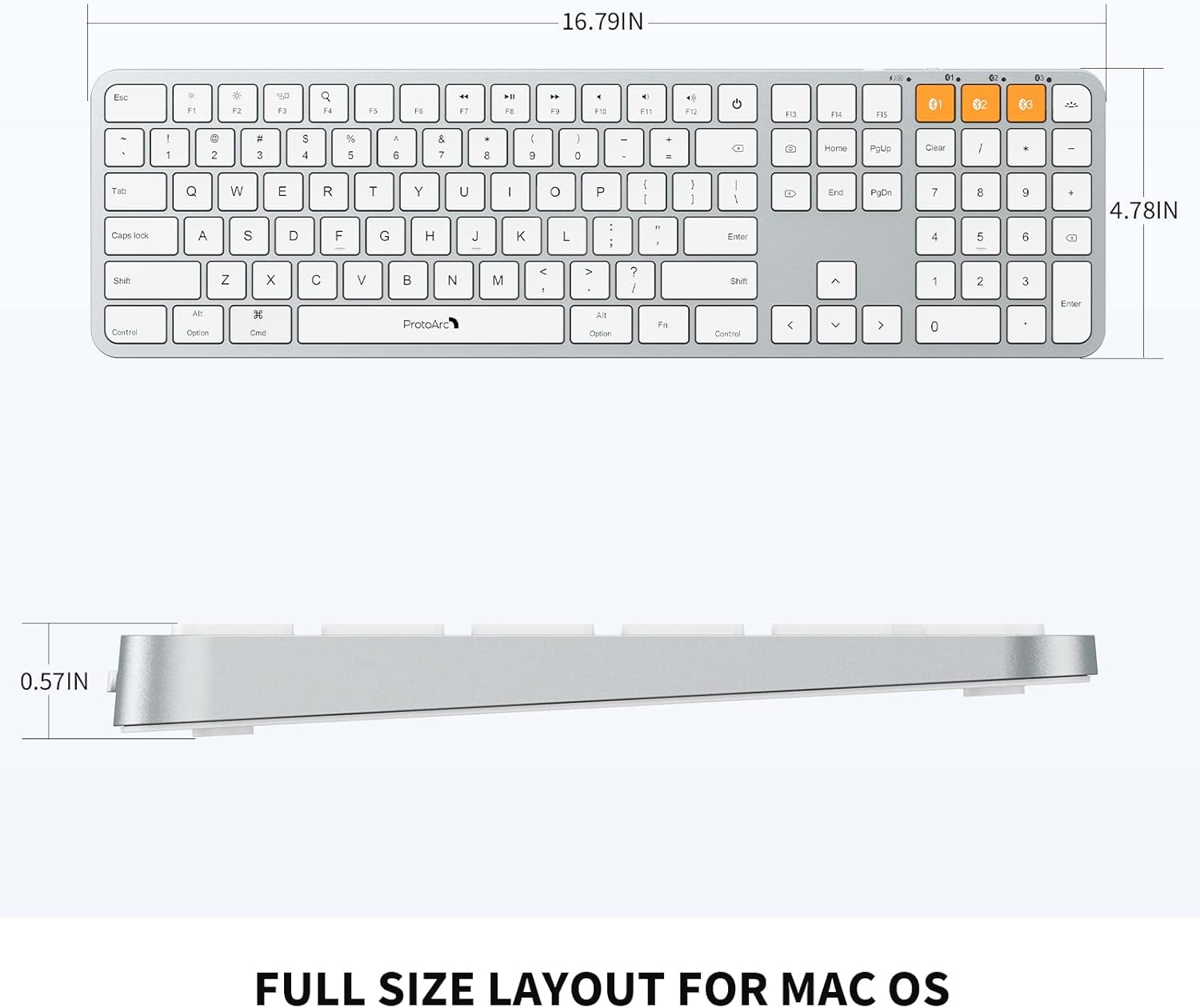
Image: Dimensional diagram of the ProtoArc K100-A keyboard.
9. Garanzia è Support
Per infurmazioni nantu à a garanzia è l'assistenza tecnica, vi pregu di cunsultà u situ ufficiale di ProtoArc. websitu o cuntattate direttamente u so serviziu clienti. Conservate a vostra ricevuta d'acquistu per e richieste di garanzia.


