1. Introduzione
Thank you for choosing the CHNADKS EM-101 EMF Meter. This advanced 3-in-1 rechargeable electromagnetic field radiation detector is designed for precise measurement of electric field strength, radiation power, and magnetic field strength. It is an essential tool for home and office EMF inspections, and can also be used for detecting anomalous magnetic field fluctuations, making it suitable for various applications including ghost hunting.
This manual provides detailed instructions on how to set up, operate, and maintain your device to ensure optimal performance and longevity.

Figure 1.1: The CHNADKS EM-101 Electromagnetic Radiation Detector, showcasing u so design compactu è u so display chjaru.
2. Caratteristiche di u produttu
- Versatile Precise Measurements: Measures electric field strength, radiation power, magnetic field strength, and polarity of static magnetic fields with an effective measurement range of 50MHz-3.5GHz. Provides numerical reference for anomalous magnetic field fluctuations.
- Easy to Use Interface: Features a TFT 2.0 color screen with a graphical menu for intuitive operation. Includes sound and flash alerts with adjustable alarm thresholds. Supports electric and magnetic field waveform display modes.
- Disegnu Portable: Compact dimensions (4.64x 2x0.78 inches) and lightweight (67g) with an IP3X protection level, making it easy to carry and durable for various settings.
- Applicazione larga: Detects RF and measures electromagnetic radiation from household appliances, cell phone towers, and low-frequency appliances. Ideal for ghost hunting enthusiasts, office workers, pregnant women, and the elderly to limit exposure to potentially harmful radiation.
3. Cuntenutu di u pacchettu
À l'apertura di u pacchettu, verificate chì tutti l'articuli seguenti sò inclusi:
- CHNADKS EM-101 EMF Meter (with built-in Li-ion battery)
- Cavu di carica USB
- Cinghia portatile
- Manuale d'uso (stu documentu)
4. Disposizione è cumpunenti di u dispusitivu

Figura 4.1: Fronte view of the EM-101 EMF Meter, showing the LCD screen and control buttons.

Figura 4.2: Detailed view of the EM-101, highlighting the USB interface, comfort buttons, buzzer hole, and LCD screen.
- Pantalla LCD: TFT 2.0 color display for showing measurement data, graphical menus, and settings.
- Buttuni di cuntrollu:
- Pulsante Power / OK: Central button for turning the device on/off and confirming selections.
- Navigation Buttons (AVR, MAX, HOLD): Used for navigating menus, adjusting settings, and selecting measurement modes. The HOLD button freezes the current reading.
- Interfaccia USB: Situatu à fiancu per carica u dispusitivu.
- Buzzer Hole: Emits audible alerts for detected radiation levels.
- Sensori: Internal sensors for detecting electric fields, magnetic fields, and RF radiation. The magnetic sensor and RF antennas are indicated by markings on the case.
5. Setup
5.1 Carica iniziale
Before first use, ensure the device is fully charged. The EM-101 has a built-in high-performance lithium battery.
- Connect the provided USB charging cable to the USB interface on the side of the EMF meter.
- Cunnette l'altra estremità di u cavu USB à un adattatore di alimentazione USB standard (micca inclusu) o à una porta USB di l'urdinatore.
- The battery indicator on the LCD screen will show charging status. Allow the device to charge until the battery icon indicates a full charge.

Figure 5.1: The EM-101 connected for USB charging, illustrating its convenient and durable charging method.
5.2 Attaching the Portable Strap
Attach the portable strap to the designated loop on the device for convenient carrying and to prevent accidental drops.
6. Operating Instructions
6.1 Accensione / spegnimentu
- Per accende: Press and hold the central Power/OK button until the LCD screen illuminates.
- Per spegne: Press and hold the central Power/OK button until the screen turns off.
6.2 Navigazione in u Menu
The device features a graphical menu for easy navigation. Use the navigation buttons (AVR, MAX, HOLD) around the central Power/OK button to move through options and make selections.
- Misura : Enter this mode to begin real-time EMF measurements.
- EF Wave: Displays the electric field waveform.
- MF Wave: Displays the magnetic field waveform.
- Alarma: Adjust alarm thresholds for different field types.
- Unità: Change measurement units (e.g., V/m, µW/cm²).
- Dormi: Configure auto-sleep settings to conserve battery.
- Lingua: Sceglite a lingua di visualizazione.
- Standard: View or adjust measurement standards.
- À propositu di: View device information and firmware version.
6.3 Piglià e Misurazioni
Once powered on, select the "Measure" option from the main menu to enter the measurement interface. The device will display real-time readings for Electric Field, Radiated Power, and Magnetic Field.
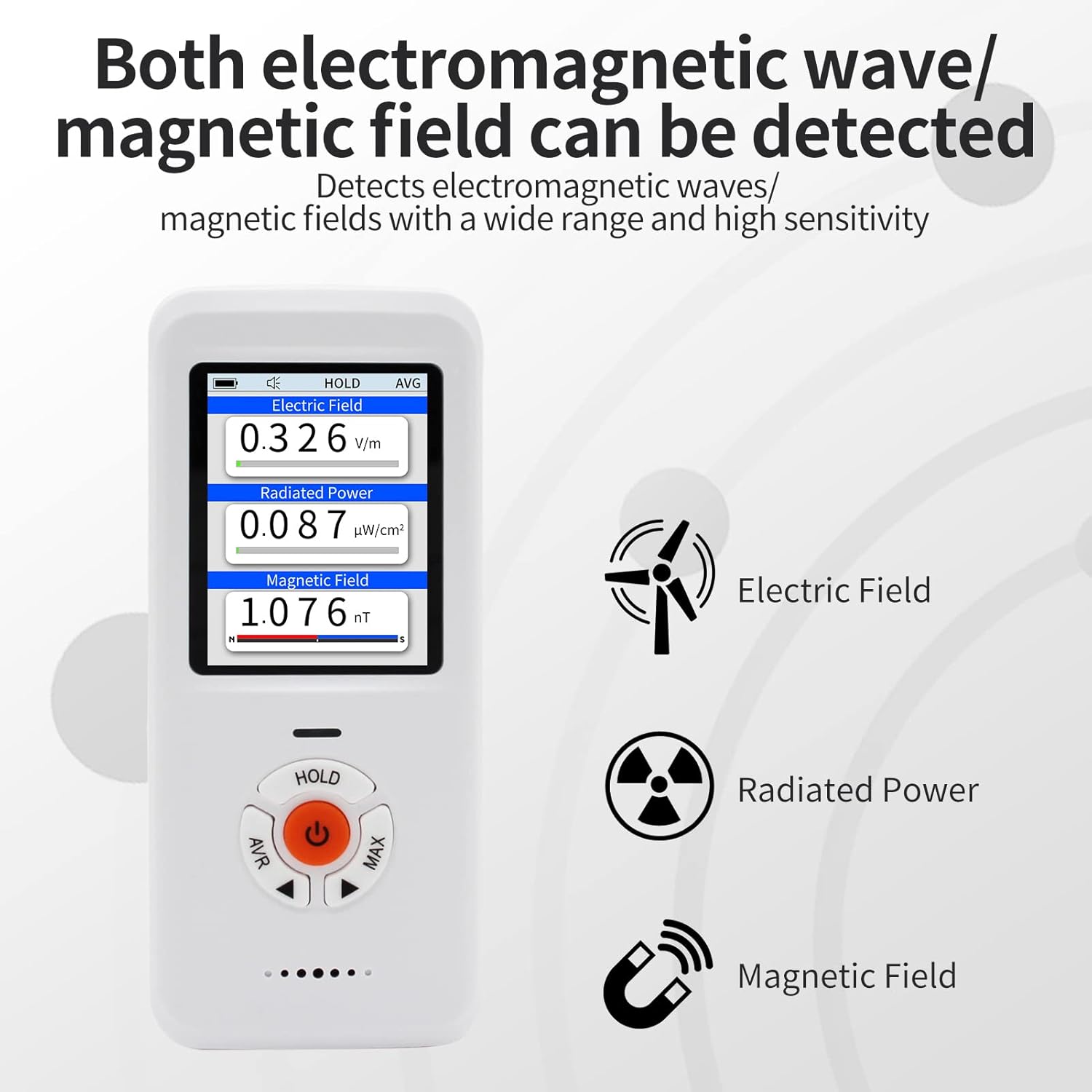
Figure 6.1: The EM-101 displaying simultaneous readings for Electric Field, Radiated Power, and Magnetic Field, along with their respective units.
- Electric Field (EF): Measures electric field strength in V/m.
- Radiated Power (RF): Measures radiation power in µW/cm².
- Magnetic Field (MF): Measures magnetic field strength in nT. The device also indicates N/S polarity for static magnetic fields.
- Funzione HOLD: Press the "HOLD" button to pause the current readings on the screen. Press again to resume real-time measurements.
- Alarma: If the detected radiation exceeds the set alarm threshold, the device will emit a sound and/or flash alert.
6.4 Applicazioni pratiche
The EM-101 can be used to test various sources of electromagnetic radiation:

Figure 6.2: The EM-101 being used to test common household appliances and devices for electromagnetic radiation, including a TV, microwave, WiFi router, and hairdryer.
- Apparecchi per a casa: Test TVs, microwaves, refrigerators, washing machines, etc.
- Dispositivi wireless: Check radiation from WiFi routers, mobile phones, Bluetooth devices.
- Power Lines & Electrical Equipment: Measure fields near power outlets, cables, and large electrical machinery.
- Ghost Hunting: Detect anomalous magnetic field fluctuations.
7. Mantenimentu
- Pulizia: Aduprate un pannu dolce è asciuttu per pulisce l'apparechju. Ùn aduprate micca detergenti abrasivi o solventi.
- Conservazione: Conservate l'apparechju in un locu frescu è asciuttu, luntanu da a luce diretta di u sole è da temperature estreme.
- Cura di a batteria: Per una durata ottimale di a batteria, evitate di scaricà cumpletamente a batteria spessu. Caricate u dispusitivu regularmente, ancu s'ellu ùn hè micca adupratu per periodi prolungati.
- Evite l'impattu: Mentre hè durevule, evitate di lascià cascà u dispusitivu o di sottumettelu à impatti forti.
8. Risoluzione di prublemi
| Prublemu | Causa Possibile | Soluzione |
|---|---|---|
| U dispusitivu ùn accende micca. | Batteria bassa o malfunzionamentu di u dispusitivu. | Charge the device fully. If the issue persists, contact customer service. |
| Letture imprecise. | Interference from other electronic devices; incorrect unit settings. | Move away from strong electromagnetic sources. Check and adjust unit settings in the menu. |
| L'alarma ùn sona micca. | Alarm threshold set too high; alarm function disabled. | Adjust the alarm threshold in the "Alarm" menu. Ensure the alarm function is enabled. |
If you encounter any issues not listed here or if the suggested solutions do not resolve the problem, please contact our customer service team for professional assistance.
9. Specificazioni
| Attributu | Valore |
|---|---|
| Marca | CHNADKS |
| Numero di mudellu | EM-101 |
| Fonte d'energia | Battery Powered (Built-in Lithium Ion) |
| Culore | Biancu |
| Pesu di l'articulu | 67 grammi |
| Dimensioni | Circa. 4.64 x 2 x 0.78 inch (11.78 x 5.08 x 1.98 cm) |
| Measurement Range (RF) | 50MHz-3.5GHz |
| Mostra | TFT 2.0 Color LCD |
| Livellu di prutezzione | IP3X |
| Cumpunenti inclusi | LCD, Li-ion battery |
| Certificazione | CE |
| Paese d'origine | USA |
10. Garanzia è Support
Your CHNADKS EM-101 EMF Meter is designed for reliability and performance. While specific warranty details are not provided in this manual, CHNADKS is committed to customer satisfaction.
If you have any questions, concerns, or require assistance with your device, please do not hesitate to contact our dedicated customer service team. We are here to provide professional and thoughtful support.
Please refer to the product packaging or the official CHNADKS websitu per l'infurmazioni di garanzia è i dettagli di cuntattu più aggiornati.


