1. Introduzione
This manual provides detailed instructions for the ENDORFY Thock Wireless Mechanical Keyboard, model EY5A078. It covers setup, operation, maintenance, and troubleshooting to ensure optimal performance and longevity of your device. Please read this manual thoroughly before using the keyboard.

Image 1.1: The ENDORFY Thock Wireless Mechanical Keyboard EY5A078. This image displays the full QWERTY layout with illuminated keys, showcasing the keyboard's design and RGB capabilities.
2. Cuntenutu di u pacchettu
Verificate chì tutti l'articuli sò presenti in u pacchettu:
- ENDORFY Thock Wireless Mechanical Keyboard EY5A078
- USB-C to USB-A Cable (detachable)
- Ricevitore USB 2.4 GHz
- Estrattore Keycap
- Interruttore Puller
- Manuale d'uso (stu documentu)
3. Setup è Connection
The ENDORFY Thock Wireless Mechanical Keyboard offers three connection modes: wired, 2.4 GHz wireless, and Bluetooth.
3.1. Cunnessione Wired
- Locate the USB-C port on the keyboard (typically on the back or top edge).
- Connect the provided USB-C to USB-A cable to the keyboard.
- Cunnette l'estremità USB-A di u cavu à una porta USB dispunibile nantu à u vostru urdinatore.
- A tastiera serà rilevata automaticamente è pronta per l'usu.
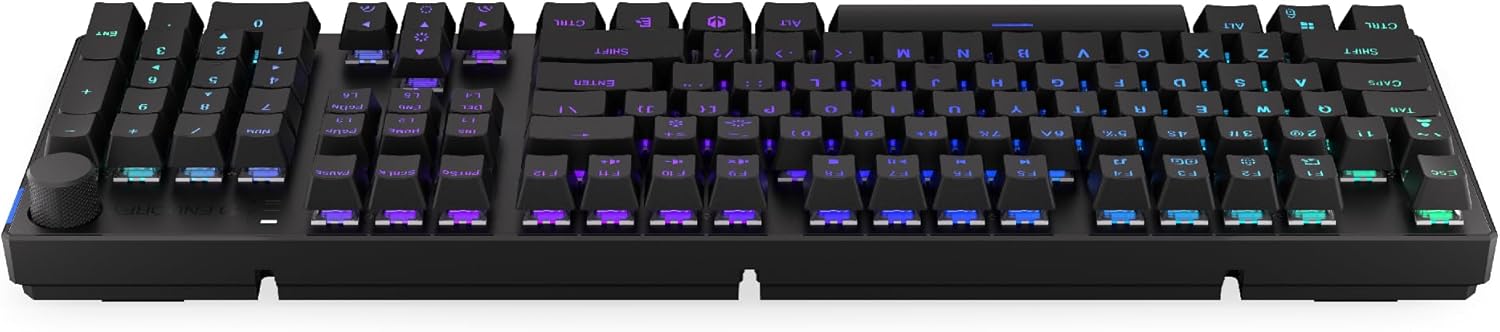
Imagine 3.1: Latu view di a tastiera, mettendu in risaltu u portu USB-C per a cunnessione cablata è a carica.
3.2. Cunnessione senza filu 2.4 GHz
- Locate the 2.4 GHz USB receiver. It may be stored in a compartment on the underside of the keyboard.
- Plug the 2.4 GHz USB receiver into an available USB port on your computer.
- On the keyboard, locate the mode switch (usually on the back or side) and set it to the 2.4 GHz wireless mode (often indicated by a specific icon or "2.4G").
- The keyboard should automatically connect. An indicator light may confirm the connection.

Image 3.2: Underside of the keyboard, showing the compartment for storing the 2.4 GHz USB receiver and adjustable feet.
3.3. Cunnessione Bluetooth
- On the keyboard, set the mode switch to Bluetooth mode (often indicated by a Bluetooth icon or "BT").
- The keyboard may have multiple Bluetooth profiles (e.g., BT1, BT2, BT3). Select one by pressing Fn + 1, Fn + 2, or Fn + 3. The corresponding indicator light will flash.
- Nant'à u vostru urdinatore o dispusitivu, apre i paràmetri Bluetooth è cercate novi dispusitivi.
- Select "ENDORFY Thock Wireless" (or similar name) from the list of available devices.
- Segui tutti i suggerimenti nantu à u screnu per compie u prucessu di accoppiamentu.
- Once paired, the indicator light on the keyboard will stop flashing and remain solid.
4. Operazione
4.1. Key Functions and Shortcuts
The keyboard features various function key combinations (Fn + Key) for multimedia control, lighting adjustments, and other settings.
- Fn + F1-F12: Multimedia and system functions (e.g., volume control, media playback, calculator). Refer to the keycap legends for specific functions.
- Fn + Tasti Freccia: Adjust RGB lighting effects (e.g., brightness, speed, direction).
- Fn + 1/2/3: Cambià trà Bluetooth profiles.
- Fn + 4: Switch to 2.4 GHz wireless mode.
- Fn + 5: Passa à a modalità cablata.
4.2. Cuntrollu di l'illuminazione RGB
The ENDORFY Thock keyboard features programmable RGB backlighting. Use the following combinations to customize the lighting:
- Fn + Freccia Destra: Change lighting effect.
- Fn + Freccia sinistra: Cambià a direzzione di l'effettu di luce.
- Fn + Freccia in su: Aumentà a luminosità.
- Fn + Freccia in giù: Diminuisce a luminosità.
- Fn + Ins: Cambia u culore.
- Fn + Del: Adjust effect speed.
4.3. Pomellu di Volume
The dedicated volume knob located on the top right of the keyboard allows for quick audio adjustments.
- Rotate in senso orario: Aumentà u voluminu.
- Girate in sensu antiorariu: Diminuisce u voluminu.
- Press Down: Disattivà/attivà l'audio.

Image 4.1: Detail of the volume knob and status indicator lights, located on the upper right side of the keyboard.
4.4. Interruttori scambiabili à caldu
The ENDORFY Thock keyboard features hot-swappable switches, allowing you to change mechanical switches without soldering. This enables customization of typing feel.
- Eliminà u Keycap: Aduprate l'estrattore di tasti furnitu per rimuovere delicatamente u tasti desideratu.
- Eliminate l'interruttore: Aduprate l'estrattore di l'interruttore furnitu per afferrà cù cura i clips superiori è inferiori di l'interruttore è tirallu drittu in su.
- Inserisce un novu interruttore: Allineate i pin di u novu interruttore cù i fori di u PCB. Appughjà fermamente l'interruttore finu à chì si sente un clic in u so postu. Assicuratevi chì i pin ùn sianu micca piegati.
- Rimpiazzà u Keycap: Rimette u cappucciu di a chjave nantu à u novu gambu di l'interruttore.

Imagine 4.2: Un primu pianu view of the Kailh Box Brown mechanical switches, demonstrating the hot-swappable design.
5. Mantenimentu
5.1. Pulizia di a tastiera
Una pulizia regulare aiuta à mantene e prestazioni è l'aspettu di a tastiera.
- Scollegate a tastiera da u vostru urdinatore prima di pulisce.
- Use a keycap puller to remove keycaps for thorough cleaning.
- Aduprate aria compressa per caccià a polvera è i detriti trà i tasti.
- Wipe keycaps and the keyboard surface with a soft, damp tela. Evite i sustanzi chimichi duri.
- Assicuratevi chì a tastiera sia cumpletamente asciutta prima di ricunnettela.
5.2. Sustituzione di i tasti è di l'interruttore
Refer to Section 4.4 for detailed instructions on replacing keycaps and switches. Use only compatible keycaps and switches to avoid damage.
6. Risoluzione di prublemi
| Prublemu | Causa Possibile | Soluzione |
|---|---|---|
| A tastiera ùn risponde micca (cablata) | Cunnessione di u cavu allentata, porta USB difettosa. | Assicuratevi chì u cavu USB-C sia cunnessu bè. Pruvate una porta USB o un cavu differente. |
| A tastiera ùn risponde micca (senza filu) | Low battery, incorrect mode, receiver not plugged in, pairing issue. | Charge the keyboard. Ensure mode switch is set correctly (2.4G or BT). Re-pair Bluetooth or re-insert 2.4 GHz receiver. |
| L'illuminazione RGB ùn funziona micca | Lighting turned off, low battery, software issue. | Check lighting controls (Fn + Arrow keys). Charge the keyboard. Restart computer. |
| Chjavi digitate duie volte o micca registrate | Dust/debris under switch, faulty switch. | Clean under keycaps with compressed air. If issue persists, replace the switch (refer to Section 4.4). |
7. Specificazioni
- Mudellu: EY5A078
- Marca: ENDORFU
- Connettività: Wired (USB-C), 2.4 GHz Wireless, Bluetooth
- Tipu di cambiamentu: Kailh Box Brown (Hot-swappable)
- Tasti di tasti: PBT Double Shot
- Disposizione: Full-size QWERTY
- Retroilluminazione: RGB programmabile
- Sistemi Operativi: Linux, Mac OS X 10.12 Sierra, Windows 10
- Culore: Neru
- Materiale: Polibutilene tereftalato (PBT)
- Funzioni speciali: Detachable cable, Volume knob with mute, Hot-swappable switches
- Batteria: Ioni di litiu (inclusi)
8. Garanzia è Support
ENDORFY products are covered by a manufacturer's warranty. For detailed warranty information, please refer to the warranty card included with your product or visit the official ENDORFY website. For technical support, product inquiries, or service requests, please contact ENDORFY customer support through their official channels.
Ufficiale Websitu: www.endorfy.com
9. Informazioni di sicurezza
- Mantene a tastiera luntanu da liquidi è umidità eccessiva.
- Evitate di espone u teclatu à temperature estreme.
- Do not attempt to disassemble or modify the keyboard beyond hot-swapping switches and keycaps, as this may void the warranty and cause damage.
- Aduprate solu u cavu di carica furnitu o cunsigliatu.
- Smaltite a batteria è i cumpunenti elettronichi in modu rispunsevule secondu e regulazioni lucali.


