1. Introduzione
The Cooler Master Synk X is an ergonomic real-time tactile immersion chair designed to enhance your entertainment experience. It converts sound waves into vibrations, providing tactile feedback for games, movies, and music. This manual provides essential information for the safe and efficient use of your Synk X chair.

Figure 1.1: Cooler Master Synk X Immersive Chair
2. Informazioni di sicurezza
Please read all safety instructions carefully before using the Synk X chair. Failure to follow these instructions may result in injury or damage to the product.
- Limitu di pesu: This product has a maximum weight recommendation of 275 pounds (125 kg). Exceeding this limit could result in damage to the chair or pose a risk of injury.
- Fonte di energia: Aduprate solu l'adattatore di alimentazione furnitu per a carica.
- Placement: Ensure the chair is placed on a stable, level surface. Avoid placing it near heat sources or in direct sunlight.
- Pulizia: Refer to the maintenance section for proper cleaning procedures. Do not use abrasive cleaners or immerse electrical components in water.
- I zitelli: Keep children and pets away from the chair during operation and assembly.
- Mudazzioni: Do not attempt to modify or disassemble the chair. Unauthorized modifications may void the warranty and pose safety risks.
3. Cuntenutu di u pacchettu
Verificate chì tutti l'articuli elencati quì sottu sò presenti in u vostru pacchettu:
- Synk X Chair (Seat and Backrest)
- Base di a sedia
- Cilindru di Ascensore di Gas
- 5 Ruote Caster
- Cuscino lumbar
- Braccioli (2)
- Adattatore di putenza
- Bluetooth Transceiver (optional accessory)
- Cavi Ausiliari
- Kit di ferramenta (viti, rondelle, chiave Allen)
- Manuale d'usu
Video 3.1: Disimballaggio è piùview di cumpunenti inclusi.
4. Setup
Follow these steps to assemble your Cooler Master Synk X chair:
- Attach Caster Wheels to Base: Insert each of the five caster wheels into the openings at the ends of the chair base until they click securely into place.
- Inserisce l'elevatore à gas: Place the gas lift cylinder into the central hole of the chair base.
- Attaccà i braccioli: Secure the armrests to the underside of the seat using the provided screws from the hardware kit. Ensure they are firmly attached.
- Cunnette u sedile à l'elevatore à gas: Carefully align the central mechanism on the underside of the seat with the top of the gas lift cylinder and press down firmly until the seat is securely seated.
- Attaccà u Backrest: Connect the backrest to the seat assembly using the remaining screws. Ensure all connections are tight.
- Cunnette i cavi: Locate the internal cables for the haptic system and RGB lighting. Connect them according to the diagrams in the included user manual.
- Attaccà u cuscinu lombare: Position the lumbar pillow on the backrest for ergonomic support.
Video 4.1: Visual guide for chair assembly.

Figure 4.1: Fully assembled Cooler Master Synk X chair.
5. Operating Instructions
The Synk X chair features an intuitive control panel for managing its functions.
5.1 Panel Control Overview

Figura 5.1: Detailed view di u pannellu di cuntrollu.
- DC 19 V IN: Power input for charging the chair's internal battery. A full charge takes approximately 6 hours and provides 4 hours of battery life.
- Indicatori di Statu di Batteria: LEDs display the current battery charge level.
- AUX IN: 3.5mm auxiliary input for wired audio sources.
- Pulsante di accoppiamento: Initiates Bluetooth pairing mode for wireless audio connections.
- Selezziunà u buttone: Cycles through different audio input modes (AUX, Bluetooth, 5.8G).
- Jack per cuffie: 3.5mm output for connecting wired headphones.
- Manopole di vulume: Adjust master volume and headphone volume.
- Vibration Level Knob: Controls the intensity of the tactile feedback.
- ARGB Button: Cycles through various RGB lighting modes and colors.
- Pulsante di putenza: Turns the chair on or off.
Video 5.1: Demonstration of the control panel functions.
5.2 Tactile Immersion
The Synk X converts audio signals into real-time vibrations, providing a dynamic tactile experience. Adjust the 'Vibration Level' knob to customize the intensity.
Video 5.2: Demonstration of the chair's vibration mode with a bowl of water.
5.3 Illuminazione RGB
The chair features customizable RGB lighting on the backrest. Press the 'ARGB' button on the control panel to cycle through various lighting effects and colors.

Figure 5.2: RGB lighting on the Synk X chair.
Video 5.3: Demonstration of RGB lighting modes.
5.4 Aggiustamenti ergonomichi
The Synk X chair offers multiple adjustments for personalized comfort:
- Altezza di u sediu: Use the lever located under the seat to adjust the chair's height.
- Angulu di reclinazione: The backrest can recline up to 135 degrees. Use the recline lever to find your preferred angle.
- Retractable Leg Rest: Pull out the leg rest from under the seat for extended comfort.
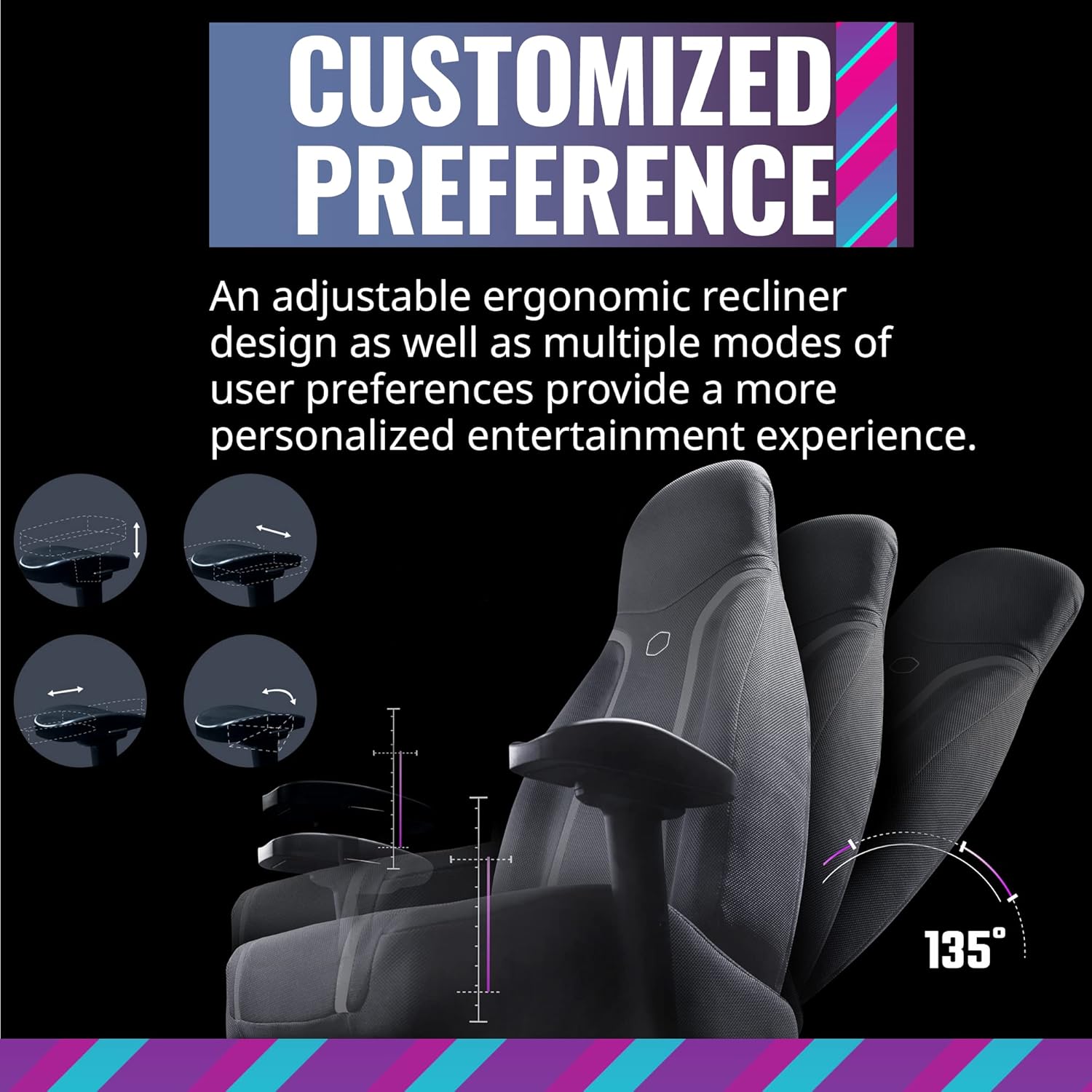
Figure 5.3: Ergonomic adjustments including recline and leg rest.
6. Mantenimentu
Proper care will extend the life of your Synk X chair:
- Pulizia: Pulisce cù l'annunziuamp tela. Ùn aduprate micca sustanzi chimichi duri o materiali abrasivi.
- Sversamenti: In casu di sversamenti, asciugate subitu a zona cù un pannu pulitu è asciuttu.
- Spostà a sedia: When moving the chair, lift it rather than dragging it to prevent damage to the base and floor.
- Conservazione: Conservate a sedia in un locu frescu è asciuttu, luntanu da a luce diretta di u sole è da temperature estreme.
7. Risoluzione di prublemi
If you encounter issues with your Synk X chair, refer to the following common problems and solutions:
| Prublemu | Causa Possibile | Soluzione |
|---|---|---|
| No power/Chair not turning on | Battery is depleted; Power adapter not connected; Power button not pressed. | Connect the power adapter and charge the chair. Ensure the power button is pressed firmly. |
| No tactile feedback/vibration | Vibration level set too low; Audio source not connected or playing; Cables are loose. | Increase the vibration level using the knob. Verify the audio source is connected and playing. Check all internal cable connections. |
| Problemi di accoppiamentu Bluetooth | Chair not in pairing mode; Device too far; Interference. | Press the pairing button on the control panel. Ensure your device is within range. Reduce interference from other wireless devices. |
| L'illuminazione RGB ùn funziona micca | Lighting off; Cable connection loose. | Press the ARGB button to cycle through modes. Check the RGB cable connection. |
| A sedia si sente instabile o traballante | Loose screws; Uneven floor. | Verificate è stringhjite tutte e viti di montaggio. Assicuratevi chì a sedia sia nantu à una superficia piana è uniforme. |
8. Specificazioni
- Marca: Cooler Master
- Nome di mudellu: Synk X
- Numero di mudellu di l'articulu: IXC-SX1-I-US1
- Culore: Grigiu lunare
- Materiale: Policarbonate
- Pesu di l'articulu: 80.8 liri (36.74 kg)
- Dimensioni di u pruduttu (LxWxH): 22 x 26.25 x 37 inch
- Raccomandazione di pesu massimu: 275 Libbra (125 kg)
- Stile di daretu: Open Back
- Caratteristica speciale: Ergonomic, Rolling, Tactile Immersion
- Usi cunsigliati: Lusinghi
- Conte di posizione reclinata: More than one (up to 135 degrees)
- Connettività: Bluetooth, AUX, 5.8G (with optional transceiver)
- Durata di a batteria: Approximately 4 hours on a full charge
- Tempu di carica: Circa 6 ore
9. Garanzia è Supportu
For warranty information and customer support, please refer to the official Cooler Master websitu o cuntattate u so serviziu clienti. Cunservate a vostra ricevuta d'acquistu cum'è prova d'acquistu per e richieste di garanzia.
Supportu in ligna: Visit the Cooler Master support page for FAQs, drivers, and contact options.
Informazioni di cuntattu: Refer to the Cooler Master websitu per i dettagli di cuntattu regiunali.


