1. Introduzione
The Sony FX3 Full-Frame Cinema Camera (ILME-FX3) is designed for solo shooters and travel applications, serving as a portable cinema camera. It integrates features from both Sony's Cinema Line and Alpha series. The FX3 features a lightweight, handheld form factor with a streamlined profile and a 'cage-free' design, allowing direct attachment of various accessories to the camera body. Its 12.1MP Exmor R BSI CMOS sensor (10.2MP effective in video mode) and BIONZ XR processor enable UHD 4K video capture with internal 10-bit 4:2:2 sampling or 16-bit raw output. The sensor's BSI design enhances clarity and sensitivity, offering an expandable ISO 80-409,600 range and over 15 stops of dynamic range for diverse lighting conditions.
2. Informazioni di sicurezza
Please read all safety instructions carefully before using the camera. Retain this manual for future reference.
- Fonte di energia: Use only the specified battery and charger. Do not attempt to disassemble or modify the battery.
- L'acqua è l'umidità: This camera is not waterproof. Avoid exposure to rain, moisture, or high humidity to prevent electric shock or malfunction.
- Temperature : Do not expose the camera to extreme temperatures (hot or cold). Operating temperature range is typically 0°C to 40°C (32°F to 104°F).
- Trattamentu: Maneghjà a camera cun cura. Evitate di lascià cascà o di sottumette à forti impatti.
- Pulizia: Use a soft, dry cloth for cleaning. Do not use organic solvents.
- Eliminazione: Smaltite e batterie è i cumpunenti elettronichi secondu e regulazioni lucali.
3. Cuntenutu di u pacchettu
Verificate chì tutti l'articuli elencati quì sottu sò inclusi in u vostru pacchettu:
- Sony FX3 Full-Frame Cinema Camera (ILME-FX3)
- Unità di manicu XLR
- Cappucciu di scarpa accessoria
- Kit di Scarpe Accessorie
- Caricatore di batteria Sony BC-QZ1
- Cappucciu di u corpu
- Handle Shoe Cap
- Cordone d'alimentazione
- Batteria ricaricabile à ioni di litiu Sony NP-FZ100 (2280 mAh)
- Cavu USB Type-A à Type-C (USB 3.2)
- Lilliput A7S 7" Monitor Full HD
- 2 x SanDisk SecureDigital 64GB Extreme PRO Card di memoria
- Borsa Soft
- 3 x NP-FZ100 Compatible Battery
- Luce LED
- Lettore di carte di memoria
- Corel Photo Software (PhotoMirage, AfterShot, Painter Essentials, PaintShop Pro, Video Studio)
- Rode VideoMicro Ultracompact Camera-Mount Shotgun Microphone
- Treppiede flessibile di 12 pollici
- Cintura di manu
- Portafogliu di carte di memoria
- Custodia di u tappu di l'obiettivo
- Kit di pulizia
- Cavu HDMI
4. Camera Overview
Familiarize yourself with the physical components and controls of your Sony FX3 camera.

Figura 4.1: Fronte view of the Sony FX3 camera body, showing the E-mount for interchangeable lenses and the full-frame sensor. The grip is visible on the left side.

Figura 4.2: Fronte view of the Sony FX3 camera with a Zeiss Sonnar FE 55mm F1.8 ZA lens attached. This illustrates the camera's compact form with a lens.

Figura 4.3: daretu view of the Sony FX3, displaying the LCD screen, control dial, and various buttons such as MENU, FOCUS MAG, Fn, DISP, ZEBRA, PEAKING, SHUTTER, and playback controls.
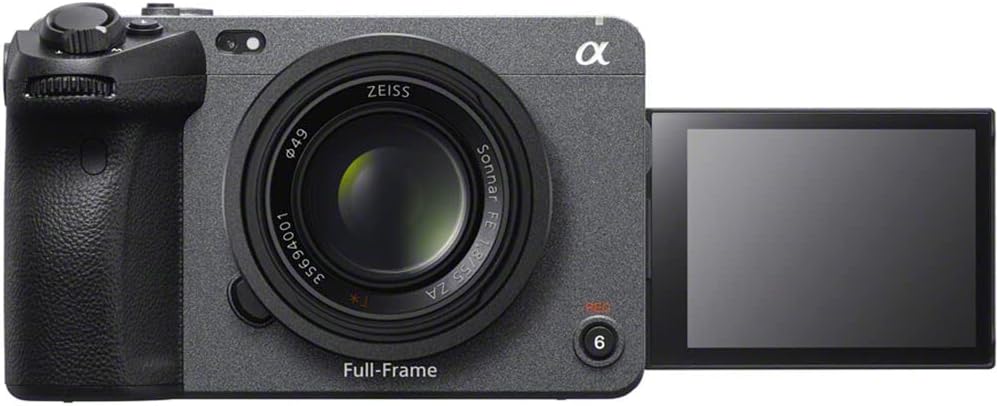
Figura 4.4: Fronte view of the Sony FX3 with the LCD screen articulated outwards, demonstrating its flexible viewing angles for various shooting scenarios.
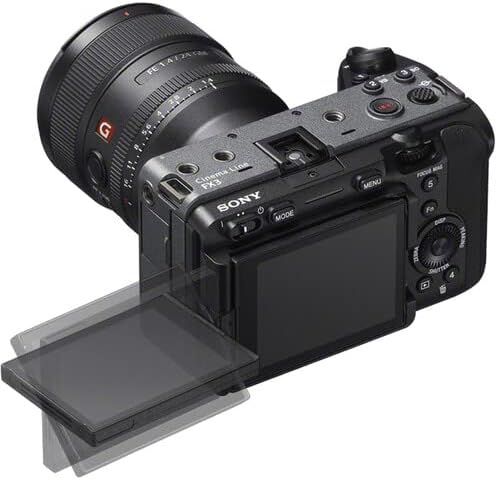
Figura 4.5: Top-rear perspective of the Sony FX3, showing the articulated LCD screen, a mounted lens, and top-panel controls including the record button and mode dial.

Figura 4.6: Latu manca view of the Sony FX3, revealing the battery compartment and dual CFexpress Type A/SDXC card slots, secured by a lock/open mechanism.

Figura 4.7: Latu drittu view of the Sony FX3, displaying various input/output ports including HDMI, USB-C (MULTI), USB-A (CHG), headphone jack, and microphone input with plug-in power.
5. Setup
5.1. Installazione è carica di a batteria
- Open the battery cover on the left side of the camera (refer to Figure 4.6).
- Insert the NP-FZ100 battery with the arrow facing inward until it locks into place.
- Chiudere a tappa di a bateria.
- To charge, remove the battery and insert it into the supplied BC-QZ1 charger. Connect the charger to a power outlet using the power cord. The charging indicator will illuminate during charging and turn off when complete.
5.2. Installazione di a carta di memoria
- Open the memory card slot cover on the left side of the camera (refer to Figure 4.6).
- Insert a CFexpress Type A or SDXC memory card into the appropriate slot until it clicks. Ensure the card is oriented correctly.
- Chiudere u coperchiu di u slot per a carta di memoria.
- Format the memory card in the camera before first use to ensure optimal performance.
5.3. Attaccu di l'accessori
- XLR Handle Unit: Attach the XLR handle unit to the multi-interface shoe on top of the camera. Secure it using the locking mechanism.
- Lilliput A7S 7" Monitor: Connect the monitor to the camera via an HDMI cable (refer to Figure 4.7 for HDMI port location). Mount the monitor using a suitable mounting solution.
- Rode VideoMicro Microphone: Connect the microphone to the camera's microphone input jack (refer to Figure 4.7).
5.4. Accensione iniziale è impostazioni di basa
- Press u buttone POWER per accende a camera.
- Segui l'istruzzioni nantu à u screnu per impostà a data, l'ora è a lingua.
- Adjust basic settings such as video format (e.g., XAVC S-I 4K), frame rate, and picture profile (e.g., S-Cinetone) as needed for your shooting requirements.
6. Upirari la Camera
6.1. Basic Video Recording
- Power On: Accende a camera cù u buttone POWER.
- Selezziunà u Modu: Use the MODE button or dial to select your desired shooting mode (e.g., Movie mode).
- Aghjustate i paràmetri: Set ISO, aperture, and shutter speed. The FX3 offers an expandable ISO range of 80-409,600.
- Focus: Utilize the Fast Hybrid AF system. The camera supports Face Tracking and Eye AF for precise subject focus.
- Start / Stop Recording: Press the REC button (often located on the top or front grip) to start recording. Press again to stop.
6.2. Advanced Video Features
- 4K Video Capture: The camera supports UHD 4K up to 120fps and 1080p up to 240fps.
- Internal Recording: Record internally with 10-bit 4:2:2 sampling using XAVC S-I.
- Raw Output: Output 16-bit raw video via HDMI to compatible external recorders.
- Color Profiles: Use S-Cinetone for cinematic color science, or S-Log3/2 for maximum dynamic range in post-production. 10-bit HLG (Hybrid Log-Gamma) is available for direct HDR productions.
- Gamma dinamica: Benefit from over 15 stops of dynamic range for capturing detail in both highlights and shadows.
6.3. Riproduzione
- Press the Playback button (often marked with a triangle icon).
- Use the control dial or directional buttons to navigate through your recorded footage.
- Press the center button to play or pause a video.
Video ufficiali di u produttu
Video 6.1: Un sopraview of the Sony FX3 Full-Frame Cinema Camera, highlighting its key features and design for cinematic production. (Duration: 3:11)
Video 6.2: A detailed demonstration of the Sony FX3's advanced functionalities, including autofocus performance and color science. (Duration: 5:23)
7. Mantenimentu
7.1. Pulizia di a Camera
- Corpu di a camera: Asciugate u corpu di a camera cù un pannu dolce è asciuttu. Per a sporcizia ostinata, asciugate leggermente.ampen the cloth with water and then wipe dry. Avoid using alcohol or other chemical cleaners.
- Lenti: Aduprate una spazzola per lenti per caccià a polvera, poi asciugate delicatamente cù un pannu di pulizia per lenti è una soluzione di pulizia per lenti.
- Sensore: Sensor cleaning should be performed with extreme care. If dust spots appear on images, use a blower brush. For persistent dust, consult a professional service center.
- Pantalla LCD: Gently wipe with a soft, lint-free cloth.
7.2. Storage
- When not in use for extended periods, remove the battery from the camera.
- Conservate a camera in un locu frescu è asciuttu, luntanu da a luce diretta di u sole è da temperature estreme.
- Aduprate un disseccante per prevene a muffa è u mildiu in ambienti umidi.
8. Risoluzione di prublemi
If you encounter issues with your Sony FX3, refer to the following common problems and solutions:
| Prublemu | Possibile Causa / Soluzione |
|---|---|
| A camera ùn s'accende micca. | A batteria pò esse scarica o inserita in modu incorrectu. Assicuratevi chì a batteria sia carica è inserita currettamente. |
| Ùn si pò arregistrà video. | Memory card may be full, locked, or not formatted. Check card status and format if necessary. Ensure sufficient battery charge. |
| L'imaghjini sò sfocate. | Check focus settings (AF/MF). Ensure lens is clean. Verify shutter speed is appropriate for lighting conditions to avoid motion blur. |
| Nisuna registrazione audio. | Check microphone connection. Verify audio recording settings in the camera menu. Ensure microphone is powered if required. |
| Camera overheats. | Prolonged recording in high ambient temperatures can cause overheating. Allow the camera to cool down. Reduce recording resolution or frame rate if possible. |
9. Specificazioni
| Feature | Detail |
|---|---|
| Marca | Sony |
| Numero di mudellu | ILME-FX3 |
| Tipu di sensor | 12.1MP Full-Frame CMOS Exmor R Sensor (10.2MP effective in video mode) |
| Risoluzione Video Capture | UHD 4K (up to 120fps), 1080p (up to 240fps) |
| Registrazione interna | 10-Bit 4:2:2 XAVC S-I |
| Output Esterni | 16-Bit Raw Output via HDMI |
| Gamma Dinamica | 15+ Fermate |
| Gamma ISO | 80 to 409,600 (Expanded) |
| Sistema di autofocus | Phase Detection AF, Face Tracking, Eye AF |
| Color Profiles | S-Cinetone, S-Log3/2, HLG |
| Slot per carte di memoria | Dual CFexpress Type A / SDXC Card Slots |
| Connettività | USB, HDMI |
| Size Screen | 7 Inches (Lilliput A7S Monitor) |
| Pesu di l'articulu | 10.4 pounds (approximate, with accessories) |
| Dimensioni di u produttu | 9.6 x 9.1 x 5.8 inches (approximate, with accessories) |
| Funzioni spiciali | Anti-Shake, Luce Poca, Time Lapse |
10. Garanzia è Support
This product is covered by Sony's standard warranty. For specific warranty terms and conditions, please refer to the warranty card included with your product or visit the official Sony support website. For technical assistance, troubleshooting, or service inquiries, please contact Sony customer support.
Risorse in linea: For the latest firmware updates, detailed manuals, and support articles, please visit the official Sony support websitu.