1. Introduzione
This user manual provides essential information for the safe and efficient operation of your HYCHIKA 3.6V Cordless Electric Rechargeable Screwdriver Drill Set. Please read this manual thoroughly before first use and keep it for future reference.
The HYCHIKA 3.6V Cordless Electric Screwdriver is designed for various screwing and light drilling tasks around the home. It features a maximum torque of 6 N-m, a 6.35 mm quick-change chuck, and a versatile design that allows for both pistol and straight grip configurations.
2. Istruzzioni di sicurità
Osservate sempre e precauzioni di sicurezza basiche quandu aduprate strumenti elettrichi per riduce u risicu d'incendiu, scossa elettrica è ferite persunali.
- Sicurezza di l'area di travagliu: Mantene a vostra zona di travagliu pulita è ben illuminata. E zone ingombre o scure invitanu l'accidenti. Ùn aduprate micca strumenti elettrici in atmosfere esplosive, cum'è in presenza di liquidi, gas o polveri inflammabili.
- Sicurezza elettrica: Evitate u cuntattu di u corpu cù superfici messe à terra o à terra cum'è tubi, radiatori, cucine è frigoriferi. Ùn espone micca l'utensili elettrici à a pioggia o à e cundizioni umide.
- Sicurezza persunale: Always wear eye protection. Use safety glasses, goggles, or a face shield. Wear hearing protection when operating noisy tools. Dress properly; avoid loose clothing or jewelry.
- Uso è cura di l'arnesi: Ùn furzate micca l'utensile elettricu. Aduprate l'utensile elettricu currettu per a vostra applicazione. Scollegate a spina da a fonte di alimentazione è/o cacciate a batteria prima di fà qualsiasi aghjustamentu, cambià accessori o almacenà l'utensili elettrichi.
- Usu è cura di a batteria: Ricaricate solu cù u caricatore specificatu da u fabricatore. Ùn aduprate micca batterie cù altri strumenti elettrici. Quandu a batteria ùn hè micca in usu, tenetela luntanu da altri oggetti metallichi.
3. Cuntenutu di u pacchettu
Verificate chì tutti l'articuli elencati quì sottu sò inclusi in u vostru pacchettu. Sè qualchì articulu manca o hè dannighjatu, cuntattate l'assistenza clienti.
- 1 x HYCHIKA 3.6V Cordless Screwdriver
- 19 x Pezzi di cacciavite
- 1 x barra di estensione
- 1 x adattatore di carica
- 1 x Manuale d'utilizatore

Figure 3.1: Contents of the HYCHIKA 3.6V Cordless Screwdriver package, including the screwdriver, various bits, and charging adapter.
4. Caratteristiche è cumpunenti di u pruduttu
Familiarize yourself with the different parts of your cordless screwdriver.

Figure 4.1: Key components of the screwdriver, including the magnetic chuck, PUSH button, front LED light, On/Off switch, LED charger indicator, 3.5mm charger port, and forward & reverse button.
- Magnetic Chuck: 1/4 inch (6.35mm) quick-change chuck for easy bit installation and removal.
- Luce LED frontale: Illuminates the work area for improved visibility in dark environments.
- Interruttore On/Off: Activates and deactivates the screwdriver.
- Forward & Reverse Button: Controlla a direzione di rotazione per avvitare è svitare.
- LED Charger Indicator: Provides status of battery charging.
- 3.5mm Charger Port: Connection point for the charging adapter.
- Pulsante PUSH: Used to adjust the grip configuration from pistol to straight.
5. Setup
5.1 Caricà a Batteria
The screwdriver is powered by a 3.6V 2000 mAh Lithium-Ion battery. Before first use, fully charge the battery.
- Connect the charging adapter to the 3.5mm charger port on the screwdriver.
- Plug the charging adapter into a standard electrical outlet.
- The LED charger indicator will illuminate during charging. Once fully charged, the indicator may change color or turn off depending on the model.
- Scollegate u caricatore una volta chì a carica hè cumpleta.

Figure 5.1: The screwdriver connected to its charging adapter, indicating a full charge.
The screwdriver is designed to maintain full power output even when the battery is low, ensuring consistent performance until the battery is depleted.
5.2 Installazione di e punte di cacciavite
The screwdriver features a 1/4 inch (6.35mm) magnetic quick-change chuck for easy bit installation.
- Sceglite a punta di cacciavite adattata per u vostru compitu.
- Insert the bit into the magnetic chuck until it is securely seated. The magnetic chuck will hold the bit firmly in place.
- To remove a bit, simply pull it out of the chuck. Bits with grooves are designed for easier removal.

Figure 5.2: Visual guide for inserting a bit into the magnetic chuck and removing it.
6. Operating Instructions
6.1 Adjusting Grip Configuration
The screwdriver can be used in two grip configurations: pistol grip or straight grip, for enhanced versatility and comfort.
- To change the grip, press and hold the "PUSH" button located at the top of the screwdriver.
- While holding the button, rotate the handle ninety degrees to switch between pistol and straight configurations.
- Release the "PUSH" button once the desired configuration is achieved. The handle will lock into place.
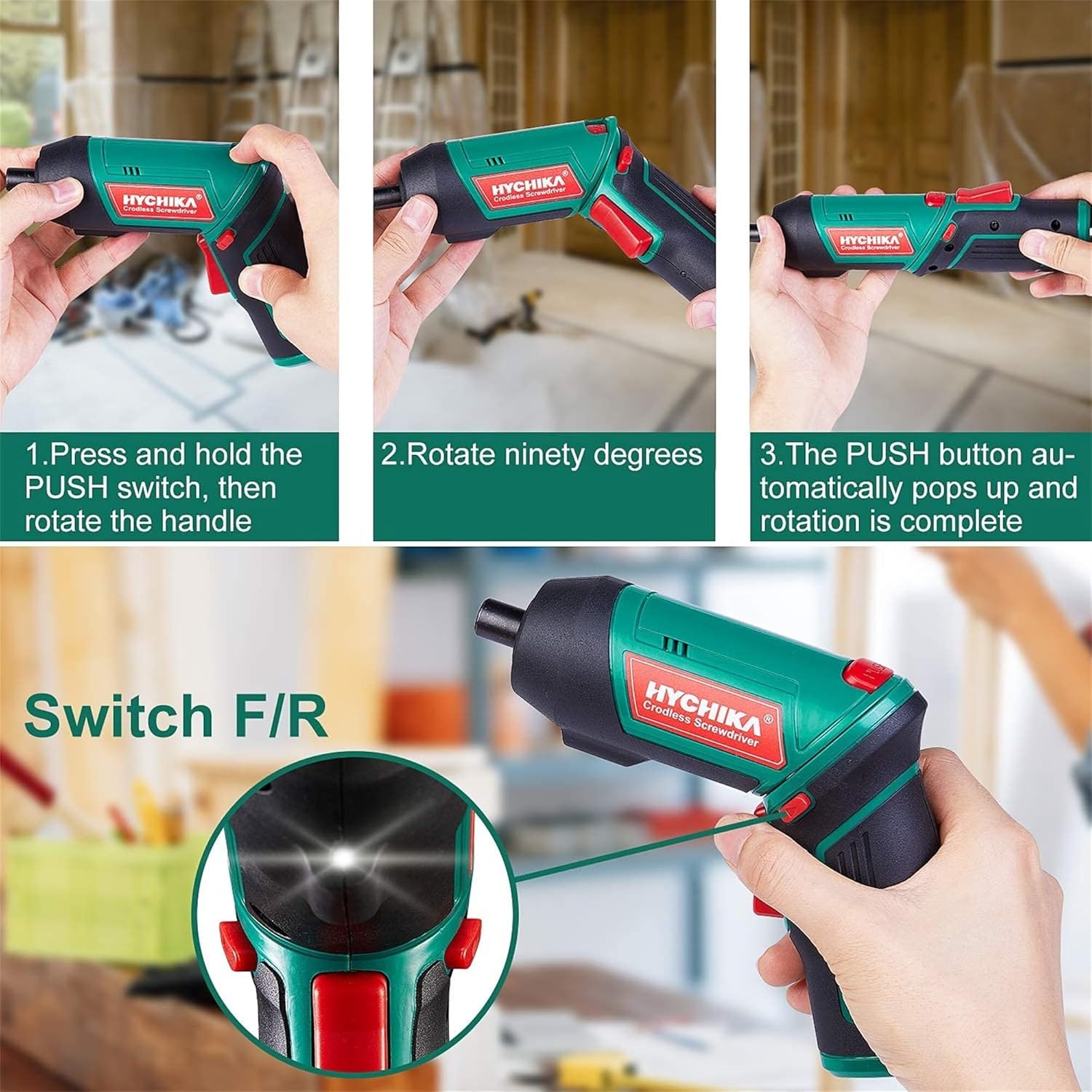
Figure 6.1: Demonstrates the process of transforming the screwdriver's grip by pressing the PUSH button and rotating the handle.
6.2 Forward and Reverse Operation
The forward/reverse button controls the direction of rotation for screwing and unscrewing.
- To drive screws (forward rotation), push the forward/reverse button to the left (when viewed da a parte posteriore di u strumentu).
- To remove screws (reverse rotation), push the forward/reverse button to the right.
- When the button is in the center position, the tool is locked, preventing accidental activation.
6.3 Usendu a luce di travagliu LED
The built-in LED light automatically illuminates when the screwdriver is in operation, providing visibility in dimly lit areas.

Figure 6.2: The integrated LED light provides clear illumination for working in dark environments.
7. Mantenimentu
Regular maintenance ensures the longevity and optimal performance of your screwdriver.
- Pulizia: Keep the ventilation openings clean and free from dust. Use a soft, damp pannu per pulisce l'arnese casing. Ùn aduprate micca prudutti chimichi aggressivi o detergenti abrasivi.
- Cura di i bit: Clean screwdriver bits after use. Store them in the provided case to prevent loss and damage.
- Conservazione di a batteria: If storing the tool for an extended period, ensure the battery is partially charged (around 50%) and store it in a cool, dry place. Recharge the battery every 3-6 months to maintain its health.
- Ispezione generale: Periodically check for any loose screws, damaged cords, or worn parts. Do not use the tool if any damage is observed.
8. Risoluzione di prublemi
This section addresses common issues you might encounter with your screwdriver.
| Prublemu | Causa Possibile | Soluzione |
|---|---|---|
| U cacciavite ùn s'accende micca. | A batteria hè scaricata. Forward/Reverse switch is in the center (locked) position. | Caricate a batteria cumpletamente. Spingete l'interruttore avanti/reverse à manca o diritta. |
| Screwdriver loses power quickly. | Batteria micca cumpletamente carica. Battery life degraded. | Assicuratevi chì a batteria sia cumpletamente carica prima di l'usu. If battery life is significantly reduced, contact customer support for replacement options. |
| Bits are not held securely in the chuck. | Bit is not fully inserted. Chuck is dirty or damaged. | Push the bit firmly into the chuck until it clicks into place. Clean the chuck area. If damage is visible, contact customer support. |
Sè u prublema persiste dopu avè pruvatu ste suluzioni, cuntattate l'assistenza clienti.
9. Specificazioni
| Feature | Specificazione |
|---|---|
| Marca | Overstock (HYCHIKA) |
| Numero di mudellu | c131a012-0da9-4306-aeab-b1d9ff5cd4b7 |
| Voltage | 3.6 Volts |
| Fonte d'energia | Alimentatu à batteria |
| Velocità | 180 RPM |
| Elementu Torque | 6 Newton Meters (6 N-m) |
| Tipu di batterie | Lithium Ion |
| Capacità batterie | 2000 mAh |
| Dimensione Chuck | 1/4 di inch (6.35mm) |
| Materiale | Plastica, gomma |
| Culore | Verde |
| UPC | 616859793583 |
10. Garanzia è Support
Overstock offers lifetime after-sales service for this product. For any questions, concerns, or technical assistance, please contact our customer support team.
Please have your model number (c131a012-0da9-4306-aeab-b1d9ff5cd4b7) and purchase information ready when contacting support.


