1. Introduzione
The 1Mii DS500-JP is a high-quality Bluetooth audio receiver designed to upgrade your existing home stereo systems, AV receivers, or powered speakers with advanced Bluetooth connectivity. This device allows you to stream high-fidelity audio wirelessly from your smartphone, PC, or other Bluetooth-enabled music players to your audio equipment within seconds. It features Bluetooth 5.1 technology and supports various high-resolution audio codecs for an immersive listening experience.
2. Produttu Finituview
Funzioni chjave
- High-Fidelity Wireless Audio: Supports advanced audio codecs including LDAC, Qualcomm aptX HD, aptX Low Latency, aptX, and AAC for superior sound quality.
- Tecnulugia Bluetooth 5.1: Equipped with a Qualcomm QCC5125 Bluetooth chip for faster and more stable wireless connections.
- Premium Audio DAC: Integrates an ES9018K2M DAC chip for enhanced audio performance.
- Connettività versatile: Features analog RCA, digital optical, and digital coaxial outputs, compatible with most audio equipment. Simultaneous output is supported.
- Gamma wireless estesa: An external booster antenna provides a stable wireless connection range of over 30 meters.
- Mustrà OLED: A clear OLED screen displays Bluetooth connection status, track name, sampling rate, and audio codec.
- Volume Control & EQ Modes: Easily adjust volume and select from multiple equalizer modes to customize your listening experience.

Image: The 1Mii DS500-JP receiver showcasing its Hi-Res Audio, LDAC, Bluetooth 5.1, and aptX HD capabilities.
Design è dimensioni
The DS500-JP features a compact and sophisticated design with an all-aluminum body, anodized for high quality. Its dimensions are approximately 86mm (height with antenna) x 76mm (width) x 23mm (depth). The OLED display provides essential information at a glance.
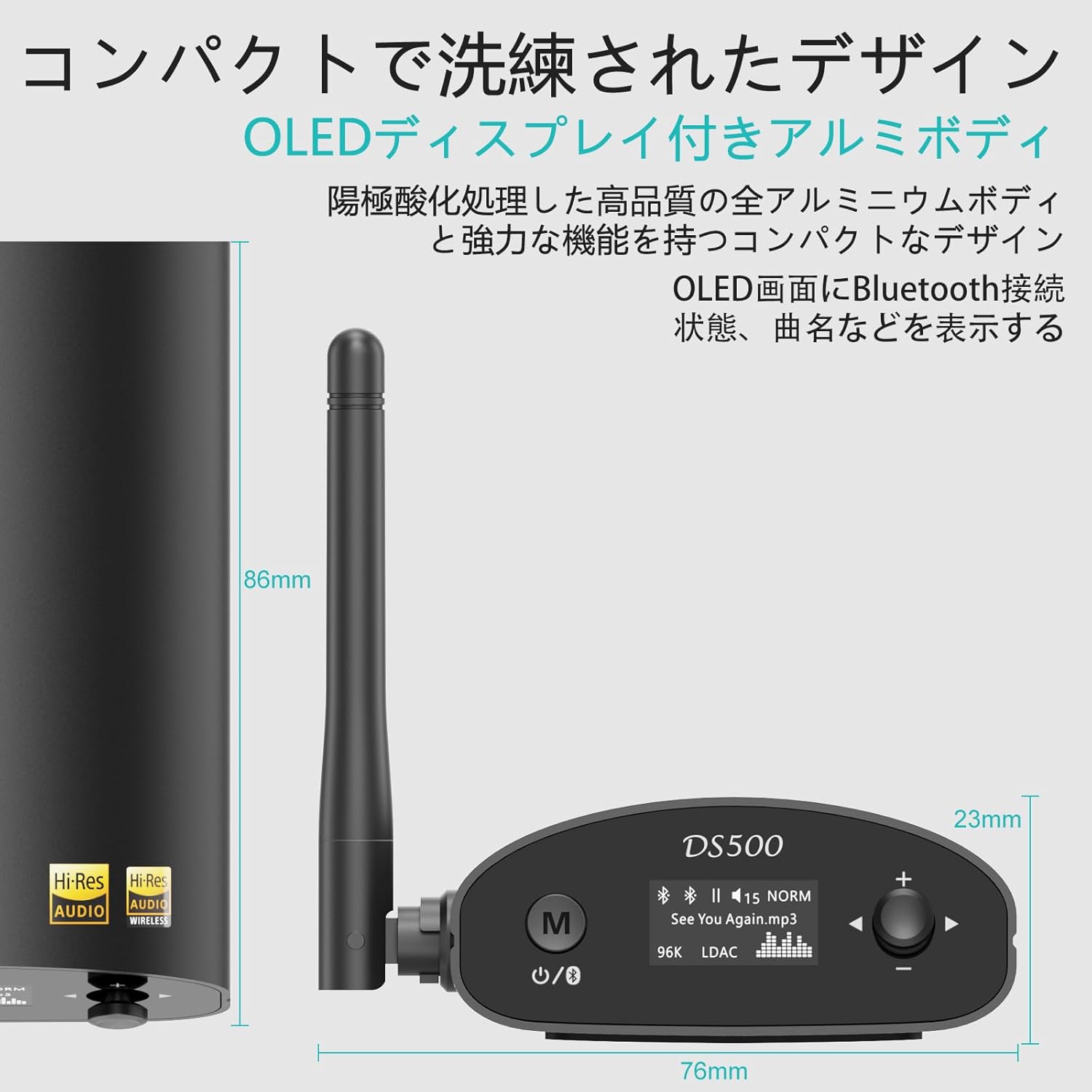
Image: Detailed dimensions of the DS500-JP receiver, highlighting its compact size.
3. Cuntenutu di u pacchettu
Quandu avete apertu u pacchettu, assicuratevi chì tutti l'articuli seguenti sianu presenti:
- 1Mii DS500-JP Wireless Audio Adapter
- Cavu di carica USB
- 3.5mm Male to RCA Male Audio Cable
- RCA Male to RCA Male Audio Cable
- Cavu otticu
- Manuale d'usu

Image: All items included in the 1Mii DS500-JP product package.
4. Setup
4.1 Cunnessione di putenza
- Connect the provided USB charging cable to the DC 5V input port on the DS500-JP.
- Plug the other end of the USB cable into a compatible USB power adapter (not included) or a USB port on your audio equipment.
4.2 Cunnessione Audio Output
The DS500-JP offers multiple output options. Choose the appropriate cable and port based on your audio system:
- Analog RCA Output: Use the RCA audio cable to connect the "ANALOG OUT" ports (red for right, white for left) on the DS500-JP to the corresponding RCA input ports on your amplifier o parlanti attivi.
- Uscita Ottica Digitale: Use the optical cable to connect the "OPTICAL OUT" port on the DS500-JP to the optical input port on your digital audio receiver or DAC.
- Uscita Coassiale Digitale: Use a coaxial cable (not included) to connect the "COAXIAL OUT" port on the DS500-JP to the coaxial input port on your digital audio receiver or DAC.

Image: The rear panel of the DS500-JP, illustrating the DC 5V, Optical Out, Analog Out (RCA), and Coaxial Out ports.
4.3 Installazione di l'antenna
Screw the external booster antenna into the antenna port on the back of the DS500-JP. Ensure it is securely tightened for optimal wireless performance.

Image: The DS500-JP with its external antenna, emphasizing enhanced Bluetooth 5.1 connectivity.
5. Operating Instructions
5.1 Power On/Off
- To power on, press the power button (usually marked with a circle and a vertical line) on the front panel. The OLED display will light up.
- Per spegne, appughjà è mantene u buttone di putenza finu à chì a visualizazione si spegne.
5.2 Accoppiamentu Bluetooth
- Ensure the DS500-JP is powered on. The OLED display will show "Pairing" or a similar indicator.
- Nant'à u vostru smartphone, tableta, o PC, attivate Bluetooth è cercate i dispusitivi dispunibili.
- Select "DS500" from the list of found devices to initiate pairing.
- Once connected, the OLED display will show the connection status, track name, and the active audio codec (e.g., LDAC, aptX HD).

Image: The OLED display of the DS500-JP, illustrating how track information and connection status are shown.
5.3 Volume Control
Use the "+" and "-" buttons on the front panel to adjust the output volume of the DS500-JP.
5.4 Selezzione di u modu EQ
In Bluetooth connection mode, the DS500-JP supports various EQ modes. To change the EQ mode:
- Press and hold the EQ button (often integrated with the volume knob or a dedicated button) for approximately 2 seconds.
- Rotate the volume knob or press the "+" / "-" buttons to cycle through the available EQ modes (e.g., Normal, Rock, Class, Jazz, Dance, Pop, Bass).
- Release the button to select the desired EQ mode.

Image: Visual guide for selecting different EQ modes on the DS500-JP.
5.5 USB Input (Sound Card Function)
The DS500-JP can also function as a USB sound card when connected to a computer via its USB port. This allows for direct digital audio transfer from your computer to the DS500-JP for playback through your audio system.
6. Mantenimentu
- Mantene l'apparechju pulitu asciugandulu cù un pannu dolce è asciuttu. Evitate l'usu di detergenti abrasivi o solventi.
- Assicuratevi chì u dispusitivu hè postu in una zona ben ventilata per prevene u surriscaldamentu.
- Evite l'esposizione di u dispositivu à temperature estreme, umidità o luce diretta di u sole.
- Ùn pruvate micca di smuntà o riparà u dispusitivu da per voi. Cuntattate un persunale di serviziu qualificatu per qualsiasi riparazione.
7. Risoluzione di prublemi
| Prublemu | Causa Possibile | Soluzione |
|---|---|---|
| Nisuna uscita di sonu. |
|
|
| Ùn si pò micca accoppià cù u dispositivu Bluetooth. |
|
|
| Audio quality is poor or drops out. |
|
|
8. Specificazioni
| Feature | Detail |
|---|---|
| Numero di mudellu | DS500-JP |
| Marca | 1 Mii |
| Versione Bluetooth | 5.1 |
| Chip Bluetooth | Qualcomm QCC5125 |
| Chip DAC | ES9018K2M |
| Codecs audio supportati | LDAC, aptX HD, aptX Low Latency, aptX, AAC, SBC |
| LDAC Sampling Rate | Up to 24-bit/96 kHz (990kbps) |
| aptX HD Sampling Rate | Up to 24-bit/48 kHz (576kbps) |
| Porti di output | Analog RCA, Digital Optical, Digital Coaxial |
| Porti di input | Bluetooth, USB (for PC sound card function) |
| Range Wireless | Over 30 meters (with external antenna) |
| Mostra | OLED |
| Input di putenza | DC 5V |
| Dimensioni (circa) | 14.1 x 12.6 x 6.8 cm (Dimensione di u pacchettu) |
| Pesu (circa) | 340 g (Pesu di u pacchettu) |
| Batteria | Not applicable (requires external power) |
9. Garanzia è Support
Per infurmazioni nantu à a garanzia è l'assistenza tecnica, vi pregu di cunsultà u situ ufficiale di 1Mii. website or contact their customer service directly. Details regarding warranty periods and service procedures are typically provided with your purchase documentation or on the manufacturer's support pages.
Supportu in ligna: Visit the 1Mii official websitu per FAQ, scaricamenti di driver è informazioni di cuntattu.
Serviziu à i clienti: If you encounter any issues not covered in this manual, please reach out to 1Mii customer support for assistance.