1. Introduzione
The Waveshare SX1262 LoRaWAN HAT is an expansion board designed for Raspberry Pi series boards, including Raspberry Pi 4B/3B/Zero/Zero W/Zero 2W, and Pico/Pico W. This HAT enables LoRaWAN communication in the 868/915MHz frequency band. It integrates the SX1262 chip, which offers improved power efficiency and an extended transmission range compared to the SX1278. This module facilitates the creation of LoRaWAN nodes, allowing seamless connection to cloud servers such as The Things Network (TTN) for various Internet of Things (IoT) applications.
2. Cuntenutu di u pacchettu
Verificate chì tutti l'articuli elencati quì sottu sò inclusi in u vostru pacchettu:
- SX1262 868/915M LoRaWAN HAT x1
- 868/915M Magnetic CB antenna x1
- IPEX to SMA adapter cable (~17cm) x1
- 2x20PIN female pinheader x1
- Screws pack x1

Figure 1: Included components of the Waveshare SX1262 LoRaWAN HAT package.
3. Features
- Standard Raspberry Pi 40PIN GPIO header, ensuring compatibility with Raspberry Pi series boards.
- Integrates the new generation SX1262 chip, offering higher power efficiency and longer transmission distance compared to the SX1278.
- Suitable for Sub-GHz band operation (868/915MHz for this model).
- Designed for building LoRaWAN networks, allowing quick connection to cloud servers like TTN when combined with a gateway.
- SPI communication interface.

Figure 2: Key features of the SX1262 LoRaWAN HAT.
4. Specificazioni
| Parametru | Valore |
|---|---|
| Chip RF | SX1262 |
| Banda di Frequency | HF: 850 - 930MHz (868/915M for this model) |
| Modulazione | LoRa / (G)FSK |
| Data Rate (LoRa) | 0.018 - 62.5kbps |
| Data Rate (GFSK) | 0.6 - 300kbps |
| Emit Power | 22dBm à 3.3V |
| Fattore di diffusione | SF7 - SF12 |
| Voltage | 3.3V |
| Module Current Consumption (emitting) | 107mA @ 22dBm |
| Module Current Consumption (receiving) | 5.3 mA à 125 kHz |
| Bus di cumunicazione | SPI |
| Temperature di funziunamentu | 0 - 50°C |
| Interfaccia | Header GPIO 40PIN |

Figure 3: Technical specifications of the SX1262 LoRaWAN HAT.
5. Definizione di Pinout
The SX1262 LoRaWAN HAT connects to the Raspberry Pi via its 40-pin GPIO header. Understanding the pinout is crucial for proper integration and software development. The following table and diagram detail the pin assignments for the LoRa node functionality:
| Pin Name | Funzione |
|---|---|
| CS | LoRa CS pin |
| CLK | LoRa CLK pin |
| MOSI | LoRa MOSI pin |
| MISO | LoRa MISO pin |
| Occupatu | LoRa BUSY pin |
| DIO1 | LoRa DIO1 pin |
| DIO4 | LoRa transmit enable pin |
| RST | LoRa reset pin |
| 5V | alimentazione 5V |
| GND | Terra |

Figure 4: Pinout diagram for the SX1262 LoRaWAN HAT.
6. Chì ci hè à bordu
Questa sezione furnisce un sopraview of the main components and indicators on the SX1262 LoRaWAN HAT:
- SX1262 LoRa module
- Power chip (5V to 3.3V LDO)
- LoRa module IPEX 1 connector (for LoRa antenna)
- Status Indicator (PWR: power indicator, RXD/TXD: UART RX/TX indicator)
- Raspberry Pi 40PIN GPIO header (for connecting with Raspberry Pi series boards)
- LoRa module pin header

Figure 5: Labeled components on the SX1262 LoRaWAN HAT. Note: This image may depict a variant with GNSS components not present on this specific model.
7. Setup
Follow these steps to set up your Waveshare SX1262 LoRaWAN HAT:
- Attach the HAT to Raspberry Pi: Carefully align the 40-pin female header of the SX1262 LoRaWAN HAT with the GPIO pins on your Raspberry Pi board. Gently press down until the HAT is securely seated. Use the provided screws and standoffs to fix the HAT to the Raspberry Pi for stability.
- Cunnette l'antenna:
- Connect the IPEX to SMA adapter cable to the LoRa module IPEX connector on the HAT.
- Screw the 868/915M magnetic CB antenna onto the SMA connector of the adapter cable. Ensure a firm connection.
- Cunfigurazione Software:
The SX1262 LoRaWAN HAT requires software configuration on your Raspberry Pi. Refer to the official Waveshare Wiki for detailed, up-to-date instructions and demo code. This typically involves:
- Enabling SPI interface on your Raspberry Pi.
- Installing necessary libraries and dependencies (e.g., Python libraries for LoRa communication).
- Corsa example scripts to test communication.
Note: Software setup can be complex. Consult the Waveshare Wiki for specific commands and troubleshooting tips.
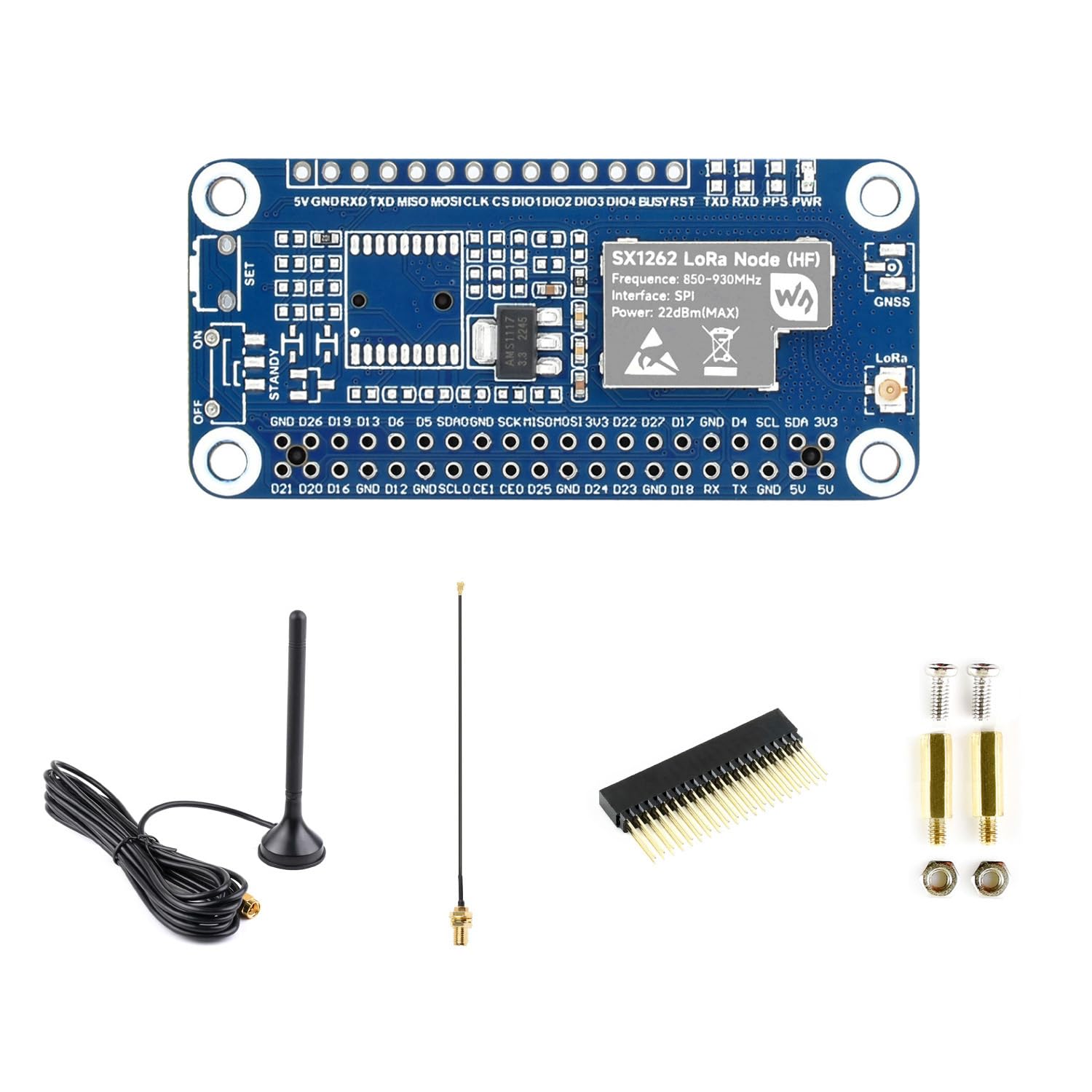
Figure 6: SX1262 LoRaWAN HAT mounted on a Raspberry Pi.
8. Operating Instructions
Once the hardware is assembled and software is configured, you can begin operating the SX1262 LoRaWAN HAT as a LoRaWAN node:
- Power On: Ensure your Raspberry Pi is powered on. The PWR indicator LED on the HAT should illuminate.
- Initialize LoRa Module: Use your configured software to initialize the SX1262 module. This typically involves setting the frequency, spreading factor, bandwidth, and coding rate.
- Join LoRaWAN Network: For LoRaWAN operation, the node needs to join a network. This can be done via Over-The-Air Activation (OTAA) or Activation By Personalization (ABP). Your software will handle the necessary keys and procedures.
- Send and Receive Data: Once joined, the node can transmit uplink messages to a LoRaWAN gateway and receive downlink messages. Monitor the RXD/TXD indicator LEDs for activity.
- Trattamentu di dati: Data transmitted by the node will be forwarded by the gateway to a Network Server (e.g., TTN), where it can be processed and integrated with other applications.
For specific programming examples and detailed API usage, refer to the Waveshare Wiki and any relevant LoRaWAN documentation or libraries you are using.
9. Dumanda Esamples
The SX1262 LoRaWAN HAT is suitable for a wide range of applications requiring long-range, low-power wireless communication. Common use cases include:
- Cuntrollu è Surviglianza Industriale
- Smart Home Automation (e.g., water meters, alarms, lighting)
- Environmental Monitoring (e.g., temperature, humidity sensors)
- Agricultural IoT (e.g., soil moisture, livestock tracking)
- Data Acquisition Systems

Figure 7: LoRaWAN application examples.
10. Risoluzione di prublemi
Questa sezione affronta i prublemi cumuni chì pudete scuntrà:
- Software Installation Errors:
If you encounter errors during library installation (e.g.,
setup.py installissues), ensure you are following the latest instructions on the Waveshare Wiki. Verify all dependencies are met and consider using modern package management tools likepipcunbuildif recommended. - Unreliable Message Transmission (e.g., garbled messages, dropped packets):
This can be caused by frequency drift, especially with longer messages or higher transmit power, leading to overheating. Try the following:
- Reduce the transmit power (Tx power) in your software configuration.
- Ensure the antenna is securely connected and positioned optimally.
- Verify the operating environment is within the specified temperature range (0-50°C).
- For Meshtastic users, be aware that some users have reported limitations with message length and reliability on this specific HAT due to oscillator stability. Consider shorter messages or alternative modem presets if issues persist.
- No GPS/GNSS Functionality:
This specific model, the SX1262 868/915M LoRaWAN HAT, does not include a GNSS (GPS) chip. If you require location services, ensure you have purchased the correct variant (e.g., "SX1262 LoRaWAN/GNSS HAT") or integrate an external GNSS module.
- No Power Indicator (PWR LED off):
Check the connection of the HAT to the Raspberry Pi GPIO header. Ensure the Raspberry Pi is powered correctly. Inspect for any physical damage to the HAT or Raspberry Pi.
11. Mantenimentu
To ensure the longevity and optimal performance of your SX1262 LoRaWAN HAT, follow these maintenance guidelines:
- Pulizia: Keep the board free from dust and debris. Use a soft, dry brush or compressed air for cleaning. Avoid using liquids or solvents.
- Conservazione: When not in use, store the HAT in an anti-static bag in a cool, dry environment, away from direct sunlight and extreme temperatures.
- Trattamentu: Always handle the board by its edges to avoid touching components, especially the antenna connectors. Static electricity can damage electronic components.
- Cura di l'antenna: Ensure the antenna connection remains secure. Avoid bending or stressing the antenna cable excessively.
12. Garanzia è Support
For warranty information, technical support, and further documentation, please refer to the official Waveshare resources:
- Waveshare ufficiale Websitu: Visit the Waveshare website for product pages, datasheets, and software downloads.
- Waveshare Wiki: U Waveshare Wiki provides comprehensive tutorials, demo codes, and detailed technical information for their products. It is the primary resource for software setup and development.
- Assistenza Clienti: For specific issues not covered in the documentation, contact Waveshare customer support through their official channels.
Per piacè cunservate a vostra prova d'acquistu per qualsiasi reclamu di garanzia.
13. Dimensioni di u contornu
The physical dimensions of the SX1262 LoRaWAN HAT are provided below for integration planning:

Figure 8: Outline dimensions of the SX1262 LoRaWAN HAT (Unit: mm).