1. Introduzione
Grazie per l'acquistuasing the CANYON BSP-8 Bluetooth Speaker. This manual provides essential information for the safe and efficient use of your device. Please read it thoroughly before operation and retain it for future reference.
Funzioni chjave:
- Uscita audio 10W: Offre un sonu chjaru è putente.
- Bluetooth 5.2: For stable and energy-efficient wireless connection up to 10 meters.
- Retroilluminazione RGB: Integrated lighting for enhanced ambiance.
- True Stereo Wireless (TWS): Connect two BSP-8 speakers for a full stereo sound experience.
- Opzioni di riproduzione multiple: Supports Bluetooth, AUX, USB, and MicroSD card inputs.
- Disegnu Portable: Compact size with a convenient hanger for easy transport.
- Long Life Battery: Finu à 3 ore di ghjocu cù una sola carica.
2. Informazioni di sicurezza
- Ùn espone micca l'altoparlante à temperature estreme, luce solare diretta o alta umidità.
- Evite di caccià o sottumette u parlante à forti impatti.
- Do not disassemble or attempt to repair the speaker yourself. Contact qualified service personnel.
- Keep the speaker away from water and other liquids. It is not waterproof.
- Aduprate solu u cavu di carica furnitu o un cavu Type-C certificatu per a carica.
- Dispose of the battery and speaker according to local regulations.
3. Cuntenutu di u pacchettu
- CANYON BSP-8 Bluetooth Speaker
- Cavu di Carica USB Type-C
- Manuale d'usu
4. Produttu Finituview
Familiarizatevi cù i cumpunenti è i cuntrolli di l'altoparlante.
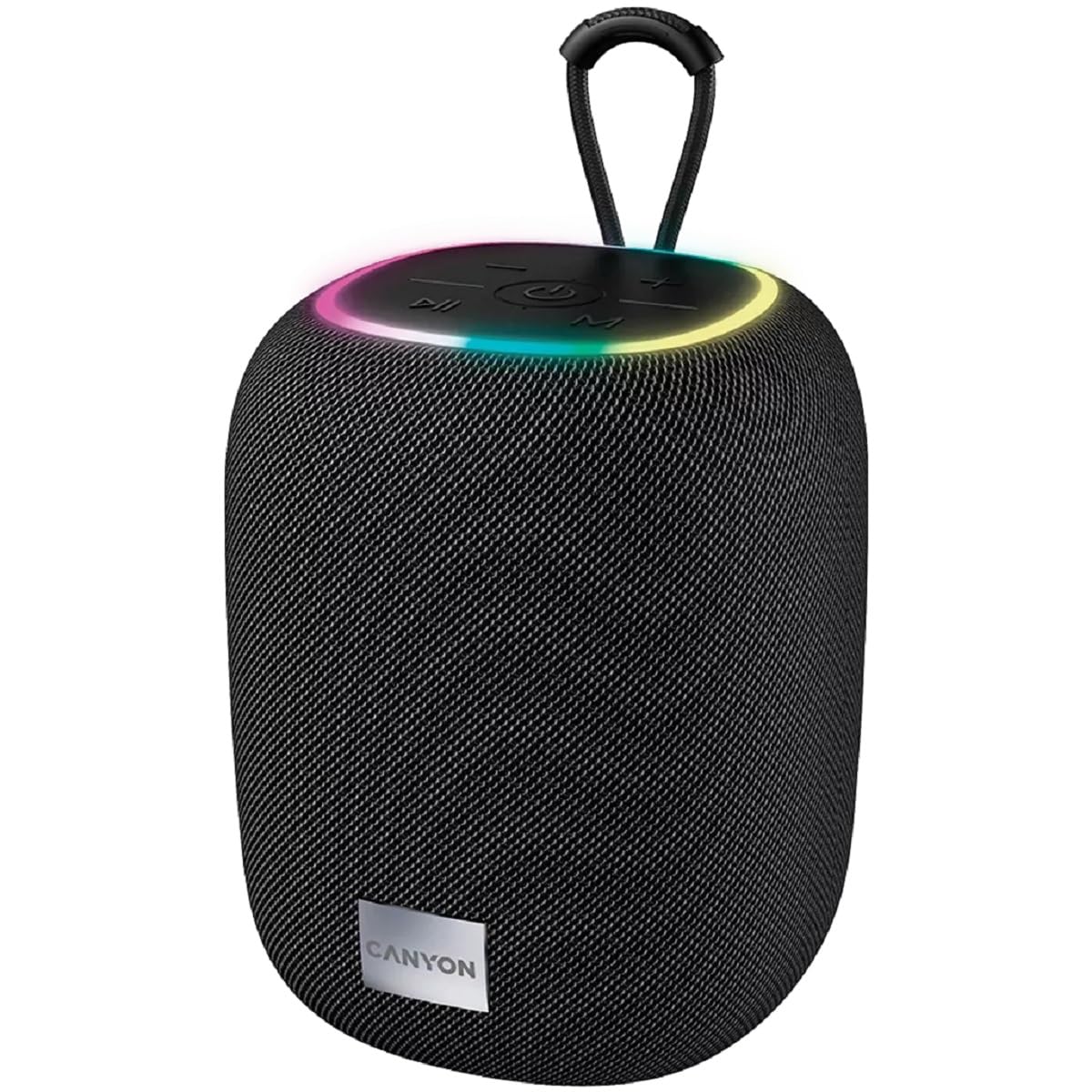
Imagine 1: In cima view of the CANYON BSP-8 speaker, showing the control buttons, RGB backlight, and integrated hanger.
Buttoni di cuntrollu (pannellu superiore):
- Pulsante di putenza: Appughjà è tene premutu per accende/spegne. Appughjà brevemente per ghjucà/mette in pausa.
- Buttone di calata di vulume / traccia precedente: Appughjà brevemente per calà u vulume. Appughjà longu per a traccia precedente.
- Buttone per aumentà u vulume / traccia successiva: Appughjà brevemente per aumentà u vulume. Appughjà longu per a prossima traccia.
- Pulsante Mode (M): Short press to switch between Bluetooth, AUX, USB, and MicroSD modes.

Image 2: Posteriore view of the CANYON BSP-8 speaker, illustrating the various input ports including AUX, USB, TF (MicroSD) card slot, and DC5V Type-C charging port.
Input Ports (Rear Panel):
- Portu AUX: Per cunnette dispositivi audio esterni via un cavu audio di 3.5 mm.
- Port USB: Per a riproduzione di file audio da una chiavetta USB.
- TF Card Slot (MicroSD): For playing audio from a MicroSD card.
- DC5V (Type-C) Port: Per carica l'altoparlante.
5. Setup
5.1 Caricamentu di l'altoparlante
- Connect the provided USB Type-C cable to the DC5V port on the speaker.
- Cunnette l'altra estremità di u cavu à un adattatore di alimentazione USB (5V/1A cunsigliatu) o à a porta USB di un urdinatore.
- A luce indicatrice di carica s'illuminerà. Si spegnerà o cambierà di culore una volta cumpletamente carica.
Nota: Per una durata ottimale di a batteria, caricate cumpletamente l'altoparlante prima di u primu usu.

Image 3: Illustration showing the 1800 mAh battery capacity and up to 3 hours of playtime for the CANYON BSP-8 speaker.
5.2 Accensione / spegnimentu
- Per accende: Press and hold the Power button for approximately 3 seconds. You will hear an audible prompt.
- Per spegne: Press and hold the Power button for approximately 3 seconds. You will hear an audible prompt.
5.3 Accoppiamentu Bluetooth
- Accendete l'altoparlante. Entrerà automaticamente in modalità di accoppiamentu Bluetooth, indicatu da una luce LED chì lampeggia.
- Attivate Bluetooth nant'à u vostru dispositivu mobile (smartphone, tablet, urdinatore).
- Cerca available Bluetooth devices and select "CANYON BSP-8" from the list.
- Una volta assuciatu, a luce LED smetterà di lampeggià è sentirete un sonu di cunferma.
Note: The speaker will automatically reconnect to the last paired device if it is within range and Bluetooth is enabled.

Image 4: Illustration highlighting the stable and energy-efficient Bluetooth 5.2 connection with an operating range of up to 10 meters.
5.4 Accoppiamentu Stereo True Wireless (TWS)
To connect two CANYON BSP-8 speakers for a stereo sound experience:
- Ensure both BSP-8 speakers are powered on and not connected to any Bluetooth device.
- Nant'à un altoparlante (questu serà l'altoparlante principale), appughjà duie volte u buttone Power. Entrerà in modalità di accoppiamentu TWS.
- I dui altoparlanti si cercheranu automaticamente è si cunnetteranu trà di elli. Sentirete un sonu di cunferma una volta cunnessi.
- Una volta chì TWS hè stabilitu, cunnette u vostru dispositivu mobile à l'altoparlante principale via Bluetooth cum'è descrittu in a sezione 5.3.
Note: TWS mode only works with two identical CANYON BSP-8 speakers.
6. Operating Instructions
6.1 Playing Audio
- Modu Bluetooth: Dopu l'accoppiamentu riesciutu, l'audio di u vostru dispositivu cunnessu serà ripruduttu per l'altoparlante.
- Modu AUX: Connect a 3.5mm audio cable from your external audio device to the AUX port on the speaker. Press the 'M' button to switch to AUX mode.
- Modalità USB: Inserite una chiavetta USB in u portu USB. L'altoparlante passerà automaticamente in modalità USB è cumincierà à riproduce l'audio. files. If not, press the 'M' button.
- Modu di carta MicroSD: Insert a MicroSD card into the TF card slot. The speaker will automatically switch to MicroSD mode and begin playing audio files. If not, press the 'M' button.
6.2 Cuntrollu Playback
- Play/Pause: Appughjà breve u buttone Power.
- Aument du volume : Appughjà brevemente u buttone Volume Up (+).
- Volume Imbruglia: Appughjà brevemente u buttone Volume Down (-).
- Prussima pista: Appughjà longu u buttone Volume Up (+).
- Pista Precedente: Appughjà longu u buttone Volume Down (-).
6.3 Retroilluminazione RGB
The speaker features an integrated RGB backlight on the top panel. The backlight activates automatically when the speaker is powered on. There are no specific controls for changing the RGB pattern or turning it off/on independently of the speaker's power state.


