1. Introduzione è Overview
The Vertiv Liebert GXT5 Lithium-Ion N Online UPS (Uninterruptible Power Supply) provides reliable, high-quality AC power to IT equipment. This unit is designed to protect critical loads from power disturbances and outages, ensuring continuous operation. Featuring Lithium-Ion battery technology, it offers extended battery life and reduced maintenance compared to traditional UPS systems. This manual provides essential information for the safe and efficient installation, operation, and maintenance of your UPS.
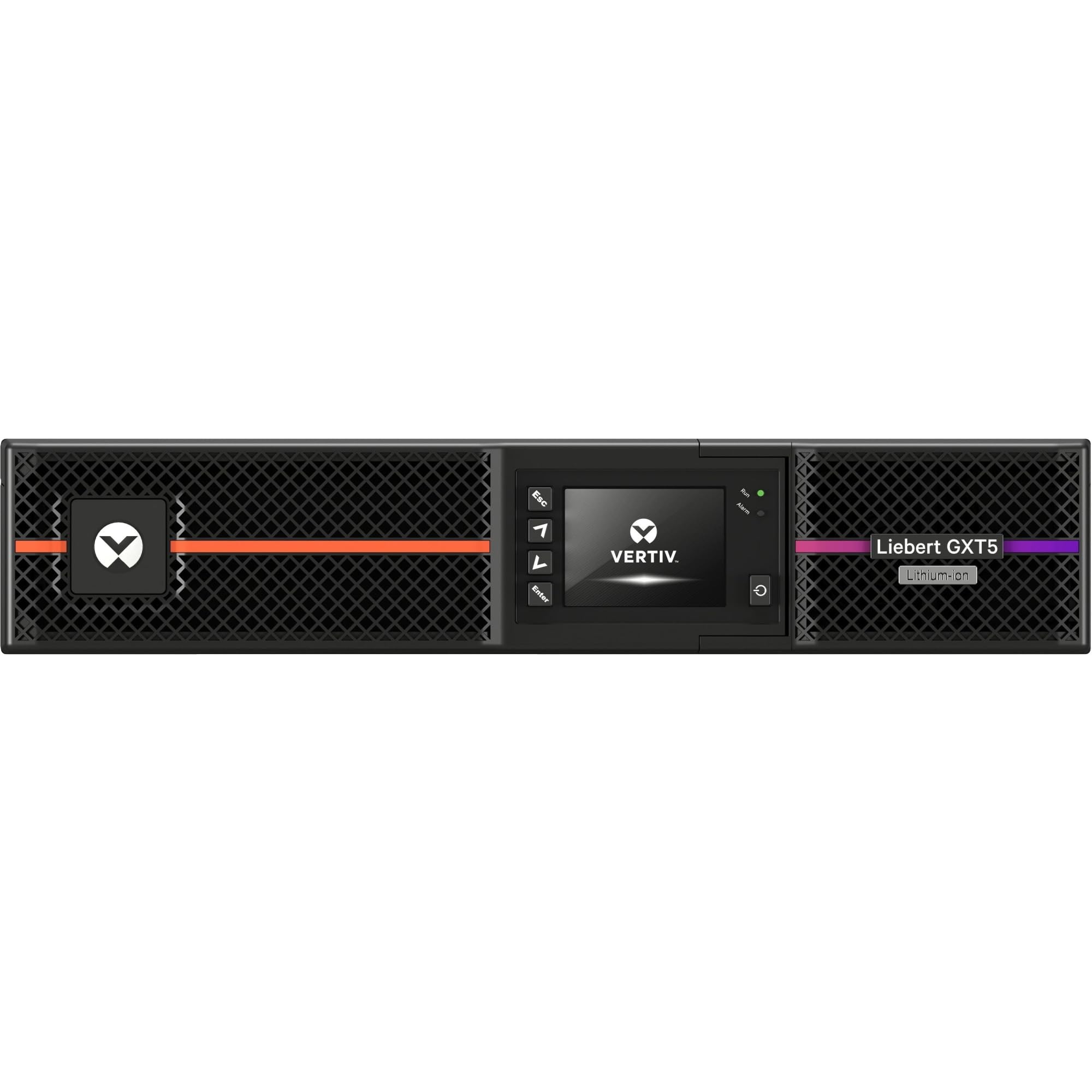
Figura 1: Fronte view of the Vertiv Liebert GXT5 UPS, showing the display and ventilation.
2. Informazioni di sicurezza
Leghjite è capite tutte l'istruzzioni di sicurezza prima di installà, fà funziunà o mantene l'UPS. A mancanza di seguitu di queste istruzzioni pò causà scosse elettriche, incendi o ferite gravi.
- Periculu elettricu: Questa unità cuntene volti periculositages. Do not open the UPS enclosure. Refer all servicing to qualified service personnel.
- Sicurezza di a batteria: The UPS contains Lithium-Ion batteries. Do not dispose of batteries in a fire. Batteries may explode. Do not open or mutilate batteries. Released electrolyte is harmful to the skin and eyes.
- Messa a terra: Ensure the UPS is properly grounded to reduce the risk of electric shock.
- Ambiente: Install the UPS in a controlled environment, free from excessive dust, humidity, and extreme temperatures.
- Pesu: The UPS unit is heavy. Use proper lifting techniques or assistance during installation to prevent injury.
3. Cuntenutu di u pacchettu
Verify that all items are present in the packaging. If any items are missing or damaged, contact your supplier.
- Vertiv Liebert GXT5 Lithium-Ion N Online UPS Unit
- Cordu di Potenza Input
- Cavi di alimentazione di uscita (a quantità pò varià)
- Cavu USB
- Cavu Seriale
- Rackmount Kit (rails, hardware)
- Tower Stands (for tower configuration)
- Guida d'iniziu rapidu è Istruzzioni di sicurezza
4. Setup
4.1 Installazione fisica
The GXT5 UPS can be installed in either a rackmount or tower configuration.
Tower Configuration:
Attach the provided tower stands to the bottom of the UPS unit for stable vertical placement. Ensure adequate clearance for ventilation.

Figure 2: UPS unit configured for tower installation with stands.
Rackmount Configuration:
Install the rackmount rails into your standard 19-inch equipment rack. Slide the UPS unit onto the installed rails and secure it with the provided screws.
4.2 Connecting Power and Equipment
- Cunnessione di l'alimentazione d'entrata: Plug the UPS input power cord into a properly grounded electrical outlet.
- Cunnette l'equipaggiu: Plug your critical equipment (servers, network devices, etc.) into the output receptacles on the rear panel of the UPS. Note that some outlets may be individually controllable.
- Porti di cumunicazione: For monitoring and management, connect the USB or serial cable to your computer or network device.
- Optional RDU101 Card: If using the optional RDU101 network management card, insert it into the Intellislot and connect an Ethernet cable for remote monitoring.
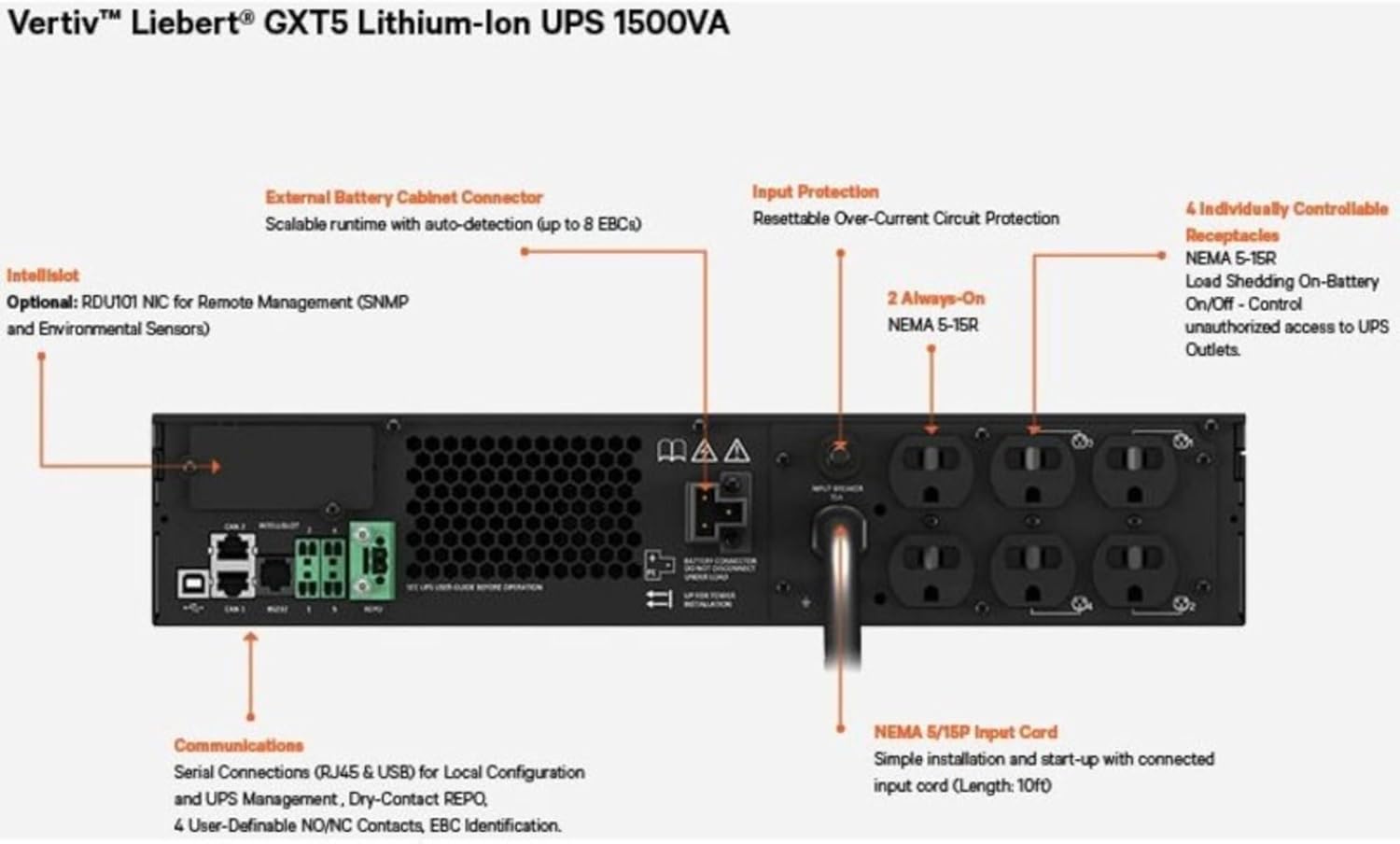
Figure 3: Rear panel connections, including input power, output receptacles, and communication ports.

Figure 4: RDU101 network management card with labeled ports.
4.3 Accensione iniziale
After all connections are secure, press the power button on the front panel to turn on the UPS. The display will illuminate, and the UPS will perform a self-test. Allow the batteries to charge for at least 24 hours before relying on them for extended backup time.
5. Funziunamentu di l'UPS
5.1 Display è cuntrolli di u pannellu frontale
The front panel LCD provides real-time status information, including input/output voltage, load level, battery status, and alarm conditions. Use the navigation buttons to access menus and configure settings.
5.2 Modi di funziunamentu
- Modu in linea: Normal operation where the UPS continuously converts AC input to DC to charge batteries and then back to AC to power connected equipment, providing maximum protection.
- Modu di batteria: When input power fails, the UPS automatically switches to battery power to keep connected equipment running.
- Modu di bypass: In certain conditions or for maintenance, the UPS can transfer the load directly to utility power, bypassing the UPS's power conditioning.
5.3 Procedure di spegnimentu
To safely shut down the UPS, first power off all connected equipment. Then, press and hold the power button on the UPS front panel until the unit powers off. Disconnect the input power cord only after the UPS is completely off.
6. Mantenimentu
6.1 Cura di a batteria
The Lithium-Ion batteries in your GXT5 UPS are designed for a long service life. Regular maintenance is generally not required. However, ensure the UPS operates within recommended temperature ranges to maximize battery lifespan. Avoid frequent deep discharges if possible.
6.2 Pulizia
Keep the UPS free from dust and debris. Use a soft, dry cloth to clean the exterior. Do not use liquid cleaners or solvents. Ensure ventilation openings are clear and unobstructed.
6.3 Aghjornamenti di u firmware
Periodically check the Vertiv website for available firmware updates for your UPS model. Firmware updates can provide performance enhancements, bug fixes, and new features. Follow the instructions provided with the update package carefully.
7. Risoluzione di prublemi
This section provides solutions to common issues you may encounter with your UPS. For more complex problems, contact Vertiv technical support.
| Prublemu | Causa Possibile | Soluzione |
|---|---|---|
| L'UPS ùn si accende micca | No input power; Battery deeply discharged; Power button not pressed correctly. | Check input power cord connection and wall outlet. Allow UPS to charge for several hours. Press and hold power button for 2-3 seconds. |
| L'UPS emette un bip continuu | On battery power; Overload condition; Battery fault. | Check input power. Reduce connected load. Check battery status on display. |
| L'attrezzatura cunnessa perde putenza | UPS battery depleted; UPS shut down due to overload; UPS fault. | Check UPS display for error messages. Ensure load is within UPS capacity. |
8. Specificazioni
| Feature | Specificazione |
|---|---|
| Numero di mudellu | GXT5LI-1500LVRT2UXLN |
| Capacità (VA/Watt) | 1500 VA / 1350 W |
| Input Voltage | 120 Volts |
| Tipu di batterie | Lithium Ion |
| Dimensioni di u produttu (L x W x H) | 24 x 22.5 x 9.5 inch |
| Pesu di l'articulu | 55.4 liri |
| Culore | Neru |
9. Garanzia è Support
Your Vertiv Liebert GXT5 UPS is covered by a manufacturer's warranty. Please refer to the warranty card included with your product or visit the official Vertiv websitu per i termini è e cundizioni di garanzia dettagliate.
For technical assistance, troubleshooting, or to inquire about service, please contact Vertiv customer support. You can also explore additional resources and product information through the Vertiv Virtual Showroom:
Visit the Vertiv Virtual Showroom

Figure 5: Scan this QR code to access the Vertiv Virtual Showroom for more product information and support.