1. Introduzione
This manual provides comprehensive instructions for the installation, operation, maintenance, and troubleshooting of the Vivotek FE9391-EHV-V2 12MP Outdoor Fisheye IR Illumination Camera. Please read this manual thoroughly before using the product to ensure proper setup and functionality. Retain this manual for future reference.
2. Produttu Finituview
2.1 Funzioni chjave
- 12 Megapixel Effective Still Resolution for high-quality imaging.
- Fisheye Lens with 1.2mm focal length for wide-area surveillance.
- Integrated IR Illumination for clear night vision up to 20 meters.
- WDR Pro technology for optimal image visibility in high contrast lighting.
- H.265/H.264/MJPEG compression for efficient video streaming.
- IP66-rated weather-resistant enclosure for outdoor use.
- Motion-only alert type for event detection.
- Wi-Fi Connectivity Protocol for flexible network integration.
2.2 Cuntenuti di u pacchettu
Verificate chì tutti l'articuli sò presenti in u pacchettu:
- Vivotek FE9391-EHV-V2 Camera Unit
- Mounting Kit (screws, anchors)
- Connettore impermeabile
- Guida d'installazione rapida
- Software CD (or download link information)
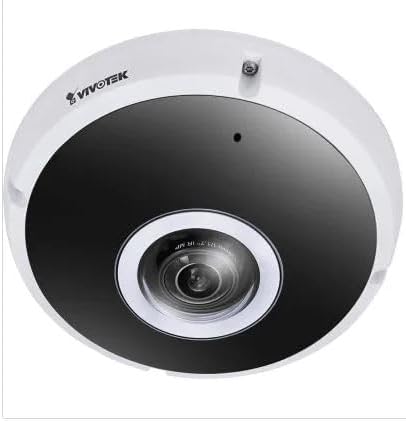
Figura 2.1: Fronte view of the Vivotek FE9391-EHV-V2 12MP Outdoor Fisheye IR Illumination Camera, showing the lens and IR illuminators.
3. Informazioni di sicurezza
- Leghjite attentamente tutte l'istruzzioni prima di l'installazione è u funziunamentu.
- Ensure the power source matches the camera's requirements (Corded Electric).
- Ùn pruvate micca di smuntà o mudificà a camera. Questu annullerà a garanzia.
- Avoid pointing the camera directly at strong light sources for extended periods.
- L'installazione deve esse effettuata da persunale qualificatu in cunfurmità cù i codici elettrici lucali.
- Protect cables from being walked on or pinched.
4. Setup è Installazione
4.1 Situazione di muntatura
Select a suitable outdoor location for mounting. Consider the desired surveillance area, proximity to power, and network connectivity (Wi-Fi or wired Ethernet). The camera is IP66 rated for outdoor use.

Figure 4.1: Dimensional drawing of the Vivotek FE9391-EHV-V2 camera, showing a diameter of 150mm and height of 68.2mm.
4.2 Installazione fisica
- Preparate a superficia di muntatura: Use the provided mounting template (if included) to mark drill holes.
- Fori: Fate fori pilota è inserite tasselli murali se necessariu.
- Secure a Camera: Attach the camera base securely to the mounting surface using the provided screws.
- Cunnette i cavi:
- putenza: Cunnette u cable d'alimentazione à una fonte d'energia adatta.
- Rete: Connect an Ethernet cable for wired network access, or ensure Wi-Fi signal strength is adequate for wireless connection. Use the waterproof connector for outdoor Ethernet connections.
- Ajuste l'angolo di a camera: Loosen the adjustment screws (if applicable) to position the fisheye lens for optimal coverage. Tighten screws once adjusted.

Figure 4.2: An Ethernet cable with an RJ45 connector, used for wired network connectivity.
4.3 Configurazione iniziale di a rete
After physical installation and power-up, the camera needs to be configured on your network.
- Scuprite a Camera: Use the Vivotek IP Utility software (available on the manufacturer's websitu) per scopre a camera nantu à a vostra rete.
- Assign IP Address: Assign a static IP address or ensure it obtains an IP address via DHCP.
- Accessu Web Interfaccia: apre a web navigatore è inserite l'indirizzu IP di a camera per accede à a so webinterfaccia di cunfigurazione basata.
- Login: Enter the default username and password (refer to the Quick Installation Guide for defaults). Change the default password immediately for security.
- Wi-Fi Setup (if applicable): Navigate to the network settings and configure the Wi-Fi connection if you are using wireless connectivity.
5. Operating Instructions
5.1 Live View
Once configured, you can access the live video feed through the web interface or compatible Vivotek surveillance software.
- Web Browser: Log in to the camera's web interface and navigate to the "Live View" sezzione.
- Surveillance Software: Add the camera to your Vivotek NVR or VMS (Video Management Software) for centralized monitoring.
- App mobile: Download the Vivotek mobile app and add your camera for remote viewing.

Figura 5.1: Esample of surveillance footage from multiple cameras displayed on a tablet device, demonstrating remote monitoring capabilities.

Figure 5.2: A monitor displaying a split-screen view of four camera feeds, labeled CAM1 through CAM4, illustrating a typical surveillance setup.
5.2 Registrazione è Archiviazione
The camera supports various recording options:
- Storage Locale: Insert a microSD card (not included) into the camera's slot for edge recording. Configure recording schedules and event triggers (e.g., motion detection).
- Network Video Recorder (NVR): Connect the camera to a compatible NVR for continuous or event-based recording.
- Storage Cloud: Some Vivotek models or third-party services may offer cloud storage integration. Refer to the camera's web interface for specific options.
5.3 Rilevazione di muvimentu è avvisi
Cunfigurà e zone di rilevazione di muvimentu è i paràmetri di sensibilità in a camera web interface. When motion is detected, the camera can trigger actions such as:
- Recording video to local storage or NVR.
- Sending email notifications with snapshots.
- Uploading footage to an FTP server.
6. Mantenimentu
- Pulizia di lenti: Asciugate delicatamente l'obiettivo di a camera cù un pannu dolce è pulitu. Per a sporcizia ostinata, aduprate una suluzione di pulizia di obiettivi cuncepita per superfici ottiche. Ùn aduprate micca detergenti abrasivi.
- Pulizia di l'alloghju: Pulite l'alloghju di a camera cù publicitàamp cloth. Avoid using strong detergents or solvents.
- Actualizazioni di firmware: Regularly check the Vivotek website for firmware updates. Updating firmware can improve performance, add features, and enhance security.
- Ispezione di u cable: Ispettate periodicamente tutti i cavi per segni di usura o danni, in particulare per l'installazioni esterne.
- Cuntrolla ambientale: Assicuratevi chì l'ambiente operativu di a camera resti in i limiti di temperatura è umidità specificati.
7. Risoluzione di prublemi
7.1 Nisun flussu video
- Verificate u putere: Ensure the camera is receiving power. Verify power adapter and cable connections.
- Cunnessione di Rete: Confirm the Ethernet cable is securely connected or that the Wi-Fi signal is strong and the camera is connected to the correct network.
- Indirizzu IP: Verify the camera's IP address and ensure it is not conflicting with another device on the network.
- Firewall: Check if any firewall settings on your network or computer are blocking access to the camera.
7.2 Scarsa qualità di l'imagine
- Lenti pulite: Assicuratevi chì l'obiettivo di a camera sia pulitu è senza polvere o macchie.
- Cundizioni di illuminazione: Adjust camera settings for optimal exposure in varying light conditions. Ensure IR illuminators are functioning at night.
- Impostazioni di risoluzione: Verify that the video resolution and quality settings are configured appropriately in the camera's web interfaccia.
- Larghezza di banda di a rete: Insufficient network bandwidth can lead to choppy or low-quality video. Check network load.
7.3 A rilevazione di muvimentu ùn funziona micca
- Attivà a rilevazione di muvimentu: Ensure motion detection is enabled in the camera's settings.
- Sensitivity and Zones: Adjust motion detection sensitivity and define detection zones correctly.
- Pianificazione di Registrazione: Verify that the recording schedule is active for motion-triggered events.
8. Specificazioni
| Feature | Detail |
|---|---|
| Numero di mudellu | FE9391-EHV-V2 |
| Risoluzione Still Efficace | 12 MP |
| Lens | 1.2mm Fisheye Lens |
| IR Illumination Range | 20 m |
| Tecnulugia WDR | WDR Pro |
| Cumpressione Video | H.265/H.264/MJPEG |
| Protocolu di cunnessione | Wi-Fi |
| Classificazione di Prutezzione Internaziunale | IP66 |
| Fonte d'energia | Corded Electric |
| Dimensioni di u produttu (L x W x H) | 5.9 x 5.9 x 2.68 inch (150 x 150 x 68.2 mm) |
| U fabricatore | Vivotek Inc. |
| Usi cunsigliati | Sicurezza Outdoor |
9. Garanzia è Support
For warranty information, technical support, and additional resources, please visit the official Vivotek websitu o cuntattate u so dipartimentu di serviziu di u cliente.
- Produttore: Vivotek Inc.
- Websitu: www.vivotek.com (Esampu ligame, u ligame attuale pò varià)
- Cuntattu: Riferite à u website for regional support contact information.
Please have your model number (FE9391-EHV-V2) and purchase date available when contacting support.


