1. Introduzione
The ROADOM KC-806 Desktop Portable CD Player is a versatile audio device designed for home use, offering multiple playback options and high-fidelity stereo sound. This manual provides detailed instructions for setting up, operating, and maintaining your CD player.
E caratteristiche chjave includenu:
- CD Playback (CD, CD-R, CD-RW, MP3, WMA formats)
- Bluetooth Transmission and Reception
- FM Radio (76.0-108.0MHZ)
- USB Disk Playback and Charging
- Ingressu / Output AUX
- Funzione Timer
- Repeat Playback Modes
- Operazione di cuntrollu remoto
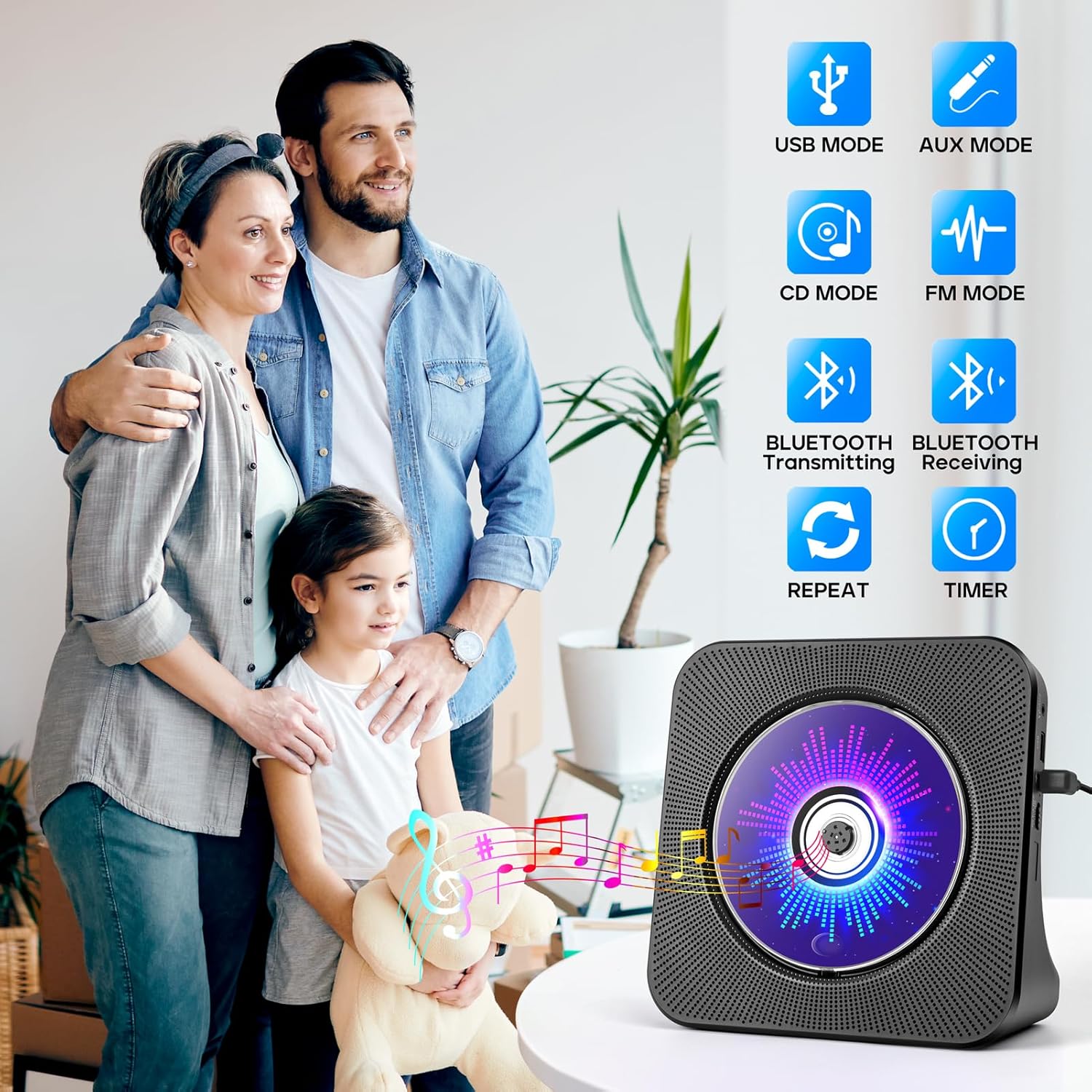
Figure 1.1: The ROADOM KC-806 CD Player highlighting its versatile 8-in-1 functionality.
2. Ciò chì hè in a scatula
Verificate u cuntenutu di u pacchettu quandu u disimballate per assicurassi chì tutti l'articuli sò presenti:
- ROADOM CD Player × 1
- Cuntrollu à distanza × 1
- Adattatore di alimentazione 5V/2A × 1
- USB - Type C Power Cable × 1
- Manuale di l'utente × 1
- 3.5mm AUX Cable × 1 (not listed in product.whats_in_the_box but shown in image)

Figure 2.1: All items included in the ROADOM KC-806 CD Player package.
3. Produttu Finituview
3.1 Fronte è Laterale View

Figura 3.1: Fronte view of the ROADOM KC-806 CD Player and its remote control.

Figura 3.2: Detailed view of the ports and controls on the ROADOM KC-806 CD Player.
3.2 Cuntrolli è Porte
- Portu AUX: For connecting external audio devices or outputting audio to headphones/speakers.
- USB Port (U Disk): For playing music from a USB flash drive and charging devices.
- Type-C Port (Power Input): Cunnette quì l'adattatore di alimentazione furnitu.
- Power (ON/OFF) Switch: Per accende o spegne u dispusitivu.
- Status Screen (LED): Displays time, mode, and track information.
- Pulsante di modu: Switches between CD, Bluetooth, FM, USB, and AUX modes.
- Volume Buttons (Vol-, Vol+): Ajuste u voluminu di riproduzione.
- Buttoni Precedente/Seguente: Skips tracks or tunes FM radio frequencies.
- Pulsante Play/Pause: Avvia o mette in pausa a riproduzione.
4. Setup
4.1 Cunnessione di putenza
- Connect the USB-C end of the power cable to the Type-C Port (Power Input) on the CD player.
- Connect the USB-A end of the power cable to the 5V/2A Power Adapter.
- Inserite l'adattatore di corrente in una presa di muru standard.
- Alternatively, you can power the device using a power bank by connecting the USB-A end of the cable to the power bank.
- Flip the Power (ON/OFF) switch to the 'ON' position. The LED screen will light up.

Figure 4.1: Powering the CD player using either a wall adapter or a power bank.
5. Operating Instructions
5.1 Riproduzione di CD
- Gently open the protective dust cover on the front of the CD player.
- Carefully place a CD (CD, CD-R, CD-RW, MP3, or WMA format) onto the spindle, ensuring it is seated correctly.
- Close the dust cover. The player will automatically detect the CD and begin playback.
- If playback does not start, press the 'Mode' button to select 'CD' mode, then press the 'Play/Pause' button.
- Use the 'Previous' and 'Next' buttons to skip tracks.
- Adjust volume with 'Vol-' and 'Vol+' buttons.

Figure 5.1: Opening the protective cover to insert a CD.

Figure 5.2: The CD player supports multiple CD formats.
5.2 Cunnessione Bluetooth
5.2.1 Bluetooth Receiving (Connect to Phone/Tablet/PC)
- Press the 'Mode' button until 'BLUE' appears on the LED screen, indicating Bluetooth receiving mode.
- On your Bluetooth-enabled device (phone, tablet, computer), search for available Bluetooth devices.
- Select 'ROADOM KC-806' from the list to pair.
- Una volta cunnessu, pudete riproduce l'audio da u vostru dispositivu attraversu l'altoparlanti di u lettore CD.

Figure 5.3: Connecting external devices to the CD player via Bluetooth receiving mode.
5.2.2 Trasmissione Bluetooth (Cunnessione à Cuffie/Altoparlanti Bluetooth)
- Ensure the CD player is in CD, USB, or AUX mode.
- Activate pairing mode on your Bluetooth headphones or external speaker.
- Press and hold the 'Bluetooth' button on the remote control or the 'Mode' button on the unit until the Bluetooth icon flashes on the LED screen, indicating transmitting mode.
- U lettore CD cercherà automaticamente è si cunnetterà à i dispositivi audio Bluetooth vicini.
- Once connected, audio from the CD player will be transmitted to your Bluetooth headphones or speaker.

Figure 5.4: Transmitting audio from the CD player to Bluetooth headphones or speakers.
5.3 Radio FM
- Press the 'Mode' button until 'FM' appears on the LED screen.
- Press the 'Play/Pause' button to initiate an automatic scan for FM stations. The player will save found stations.
- Use the 'Previous' and 'Next' buttons to navigate through the saved stations.
- For manual tuning, press and hold the 'Previous' or 'Next' button to fine-tune the frequency.

Figure 5.5: Enjoying FM radio on the CD player.
5.4 Riproduzione è carica USB
- Insert a USB flash drive (U Disk) containing audio files into the USB Port.
- Press the 'Mode' button until 'USB' appears on the LED screen.
- U lettore rileverà automaticamente è cumincierà à ghjucà l'audio files da u discu USB.
- Use the 'Previous' and 'Next' buttons to navigate tracks.
- The USB port can also be used to charge small electronic devices.

Figure 5.6: USB functionality for playback and charging.
5.5 Modu AUX
- Connect one end of the 3.5mm AUX cable to the AUX Port on the CD player.
- Connect the other end to the audio output of an external device (e.g., phone, computer, MP3 player) or to external headphones/speakers.
- Press the 'Mode' button until 'AUX' appears on the LED screen.
- Audio from the connected external device will play through the CD player's speakers (if used as an input) or be output to your headphones/speakers (if used as an output).

Figure 5.7: AUX input and output connections.
5.6 Funzione Timer
- While playing audio, press the 'Timer' button on the remote control.
- Repeatedly press the 'Timer' button to cycle through available sleep timer settings (e.g., 30, 60, 90, 120, 150, 180 minutes).
- The player will automatically stop playback after the selected time duration.

Figure 5.8: Setting the sleep timer for automatic playback stop.
5.7 Repeat Function
- During CD or USB playback, press the 'Repeat' button on the remote control.
- Repeatedly press the 'Repeat' button to cycle through the following modes:
- UNU: Ripete a traccia attuale.
- TUTTI: Repeats all tracks on the CD/USB.
- SFL (Shuffle): Riproduce i brani in ordine aleatoriu.
- AB: Repeats a specific section of a track (set start point 'A' and end point 'B').

Figure 5.9: Understanding the repeat playback modes.
5.8 Operazione di cuntrollu remoto
The included remote control allows for convenient operation of all functions from a distance. Ensure the remote has working batteries and is pointed towards the front of the CD player.

Figure 5.10: Operating the CD player with the remote control.
6. Mantenimentu
- Pulizia: Aduprate un pannu dolce è asciuttu per pulisce l'esternu di u lettore CD. Ùn aduprate micca detergenti liquidi o materiali abrasivi.
- CD Care: Maneghjà i CD per i so bordi. Pulite i CD sporchi cù un pannu dolce è senza pelu, asciugandu da u centru versu l'esternu.
- Copertura di polvere: Keep the protective dust cover closed when not in use to prevent dust accumulation in the CD compartment.
- Conservazione: Conservate u lettore CD in un locu frescu è asciuttu, luntanu da a luce diretta di u sole è da temperature estreme.
7. Risoluzione di prublemi
| Prublemu | Causa Possibile | Soluzione |
|---|---|---|
| U lettore ùn s'accende micca. | No power connection; Power switch off. | Ensure power adapter is securely plugged in and the power switch is ON. |
| U CD ùn ghjoca micca o salta. | CD is dirty, scratched, or inserted incorrectly; Dust cover open. | Clean or replace CD. Ensure CD is seated correctly and dust cover is closed. |
| Nisun sonu. | Volume too low; Incorrect mode selected; External speakers/headphones not connected properly. | Increase volume. Select correct mode. Check AUX cable connections. |
| L'associu Bluetooth falla. | Device too far; Incorrect Bluetooth mode; Device not in pairing mode. | Ensure devices are close. Select correct Bluetooth mode (receiving or transmitting). Put external device in pairing mode. |
| U cuntrollu remoto ùn funziona micca. | Batteries dead or inserted incorrectly; Obstruction between remote and player. | Replace batteries. Ensure correct polarity. Remove obstructions. |
8. Specificazioni
| Feature | Detail |
|---|---|
| Numero di mudellu | KC-806 |
| Dimensioni di u produttu | 7.4 x 2.7 x 7.4 inch |
| Pesu di l'articulu | 1.98 liri |
| Tecnulugia di cunnessione | Ausiliariu, Bluetooth, USB |
| Formati CD supportati | CD, CD-R, CD-RW, MP3, WMA |
| Frequenza Radio FM | 76.0-108.0MHZ |
| Input di putenza | 5V/2A via Type-C Port |

Figure 8.1: Physical dimensions and weight of the CD player.
9. Garanzia è Supportu
ROADOM provides a 12-month product warranty for the KC-806 CD Player. For any questions or support needs, please contact ROADOM customer service. Details for contacting support are typically found in the included user manual or on the official ROADOM websitu.
I benefici supplementari ponu include:
- 30 Days Free Returns
- 24 Hours After-sale Service


