1. Produttu Finituview
The ION Audio Highlander is a high-powered, all-weather portable Bluetooth speaker designed to deliver rich sound and deep bass even at high volumes. Its durable construction makes it suitable for various environments, ensuring your music can accompany you wherever you go.
Funzioni chjave:
- High-Power Audio: Delivers 120 Watts of speaker maximum output power for impactful sound.
- Bass Boost: Enhances low frequencies for maximum impact.
- Bluetooth 5.0 Enabled: Allows wireless streaming and control of your music from compatible devices.
- Resistente à l'acqua IPX5: Designed to withstand splashes and rain, making it safe for outdoor use.
- Rechargeable 50-Hour Battery: Provides extended playtime on a single charge.
- Maniglie è rote integrate: Facilitates easy transportation.
2. Cuntenutu di u pacchettu
Assicuratevi chì tutti l'articuli elencati quì sottu sianu presenti in u vostru pacchettu:
- ION Audio Highlander Portable Speaker
- Cavu di putenza
3. Setup Guide
3.1 Caricà a Batteria
Before first use, fully charge the Highlander speaker. The battery life is approximately 50 hours, but initial charging may take several hours.
- Connect the included power cable to the power input on the back of the Highlander speaker.
- Inserite l'altra estremità di u cavu di alimentazione in una presa di corrente standard.
- The charging indicator light will illuminate. The light will change or turn off once charging is complete.
3.2 Accensione / spegnimentu
To power the speaker on or off, locate the power button on the control panel.
- Per accende: Appughjà è tene premutu u buttone di accensione per uni pochi secondi finu à chì u display s'illumina.
- Per spegne: Press and hold the Power button again for a few seconds until the display turns off.
3.3 Accoppiamentu Bluetooth
Follow these steps to connect your Bluetooth device to the Highlander speaker:
- Ensure the Highlander speaker is powered on and in Bluetooth mode. The Bluetooth indicator on the display will flash, indicating it's ready to pair.
- On your Bluetooth device (smartphone, tablet, laptop), go to its Bluetooth settings.
- Cerca available devices. Select "ION Highlander" from the list.
- Once paired, the Bluetooth indicator on the speaker will stop flashing and remain solid. You can now play audio through the speaker.
- To disconnect, turn off Bluetooth on your device or select "Forget This Device" in your device's Bluetooth settings.
4. Operating Instructions
4.1 Panel Control Overview
The top panel of the Highlander speaker features various controls for managing audio playback and settings.

- Pulsante di putenza: Accende o spegne u parlante.
- Manopola di Volume: Ajusta u livellu di u voluminu generale.
- Button Bluetooth: Avvia a modalità di accoppiamentu Bluetooth.
- Pulsante Bass Boost: Activates or deactivates the bass boost feature.
- Pantalla di visualizazione: Shows current mode, battery status, and other information.
4.2 Adjusting Volume and Bass Boost
- Volume: Rotate the main volume knob clockwise to increase volume and counter-clockwise to decrease it.
- Bass Boost: Press the "Bass Boost" button to enhance the bass output. Press it again to return to normal audio.
4.3 Portability Features
The Highlander is designed for easy transport:
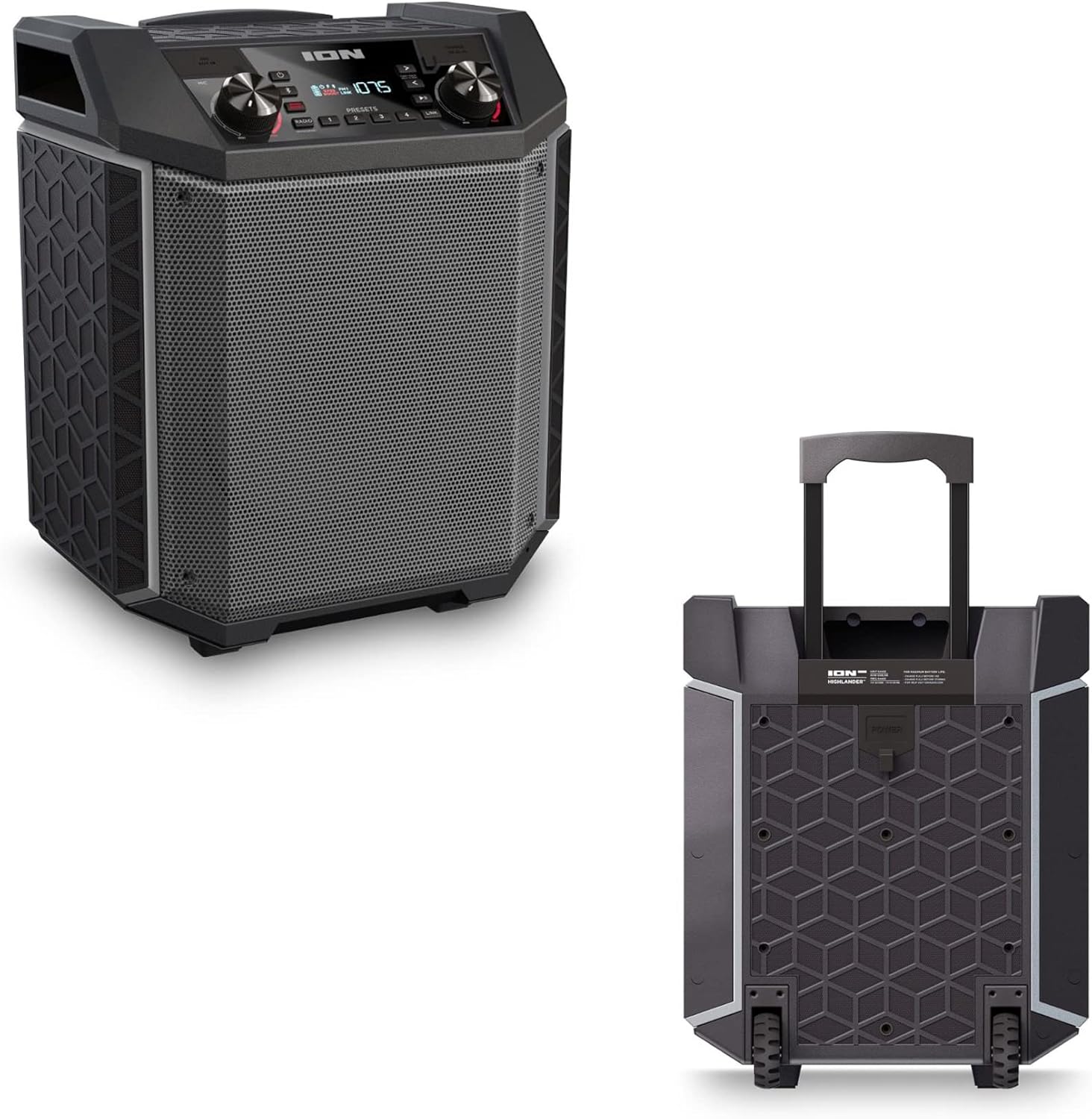

- Maniglia retractable: Pull up the integrated handle to roll the speaker like luggage.
- Roti: Use the built-in wheels for smooth movement across various surfaces.
4.4 Resistenza à l'acqua (IPX5)
The Highlander speaker is IPX5 water-resistant, meaning it can withstand splashes of water from any direction. It is suitable for use by the pool or in light rain.

Impurtante: Do not submerge the speaker in water. Ensure all port covers are securely closed when exposed to water.
5. Mantenimentu
5.1 Pulizia
- Spegne sempre l'altoparlante è scollegalo da a fonte di alimentazione prima di pulirlo.
- Aduprate un pannu dolce è asciuttu per asciugà e superfici esterne.
- Per a sporcizia stubborn, ligeramente dampSciacquate u pannu cù acqua. Evitate l'usu di prudutti chimichi aggressivi, solventi o detergenti abrasivi.
- Ùn spruzzate micca liquidi di pulizia direttamente nantu à l'altoparlante.
5.2 Storage
- Conservate l'altoparlante in un locu frescu è asciuttu, luntanu da a luce diretta di u sole è da temperature estreme.
- If storing for an extended period, ensure the battery is partially charged (around 50%) to maintain battery health. Recharge every few months if not in use.
5.3 Cura di a batteria
- Evitate di svuotà cumpletamente a batteria spessu.
- Ùn espone micca a bateria à u caldu o u friddu eccessivu.
- Sè e prestazioni di a batteria diminuiscenu significativamente, cuntattate l'assistenza clienti per assistenza.
6. Risoluzione di prublemi
If you encounter issues with your Highlander speaker, refer to the table below for common problems and solutions.
| Prublemu | Soluzione Possibile |
|---|---|
| L'altoparlante ùn s'accende micca. |
|
| Ùn si pò micca accoppià cù u dispositivu Bluetooth. |
|
| Nisun sonu o un vulume bassu. |
|
| Distorsione di u sonu. |
|
7. Specificazioni
| Feature | Detail |
|---|---|
| Nome di mudellu | Highlander |
| Marca | ION |
| Tipu di parlante | Outdoor |
| Tecnulugia di cunnessione | Bluetooth 5.0 |
| Fonte d'energia | Alimentatu à batteria |
| A vita di a batteria | 50 Ore |
| Livellu di resistenza à l'acqua | IPX5 (resistente à l'acqua) |
| Potenza massima di output di Speaker | 120 Watt |
| Dimensioni di u produttu | 19.5 "D x 19.5" W x 14 "H |
| Pesu di l'articulu | 23.2 liri |
| Materiale | Water-resistant plastic or rubber, with a black coating |
| Cumpunenti inclusi | Cavu di putenza |
| UPC | 657768542732 |
8. Garanzia è Support
The ION Audio Highlander speaker comes with a Limited Warranty. For specific details regarding warranty coverage, duration, and terms, please refer to the warranty information provided with your purchase or visit the official ION Audio websitu.
For technical support, troubleshooting assistance beyond this manual, or warranty claims, please contact ION Audio customer support through their official channels. Keep your proof of purchase handy when contacting support.


