Introduzione
This manual provides essential information for the safe and efficient operation of your TECNO Pova 5 Pro 5G smartphone. Please read it thoroughly before using your device to ensure optimal performance and longevity.

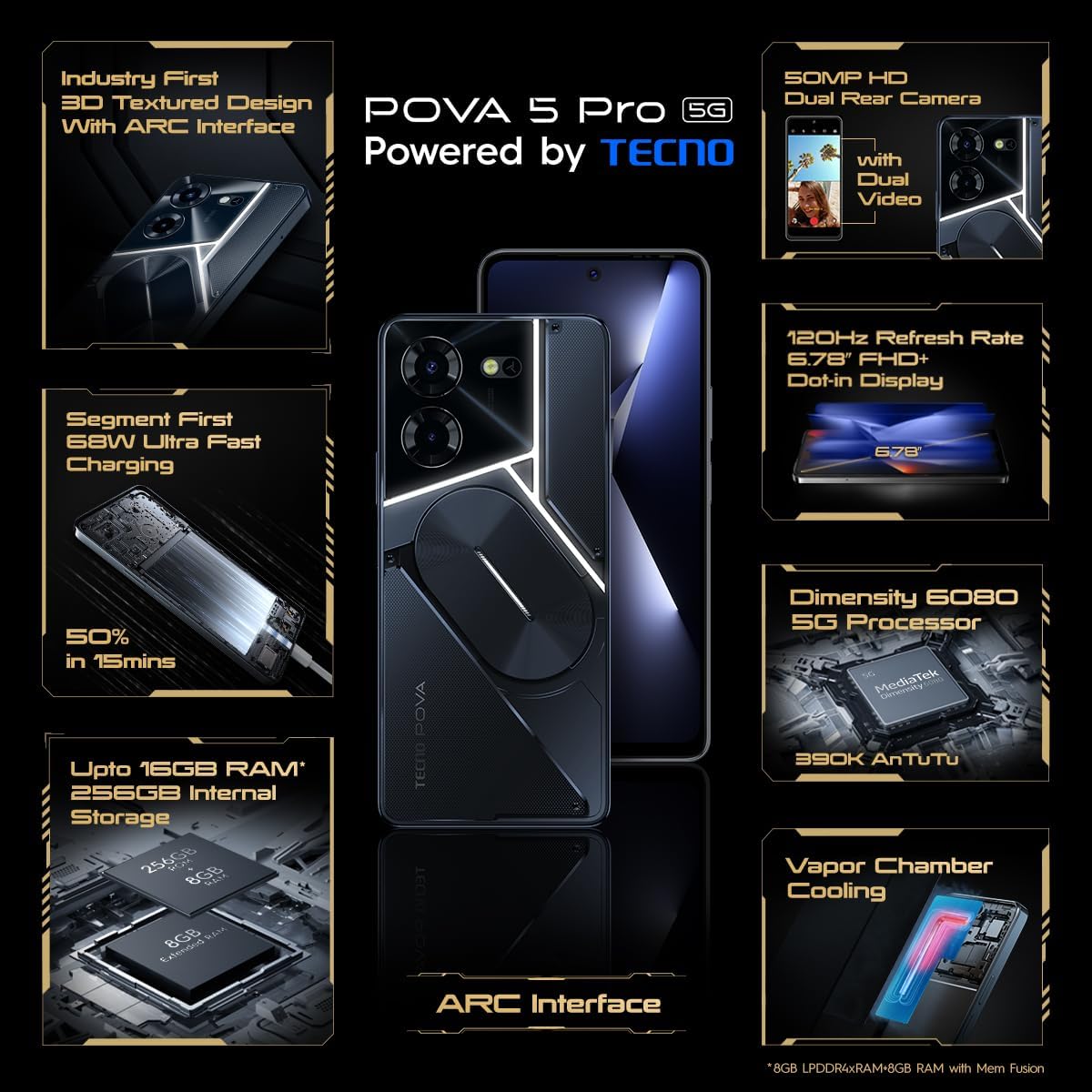
Image: The TECNO Pova 5 Pro 5G smartphone, showcasing its design and key feature of 68W Ultra Fast Charging.
Chì ci hè in u Box
Verificate chì tutti l'articuli sò presenti in l'imballu:
- Smartphone
- Adattatore di Potenza 68 W.
- Cavu Type-C
- TPU Cover
- Strumentu di espulsione SIM

Image: A flat lay of the TECNO Pova 5 Pro 5G packaging contents, showing the smartphone, 68W power adapter, USB-C cable, TPU protective cover, and the SIM ejector tool.
Istituisci
Configurazione iniziale
- Inserite a carta SIM/SD: Locate the SIM tray on the side of the device. Use the provided SIM ejector tool to open the tray. Insert your Nano-SIM card(s) and/or microSD card into the designated slots. Ensure the tray is fully reinserted.
- Power On: Press and hold the Power button (located on the right side) until the TECNO logo appears.
- Segui l'istruzzioni à u screnu: The device will guide you through initial setup, including language selection, Wi-Fi connection, Google account setup, and security settings.
Caricà u dispusitivu
The TECNO Pova 5 Pro 5G supports 68W Ultra Fast Charging.
- Cunnette u cavu Type-C à u portu di carica in fondu à u telefunu.
- Cunnette l'altra estremità di u cavu à l'adattatore di alimentazione di 68W.
- Inserite l'adattatore di corrente in una presa murale.
- A full charge typically takes approximately 45 minutes, with 50% charge achievable in about 15 minutes.
Imagine: Un fronte chjaru view of the TECNO Pova 5 Pro 5G smartphone, highlighting its display and front camera.
Operazione di u dispusitivu
Navigazione basica
- Touchscreen: Toccate per selezziunà, scorri per scorrere, pizzicà per zoomà.
- Pulsante di putenza: Appughjà per attivà/disattivà u schermu. Appughjà è tene premutu per spegne o riavvià.
- Pulsanti di volume: Ajustà u vulume di i media, u vulume di e chjamate o u vulume di a suoneria.
Uso di Camera
The device features a 50MP AI Dual Rear Camera and a 16MP Selfie Camera.
- Apri l'app Camera da u screnu principale o da u cassettu di l'app.
- Selezziunate u modu desideratu (Foto, Video, Ritrattu, ecc.).
- Toccate u buttone di l'otturatore per catturà foto o inizià / fermà a registrazione video.
- Utilize AI enhancements for optimized scene recognition and image quality.
ARC Interface and Notifications
The TECNO Pova 5 Pro 5G features a unique multi-color ARC interface with backlighting.
- The ARC interface provides customizable light effects for notifications, incoming calls, gaming, and music playback.
- Access settings to personalize the light patterns and colors for different alerts.

Imagine: A parte posteriore view of the TECNO Pova 5 Pro 5G, showcasing its distinctive 3D textured design and the illuminated ARC interface.

Imagine: Un dettagliu view of the TECNO Pova 5 Pro 5G's ARC interface, illustrating the multi-color backlighting feature.
Mantenimentu
- Cura di a batteria: To prolong battery life, avoid exposing the device to extreme temperatures. Do not fully discharge the battery regularly.
- Pulizia: Aduprate un pannu dolce è senza pelu per pulisce u schermu è u corpu. Evitate l'usu di prudutti chimichi aggressivi o materiali abrasivi.
- Actualizazioni di u software: Regularly check for and install system updates to ensure optimal performance, security, and access to new features. Navigate to Settings > System > System update.
- Gestione di u almacenamentu: Sguassà periodicamente innecessariu files è app per mantene un spaziu di almacenamentu è una velocità di u dispusitivu sufficiente.
Risoluzione di prublemi
- U dispositivu ùn si accende micca: Ensure the battery is charged. Connect the device to the charger for at least 15 minutes before attempting to power on again. If the issue persists, perform a forced restart by holding the Power button for 10-15 seconds.
- Problemi di carica: Verify that the charging cable and adapter are securely connected and undamaged. Try using a different outlet.
- Crash/Bloccu di l'applicazione: Close the problematic app and reopen it. If the issue continues, clear the app's cache and data in Settings > Apps. As a last resort, uninstall and reinstall the app.
- Scarsa cunnessione di rete: Check if Airplane Mode is off. Restart the device. If using mobile data, ensure your SIM card is properly inserted and your data plan is active.
- Surriscaldamentu: Avoid using the device in direct sunlight or during intensive tasks for extended periods. Close background applications.
Specificazioni
| Feature | Specificazione |
|---|---|
| Nome di mudellu | Pova 5 Pro 5G |
| Sistema upirativu | Android 13.0 |
| Processore | Dimensity 6080 (2.4 GHz Octa-Core) |
| RAM | 8 GB (expandable up to 16 GB with Memory Fusion) |
| Storage internu | 256 GB (UMCP) |
| Mostra | 6.78-inch FHD+ Dot-in Display |
| Frequenza di rinfrescante | 120 Hz |
| Camera posteriore | Doppia fotocamera IA da 50 MP |
| Camera frontale | Camera selfie da 16 MP |
| Batteria | 5000 mAh Lithium-Polimer |
| Carica | 68W Ultra Fast Charging |
| Dimensioni | 16.9 x 7.7 x 16.9 cm |
| Pesu | 214 grammi |
| Connettività | 5G (10 bands supported), NFC, Bluetooth 5.1 |

Image: An internal diagram or view of the TECNO Pova 5 Pro 5G, illustrating its vapor chamber cooling system for efficient heat dissipation.
Garanzia è Supportu
Your TECNO Pova 5 Pro 5G comes with a manufacturer's warranty. Please refer to the warranty card included in your product packaging for specific terms and conditions.
For technical support, service, or warranty claims, please contact TECNO customer service. TECNO maintains a large service network with over 1200 service centers in India.
You can find more information and support resources by visiting the official Tecno store on Amazon: Tecno Store


