Introduzione
Grazie per l'acquistuasing the JTEMAN Cell Phone Stand with Wireless Bluetooth Speaker and Alarm Clock. This multi-functional device is designed to enhance your daily routine by combining essential features into one compact and stylish unit. It serves as a high-quality Bluetooth speaker, a reliable alarm clock with a clear display, and a stable, adjustable stand for your mobile devices. Please read this manual carefully to ensure proper use and optimal performance.
Informazioni di sicurezza
- Ùn espone micca u dispusitivu à temperature estreme, à a luce diretta di u sole o à alta umidità.
- Evite di abbandunà o sottumette u dispusitivu à forti impatti.
- Keep away from water and other liquids. If the device comes into contact with liquid, disconnect it immediately and allow it to dry completely before reuse.
- Ùn pruvate micca di smuntà, riparà o mudificà l'apparechju da per voi. Affidate tutta a manutenzione à persunale qualificatu.
- Aduprate solu u cavu di carica furnitu o un equivalente certificatu.
- Mantene fora di a portata di i zitelli.
Cuntenutu di u pacchettu
- JTEMAN Cell Phone Stand with Wireless Bluetooth Speaker and Alarm Clock (Model: JT-L36)
- Cavu di Carica Type-C
- Manuale d'usu
Product Overview
Familiarize yourself with the components and controls of your JTEMAN device:
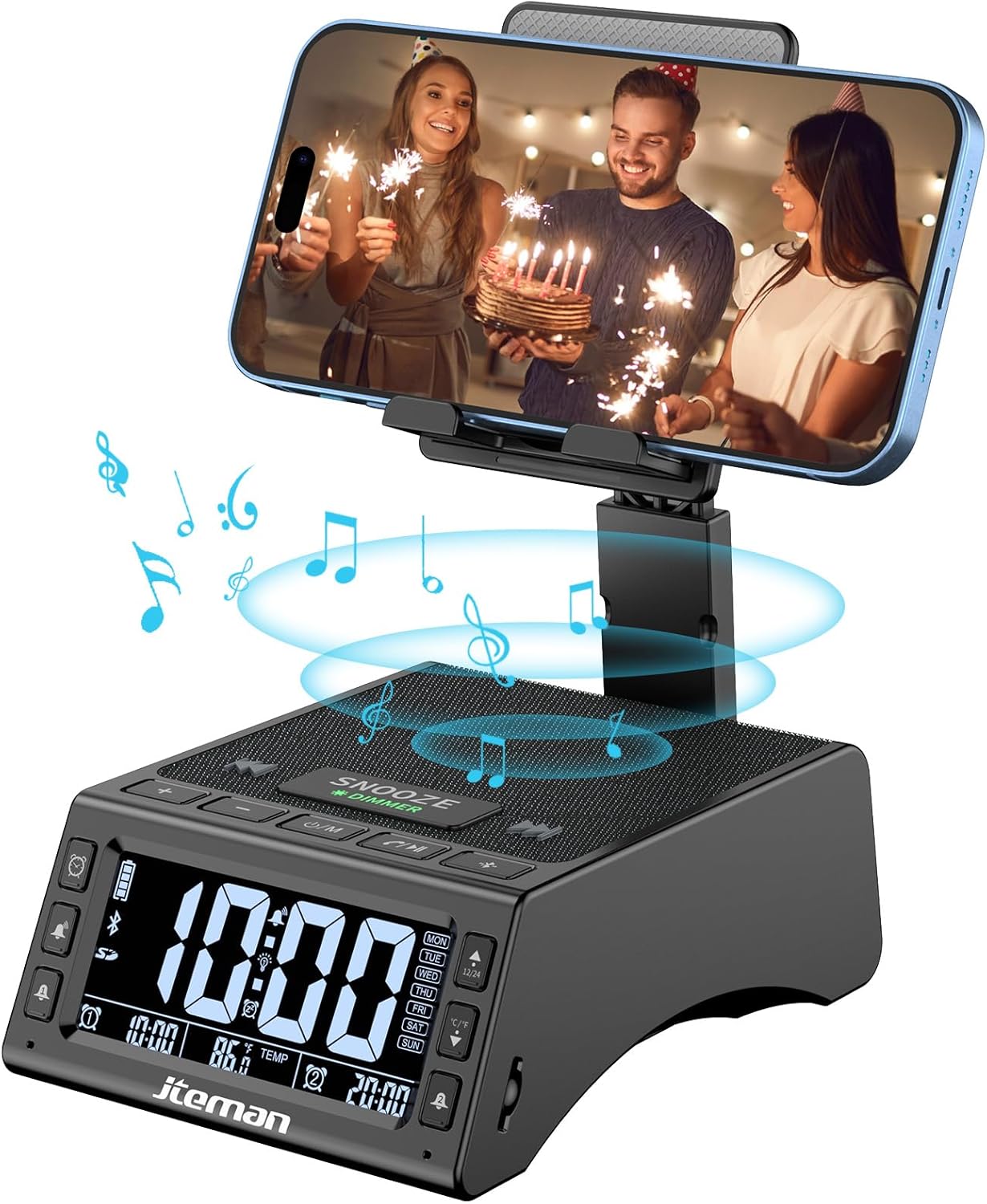
Figura 1: Fronte view of the JTEMAN device with a smartphone on the adjustable stand, displaying the time and temperature.

Figura 2: Overview highlighting the multi-functional aspects including Bluetooth speaker, 12/24H time display, temperature display, foldable phone stand, TF card support, microphone, charging station, dual alarm clocks, and 9 ringtones.
Cuntrolli è porti:
- Pantalla di visualizazione: Shows time, temperature, day of the week, and alarm indicators.
- Pulsante SNOOZE/DIMMER: Press to snooze an active alarm (5 minutes); long press to adjust display brightness (4 levels).
- Power On/Off/Mode Button: Long press to power on/off; short press to cycle through modes (Bluetooth, TF Card).
- Play/Pause/Answer Button: Controls music playback; answers/ends calls.
- Buttone di vulume su / traccia successiva: Increases volume; short press for next track.
- Buttone di calata di u vulume/traccia precedente: Decreases volume; short press for previous track.
- Pulsante di accoppiamentu Bluetooth: Avvia a modalità di accoppiamentu Bluetooth.
- Alarm 1 & Alarm 2 Buttons: For setting and managing dual alarms.
- Micrufonu: Per chjamate senza mani.
- Port d'Input Type-C: Per carricà u dispusitivu.
- Port d'output Type-C: Per caricare dispositivi esterni.
- Slot per Carta TF: Per riproduce musica direttamente da una carta TF.
- Adjustable Phone Stand: Foldable and extendable for various viewing angles. Features anti-slip pads and base for stability.
Istituisci
1. Carica iniziale
- Connect the provided Type-C charging cable to the Port d'Input Type-C nant'à u dispusitivu.
- Cunnette l'altra estremità di u cavu à un adattatore di alimentazione USB cumpatibile (micca inclusu) è inseriscilu in una presa murale.
- The display will indicate charging status. Fully charge the device before first use.

Figure 3: The device connected via Type-C for charging itself and an external phone.
2. Setting Time and Date
- Upon powering on, the device should automatically synchronize the current time.
- If manual adjustment is needed, refer to the detailed instructions in the full user manual (included in the package).
- To switch between 12/24 hour format or °F/°C temperature display, use the dedicated buttons or refer to the full manual.

Figure 4: The HD display showing time, temperature, and alarm settings with brightness adjustment levels.
Istruzzioni di funziunamentu
1. Using the Phone Stand
- The integrated phone stand can be pulled up from the back of the unit.
- Adjust the height and angle of the stand to your preferred viewing position. The stand is designed to be stable and strong, accommodating devices from 4.0 to 13 inches.
- When not in use, the stand can be folded back into the unit for a compact form factor.

Figure 5: Demonstrates the adjustable height and angle of the phone stand, along with its anti-slip features and foldable design.
2. Bluetooth Speaker Function
- Power On: Long press the Power On/Off/Mode button. The device will enter Bluetooth pairing mode, indicated by a flashing Bluetooth icon on the display.
- Accoppiamentu: On your smartphone or other Bluetooth-enabled device, search for “JT-L36” in the Bluetooth settings and select it to pair. A confirmation sound will indicate successful pairing.
- Riproduzione di musica: Once paired, you can play audio from your device through the JTEMAN speaker. Use the Play/Pause, Volume Up/Next Track, and Volume Down/Previous Track buttons to control playback.
3. Riproduzione di a carta TF
- Insert a TF card (not included) with audio files into the TF Card Slot.
- The device will automatically switch to TF Card mode and begin playing music. If not, short press the Mode button to select TF Card mode.
4. Alarm Clock Features
- Impostazione di l'allarmi: Use the Alarm 1 and Alarm 2 buttons to set up to two independent alarms. Follow the on-screen prompts to set the time and alarm frequency (e.g., Mon-Fri, Sat-Sun, Mon-Sun).
- Funzione Snooze: When an alarm sounds, press the large SNOOZE button on top to activate a 5-minute snooze.
- Ajustamentu di luminosità: Long press the SNOOZE/DIMMER button to cycle through four levels of display brightness, including an off setting for minimal light disturbance.
5. Hands-Free Calling
- When a call comes in while your phone is connected via Bluetooth, press the Play/Pause/Answer button to answer the call.
- Aduprate u microfonu integratu per una cumunicazione clara.
- Press the Play/Pause/Answer button again to end the call.
6. Caricamentu di dispositivi esterni
- Connect your external device (e.g., smartphone, tablet) to the Port d'output Type-C on the JTEMAN unit using a compatible charging cable.
- The JTEMAN device will provide power to charge your external device.
Mantenimentu
- Pulite l'apparechju cù un pannu dolce è asciuttu. Ùn aduprate micca detergenti abrasivi o solventi.
- Assicuratevi chì tutti i porti sianu liberi da polvere è detriti.
- Conservate u dispusitivu in un locu frescu è asciuttu quandu ùn hè micca adupratu per periodi prolungati.
Risoluzione di prublemi
| Prublemu | Causa Possibile | Soluzione |
|---|---|---|
| U dispusitivu ùn accende micca. | Low battery; power adapter/cable issue. | Charge the device fully. Check power adapter and cable connections. |
| Nisun sonu da l'altoparlante. | Volume too low; not paired correctly; wrong mode. | Increase volume on both device and connected phone. Re-pair Bluetooth. Ensure correct mode (Bluetooth/TF Card). |
| L'associu Bluetooth falla. | Apparatu troppu luntanu; modu di accoppiamentu micca attivu; interferenza. | Ensure device is in pairing mode and within 10 meters. Turn off other Bluetooth devices. Try restarting both devices. |
| L'alarma ùn sona micca. | Alarm not set; alarm volume too low; alarm disabled. | Verify alarm settings and ensure it's enabled. Increase alarm volume. |
| Phone not charging via output port. | Cable issue; device battery low; incompatible device. | Ensure the JTEMAN device is charged. Try a different charging cable. Confirm your phone is compatible with Type-C charging. |
Specificazioni
| Marca | JTEMAN |
| Numero di mudellu | JT-L36 |
| Dimensioni di u produttu | 6.1 x 4.3 x 2.1 inch |
| Pesu di l'articulu | 1.26 liri |
| Culore | Neru |
| Interfaccia Hardware | USB 2.0 |
| Total Ports USB | 2 (Type-C Input, Type-C Output) |
| Cumpatibilità | 4.0-13 inch devices |
Garanzia è Supportu
JTEMAN products are manufactured with high standards of quality. For specific warranty information, please refer to the warranty card included in your product packaging or visit the official JTEMAN website. If you encounter any issues or have questions not covered in this manual, please contact JTEMAN customer support through the contact information provided on the product packaging or websitu.
Per piacè conservate a vostra prova di compra per rivendicazioni di garanzia.


