1. Produttu Finituview
The Vorago BSP-500-V2 is a portable Bluetooth speaker designed for robust performance and durability. It features IPX5 water resistance, making it suitable for various environments, including outdoor adventures and parties. This manual provides detailed instructions for setting up, operating, and maintaining your speaker.
Funzioni chjave:
- Cunnessione stereo senza filu vera (TWS): Connect two BSP-500-V2 speakers for an immersive stereo sound experience.
- Durata di a batteria estesa: Enjoy up to 7 hours of music playback at 70% volume, thanks to its 2000 mAh battery.
- Carica USB Type-C: Convenient and modern USB-C port for charging.
- Connettività versatile: Supports Bluetooth for wireless streaming and a 3.5mm auxiliary input for wired connections.
- Resistenza à l'acqua IPX5: Prutettu contr'à i getti d'acqua à bassa pressione da ogni direzzione.
Cuntenutu di u pacchettu:
- Speaker Bluetooth Vorago BSP-500-V2
- Cavu di Carica USB Type-C
- Cavo audio da 3.5 mm
- Manuale d'uso (stu documentu)
Diagramma di u produttu:

Figura 1.1: Fronte view of the Vorago BSP-500-V2 Bluetooth speaker, showcasing its mesh grille and central Vorago logo.

Figura 1.2: Angulata view of the speaker, highlighting its robust, rectangular design and integrated carrying strap.

Figura 1.3: Top view showing the control panel with power, volume down, play/pause, and volume up buttons.
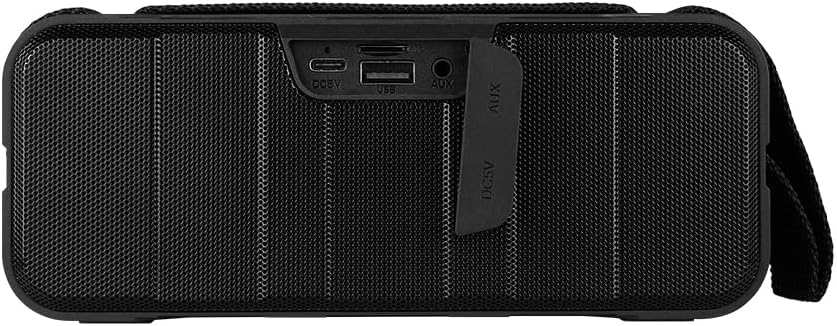
Figura 1.4: Posteriore view of the speaker, showing the protective flap covering the input ports.

Figure 1.5: Close-up of the input ports, including DC 5V (USB-C), USB-A, and AUX (3.5mm) inputs, protected by a rubber cover.
2. Informazioni di sicurezza
- Ùn espone micca l'altoparlante à temperature estreme (calde o fredde).
- Evite di caccià o sottumette u parlante à forti impatti.
- Keep the speaker away from direct sunlight and heat sources.
- Ùn smuntate, riparate o mudificate micca l'altoparlante voi stessu. Questu annullerà a garanzia.
- Ensure the port cover is securely closed when using the speaker near water to maintain IPX5 water resistance.
- Do not immerse the speaker in water. IPX5 rating protects against splashes and light rain, not submersion.
- Aduprate solu u cavu di carica furnitu o un cavu USB Type-C certificatu per a carica.
- Pulite l'altoparlante cù un pannu dolce è asciuttu. Ùn aduprate micca detergenti abrasivi o solventi.
3. Setup
3.1 Caricamentu di l'altoparlante
- Open the protective rubber cover on the rear of the speaker to access the charging port.
- Connect the USB Type-C end of the charging cable to the speaker's DC 5V port.
- Cunnette l'altra estremità di u cavu USB à un adattatore di alimentazione USB (micca inclusu) o à a porta USB di un urdinatore.
- A luce indicatrice di carica s'illuminerà durante a carica è si spegnerà quandu hè cumpletamente carica.
- Once charging is complete, securely close the protective rubber cover to maintain water resistance.
3.2 Accensione / spegnimentu
- Per accende: Appughjà è tene premutu Pulsante di putenza on the top panel for approximately 3 seconds until you hear an audible prompt.
- Per spegne: Appughjà è tene premutu Pulsante di putenza for approximately 3 seconds until you hear an audible prompt.
3.3 Accoppiamentu Bluetooth
- Assicuratevi chì l'altoparlante sia acceso. Entrerà automaticamente in modalità di accoppiamentu Bluetooth, indicata da una luce LED chì lampeggia.
- Nant'à u vostru apparechju (smartphone, tableta, laptop), attivate Bluetooth è cercate l'apparechji dispunibili.
- Select "BSP-500-V2" from the list of found devices.
- Una volta assuciatu cù successu, l'altoparlante emetterà una cunferma sonora, è a luce LED smetterà di lampeggià è resterà fissa.
- L'altoparlante si ricunnetterà automaticamente à l'ultimu dispositivu accoppiatu quandu hè acceso, se u dispositivu hè in portata è u Bluetooth hè attivatu.
3.4 Accoppiamentu Stereo True Wireless (TWS)
TWS allows you to connect two BSP-500-V2 speakers together for a true stereo sound experience.
- Ensure both BSP-500-V2 speakers are powered on and not connected to any other Bluetooth device.
- On one of the speakers (this will be the primary speaker), double-press the Pulsante Play/Pause. The speaker will enter TWS pairing mode.
- The two speakers will automatically search for and connect to each other. You will hear an audible confirmation once they are successfully paired.
- Once TWS is established, connect your device to the primary speaker via Bluetooth as described in Section 3.3.
- To disconnect TWS, double-press the Pulsante Play/Pause nantu à qualsiasi parlante.
3.5 Auxiliary (AUX) Connection
For devices without Bluetooth, you can use the 3.5mm audio cable.
- Open the protective rubber cover on the rear of the speaker.
- Cunnette una estremità di u cavu audio di 3.5 mm à a porta AUX di l'altoparlante.
- Cunnette l'altra estremità di u cavu à a presa di uscita audio di u vostru dispositivu.
- L'altoparlante passerà automaticamente in modalità AUX.
- Once disconnected, securely close the protective rubber cover.
4. Operating Instructions
4.1 Funzioni di i buttoni:
| Pulsante | Funzione (Pressione Breve) | Funzione (pressa longa) |
|---|---|---|
| Pulsante di putenza | N/A | Power On/Off |
| buttone Volume Down | Diminuisce u voluminu | Pista Precedente |
| Pulsante Play/Pause | Riproduce/Mette in pausa a musica, Rispondi/Fine chjama | Reject Call, Double-press for TWS Pairing |
| buttone Volume Up | Aumentà u voluminu | Next Track |
5. Mantenimentu
- Pulizia: Use a soft, dry, lint-free cloth to clean the speaker's surface. For stubborn dirt, slightly dampSciacquate u pannu cù acqua. Ùn aduprate micca prudutti chimichi aggressivi, solventi di pulizia o detergenti forti.
- Cura di resistenza à l'acqua: Always ensure the rubber port cover on the back of the speaker is fully and securely sealed when using the speaker outdoors or near water. This maintains its IPX5 water resistance. After exposure to water, wipe the speaker dry before opening the port cover for charging or auxiliary connections.
- Conservazione: When not in use for extended periods, store the speaker in a cool, dry place, away from direct sunlight and extreme temperatures. It is recommended to charge the speaker fully before storing and to recharge it every few months to maintain battery health.
- Cura di a batteria: To prolong battery life, avoid fully discharging the battery frequently. Charge the speaker when the low battery indicator is active.
6. Risoluzione di prublemi
| Prublemu | Causa Possibile | Soluzione |
|---|---|---|
| L'altoparlante ùn s'accende micca. | Batteria bassa. | Charge the speaker fully using the provided USB Type-C cable. |
| Ùn si pò micca accoppià via Bluetooth. | Speaker is not in pairing mode; Device's Bluetooth is off; Speaker is already connected to another device; Device is too far from speaker. | Ensure speaker is powered on and flashing (pairing mode). Turn on Bluetooth on your device. Disconnect from other devices. Move device closer to speaker (within 10 meters). |
| Nisun sonu o un vulume bassu. | Volume too low on speaker or device; Incorrect input mode; Speaker not connected. | Increase volume on both speaker and connected device. Ensure correct mode (Bluetooth or AUX) is active. Verify successful Bluetooth pairing or AUX cable connection. |
| Distorsione di u sonu. | Volume too high; Device too far from speaker; Interference. | Reduce volume on speaker and/or device. Move device closer to speaker. Avoid obstacles between speaker and device. |
| L'accoppiamentu TWS fiasca. | Speakers are already paired to a device; Speakers are too far apart. | Ensure both speakers are disconnected from any Bluetooth devices. Place speakers close to each other during TWS pairing. |
7. Specificazioni
| Feature | Detail |
|---|---|
| Nome di mudellu | BSP-500-V2 |
| Tipu di parlante | Multimedia |
| Funzione speciale | Bluetooth |
| Usu cunsigliatu | For music players |
| Dispositivi compatibles | Ordinatore portatile, lettore MP3, smartphone, tableta |
| Tipu di cuntrollu | Pulsante |
| Cunfigurazione di u Canale Sonu Surround | 5.0 |
| A vita di a batteria | 7 Ore |
| Cumpunenti inclusi | Speaker |
| Dimensioni di u produttu | 5D x 15W x 18H centimetri |
| Pesu di u produttu | 1 chilògrammu |
| Impermeabile | Iè (IPX5) |
| Capacità batterie | 2000 mAh |
| AmpType più vivu | Attivu |
| Fonte d'energia | Batteria |
| Risposta di Frequency | 180 Hz |
| Tecnulugia di cunnessione | Bluetooth |
| Modu Output Audio | Stereo |
| Tipu di muntatura | Munti di tavulinu |
8. Garanzia è Support
The Vorago BSP-500-V2 Bluetooth Speaker comes with a limited warranty. Please refer to the warranty card included with your product for specific terms and conditions, or visit the official Vorago websitu per più dettagli.
For technical support, troubleshooting assistance, or warranty claims, please contact Vorago customer service through their official channels. You can find more information and contact details on the Vorago Brand Store on Amazon o u so ufficiale websitu.
Per piacè cunservate a vostra prova d'acquistu per scopi di garanzia.


