1. Introduzione
This manual provides comprehensive instructions for the installation, operation, and maintenance of your Vivotek ND9426P Network Video Recorder (NVR). The ND9426P is a 16-channel, 2-bay embedded NVR with Power over Ethernet (PoE) capabilities and integrated Artificial Intelligence (AI) features, designed for robust surveillance applications. Please read this manual thoroughly before using the device to ensure proper setup and functionality.
2. Informazioni di sicurezza
- Ensure the NVR is installed in a well-ventilated area to prevent overheating.
- Aduprate solu l'adattatore di corrente furnitu cù u dispusitivu.
- Do not expose the NVR to water, moisture, or extreme temperatures.
- Avoid placing heavy objects on top of the NVR.
- Scollegate l'alimentazione prima di fà qualsiasi prucedura di manutenzione o installazione.
- Riferite tutte l'assistenza à u persunale qualificatu.
3. Cuntenutu di u pacchettu
Verify that all items listed below are included in your package. If any items are missing or damaged, contact your vendor immediately.
- Vivotek ND9426P NVR Unit
- Adattatore di putenza
- Mouse USB
- Guida d'installazione rapida
- Viti di muntatura di u discu duru
4. Sopra à a fisicaview
Familiarize yourself with the front and rear panels of the Vivotek ND9426P NVR.
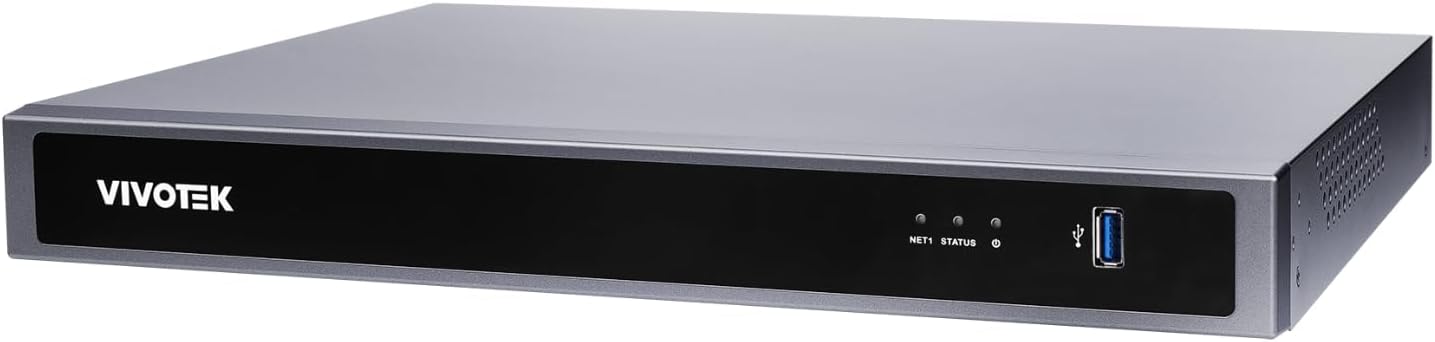
Figure 1: Front Panel of Vivotek ND9426P NVR. This image displays the front of the NVR unit, featuring the VIVOTEK brand logo on the left, two small indicator LEDs labeled "NET1" and "STATUS" in the center, and a blue USB 3.0 port on the right. The overall casing is a dark gray metallic finish.
4.1 Pannellu Frontale
- VIVOTEK Logo: Indica a marca.
- NET1 LED: Network activity indicator for LAN port 1.
- LED STATUS: Indicatore di statutu di u sistema.
- Portu USB 3.0: For connecting a USB mouse, keyboard, or external storage devices.
4.2 Pannellu posteriore (cunfigurazione tipica)
While not pictured, the rear panel typically includes the following ports:
- PoE Ports (x16): RJ-45 ports for connecting IP cameras and providing power.
- Portu LAN: RJ-45 port for connecting the NVR to your local network.
- Uscita HDMI: For connecting to a monitor or display.
- Output VGA: For connecting to a monitor or display.
- Audio In / Out: Per cunnette i dispositi audio esterni.
- Porti USB 2.0: Porte USB supplementari per periferiche.
- Input di putenza: Per cunnette l'adattatore di corrente.
- Terminal di messa à terra: Per una messa à terra sicura.
5. Setup
5.1 Installazione di hardware
- Installazione di u discu duru:
Unscrew the NVR casing to access the internal bays. Mount up to two 3.5-inch SATA hard drives using the provided screws. Reattach the casing in modu sicuru.
- Cunnette e camere IP:
Connect your PoE-enabled IP cameras to the NVR's PoE ports using Ethernet cables. The NVR will provide power and data connectivity.
- Connect Display and Mouse:
Connect a monitor to the NVR's HDMI or VGA output port. Connect the USB mouse to one of the NVR's USB ports.
- Cunnessione di Rete:
Connect the NVR's LAN port to your network router or switch using an Ethernet cable.
- Power On:
Cunnette l'adattatore di corrente à l'entrata di alimentazione di u NVR è dopu inseritelu in una presa di corrente. U NVR s'accenderà automaticamente.
5.2 Configurazione iniziale
- Upon first boot, the NVR will guide you through a setup wizard. Follow the on-screen instructions.
- Set a strong password for the administrator account. This is crucial for security.
- Cunfigurà i paràmetri di rete (DHCP o IP staticu).
- Scan for and add connected IP cameras.
- Stabbilisce a data, l'ora è u fusu orariu.
6. Funziunamentu di u NVR
6.1 Navigazione di l'interfaccia d'utilizatore
- Live View: Access real-time video feeds from all connected cameras. Use the mouse to select camera views and layouts.
- Riproduzione: Review arregistratu footage. Navigate through timelines, search by date/time, and export video clips.
- Impostazioni di registrazione: Configure recording schedules (continuous, motion-triggered, event-based) and video quality for each camera.
- Gestione di l'eventi: Set up alerts for motion detection, tampering, or AI-triggered events. Configure notification methods (e.g., email, push notifications).
- Impostazioni di u sistema: Manage user accounts, network configurations, storage, and system logs.
6.2 Funzioni di l'IA
The Vivotek ND9426P integrates advanced AI capabilities to enhance surveillance efficiency. These features may include:
- Rilevazione di muvimentu intelligente: Differentiates between human/vehicle movement and environmental factors to reduce false alarms.
- Rilevazione di Intrusioni: Defines specific areas for monitoring and triggers alerts upon unauthorized entry.
- Rilevazione di attraversamentu di linea: Detects when an object crosses a predefined virtual line.
- Refer to the NVR's on-screen interface or the detailed software manual for specific AI feature configuration.
7. Mantenimentu
- Actualizazioni di firmware: Regularly check the VIVOTEK website for firmware updates to ensure optimal performance and security. Follow the provided instructions carefully for updating.
- Backup di dati: Periodically back up important recorded footage to external storage devices (e.g., USB drive, network storage) to prevent data loss.
- Logs di sistema: Review system logs regularly for any error messages or unusual activity that may indicate a problem.
- Pulizia: Keep the NVR unit clean and free from dust. Use a soft, dry cloth. Do not use liquid cleaners or aerosols. Ensure ventilation openings are not obstructed.
8. Risoluzione di prublemi
| Prublemu | Causa Possibile | Soluzione |
|---|---|---|
| Nisuna uscita video nant'à u monitor | Cunnessione di u cavu allentata, fonte d'ingressu sbagliata nantu à u monitor, NVR micca acceso. | Check HDMI/VGA cable connections. Ensure monitor is set to correct input. Verify NVR power. |
| E camere ùn mostranu micca | Camera not powered, network issue, incorrect camera settings. | Check camera power and Ethernet cables. Verify network connectivity. Ensure cameras are added and configured correctly in NVR settings. |
| Cannot access NVR over network | Network cable disconnected, incorrect IP address, firewall blocking access. | Check LAN cable. Verify NVR's IP address and network settings. Adjust firewall rules if necessary. |
| A registrazione ùn funziona micca | Hard drive not installed/initialized, recording schedule not set, insufficient storage. | Ensure HDD is installed and formatted. Check recording schedules. Verify available storage space. |
9. Specificazioni
| Mudellu | ND9426P |
| Marca | VIVOTEK |
| Numero di canali | 16 |
| Baie di HDD | 2 (3.5" SATA) |
| Porti PoE | 16 |
| Tecnulugia di cunnessione | Ethernet, USB |
| Pesu di l'articulu | 1 kilogrammi (2.2 liri) |
| Dimensioni di u pacchettu | 0.39 x 0.39 x 0.39 inch (L x W x H) |
Note: Specifications are subject to change without notice. For the most current information, please refer to the official VIVOTEK product page.
10. Garanzia è Support
VIVOTEK products are covered by a limited warranty. For detailed warranty terms and conditions, please refer to the warranty card included with your product or visit the official VIVOTEK websitu.
For technical support, product inquiries, or service requests, please contact your local VIVOTEK dealer or visit the VIVOTEK support portal online. Have your product model and serial number ready when contacting support.
- VIVOTEK Official Websitu: www.vivotek.com
- Portal di supportu: Riferite à u websitu per i cuntatti di supportu regiunale.


